

Team Size: 12
Game Engine: Unity
Role(s): Lead Programmer
While the project had been created and prototyped in a functional state, my job as the new lead programmer was to take these old pre-existing systems and optimize them to make way for new scenes and new functionality. While the core simulation loop has stayed consistent, the project has grown into something much more versatile to work with. My optimizations have allowed for new functions such as variable hall widths, density areas that spawn an assortment of objects, an spatial ambience system, and much more. The goal of my work is to make things as easy as possible to edit for both the designer in terms of appearance and the proctor in terms of simulation functionality.
Refactored the pre-existing alley system to allow for more modularity of how the scenes are laid out, such as variable hall widths. Added systems for creating new scenes based on assets assigned through predefined data files.
Implemented assets from the art and sound team, creating designer tools to allow for more control over the visual and auditory experience of the simulation.
Reworked the entire configuration settings system, optimizing how config files are loaded / saved so that they can be easily created, read, updated, and deleted as needed.

The proctor can choose between a few different widths variations of halls, from narrow to extra wide. The maps are procedurally generated with these widths in mind, adjusting the position of the halls to have a seamless transition between two different widths.
To add some variety to the environment, I was tasked which creating a system that takes the map generation system and creates halls of varying widths. The halls of each scene are laid out identically, each having a floor, wall pieces and an option for a ceiling. My first step was to take the existing tile pieces and create a script that adjusts the width of that specific piece. Each piece is built with a default width of 1, so I used these measurements as a baseline for what needs to be scaled. The floor / ceiling scale was as simple as using the width value as a scale number. For the walls, however, it was a bit trickier. In order to figure out the formulas for adjusting the width, I would manually position items at various widths and study the trends of the values that ended up making the most sense. In the end, for the walls, the formula for moving walls turned out to be f(x) = Floor Width / 2 * Alley Width + (Wall Width / 2). After ensuring that the system worked at various widths, I would move onto getting the widths of the corner pieces working.
Corner pieces proved to be a bit trickier, since they are used as the transitional piece between halls of different lengths. There are two widths for corner pieces that get tracked: the width of the hall that it ends at and the width of the incoming connecting hall. To ensure that the corner matched the connecting hall, I needed to make the hallway adjuster system stretch the corner in the opposite direction with the same formula to match the width of the new hall. This resulted in a reliable hallway sizing system, but since the tiles are in static positions, it would leave them misaligned.
Since all tile pieces are childed to a hall parent, I decided the best way to align halls was to have an offset that is added / subtracted to that modifies halls as they are spawned in sequential order. To figure out the formula for how to adjust the halls, I would generate halls that are misaligned and move them into the correct offsets manually, noting values along the way to check for patterns. I tracked the difference between hall widths, the direction the corner turns, and what units I had to adjust to get the map looking correct. Through this process, I discovered that I had to move the X or Z value in units that matched the width of the wall pieces * the width of the alley. Whether it was a negative or positive value depended on the direction, and since the player only moves in three directions (south, east, west), I could simply keep track of the direction of the corner and update the sign of the value based on the direction. After meticulously figuring out each directional case for movement, I was able to make a very reliable system that worked with just about any hall size variation.

In order to create different kinds of levels, the visuals and audio of the scene are determined through a ScriptableObject. Designers can adjust many settings in order to customize how each simulation looks and feels without having to delve into any code.
Since a large amount of the people working on the project were not programmers, one of my goals was to take the systems making the project work and allow the designers to control what assets belonged in the project.
The map preset settings let designers set what tile pieces are used within the scene. These are the core modular assets that provide the most visual layout across scenes. Some of the assets that can be assigned include corner tiles, cap tiles, standard hall tiles, and variations of tiles where targets will show. In addition to setting the tiles, the materials for the walls, floors, and skybox are set here as well. In terms of implementation through code, since the base scene ScriptableObject has a global reference, all subsequent data can be referenced through it. This did not affect existing systems greatly, but allowed for more flexible options for what can be done with the levels in the future.
Similar to the map preset system, I created a map content settings object that stores all of the objects that can spawn within the level. This is split between five types of content: debris, decor, wall pieces, wall lights, and obstacles. Originally, this data was stored in multiple places, which led to inconsistencies on what would spawn. Delegating all of the objects onto one place lets designers quickly add or remove objects from the scene, as well as switching the settings for another set of map contents entirely.
The previous version of the project had not implemented audio yet, so I was able to create an entirely new system while keeping in mind that I wanted the sound design team to be able to edit the sound settings as needed. After creating a basic audio manager system, I engineered a list of ambience tracks that play during the level in the form of a list in a ScriptableObject. The sound design team is able to create multiple tracks, which play a random sound from that track every X to Y seconds. For each sound, the sound designer can modify the volume of the specific sound and whether the sound is spatialized or not. All spatialized sounds are spawned relative to the player’s world position. For these types of sounds, the sound design team can create two areas: an area where the audio can be positioned, and a deadzone where the audio will not be positioned. By having these settings, sound designers have been able to control and tweak sounds with precision without having to delve into the code at all.
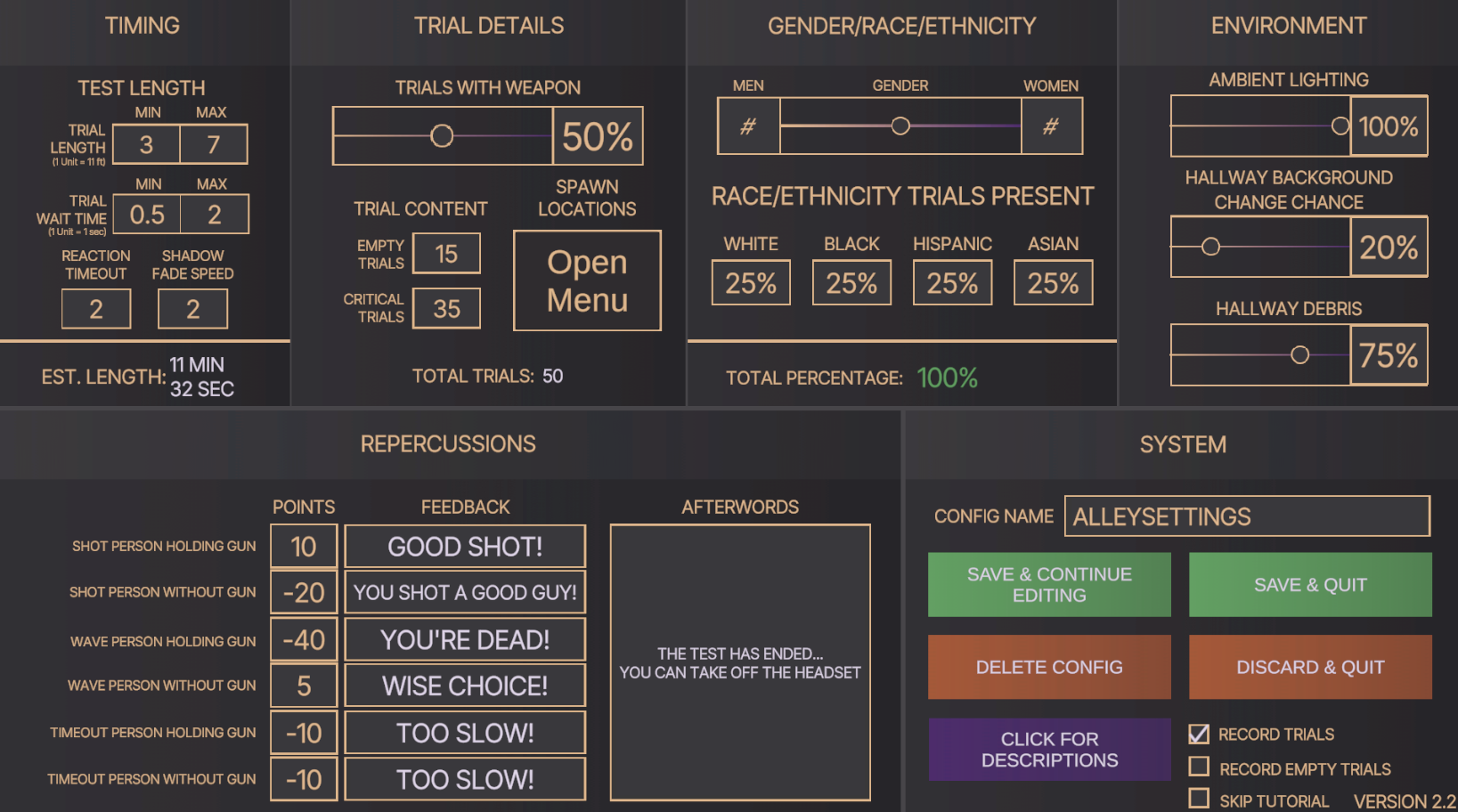
In order to get valuable data from the simulation, the proctor is able to create a set of configuration data that caters the experience to what they need. Through back-end optimization, this system has been fully reworked and allows for an easier means of creating more settings that proctors might want to control for their tests.
The previous version of the project had built a configuration system that was functional for one scene. However, since the new version of the project hosted multiple scenes, the code needed to be reworked. The old config files of the game relied on reading, writing and manipulating data in the ScriptableObject file of the current scene, which I felt was bad practice since swapping between different scenes would mean data from the prior scene would not be relayed.
Thankfully, a lot of the groundwork for decoupling the data from ScriptableObjects was done, since the config settings were created in a class. To make the system easier to work with, I created a global reference to a config settings object that could load in and save changes to the data. This required having to change a lot of references within the project, but ultimately led to a more stable version of storing settings. By having all of the config settings stored in one place, I was even able to pinpoint issues that I had not been able to do prior, such as the target generation system having some issues on how different genders / races were assigned.
After ensuring that my reworking of the old config system was tested and verified, I was able to fully implement a new config setting that I had not been able to prior: spawn location data. With this new setting, targets are able to spawn in nine grid spots, which include variations between close / far and left / right. With a set number of trials, the proctor is able to determine where those targets will go for those trials.
The first setting is random target distribution. The proctor inputs a percentage in each square, all of which needing to equal 100%. In order to get the number of targets for that spot, the script gets the numerical percentage of targets that would go to that spot based on the total number of trials. However, oftentimes this will not result in an exact number. To work around this, target number is rounded to the nearest number, which the decimal reminder is stored. After all of the targets have gotten rounded estimates for target numbers, the code checks to see how many targets are left that need to be distributed. Using the remainders stored previously, the remaining targets are spread amongst the rest of the grid spaces, prioritizing grid spaces that had the largest remainder left after rounding the percentage. Once this is complete, a list with the number of targets for each space is returned as output.
The other option for target distribution is for the proctor to manually decide how many targets should spawn in each location. They are able to input numbers in each of the nine grid spaces, with the script only being able to output if all of the numbers add up to be the exact number of targets used for the trials.
With this configuration rework, it is much more efficient for proctors to request the team to add / edit additional settings if needed and be able to apply them into the scene.
The biggest challenge that has arisen with this project primarily was the fact that the project’s foundation was created prior to the new version being worked on. Some of the existing code base either had little documentation or systems that needed to be optimized for the new features that were coming. The biggest optimization that was required for this project was being able to switch base data files to swap out different scenes. The earlier version of the project was married to the idea that only one scene would ever exist, so there was little modularity to initially worked with. In order to get systems working with scenes such as the forest and the abandoned building, I had to ensure that nothing was hard coded into the scripts, such as GameObjects needed to have specific names in order to work properly or having multiple places where the data file for the alley scene was referenced rather than keeping the base ruleset for the scene in one spot. Overall, the project structure was not inherently bad for the earlier version of the project, but it needed to be changed to accommodate for features that I would eventually need to work into it.
Since this project had started development before I joined the team, a lot of my optimizations relied on interpreting how earlier versions of systems worked and either reformatting them to be more optimized or adding to scripts to get the functionality needed for the next version of the project. Working on Arbiter has helped me improve my skills in parsing through other contributors’ code and adding meaningful documentation, since I have worked under the knowledge that the project will be open source. Data is an essential part of the simulation, so being able to know how each piece works is crucial to getting things working in a predictable manner.
Another major role that I fulfilled in this project is creating systems for the art and sound team to be able to work with. A large majority of the team was not as experienced with Unity and programming as I have, so being able to simplify implementation of assets has been something I have taught myself a lot through Arbiter. The biggest change in the back-end of the project is having different scenes run through the same system. Arbiter’s scenes are very modular in nature, so being able to change what scene is being run simply through changing what data file is being read has been a very fulfilling task.