PDF Server for Windows 202211.0
Publisher Description
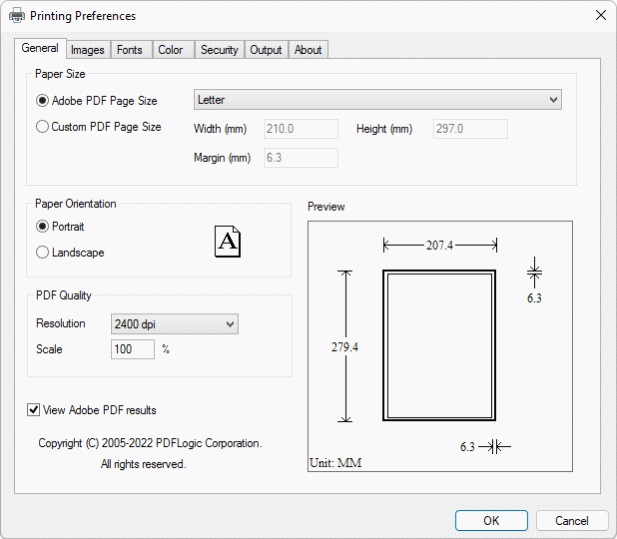
PDF Server installs a virtual printer namely PDF Creator. You can print from virtually any Windows application to this PDF Creator printer, and get a press-ready, high quality, searchable, color PDF file.
Features:
Create PDF file from any Windows application that can print
Convert to PDF from other formats
Set PDF paper size
Define custom paper size
Specify page orientation, scaling, and PDF resolution
View PDF results after creation
Font Embedding and Subsetting
Image Downsampling
JPEG 2000 image compression
Graphics and image compression
Support RGB, sRGB and CMYK color space
ICC Profile
128-bit RC4 content encryption
Press Ready Output
PDF Output Options
Custom Action DLL interface for printer driver integration
AutoCAD DWG, DXF support for all versions
Support PDF 1.4 to 1.7
Adobe PDF, PDF/X and PDF/A output capable
PDF Server Features:
Support Terminal Services and Citrix MetaFrame farm
Centralized PDF conversion
Grant print permission for users with a click
Dynamically enable or disable shareable PDF printer
Share PDF Creator printer on server-side for client-side users with Client Install Utility(http://www.pdfeleven.com/download.html)
Deploy PDF printer as a shared printer across your network
Complete control via PDF Server Management Console
Easy software distribution Application integration
Supported Platforms:
Microsoft Windows Server 2022
Microsoft Windows Server 2019
Microsoft Windows Server 2016
Microsoft Windows Server 2012
Windows 8 Business
Windows 8 Enterprise
Windows 8 Ultimate
Windows 10 Business
Windows 10 Enterprise
Windows 10 Ultimate
Windows 11 Business
Windows 11 Enterprise
Windows 11 Ultimate
Release Notes:
This new release adds support for Microsoft Windows all 64-bit operating systems (x64 OS).
About PDF Server for Windows 2022
This Office Suites & Tools program is available in English. It was last updated on 09 July, 2026. PDF Server for Windows 2022 is compatible with the following operating systems: Windows.
The company that develops PDF Server for Windows 2022 is PDFLogic Corporation. The latest version released by its developer is 11.0.
The download we have available for PDF Server for Windows 2022 has a file size of 2.1 MB. Just click the green Download button above to start the downloading process. The program is listed on our website since 2021-10-07 and was downloaded 33 times. We have already checked if the download link is safe, however for your own protection we recommend that you scan the downloaded software with your antivirus. Your antivirus may detect the PDF Server for Windows 2022 as malware if the download link is broken.
How to install PDF Server for Windows 2022 on your Windows device:
- Click on the Download button on our website. This will start the download from the website of the developer.
- Once the PDF Server for Windows 2022 is downloaded click on it to start the setup process (assuming you are on a desktop computer).
- When the installation is finished you should be able to see and run the program.
Program Details
System requirements
Download information
Pricing
Version History
version 11.0
posted on 2021-10-07
Support Terminal Services and Citrix.