
ຄຳອະທິບາຍ
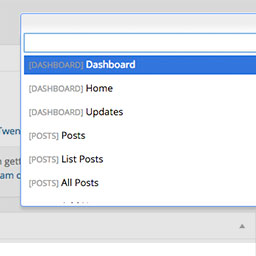
Dashy gives you a search field to get to admin pages quicker. More keyboard shortcuts right inside of WordPress. Get to pages, post, plugins, custom post types, faster. You can even search and get a to single post with the keyboard. To activate, use Control+Space.
To get to a specific page, type “list” and choose “List Pages”. From there you will be showing all of your pages that you can edit. Start searching the page name, and hit enter to go directly to editing that page. This supports posts, pages, and custom post types.
ພາບໜ້າຈໍ

View of Dashy when activated. 
Search for menu items to get to them quickly. 
Go directly to pages, posts, and CPTs from the “List ___” option.
ການຕິດຕັ້ງ
- Upload ‘dashy’ to the
/wp-content/plugins/directory - Activate the plugin through the ‘Plugins’ menu in WordPress
- Press Control+Shift+D to activate.
ການຣີວິວ
ບໍ່ມີການຣີວິວສຳລັບປລັກອິນນີ້.
ຜູ້ຮ່ວມພັດທະນາ ແລະ ຜູ້ພັດທະນາ
“Dashy” ແມ່ນຊອຟແວໂອເພັນຊອດ (Open Source). ບຸກຄົນຕໍ່ໄປນີ້ໄດ້ມີສ່ວນຮ່ວມໃນການພັດທະນາປລັກອິນນີ້.
ຜູ້ຮ່ວມພັດທະນາ
ສົນໃຈຮ່ວມພັດທະນາບໍ່?
ເບິ່ງລະຫັດ, ກວດເບິ່ງ ຄັງເກັບ SVN, ຫຼື ຕິດຕາມ ບັນທຶກການພັດທະນາ ຜ່ານ RSS.