Go to Android platform Display platforms icon
Go to Android platform Go to Windows platform Go to Mac platform
Google Docs icon

Google Docs

1.26.021.01.90
103 reviews
8 M downloads
security security

Create and edit text documents on Android

Advertisement
Remove ads and more with Turbo
Advertisement
Remove ads and more with Turbo
Andrés López icon
Reviewed by
Andrés López
Content Editor
Andrés López is part of Uptodown's in-house Editorial Team. Translated by Uptodown Localization Team

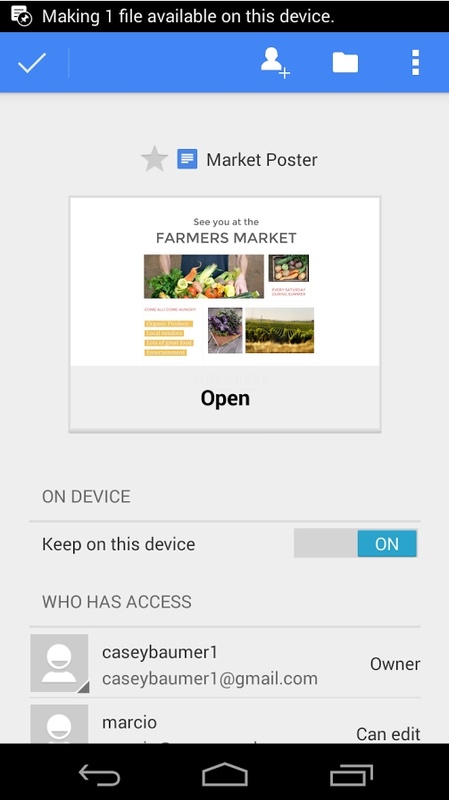
Google Docs is the official Google app for creating and managing text documents from your Android device. You will need to sync your email account to use the app. Doing this will allow you to access all the documents you have stored in the cloud or any that are shared with you. By clicking on your profile picture, you can also quickly switch between accounts if you're using multiple email addresses.

The best way to organize your documents

The first time you open Google Docs, you will see all your text documents perfectly organized. By default, the first displayed documents are those you have opened most recently, but you can easily change this order. You can sort them by name or by the date they were last modified. You can also change the document display, choosing between a list or tiles. In a separate tab, you will also find all the documents shared with you, and you can see who the original author is in the document details.

Advertisement
Remove ads and more with Turbo

Create new documents easily

By tapping the button in the lower right corner of the screen, you can create a new document in just a few seconds. If you want to open a blank page, simply tap the New Document button. However, it is worth keeping in mind that there are also a lot of useful templates at your disposal if you tap on the Choose Template button. Here you will find over 20 templates for writing resumes, corporate letters, informal letters, college reports, class notes, book reviews, project proposals, incorporation plans, brochures, and much more. Using any of these templates means a good part of the work is already done for you.

All the editing tools you need

When it comes to creating and editing your text document, Google Docs offers exactly the same tools as the desktop or browser versions. That is, you can choose between different font types and sizes, use bold and italics, underline text, use different paragraph types, add links, insert tables and images, create notes, and so on. In short, the app offers everything you could need to write any kind of text document you have in mind. And, of course, any changes you make to your document are automatically saved as you type.

Easily export your documents

One of the most useful features of Google Docs is that it allows you to export all your text documents to different formats. Once you have finished working with your document, you can save it as .docx, .pdf, .odt, .rtf, .txt or .html. In addition to this, you can work with your documents offline, even if you don't have an Internet connection. Any changes you make offline are automatically saved when you reconnect to the Internet, so you won't lose any progress.

An excellent text editing tool

Download the Google Docs APK if you usually work with text documents and want to be able to do so anytime, anywhere. This is a powerful, all-in-one app that will allow you to do anything from writing your resume or a book to working from home, all from the comfort of your Android device, and all in a light app with a simple and accessible interface.

Requirements (Latest version)

  • Android 10 or higher required

Information about Google Docs 1.26.021.01.90

Basic information

Developer Google LLC
License Free
Category Personal
Rating +3
Languages English
37 more

Security and privacy

Required permissions
33
Advertising Not specified
Certificate signature d046fc5d1fc3cd0e57c5444097cd5449,0ea37f3786c8273287600bee47186c32
See security and antivirus report
Why is this app published on Uptodown? (More information)

Download info

Downloads 8,037,918
Date Jan 18, 2026
File type XAPK
Size 72.58 MB
SHA256 7818e020cc5b3b960b5582343946b31e4b26e3486103cef501eb0331528da34f

Technical details

Package Name com.google.android.apps.docs.editors.docs
Advertisement
Remove ads and more with Turbo

Older versions

See more
xapk 1.25.511.01.90 Android + 12L Jan 18, 2026
xapk 1.25.511.00.90 Android + 10 Jan 15, 2026
xapk 1.25.501.01.90 Android + 10 Jan 8, 2026
xapk 1.25.501.00.90 Android + 12L Jan 7, 2026
xapk 1.25.491.02.90 Android + 10 Dec 24, 2025
xapk 1.25.491.01.90 Android + 10 Dec 20, 2025

Rate this App

Review the app
Google Docs icon

Rating

4.5
5
4
3
2
1
103 reviews

Users say

  • Users find the app very helpful for students
  • Many say the app is good and useful overall
  • No significant negative feedback is mentioned by users
This is an AI-generated summary based upon real user reviews.

Comments

See more
massiveorangejackal32737 icon
massiveorangejackal32737
2 months ago

the app is very helpful for students

1
Reply
fatorangeanchovy77568 icon
fatorangeanchovy77568
5 months ago

this is a good app

Like
Reply
fatredquail89875 icon
fatredquail89875
6 months ago

Very, very, very wonderful 😎😍

1
Reply
handsomerednightingale11282 icon
handsomerednightingale11282
6 months ago

An application to save documents and everything related to them. It's exceptional; I've been using it for 25 years.

3
Reply
oldorangeduck53083 icon
oldorangeduck53083
8 months ago

This work itself feels like a dream.

3
Reply
angrygreycheetah85889 icon
angrygreycheetah85889
11 months ago

Wonderful

4
Reply
See more
Advertisement
Remove ads and more with Turbo
Google Drive icon
Synchronize documents and files with Google Drive
Google Calendar icon
The best way to make sure you never forget a thing
WPS Office icon
A complete office suite on your smartphone
Microsoft Word icon
Official app for Microsoft Word on Android
Samsung Notes icon
A notepad for your Samsung device
Forest: Stay Focused icon
Stop looking at your smartphone all the time
Obsidian icon
Take note-taking to the next level
Evernote icon
Take notes about absolutely everything
ProtonVPN icon
A powerful and free VPN
Spotify icon
Take your music anywhere
WhatsApp Business icon
Manage your verified business account
Google Drive icon
Synchronize documents and files with Google Drive
Google Meet icon
The simplest video call app
Fomodoro icon
Helps you concentrate when working or studying
Taimee icon
The best temporary work app in Japan
Multiple Accounts Assist icon
Easily toggle and manage multiple app accounts with one tool
Pinterest icon
Pin any photo at any time
Google Calendar icon
The best way to make sure you never forget a thing
Tumblr icon
The official app of the Tumblr social media platform
WPS Office icon
A complete office suite on your smartphone
Samsung Notes icon
A notepad for your Samsung device
Linguix icon
Get grammar, punctuation and spell checker
Galaxy AI icon
AI app for error-free multilingual messages with tone adjustment
Kilonotes icon
Create notebooks for all your needs
DeepSeek icon
AI at your fingertips
ChatGPT icon
The official ChatGPT app created by OpenAI
Google Drive icon
Synchronize documents and files with Google Drive
World App - Worldcoin Wallet icon
Scan your iris in exchange for cryptocurrency
Google Gemini icon
Enjoy Google's AI on your device with its official app
Tachiyomi icon
Enjoy all the comics and manga on your Android device
Grok icon
Official app of the X AI
bilibili icon
Stream the best anime