This version is now obsolete - see https://idvork.in/td
Cardinal copy is @ https://idvork.in/td Leaving this stuff here for history.
- Major Research Areas and Musing
- Minor Tips
- Complete Projects
- In Progress Projects
- VIM
- C Sharp
- Java
- Python
- Typescript
- Apple
- Home Automation
- Text manipulation tools
- Cool shell tools
- Natural Language Processing
- Azure One Liners
- git
- GitHub
- SSH
- TMUX
- Random 1-liners
- App Launchers
- Chrome extensions
- Web tools (http)
- Video Manipulation Tools
- Linters and formatters
- Switching between Unix and DOS file ending
- Spelling
- Web scripting
- Programming Helpers
- PlantUML alternatives
- PlantUML
- Windows Managers
- CLI Screen Recoding
- Other Resources
- Denite
- Fugitive
- Support italics in vim in Tmux
- Lambok
- Hug: Python API generator
- Httpie: wget replacement
- Pendulum: The best datetime library (better then arrow).
- PipEnv - Finally sane dependency management for python!
- Datalore - Jetbrain's version of Jupyter
- Requests Http requests for humans
- Requests-HTML Web Parsing for humans
- Scapy Web crawling for humans.
- Records Raw SQL for humans
- Delegator Sub process for humans
- Pylinkvalidator - Crawl a web site for errors (great for web testing)
- Quick Type Create classes from JSON
- Copy files without iTunes - CopyTrans Manager
- Tips and tricks for iOS
- How to be an iPad nomad
- Bridge from HomeKit to Wink - Homebridge-wink3
- XPath and HtmlAgilityPack
- Regexp + VIM
- Beautiful soup
jq is the JavaScript equivalent of regexp I'm very enamored with it!
By default it colorizes:
cat x.json | jq
It has funny escaping syntax - so I'll list out some recipes. Notice the specific of dots open brackets and quote types. They matter. Select every object in the array and string interpolates out object elements of name defaultHostName and appServicePlanId
cat x.json | jq '.[] | "\(.defaultHostName) \(.appServicePlanId) "'
Read the Algolia key from my secretBox
cat ~/gits/igor2/secretBox.json | jq '.AlgoliaKey'
List AWS lightsail properties
saws> aws lightsail get-instances  | jq '.instances[] | .name, .state.name, .publicIpAddress'
"Amazon_Linux-1GB-Oregon-1"
"running"
"54.190.183.299"
Decent blog posts:
https://remysharp.com/2018/08/23/cli-improved
- Mosh - A better ssh (I no longer recommend)
- fzf - Fuzzy file finder (Try C-R and C-T)
- Rg - RipGrep (like ag)
- linuxbrew - Brew for Linux
- Ngrok - Pipe ports to the internet web site (great for local host development on iOS)
- Bat - cat but with paging/git integration.
- Pretty ping - Graphical Ping
- glances - Prettier Top
- iftop - Network based top based on network connection
- nethogs - Network based top based on process
- fd - Better find/recurse. (fd "regexp")
- Rant - a cool c# human language generator
- Rhymebrain -
- Tranquil
- Sentiment Analysis
https://docs.microsoft.com/en-us/azure/app-service/deploy-local-git
- Create the git credentials to deploy which gives a new git repository.
- Add a git remote
- Push to the git remote
npx add-gitignore - update gitignore files
Find when text is deleted:
# ignore the path if you don't know it.
git log -c -S'missingtext' /path/to/file
Diff so fancy - a very nice diff
My original git tricks from 2014 :)
The TUI clone of git gui - my day to day git interface.
Alternate TUI to tig
TUI (merge tool)[https://github.com/mkchoi212/fac]
- Serve HTML files directly from GitHub: https://rawgit.com/idvorkin/linqpadsnippets/master/js/DetectBackButton.html
- Keyboard shortcuts: https://help.github.com/articles/using-keyboard-shortcuts/
- Grip - Local renders of GHFM https://github.com/joeyespo/grip
- hub a better git client that understands everything comes from github
Exit the ssh session (very helpful when stuck in a nested tmux session.
<enter> ~ .
Get help on the in built console
<enter> ~ ?
List forwarded ports
<enter> ~ #
Connect on 8889 will get redirected to 8888 on the remote_host.
# Connections on 4444 will get redirected to 8888 on the remote_host.
ssh -N -L localhost:8888:localhost:4444 remote_user@remote_host
Use a tool to auto re-connect (MOSH should do this, but it's been flaky for me of late)
autossh -M 0 server
For my memory here are the many ports I forward, which you can also configure in your ssh config
# jupyter
ssh -N -L localhost:8888:localhost:8888 lightsail

# jekyll
ssh -N -L localhost:4000:localhost:4000 lightsail

# jekyll live reload
ssh -N -L localhost:35729:localhost:35729 lightsail

# grip
ssh -N -L localhost:6419:localhost:6419 lightsail
This is so hard for me to remember:
Install tmuxp to re-create sessions. Look at my config to see how to setup vi mode Look at tmux plugin manager
https://gist.github.com/MohamedAlaa/2961058
- C-A w - See all windows and sessions.
- C-A $ - rename session
- C-A , - rename windows
- C-A % - split left right
- C-A " - split top bottom
- C-A q - show pane #
- C-A navigate panes
- C-A ? - list shortcuts (then search using / )
- C-A swap-window -t -1 -- Move window to the left
- C-A swap-window -t 0 -- Move window to the front
- C-A x - kill-pane
Tmux command line
Re-attach to current session
tmux attach
Force resize to current terminal size while reattaching
tmux attach -d
Clean up dead MOSH instances
kill $(ps --no-headers --sort=start_time -C mosh-server -o pid | head -n -1)
zsh path append
path+="/my/new/path"
- Alfred on OSX
- WoX on Windows + (switcheroo to switch windows) [win - app name]
-
Hibernate unused tabs The great suspender
-
Close unused tabs OneTab
-
Vim based web Vimium
-
Vim in any text box Wasavi
-
Speed up YouTube playback via keyboard shortcut YouTube playback speed control
-
Fail to load dinosaur - Not an extension but you can play a little game with the dinosaur by pressing on the chrome dinosaur
-
Custom searchh engines are cool. You can use them for search sites you frequently use. For example my github repo and my blog:
ghtd: https://github.com/search?l=&q=%s+user%3Aidvorkin&type=Code&s=indexed ig: https://www.idvork.in/index.html?q=%s
TUI http debugger
A TUI http server - The oppositve of wuzz.
httpie is like wget and curl, but easier to use.
Here's an example of sending content to a web hook which would send a message to chime. Notice -pHBhb prints request response, and Content is a JSON field.
http -pHBhb POST https://hooks.chime.aws/incomingwebhooks/botaddress -- Content=We love PMs
Graphical httpie with tab completion. It's actually built on httpie
You'd think there would be a slew of these, but all the ones I tried weren't great (can't limit recurse depth, don't group errors, etc). I'm using bcl right now, but would love a good alternative.
Using BLC I crawl my website using (-r recurse ; -o group output; -e skip external):
blc https://idvork.in/d -roe
I disliked bcl so much I wrote my own using scrapy
This looks pretty cool. I had to run it in a container:
docker run --rm -it browsh/browsh
The keybindings are desktop-esk, which is too bad as they conflict with my terminal bindings. If you try it C-Q gets you out of it, can also run extensions, so I bet you could run vimium in there. Although, your'e going a little crazy at this point
A text based browser better then lynx. But,
Decent cross plat video editors.
- OpenShot - Video editor with good splicing.
- Lossless cutting - A tool to make lossless cuts.
ffmpeg recipes:
Convert video formats
ffmpeg -i in.mov -qscale 0 -out.mp4
Trimming
https://superuser.com/questions/138331/using-ffmpeg-to-cut-up-video As other people mentioned, putting -ss before (much faster) or after (more accurate) the -i makes a big difference. The section "Fast And Accurate Seeking" on the ffmpeg seek page tells you how to get both, and I have used it, and it makes a big difference. Basically you put -ss before AND after the -i, just make sure to leave enough time before where you want to start cutting to have another key frame. Example: If you want to make a 1-minute clip, from 9min0sec to 10min 0sec in Video.mp4, you could do it both quickly and accurately using:
ffmpeg -ss 00:08:00 -i Video.mp4 -ss 00:01:00 -t 00:01:00 -c copy VideoClip.mp4
The first -ss seeks fast to (approximately) 8min0sec, and then the second -ss seeks accurately to 9min0sec, and the -t 00:01:00 takes out a 1min0sec clip. -c copy doesn't re-transcode so faster, but has problems since needs key frames.
ffmpeg -ss 00:08:00 -i $infile -ss 00:01:00 -t 00:01:00 -c copy $outfile
Video To Gif on iOS
On github, it's common to share an inline view of a repro. A great way to do that is to make a gif of the issue. To do that on iOS you need to do do a screen recording, and then save that to a gif. I used GifMaker, seems good engouh.
You know what sucks less then coding standards? Arguing about coding standards. Nothing pains me more then arguing about formatting (and other minutia). As such I love having lint failures being build breaks and including formatting on save. Even better when you have opinionated formatters that don't have options. Sure standards suck, but they suck much less then arguing.
(https://stackoverflow.com/questions/2466959/git-removing-carriage-returns-from-source-controlled-files) On windows, when you switch between windows and WSL, you can get your line endings messed up in git.
To have git honor settings in the existing files set:
In: ~.gitconfig set:
core.autocrlf=input
core.safecrlf=false
Sometimes your repository gets screwed up and needs to be fixed. In that case, erase all files, and re checkout.
#!/bin/sh
# remove local tree
git ls-files -z | xargs -0 rm
# checkout with proper crlf
git checkout .
Also, can set a single file in vim by settings set ff=unix
Command line spelling. Ispell has nicer word highlighting, but aspell is supposed to have better spelling correction.
aspell ispell
(Bragging - I fixed aspell highlighting in WSL) GNUAspell/aspell#590 Homebrew/homebrew-core#48163
I like to watch YouTube (engineering documentaries) before bed, and need a sleep timer. JS will let you close a windows you opened, so this script opens a new window to watch YouTube in for an hour.
// Open in another window so I have perms to close it
var customWindow = window.open('https://youtube.com', '_blank', '');
// Close tab in 2 hours
setTimeout(()=>customWindow.close(),1000*60*120)
A quick tool to show you how to 'spell' your task in language of choice.
> howdoi do time to minutes in python

import datetime as DT
t1 = DT.datetime.strptime('00:05:36.0100000', '%H:%M:%S.%f0')
t2 = DT.datetime(1900,1,1)

print((t1-t2).total_seconds() / 60.0)
Huh, turns out there are lots (for UML and graphicing, etc). Read the list here, I haven't played with them yet:
https://hackmd.io/features#UML-Diagrams
- PlantText Interactive editor with vi-keybindings, but needs a manual refresh
- LiveUML - Interactive editor with auto-refresh
- VS Code has a great plugin for PlantUML
- Vim has a PlantUML preview in ASCII
You can't directly render PlantUML in Markdown, but you can render images, and get PlantUML to load content from file. E.g:
https://www.plantuml.com/plantuml/proxy?idx=0&format=svg&src=**URL_with_uml_file**&cache_buster=**increment_to_avoid_caching**
Store your PlantUML file somewhere - e.g.
[https://raw.github.com/idvorkin/techdiary/master/sample_diagrams.puml](https://raw.githubusercontent.com/idvorkin/techdiary/master/sample_diagrams.puml)
Then render it like an image e.g.
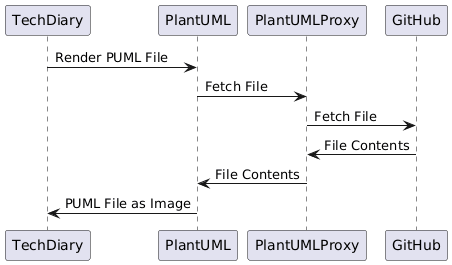
- GitHub caches, so increment the c parameter
Tools that let you re-tile
- OSX - Magnets
- Windows - Windows Power Toys - FancyZones
OK, this is a 2 putter: First run asciinema, then svgterm
asciinema rec foo.cast
# records till you hit C-D  (curious how that works)
cat foo.cast | svg-term --out foo.svg
# Copy out your svg file
If on iOS then you need to click to open the image in a new tag

(Note, to include an svg from raw.githubusercontent.com/blah.svg you'll need to add blah.svg?sanatize=true)
Good list of tools