All Activity
- Past hour
-
 musu joined the community
 -
 mkenthusiast joined the community
 -
 AltRomantic joined the community
 -
 Hikikomori joined the community
 -
 DrMalpractice joined the community
 -
Ok, cheat in MAME folder, still just autofire
-
 glorp joined the community
 - Today
-
 Exr joined the community
 -
 soicau247dev joined the community
 -
Thanks Nanbean, beauty always lies in the eye of the beholder. However, having said that...I do appreciate if other users try to improve and make effort to get the best version available in the gamesDB. So, thanks for your contribution! It's appreciated ☺️
-
 lvilar joined the community
 -
.thumb.png.c9faf450e4d2b690a819048b18173f61.png)
MAME cheats only have Autofire as option
JoeViking245 replied to jruizleon's topic in Troubleshooting
The zip file goes in the same folder as mame.exe. Individual game custom xml files go in the /cheat/ folder. Autofire is a MAME plugin. -
This one was looking a bit blurry and washed out, so I took a crack at it.

-
@HADES81 I found this one which didnt have a HQ. Best of the Best
-
@HADES81 Any others I missed since start of december?
-
placed the Zip file in the cheats folder, enabled cheats, but only have Autofire as an option
-
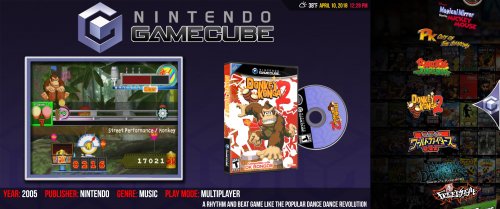 awesome, can i change the marquee in the arcade section, i cant find the image to replace
 -

Moved directories, but some parameter didn't migrate properly
Relienton1 replied to Relienton1's topic in Troubleshooting
Nevermind. I found this and it looks like it worked: It turns out it was the same error (though I don't know why). I just needed to manually update the XML file. -
Hi All, I'm running LaunchBox 13.24 on Windows. I recently had a HDD failure and needed to migrate files into a new drive. I had previously kept my roms in a separate drive from my main directory, but I'm taking this opportunity to consolidate everything to a third, new location. As I understand it, I can move my main Launchbox directory without any additional changes (and it looks like that works). Then, I want to move my roms into that new directory, which I do manually, then point to them using File Management>Change Roms Folder... That generally seems to work, however: a) when I open LaunchBox, it's creating 'Images' subdirectories in my previous Launchbox directory; and b) if I go to tools>manage platforms, I get an error that "A directory could not be created" and it lists the drive that died, and where roms used to be stored. I suspect that these are two different issues, but I don't know what I did wrong. Searching for answers isn't yielding any results. Any tips? Thanks!
-
 Songjiangyanyi Final mame arcade bezel songjang.zip
-
Solitaire mame arcade bezel solitaire.zip
-
Super Motor (prototype) mame arcade bezel smotor.zip
-
Super Miss World mame arcade bezel smissw.zip
-
This feels more like a system balance issue than a pure LaunchBox problem. With a game already using around 6 GB of RAM, Chrome running video streams, and LaunchBox keeping media and metadata cached in the background, a 16 GB system can hit memory pressure pretty quickly. Memory “optimizers” do not really reduce usage. They mostly push inactive data into the page file, which can move the bottleneck from RAM to disk I/O. That can explain why things look better in Task Manager but do not always improve real performance. Using list view, lighter themes, or Big Box helps reduce background memory, but if this workflow is common, upgrading to 32 GB RAM gives the OS enough headroom to manage caching properly. In this case the issue is overall hardware balance, not just one application using too much memory.
-

Sega Model 3 | Supermodel Git - EVERYTHING Pre Configured inc Controls. For PC, Controller, Mouse & Light Guns. Test Menu's Configured. Free Play. All Games in English. 2 Player Mouse Support. Audio Adjusted. Layout Images...The Whole 9 Yards
Robert Grey commented on Warped Polygon's file in Sega Model 3
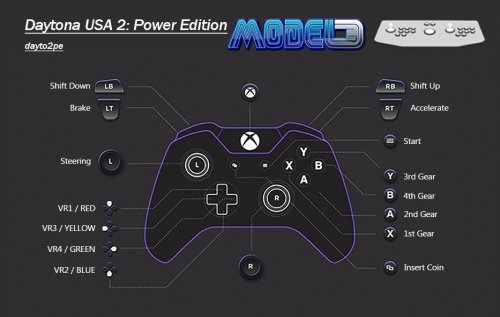 I was trying this setup and after following the config, the controller was clearly being picked up, but inputs weren’t doing anything in Supermodel. I checked the controller separately using https://gamepad-tester.com/ as you mentioned and found all buttons and axes were responding correctly there. That confirmed that the problem wasn’t the controller itself but how the emulator was handling the inputs. In my case it ended up being an emulator-side config issue rather than anything with the controller or Windows. Thanks a lot.
 -

Having issues with Big Box and dual monitors
FurabioS replied to FurabioS's topic in Troubleshooting
Thank you Jayinem, that program solved the problem entirely. Huge thanks for the tip. -
Having issues with Big Box and dual monitors
FurabioS replied to FurabioS's topic in Troubleshooting
Yes, they are both side-by-side, PC as 1 (on the left) and TV as 2 (on the right). And I think they are aligned
-
RHI Roller Hockey 95
-
Redone, based on new input
-
When making a theme in the community theme creator, does anyone know why the horizontal wheel will sometimes have games whose banners are smaller than the others? See the attached screenshot of KOF 13. I have been trying to fix this for months and cant find out why.
-
I remade a NesicaxLive 2 theme to show mostly Japanese letters instead of English, but for some reason the banners in the game wheel will have a few games that are sized incorrectly. I would say 90% of the banners look fine. I cant find out why some are smaller. See the screenshot with the KOF 13 banner. Does anyone know what I am doing wrong in the community theme creator? All banners are the same size for all the games. I have been trying to find out for months. Thanks
-
Felt this was worth a share, I made an AHK script that will bypass the annoying 'Click here to play' screen. Install Instructions This MUST go in .\Launchbox\Scripts folder. Unzip the file in this location After the game has been imported into launchbox, navigate to Additional Apps and Add an application Make sure it has these settings. hope this helps someone. Enjoy. Abobo's Big Adventure Startup Script.zip
-
 Hey i got an error with steam importing media from steam games (and steam scrapper) that i'm not sure is really the same that already noted before : this error cause launchbox crash, has anyone got the same and pass through ? 2026-01-18 01:38:01 AM DataManager.SaveInternal started. 2026-01-18 01:38:01 AM Saving InputBindings.xml... 2026-01-18 01:38:01 AM Saving GameControllers.xml... 2026-01-18 01:38:01 AM Saving ListCache.xml... 2026-01-18 01:38:01 AM Saving Settings.xml... 2026-01-18 01:38:01 AM Saving ImportBlacklist.xml... 2026-01-18 01:38:01 AM Saving D:\LaunchBox\Data\Platforms\Windows.xml... 2026-01-18 01:38:01 AM DataManager.SaveInternal completed successfully. 2026-01-18 01:38:10 AM Setting Security Protocol Type to TLS 1.2... 2026-01-18 01:38:12 AM FIRST CHANCE EXCEPTION: Object reference not set to an instance of an object. at Unbroken.LaunchBox.Windows.SteamGame.GetTrailerVideoUrl(SteamGame game) 2026-01-18 01:38:12 AM FIRST CHANCE EXCEPTION: Object reference not set to an instance of an object. at Unbroken.LaunchBox.Windows.SteamGame.GetTrailerVideoUrl(SteamGame game) at Unbroken.LaunchBox.Windows.Desktop.ViewModels.DownloadImagesViewModel.MaintainVisualWrapper() at Unbroken.LaunchBox.Windows.Desktop.ViewModels.DownloadImagesViewModel.<>c.OptimizeGlobalSorter(Action action) at Unbroken.LaunchBox.Windows.Threading.<>c__DisplayClass13_1`1.TrackDetailedFactoryNotifier() at System.Threading.ExecutionContext.RunInternal(ExecutionContext executionContext, ContextCallback callback, Object state) --- End of stack trace from previous location --- at System.Runtime.ExceptionServices.ExceptionDispatchInfo.Throw() 2026-01-18 01:38:12 AM DISPLAYED EXCEPTION: Object reference not set to an instance of an object. at Unbroken.LaunchBox.Windows.SteamGame.GetTrailerVideoUrl(SteamGame game) at Unbroken.LaunchBox.Windows.Desktop.ViewModels.DownloadImagesViewModel.MaintainVisualWrapper() at Unbroken.LaunchBox.Windows.Desktop.ViewModels.DownloadImagesViewModel.<>c.OptimizeGlobalSorter(Action action) at Unbroken.LaunchBox.Windows.Threading.<>c__DisplayClass13_1`1.TrackDetailedFactoryNotifier() at System.Threading.ExecutionContext.RunInternal(ExecutionContext executionContext, ContextCallback callback, Object state) --- End of stack trace from previous location --- at System.Threading.ExecutionContext.RunInternal(ExecutionContext executionContext, ContextCallback callback, Object state) 2026-01-18 01:38:12 AM Resolving assembly Unbroken.LaunchBox.Windows.resources, Version=0.0.0.0, Culture=fr-FR, PublicKeyToken=null... 2026-01-18 01:38:12 AM Resolving assembly Unbroken.LaunchBox.Windows.resources, Version=0.0.0.0, Culture=fr, PublicKeyToken=null...


.thumb.png.c9faf450e4d2b690a819048b18173f61.png)