
Go to Windows platform Display platforms icon
Go to Windows platform Go to Mac platform Go to Android platform Go to iOS platform
Express Scribe Transcription Software icon

Express Scribe Transcription Software

13.20
Dev Onboard
5 1 reviews
64.9 k downloads
security security

Transcribe any audio file using a simple interface

Advertisement
Remove ads and more with Turbo
Advertisement
Remove ads and more with Turbo
Álvaro Toledo icon
Reviewed by
Álvaro Toledo
Chief Content Officer
Álvaro Toledo is part of Uptodown's in-house Editorial Team. Translated by Uptodown Localization Team

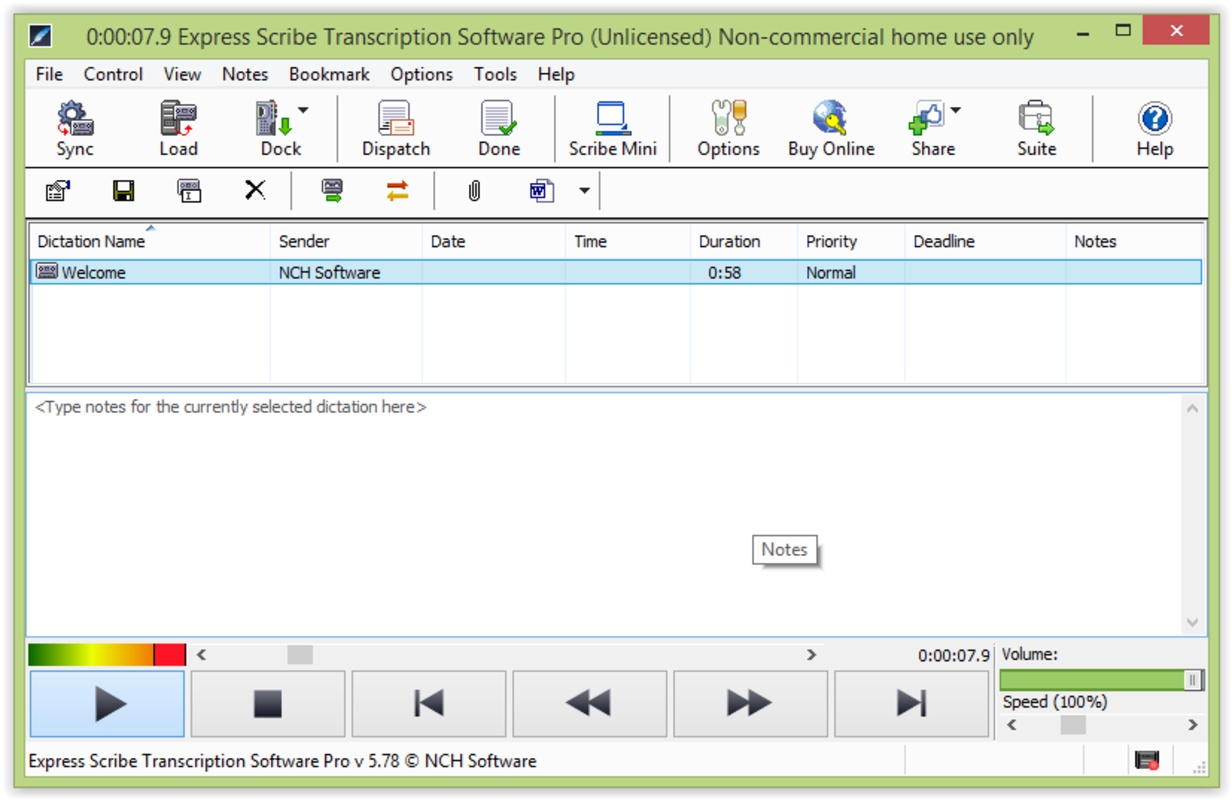
If you often convert audio files to text, you'll already know that using a regular music player can be a nightmare. You have to start and stop the audio file again and again, and often you don't have any tools to help you hear a word or sound more clearly. Express Scribe is a convenient tool that helps you transcribe so efficiently that you'll never have to use your standard audio player again. You'll find everything you need in this application for transcribing texts without wasting any time.

The biggest appeal of Express Scribe is that the audio and text sections are found on the same interface, meaning you won't have to swap between programs since you can listen and write simultaneously. You'll also have many tools for making changes such as switching audio tracks, jumping to a specific part of the track, or inserting notes related to the files – and can do any of these tasks with a single click.

Advertisement
Remove ads and more with Turbo

You can load audio from CDs, DVDs, emails, LANs, FTP servers, external or internal hard drives, or any other device – you won't have any trouble finding and opening the file. The program is also compatible with portable audio recorders so no matter how you work Express Scribe will make your transcribing much easier. If you record a conference call, press conference, or someone who doesn't speak loudly or clearly, you can apply certain filters to make it easier to understand the recording.

It's compatible with the following formats: WAV, MP3, AU, AIF, VOX, DCT, Windows Media, VoiceIt (SRI), RealAudio (RA y RM), Olympus, Lanier & Grundig (DSS), Sony Recorder formats (MSV, DVF), Philips Digital Recorder, Sanyo Digital Recorder, DSP TrueSpeech*, GSM 6.10, MP2, PCM, uLaw, ALaw, ADPCM, and CE ... in other words, almost any format used by older or more modern recording devices. This is, without a doubt, one of the best tools for transcribers.

Information about Express Scribe Transcription Software 13.20

Basic information

Developer NCHSoftware
License Trial
Category Utilities
Rating Not specified
Languages English

Security and privacy

Required permissions Not applicable
Advertising Not specified
See security and antivirus report
Why is this app published on Uptodown? (More information)

Download info

Downloads 64,906
Date Oct 2, 2024
File type EXE
Size 1.21 MB
SHA256 59505a618b72ecf0b0c96683252216c6d99a76a98fcdd87619bab60334d42aeb
Advertisement
Remove ads and more with Turbo

Older versions

See more
exe 12.09 Jul 13, 2023
exe 11.00 Feb 9, 2022
exe 10.13 Jul 29, 2021
exe 10.05 Feb 10, 2021
exe 10.01 Jan 14, 2021
exe 9.11 Jul 31, 2020

Rate this App

Review the app
Express Scribe Transcription Software icon

Rating

5.0
5
4
3
2
1
1 reviews

Comments

There are no opinions about Express Scribe Transcription Software yet. Be the first! Comment

Advertisement
Remove ads and more with Turbo
FxSound icon
Equalize and improve the sound quality on Windows
AudioRelay icon
Turn your smartphone into a microphone for your PC
WO Mic icon
Use your smartphone as a microphone
Dolby Access icon
Activate and configure Dolby Atmos on your Windows PC
Ableton Live icon
Professional and easy-to-use music production software
Flutter icon
Control your music with a wave of the hand
iTunes (32-bit) icon
Apple's comprehensive media player and online marketplace
SurFast Video Downloader icon
Reliable and multi-functional video downloader
VideoPad Video Editor and Movie Maker Free icon
Easily create your own videos
Wavepad icon
Complete audio editor with professional results
Debut Video Capture icon
Record webcam videos or reate videos of the screen activity
MixPad Free Music Mixer and Recorder icon
Create your own mixes with professional results
PhotoPad Image Editor icon
Retouch your photos and apply effects on them
Prism Video File Converter icon
Multiformat video converter
WavePad Masters Edition icon
Create your own professional audio mixes
Express Burn CD and DVD Burner icon
CD, DVD, HDDVD and BluRay Burning tool
VirtualDJ icon
Create great DJ sets and stream them online
Spotify icon
Stream your favorite artists for free
iTunes (64-bit) icon
Apple's comprehensive multimedia player and online marketplace
FxSound icon
Equalize and improve the sound quality on Windows
QQPlayer icon
Play and capture songs and videos
Audacity icon
Record and edit all types of audio files
Cubase icon
Create your own music pieces in a comfortable way
Serato DJ icon
Professional software for DJs looking for the highest quality