About DragFX
Want your car to sound like an expensive muscle car? Now you can! NOTE: DragFX requires a compatible 3rd party hardware interface. Supported interfaces include: - OBDLink WiFi - OBDLink MX WiFi - OBDKey WLAN - Kiwi 2 for...
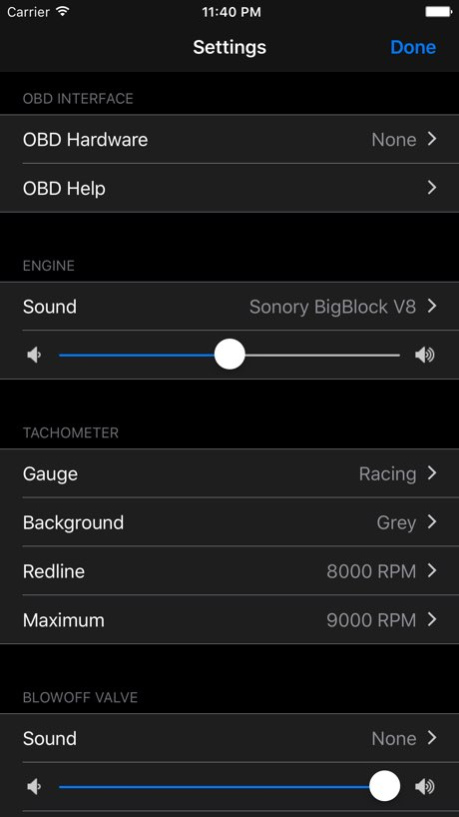
Want your car to sound like an expensive muscle car? Now you can! NOTE: DragFX requires a compatible 3rd party hardware interface. Supported interfaces include: - OBDLink WiFi - OBDLink MX WiFi - OBDKey WLAN - Kiwi 2 for iOS - Kiwi 3 The hardware allows DragFX to connect to your vehicle's OBD interface, so that the sound produced by DragFX accurately matches your engine's actual RPM in real time. Hear the sound of a turbocharger blow-off valve when your RPM drops below a configurable threshold. DragFX can also provide an audible indication when 3 different RPM thresholds have been exceeded to assist in shifting gears. You can even listen to music while also enjoying the sound of a souped-up engine! Without the hardware, a slider allows manual control of the RPM to preview the available engine sounds.
Version History This update from Apple will improve the functionality of this app. No new features are included. Updated for iOS 8/9/10 Added support for Kiwi 3 OBD interface 2.1 09/23/2016 New engine sounds Blow-off valve sounds Shift aid sounds Preview all sounds in settings Demo video 2.0 03/10/2013 New engine sounds, gauges, and backgrounds. 1.1 08/30/2012 1.0 04/12/2012
Previous Versions
Here you can find the changelog of DragFX since it was posted on our website on 2016-09-26 08:51:29.
The latest version is 2.1 and it was updated on 2026-06-23 01:07:45. See below the changes in each version.
DragFX version 2.1
Updated At: 2026-05-30
Changes: Version History This update from Apple will improve the functionality of this app. No new features are included.
Updated for iOS 8/9/10
Added support for Kiwi 3 OBD interface 2.1 09/23/2016 New engine sounds
Blow-off valve sounds
Shift aid sounds
Preview all sounds in settings
Demo video 2.0 03/10/2013 New engine sounds, gauges, and backgrounds. 1.1 08/30/2012 1.0 04/12/2012
DragFX version 2.1
Updated At: 2016-09-23
Changes: This app has been updated by Apple to display the Apple Watch app icon.
Updated for iOS 8/9/10
Added support for Kiwi 3 OBD interface
DragFX version 2.1
Updated At: 2016-09-23
Changes: Sep 23, 2016 Version 2.1
This app has been updated by Apple to display the Apple Watch app icon.
Updated for iOS 8/9/10
Added support for Kiwi 3 OBD interface
DragFX version 2.1
Updated At: 2016-09-23
Changes: Sep 23, 2016 Version 2.1
This app has been updated by Apple to use the latest Apple signing certificate.
Updated for iOS 8/9/10
Added support for Kiwi 3 OBD interface
DragFX version 2.1
Updated At: 2016-09-23
Changes: 23 Sep 2016 Version 2.1
Updated for iOS 8/9/10
Added support for Kiwi 3 OBD interface
DragFX version 2.1
Updated At: 2016-09-23
Changes: Sep 23, 2016 Version 2.1
Updated for iOS 8/9/10
Added support for Kiwi 3 OBD interface
DragFX version 2.1
Updated At: 2012-04-12
DragFX version 2.1
Updated At: 1970-01-01
Changes: 2016年9月23日 Version 2.1
Updated for iOS 8/9/10
Added support for Kiwi 3 OBD interface
Disclaimer
Official App Store Link
We do not host DragFX on our servers. We did not scan it for viruses, adware, spyware or other type of malware. This app is hosted by Apple and passed their terms and conditions to be listed there. We recommend caution when installing it.
The App Store link for DragFX is provided to you by apps112.com without any warranties, representations or guarantees of any kind, so access it at your own risk.
If you have questions regarding this particular app contact the publisher directly. For questions about the functionalities of apps112.com contact us.