
Go to Windows platform Display platforms icon
Go to Windows platform Go to Mac platform Go to Android platform
Double Commander icon

Double Commander

1.1.32
5 1 reviews
7.5 k downloads
security security

Multi-platform, two-paneled file manager

Advertisement
Remove ads and more with Turbo
Advertisement
Remove ads and more with Turbo
Álvaro Toledo icon
Reviewed by
Álvaro Toledo
Chief Content Officer
Álvaro Toledo is part of Uptodown's in-house Editorial Team. Translated by Uptodown Localization Team

It's not hard to find alternatives to the default Windows file explorer, one of the aspects of the operating system that could really use some improvements.

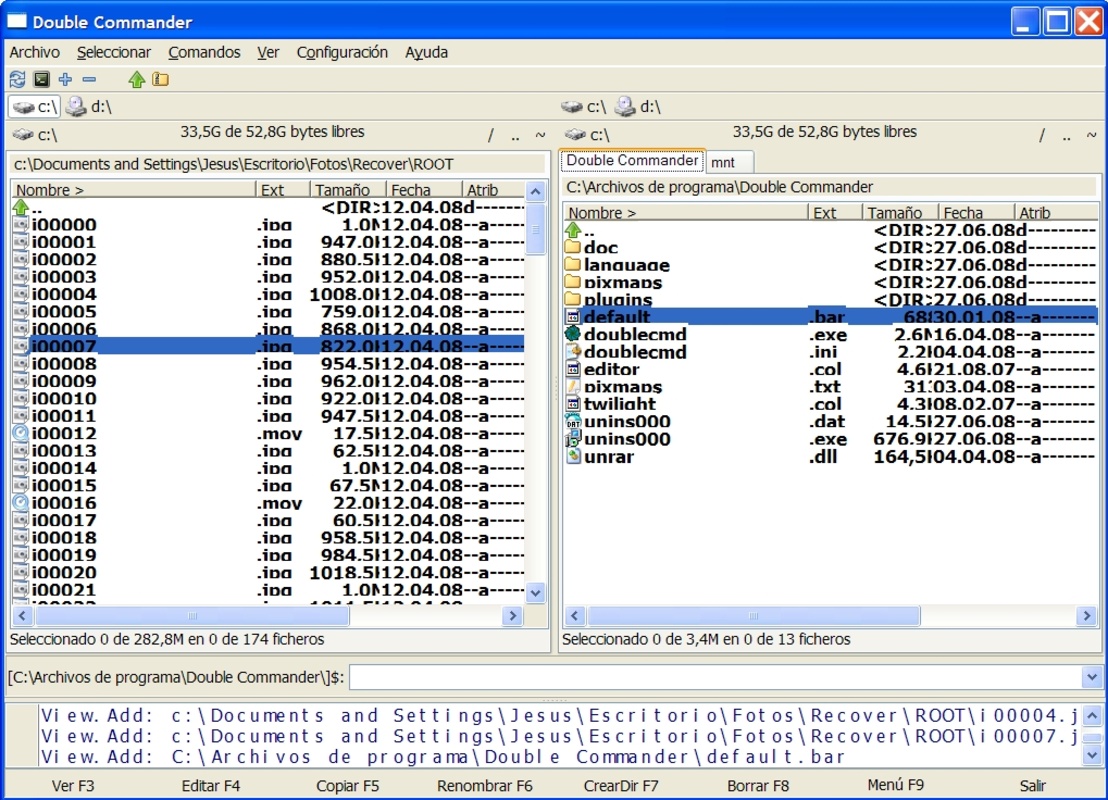
Double Commander is a two-panel file manager for Windows and Linux that streamlines file management thanks to a series of small features.

Advertisement
Remove ads and more with Turbo

The first is the fact that you can personalize the columns displayed by the application in each panel. The column that seems to be the most useful is that of attributes or file permissions (that's right, permissions aren't just a part of UNIX systems).

The second is the ability to select and unselect files using a mask, and then to package them together using a compression tool included in the program. It is compatible with ZIP, TAR, GZ, and TGZ formats.

Double Commander makes use of a tool bar similar to that of Norton Commander from MS-DOS. It allows you to perform different actions with a file by simply pressing the corresponding key. When it comes to viewing a file (F3), Double Commander includes a file viewer/editor that can display the contents of a file in text, binary, or hexadecimal form.

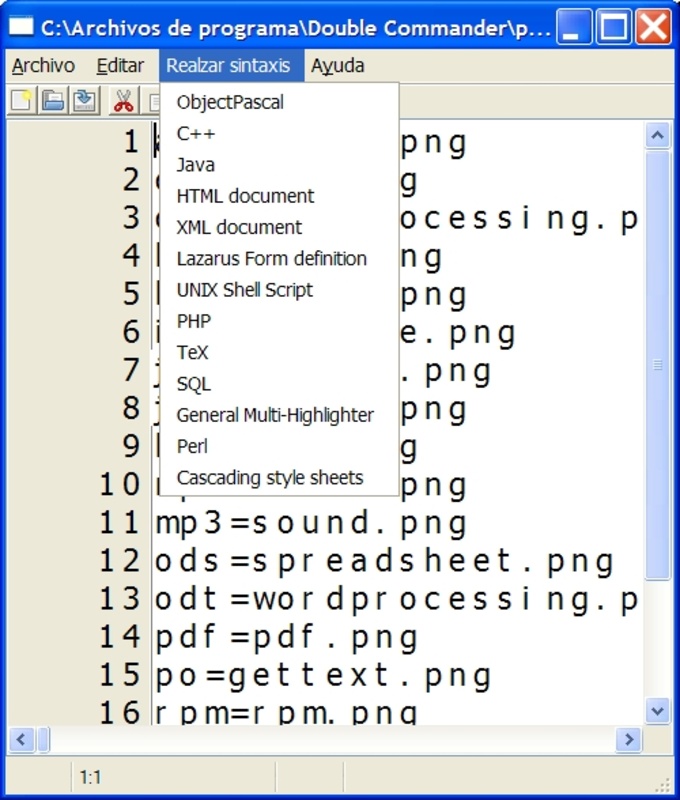
The viewer is especially useful for web developers, since it is capable of highlighting the syntax of various programming languages, including the following: ObjectPascal, Java, C , PHP, SQL, HTML, XML, UNIX scripts, TEX, Perl, CSS, definitions of the Lazarus formula, and more.

These and many more features await you in an application that simplifies Windows file management.

Information about Double Commander 1.1.32

Basic information

Developer Double Commander Team
License GNU
Category Disc/Files
Rating Not specified
Languages English
6 more

Security and privacy

Required permissions Not applicable
Advertising Not specified
See security and antivirus report
Why is this app published on Uptodown? (More information)

Download info

Downloads 7,513
Date Jan 7, 2026
File type EXE
Size 10.01 MB
SHA256 af88027a55b3db3793085e2c7babd667ea068ab526aba524ac5773ba7fa6f27d
Advertisement
Remove ads and more with Turbo

Older versions

See more
zip 1.1.31.0 Dec 22, 2025
msi 1.1.31 Dec 21, 2025
zip 1.1.30.0 Nov 10, 2025
zip 1.1.29.0 Oct 14, 2025
zip 1.1.28.0 Aug 11, 2025
exe 1.1.27 Aug 1, 2025
Available for other platforms

Rate this App

Review the app
Double Commander icon

Rating

5.0
5
4
3
2
1
1 reviews

Comments

There are no opinions about Double Commander yet. Be the first! Comment

Advertisement
Remove ads and more with Turbo
Rufus icon
Create boot disks from an external drive
CrystalDiskInfo icon
Monitor the health status of your hard drive
FAT32Format icon
A lightweight program for format in FAT32
Recuva icon
Recover any file deleted by mistake
Unlocker icon
Delete in-use, locked, or protected files
Teracopy icon
Transfer your files with total security
MiniTool Partition Wizard Free icon
Recover partitions on any external or hard drive
HDD Low Level Format Tool icon
Securely erase data from your hard drive
Windows 7 Home Premium icon
Download the latest Operating System by Microsoft
Windows 10 icon
Download the latest Windows 10 ISO on your device
Microsoft Word icon
The leading word processor for working with documents
AnyDesk icon
Faster remote desktop is possible
Microsoft Office 2021 icon
2021 versions of Word, Excel, PowerPoint and Outlook
Windows 8.1 icon
Upgrade to Windows 8.1 before anyone else
Microsoft Office 2016 icon
The 2016 version of Microsoft's office suite
Windows 11 icon
Download the latest Windows 11 ISO on your device