
Slack vs Teams: Which Collaboration Tool to Choose in 2026


Did you know Microsoft Teams supports over 320 million daily active users, up from 270 million in 2022? Slack, on the other hand, continues to cap out at around 42 million DAU in 2025. But what to choose between Slack and Teams? So, let’s discuss Slack vs Teams.
Remote and hybrid work are now part of our everyday jobs. Using the wrong collaboration tools can disrupt workflows, slow down decisions, and annoy teams. Imagine a project stalled after many talks.
Critical files might get buried in different platforms, or key updates could vanish in long chat threads. That’s not only an inconvenience; it costs time, money, and momentum.
This post compares Slack and Microsoft Teams in 2026. It looks at user interface, messaging, video calls, integrations, security, pricing, and more. Use this guide to select the best platform for your team’s size, technology stack, and objectives.
Slack vs Teams: A Brief Comparison
| Feature | Slack | Microsoft Teams |
|---|---|---|
| Daily Active Users | ~42 million DAU in 2025, up from ~30 M in 2023 | ~145 million DAU in 2025, part of ~300 million MAU |
| Interface & Onboarding | Clean, customizable UI; drag‑and‑drop setup, intuitive for teams | Structured, integrated with Outlook/SharePoint; steeper learning curve |
| Integrations | 2,400–2,600+ third-party apps; highly flexible | ~700 external apps; deep Microsoft 365 with custom apps via Power Platform |
| Video & Meetings | Huddles (up to 50 users); basic calls, requires Zoom/Google for larger meetings | Built‑in conferencing for up to 300–1,000 attendees; breakout rooms, live captions, webinars |
| File Collaboration | No native editing; relies on integrated services; limited DLP in Free/Pro | 1 TB/user storage, real-time co-editing (Word/Excel/PPT) with version history |
| AI & Automation | Slack AI for recaps/search; Workflow Builder is no-code | Copilot offers meeting summaries and task suggestions; Power Automate enables cross-platform workflows |
| Security & Compliance | SSO, 2FA, encryption, advanced tools via paid EKM add-on | Enterprise-grade security (ATP, GDPR, HIPAA, DLP, eDiscovery) built-in |
| Pricing (Paid Plan) | Free (Rs. 0); Pro (Rs. 245.25); Business+ (Rs. 557.10); Enterprise (on contact) | Include Home, Business, and Enterprise plans. |
Slack vs Teams – Features Compared
Below is a detailed comparison between Slack and Teams. Read ahead to know your best fit for a collaboration tool.
1. Slack vs Teams: User Interface and Onboarding
A smooth onboarding experience encourages onboarding adoption, especially for hybrid and remote teams.
Slack

Slack’s minimalist, interactive onboarding makes it very easy to collaborate:
- Slack offers a simple and engaging onboarding process. This lets teams begin collaborating right away.
- New users provide their email and are granted instant access to a workspace. The UI stays clean and distraction-free. This helps reduce initial friction. Userpilot says this easy signup “removes barriers to entry.”
- In-app prompts and overlays include:
- Tooltips
- Slackbot nudges like “send your first message” and “let other teammates know”
- Fun confetti effects
- The UX stays the same on all devices. This helps keep the flow smooth and cuts down onboarding time.
Microsoft Teams

Teams has a much more robust and IT-based onboarding experience, but it is equally challenging to navigate:
- The interface has multiple tabs, bots, and menus, which can overwhelm non-technical users.
- Admin oversight is needed. Set up permissions, compliance, and guest access first. Then, you can start using it.
- A healthcare provider needed two weeks to learn how to set the security configuration in Teams. Only then could they start any collaborative work.
Winner: Slack
Slack takes this round; it onboards users hands-on, guiding them along the way, which creates low friction, and value can be realized in minutes.
2. Slack vs Teams: Messaging and Chat
Messaging is the core of collaboration tools. Let’s analyze how Slack and Teams provide support for conversations, customization, and real-time communication.
Slack

Slack is at the forefront of messaging with features that are unlike other tools, and users engage with Slack heavily.
- Real-time messaging without limits: Users of Slack each send about 1.5 billion messages every day. Each user sends an average of 92 messages per day. This indicates that they engage in collaborative workflows.
- Communication is channel-centric: Slack allows unlimited public and private channels, as well as group DMs with up to 9 users. All of this allows for organized conversations that can easily be searched in the workspace.
- Expandable expressive tools: Support for emojis, GIFs, and reactions. Slack offers hundreds of emojis for your chats. They boost team spirit and encourage casual interactions.
- Advanced search & actions: You can fine-tune search filters and use Slack AI. This makes it easy to find past discussions, files, or controlled messages instantly.
- Lightweight huddles: Use quick audio/video chats for up to 50 people. More teams are using these huddles (paid tier only) for quick stand-ups and brainstorming.
Microsoft Teams

The Teams application has a strong chat capability. Beyond chat capability, Teams offers enterprise-class chat capabilities:
- Persistent Threaded Chats: Offers one-on-one and group chats. Ability to use emojis and stickers and share files. All chats are central, searchable, and persistent.
- Threaded channels (UI refresh): Teams has been in public preview since November 2024. This update makes chatting easier. Now, you can see all chats, channels, and threads in one place.
- Scheduled and Smart Chat Tools: Users can schedule messages. Agents or bots can join chats for reminders or support.
- Teams Copilot uses AI: It helps draft replies, summarizes chats, and shares useful background info during discussions.
- Enterprise integration: Teams connects deeply with SharePoint, OneDrive, and Planner. This lets you use adaptive cards and see file previews right in a chat.
Winner: Slack
Slack is the winner in this category. Slack sends 1.5 billion messages daily. The features in Slack make it more engaging than the heavier, enterprise-focused Teams.
3. Slack vs Teams: Audio and Video Communication
Good audio and video calls can really help your team work together. This is especially true in hybrid settings where meeting in person isn’t possible.
Slack

Slack has Huddles to provide quick, lightweight audio and video calls within channels:
- Quick syncs: Allow quick audio Huddles and longer video chats. Teams on paid plans can have up to 50 members, while free plans allow only 2. Almost 44% of Slack’s enterprise customers use Huddles weekly. They spend a total of 243 million minutes in Huddles each week.
- Screen sharing and fun features: Slack lets you share your screen. You can also use virtual backgrounds and add floating emoji reactions. However, slackers say there are problems. Some users experience glitches during calls, like audio dropouts.
Microsoft Teams

Teams has an all-in-one, enterprise-quality video conferencing platform:
- Supports larger meetings: Hosts up to 300 team members on paid plans (up to 100 on free plan). Includes features like breakout rooms, live captions, transcripts, and webinars.
- All features included:
- Create meetings
- Record sessions
- AI-generated recap
- “Together mode”
- Speaker coach
- Polls
- Shared whiteboards
- Great call quality and reliability: Users praise the quality and reliability of Teams. Most prefer it over Slack for formal or larger meetings.
Winner: Teams
Microsoft Teams wins this category. Teams supports meetings with many more participants (300 versus 50), offers advanced features like recording, transcripts, and breakout rooms, and has shown a more reliable and consistent audio and video quality, making Teams ideal for structured, enterprise-grade collaboration.
4. Slack vs Teams: File Sharing and Document Collaboration
Teams and companies need simple file sharing and easy document collaboration to stay productive.
Slack

Slack has 1 GB file upload for files on paid plans and up to 20 GB of storage per user.
- Free users get 5 GB of storage in their workspace.
- Slack doesn’t have built-in editing. Also, you can’t collaborate on the platform without using integrations.
Teams

Teams provides 1TB/user OneDrive storage and in-app co-editing in Word, Excel, and PowerPoint. A law firm works on contracts in real time in Teams, with changes being synced instantly to SharePoint. Teams has 15 GB single file uploads and a 10 GB allowance per license. Teams allows real-time co-editing of Office documents right within the platform.
Winner: Teams
Once again, Teams takes the cake! Teams allows real-time collaborative editing and has unlimited file sharing size (and unlimited storage). On the other hand, Slack has a 1GB limit per file with no co-editing tools available and is reliant on third-party tools for collaborative editing.
5. Slack vs Teams: Third-Party Integrations
Integrations transform collaboration tools into central hubs. Let’s explore how Slack and Microsoft Teams integrate with an array of apps and workflows.
Slack

Slack has one of the largest user bases for integrations:
- Ecosystem Size: Integrates with 2,600 apps such as GitHub, Salesforce, Google Workspace, Zoom, and Asana. Much larger than the more limited marketplace for Teams.
- High Adoption and Custom Bots: About 70% of Slack users use at least 1 external app. 30% automate tasks with bots. In 2025, the use of connectors in the Workflow Builder increased by 34%.
Microsoft Teams

Teams has a deep and seamless integration within the Microsoft ecosystem:
- Built-in Microsoft tools: This lets users connect to Office apps like Word, Excel, and PowerPoint. They can also access SharePoint, OneDrive, Planner, and Power BI right from the chat and channel experience.
- App Marketplace: Offers 1,400-2,000 third-party apps. It also supports enterprise line-of-business (LOB) apps with Power Platform.
Winner: Slack
Slack is the winner here. It has a bigger integration library, higher user adoption, and a stronger bot ecosystem. This allows for many workflows. Teams, however, works better with Microsoft tools but has fewer app options outside its own suite.
6. Slack vs Teams: Artificial Intelligence Assistance
AI is changing how teams work together. It helps them summarize information and automate tasks in today’s platforms. Here’s what Slack and Microsoft Teams currently look like in regard to the AI features and value:
Slack

Slack promotes itself as a flexible AI-agent hub to improve workplace productivity.
- Slack AI features (available with paid plans starting July 2025) include:
- Conversation and thread summaries
- Huddle notes
- AI-powered searches
- Protections for private data
- These features work on a system that stops sharing customer data with LLMs.
- Custom internal AI apps: Users created 13,408 AI-enabled add-ons for Slack. These include bots that summarize workflows and bots that query chat-assisted databases.
Microsoft Teams

Teams provides embedded AI through its Copilot assistant, helping users to be smarter, not harder:
- Microsoft 365 Copilot in Teams helps with chatting. It summarizes meeting chats and makes follow-up items. It also highlights action items and drafts meeting messages.
- In a trial with 14,500 UK customers, 34% used Copilot daily in Teams. Each user saved an average of 26 minutes of work every day. Also, over 70% of users reported less mundane work.
Winner: Microsoft Teams
Microsoft Teams wins this round. It offers useful productivity boosts with Copilot. Users save more than 26 minutes each day. Slack’s AI features are useful and can be expanded, but they don’t deliver the same productivity results as Teams.
7. Slack vs Teams: Workflow Automation
Automation allows teams to free themselves up from repetitive work and spend more time on strategy. Let’s take a look at how Slack and Microsoft Teams measure up in workflow tools and no-code features.
Slack

Slack has a no-code Workflow Builder made for everyday users:
- Wide adoption & ease of use: 80% of workflow builders are non-technical users. Nearly 1M users have built automation without code. In its final year, Salesforce analyzed customer data. They found that automation saved 28% of the time on tasks.
- Extensive integrations and custom bot capabilities: 3M+ workflows run every day. There are 60+ connectors with ongoing experiments with AI-generated workflows. Onboarding, status reports, alert routing, etc.
Microsoft Teams

Teams helps set up workflows in Power Automate. This tool is mainly designed for IT and enterprise users:
- Power Automate works well with the Microsoft ecosystem. It runs advanced flows and connects SharePoint, Teams, OneDrive, and third-party apps.
- Automation allows some powerful configurations. However, users faced challenges. Complicated workflows slowed down their tasks, debugging, and using custom connectors. Some went back to simpler connectors or pushed for better user interface improvements.
Winner: Slack
In this round, the ‘winner’ is Slack. Slack’s Workflow Builder is simple to use. Non-technical staff can create automation in a short amount of time.
8. Slack vs Teams: Mobile Experience
Seamless mobile access is a requirement for any modern team. Here’s how Slack and Microsoft Teams take into account usability, speed, and overall experience on mobile devices:
Slack

Slack provides a consistent mobile experience—although updates have drawn mixed reviews.
- High mobile usage: Nearly 76% of active Slack users are on mobile. Users are taking over 1 billion actions every week, demonstrating highly engaged mobile users.
- Performance Issues: Some users see delays. Their chat loads slower, taking over 10 seconds. Their user experience feels slower as well after the most recent updates.
Microsoft Teams

Teams also has a rich feature set for its mobile client, and user feedback would suggest mixed reliability:
- Feature-rich: Teams has chat, calling, file sharing, and calendar features on mobile. Users enjoy the complete mobile experience.
Winner: Microsoft Teams
In this round, there can be only one winner, and that is Teams. Slack performed best in engagement metrics. However, Teams offers a complete, reliable mobile experience. It has a great calendar and calling features. This makes Teams a better choice for mobile collaboration. There are some quirks unique to the platform, but the benefits outweigh them.
9. Slack vs Teams: Guest Access
Working with external teams—clients, freelancers, contractors—is becoming more common. Let’s explore what guest access looks like in Slack and Microsoft Teams. We’re looking for flexibility, security, and usability.
Slack

Slack has flexible and granular guest access, with intuitive controls and usage reporting.
- Per workspace and shared channels:
- Supports single and multi-channel guest roles.
- Free for paying clients with up to 5 single-channel guests.
- Admins can set tag and expiry controls.
- Tags can identify guests.
- Admins receive a notification 2 days before guest deactivation.
- Over 65% of paid Slack Workspaces have guest accounts. Typically, each workspace can consist of about 15 guests. This shows that guest access boosts collaboration with outsiders.
- Workspace owners control guest invites and access to channels. The deactivation times are automatically set, limiting and securing access to outsiders.
Microsoft Teams

Teams allows for guest access for the enterprise, but the configuration can be messy:
- Azure AD prerequisites: Guests must first have been created in Azure Active Directory before you are able to add them to Teams. This can be tricky and create sign-in loops or errors.
- Authentication Problems: Reddit has users with issues logging in as guests. Guests usually have to clear their browser cache to log in or switch tenants before logging in. If they do not do this, they are unable to log in.
- Best practices:
- Use MFA for secure logins.
- Set clear conditional access rules.
Winner: Slack
Slack takes the lead. It handles guest flows well, sends expiry alerts, and boasts a big user base. This makes setting up external collaboration quick and secure. Teams will have robust security, but Azure AD is very complex, even when configured properly. The complexity can slow down guest onboarding and overall collaboration.
10. Slack vs Teams: Security & Compliance
Data protection and compliance with regulations are crucial. Slack and Microsoft Teams have unique features. They differ in encryption, certifications, and enterprise policies.
Here is how Slack and Microsoft Teams stack up:
Slack

Slack offers solid security right away. Its compliance features are robust and come with extra options at different tiers.
- Encryption & EKM (Enterprise Key Management): Provides AES-256 encryption and AES in transit. Optional Enterprise Key Management gives you full control over encryption.
- Certifications include:
- ISO 27001/17/18/27 701
- SOC 2/3
- HIPAA
- FINRA
- FedRAMP
- GDPR
- Other certifications are:
- Legal hold
- eDiscovery
- Global retention policy.
Microsoft Teams

Teams builds on Microsoft’s top privacy and security features. These come from the largest compliance and threat protection platform in the industry.
- Encryption & MFA (Multi-Factor Authentication): Defaults with TLS and AES‑256 encryption. Offers BYOK (Bring Your Own Key) option for customers and can enforce MFA limitations via Azure AD, etc.
- Enterprise Governance: Compliance crosses many industries, including GDPR, HIPAA, ISO 27001, and SOC 1/2/3. It also contains advanced threat protection (ATP), conditional access, eDiscovery, legal hold, and data loss prevention (DLP).
Winner: Microsoft
In this area, Microsoft is ahead of the pack, most importantly regarding compliance. It has strong security features and is a good option for organizations that are in a regulated industry or have strict rules to follow internally. Slack is secure and compliant. However, to access the highest level of advanced controls, you need to buy a higher tier of their SaaS product.
11. Slack vs Teams: Pricing Structure
Here is a detailed listing of Slack vs Teams pricing structure.
Slack

- Free (Rs. 0): 90 days of message history, 10 app integrations, 1:1 meetings, and 1:1 external messages.
- Pro (Rs. 245.25): Unlimited days of message history, unlimited app integrations, group meetings, group external messages, and Basic AI.
- Business+ (Rs. 557.10): Unlimited days of message history, unlimited app integrations, group meetings, group external messages, and Advanced AI.
- Enterprise+ (Rs. 557.10): Unlimited days of message history, unlimited app integrations, group meetings, group external messages, and Enterprise-grade AI.
Microsoft Teams

- Business:
- Microsoft Teams Essentials: $4.00/user/ month paid yearly, an affordable solution for businesses.
- Microsoft 365 Business Basic: $6.00/user/month paid yearly, a lightweight app and mobile solution for businesses.
- Microsoft 365 Business Standard: $12.50/user/month paid yearly, a powerful web, mobile, and desktop solution for businesses.
- Home:
- Microsoft Teams: Free solution for chat and calls for home users.
- Microsoft 365 Personal: $99.99/year, Microsoft 365 apps, online protection, and cloud storage for 1 person.
- Microsoft 365 Personal: $99.99/year, Microsoft 365 apps, online protection, and cloud storage for 1 person.
- Microsoft 365 Personal: $129.99/year, Microsoft 365 apps, online protection, and cloud storage for 6 person.
- Enterprise:
- Microsoft Teams Enterprise: $5.25/user/month paid yearly, an affordable solution for enterprises.
- Microsoft 365 E3 (no Teams): $33.75/user/month paid yearly, secured solution for enterprises.
- Microsoft 365 E5 (no Teams): $54.75/user/month paid yearly, analytics with advanced security features for enterprises.
Winner: Teams
Teams wins for cost-effectiveness, especially for organizations already invested in Microsoft tools. Slack’s standalone pricing adds up for large teams, though it’s ideal for startups avoiding vendor lock-in.
12. Slack vs Teams: Industry-Specific Use Cases
There are remarkable collaboration tools across every sector, whether financial services, healthcare, or gaming. While financial services quickly move to compliance as a concern, startups value flexibility. Here is a short description of where each platform excels in different sectors.
Slack
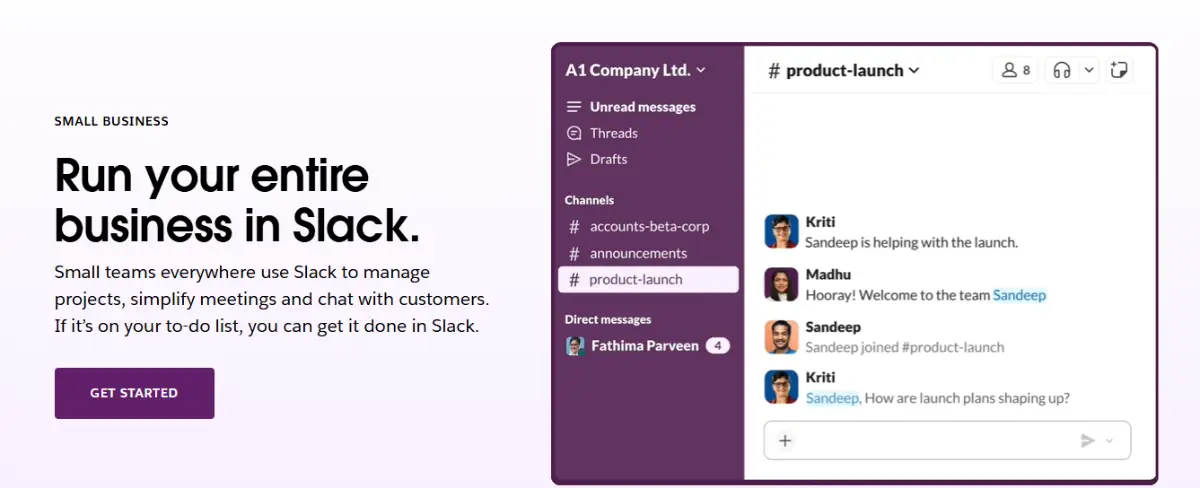
Usually a tool of choice in technology, startups, and remote-first collaborations:
- Slack works well for start-ups, tech firms, and creative agencies. It encourages quick actions, strong integrations, and a very flexible culture.
- Developers and tech-savvy users fit well with Slack. You can launch it quickly, depending on your operating system.
- It’s even easier to tailor workflows around Agile teams because you control your degrees of customization and changes.
- Slack encourages a level of community within teams; the emoji, GIF, and reaction features make it easy for teams to express feelings with one another. Team members can also create public Slack channels.
Microsoft Teams

- Microsoft Teams is designed for businesses, regulated sectors, and schools.
- It offers benefits in governance, compliance, and integration with Microsoft 365.
- Many big companies use Microsoft 365. They like Teams because it links to Outlook, SharePoint, and Planner. Teams has become their main space for internal workflows.
- Education and public sector groups gain from virtual classrooms. They also benefit from LMS integrations and secure guest access.
Winner: Microsoft Teams
Microsoft Teams stands out with its industry-specific solutions. By 2025, there will likely be about 320 million active users each month. This shows strong market resilience. It also provides smooth integrations with Microsoft 365 and compliance tools.
13. Slack vs Teams: Scalability and Ongoing Support
Fast growth and long-term reliability are crucial for companies aiming to scale. Here is a detailed comparison between Slack and Microsoft Teams based on their growth and business support.
Slack

- Slack helps big businesses grow with unlimited workspaces and communities.
- Slack has its Enterprise Grid, which is best for complex organizations of all sizes.
- Slack Enterprise Grid offers unlimited workspaces and channels. It supports up to 500,000 users and is used by companies like IBM and Oracle.
- Slack offers tools for app deployment. It includes governance controls and workspace dashboards. This setup also boosts user simplicity and efficiency.
Microsoft Teams

- Teams is built to scale seamlessly through enterprise-scale and enterprise-grade infrastructure. Teams also has 320 million monthly active users. They are spread across 181 markets and are available in 44 languages.
- Teams can offer a 99.999% uptime SLA for Teams Phone. You also enjoy a zero-trust architecture based on Azure microservices.
Winner: Teams
Teams can expand rapidly through frequent updates for clients and various platforms. This helps the organization maintain the high availability of infrastructure 24/7. It also scales and delivers enterprise infrastructure to productivity tools with high efficiency.
Final Thoughts: Slack vs Teams
Slack and Teams both offer strong free tiers. If you want something quick to set up, simple to use, and easy to collaborate on remotely, Slack is great. If your team is big, uses Office apps, or needs strong security and admin controls, Microsoft Teams is probably the best choice.
Slack’s free plan and Teams Essentials provide plenty of resources for your needs. Just ask a small team to pilot both solutions. Pay attention to how easy it is to share files, exchange chats, join meetings, and automate tasks. Actual experience will leave you well-prepared to select the best choice!
Sagnika Goswami
Hi, I’m Sagnika Goswami. I am a tech enthusiast with a knack for content writing. Read my blogs for your daily insights.
Join thousands of readers getting smarter every week.
Leave a Reply