
Ghost vs WordPress: Which Platform is Best for You?


Finding the right platform to build your blog or content site can be frustrating in and of itself. And because you’re trying to decide between Ghost vs WordPress, that only adds to the pressure. Both of these platforms are popular, powerful, and widely used, but they aren’t always used for the same things.
The problem is this: if you pick the wrong one, you could end up fighting tech problems, racking up expenses, or worse of all, limiting your own website.
That’s why in this guide, we’re going to break down everything worth knowing about Ghost vs WordPress side-by-side, so we can be as thorough as possible. Speed, SEO, themes, pricing, and ease of use—you name it—we will cover it all.
Whether you are a solo blogger, newsletter creator, or if you’re building a content-heavy site, this comparison will give you the framework for choosing the right platform for your future goals.
So, let’s get to it and finally settle this debate!
Ghost vs WordPress
So, what’s the difference between Ghost and WordPress? To make sense of the Ghost vs WordPress discussion, we need to first define what each platform is.
What is Ghost?

Ghost is a modern, open-source publishing platform designed specifically for writers, bloggers, and newsletter creators. You can think of it as a lightweight, no-nonsense version of WordPress—it’s focused on speed, straightforwardness, and clean publishing.
Ghost was launched in 2013 to put writing back at the center of the digital publishing experience. It runs on Node.js, making it very fast, and has built-in tools for:
- SEO (with no plugins required)
- Email newsletter delivery
- Paid membership systems
Ghost is perfect for creators who want a professional publishing tool without the distraction of a giant website builder. Ghost offers Markdown support, a good editor, and a clean dashboard. You can easily use Ghost to publish a personal blog or a subscription newsletter.
One thing to note, however, Ghost is generally for developers, or at least comfortable tinkering a bit, especially with the self-hosted version.
What is WordPress?

Let’s turn the tables. WordPress is the largest content management system in the world, with over 43% of all websites online powered by WordPress.
Unlike Ghost, WordPress is an all-encompassing website builder and can be customized into nearly everything, including blogs, business sites, online stores, education platforms, forums, etc. WordPress is open-source and is supported by a large community of developers and users, as well as the following:
- 60,000+ plugins for additional functionality
- Thousands of free and paid themes
- Visual page builders, e.g., Elementor or Gutenberg
- WooCommerce for eCommerce needs
WordPress started as a blogging platform, but is now an ecosystem of programs/settings/rules/organizations that can build complex and large websites.
Whether you are a novice starting your first blog or an agency building a client portal, WordPress has everything you need to be successful and is capable of growing and expanding as your vision does.
Ghost vs WordPress: Detailed Comparison (8 Key Differences)
When deciding on Ghost vs WordPress, it’s not simply about brand or appearance, but rather it’s a matter of function, goals, and how much time (and effort) you want to invest into maintaining your site.
1. Ease of Use
Ghost

Ghost follows the principle of “less is more”. Once installed, the interface is clean, simple, and beautifully designed for writers. Whether you are publishing blog posts or setting up a newsletter, everything is easy to use and intuitive.
One downside, separating from the company, is that self-hosting Ghost isn’t easy for people who are not developers. If you go the self-hosting route, you will need Node.js knowledge, some knowledge of the command line, and some server knowledge, or pay for Ghost(Pro).
If you have Ghost(Pro), there is no hassle with installations, no updates, just writing.
WordPress

WordPress can be as easy or as difficult as you want it. If you are using WordPress.com or a managed hosting like SiteGround or Bluehost, the setup process is pretty simple. The admin dashboard is easy for beginners, and there are lots of tutorials behind WordPress.
However, as you add plugins, themes, and customizations, the dashboard can get cluttered and harder to use. Some users report “plugin fatigue” or even dependency issues later on.
Winner: WordPress
Ghost is beautiful, but WordPress wins, for its open accessibility to set up and ease of getting started, especially for beginners.
2. Themes and Design Flexibility
Ghost

Ghost themes are simple, fast, and usually content-forward. They are great for blogs, newsletters, magazines, and publications. Most themes are simple, clean, and distraction-free and will allow your writing to take center stage.
The downside? There are a limited number of themes, and usually customization requires editing Handlebars templates, which is not easy for a beginner. You can also hire a developer to customize a theme for you, but the ecosystem is still young compared to WordPress.
WordPress

With more than 10,000 free themes in the WordPress repository and thousands more premium themes available on ThemeForest and other platforms, you will never run out of options. It does not matter if you are building a travel blog, SaaS site, or online store; there is a theme for that.
In addition, builders like Elementor, Divi, and Gutenberg made customizing themes much easier for non-coders because you can design almost anything visually.
Winner: WordPress
WordPress wins in the design category because of the endless theme options available and visual page builders that eliminate the need for coding.
3. Performance and Speed
Ghost

This is where Ghost shines. Being built on Node.js means it is fast. Ghost loads quickly, can handle large traffic loads, and automatically avoids bloat. There are no clunky plugins or big additions slowing it down.
If you’re using Ghost(Pro), it’s built on a global CDN (content delivery network), making loading time and performance that much better. For content-focused sites, performance can drastically affect SEO and retention, and Ghost has both.
WordPress

The performance of WordPress sites totally depends on how you build and set them up. A clean, optimized WP install can be speedy, but only if you have:
- Good hosting
- Caching plugins (like WP Rocket)
- Image optimization
- Lazy loading and performance tweaks
If you’re not actively managing performance, your WordPress site can become slow quickly, especially with the addition of excessive plugins or elaborate themes.
Winner: Ghost
Ghost is faster immediately, and Ghost requires less effort to maintain top performance.
4. SEO Features and Optimization
Ghost

Ghost was developed with modern SEO practices in mind. You won’t need to add additional plugins or extensions, because Ghost has native support for:
- Clean URLs
- Meta titles/descriptions
- Canonical tags
- AMP support
- Open Graph & Twitter Cards
- XML sitemaps
- Schema markup
Ghost takes care of SEO where it matters most behind the scenes, so you can focus on the content and stop toggling with plugin settings.
WordPress

SEO in the WordPress experience is driven by plugins. In order to get the same level of control as Ghost offers you out of the box, you would need tools like Yoast SEO and Rank Math.
That being said, the power of WordPress’s SEO plugins is incredible. You can get as deep as you’d like with your on-page SEO, custom schemas, and integrations. But there’s a bit of a learning curve—and in turn, more management.
Winner: Ghost
If you are looking for simple, powerful SEO without any of the plugins or complexity of features, Ghost wins hands down. WordPress can get there if you have the right tools.
5. Content Management Experience
Ghost

Ghost is fully built around the experience of publishing. Its editor is super fast, Markdown-based, and completely distraction-free. If you are focused on writing, sending newsletters, or creating membership-based content, Ghost is distraction-free and has a streamlined workflow.
You can:
- Organize content with tags and custom routes
- Create member-only content
- Send email newsletters from the dashboard
- Track performance with integrated analytics
That’s a lot without plugins.
WordPress
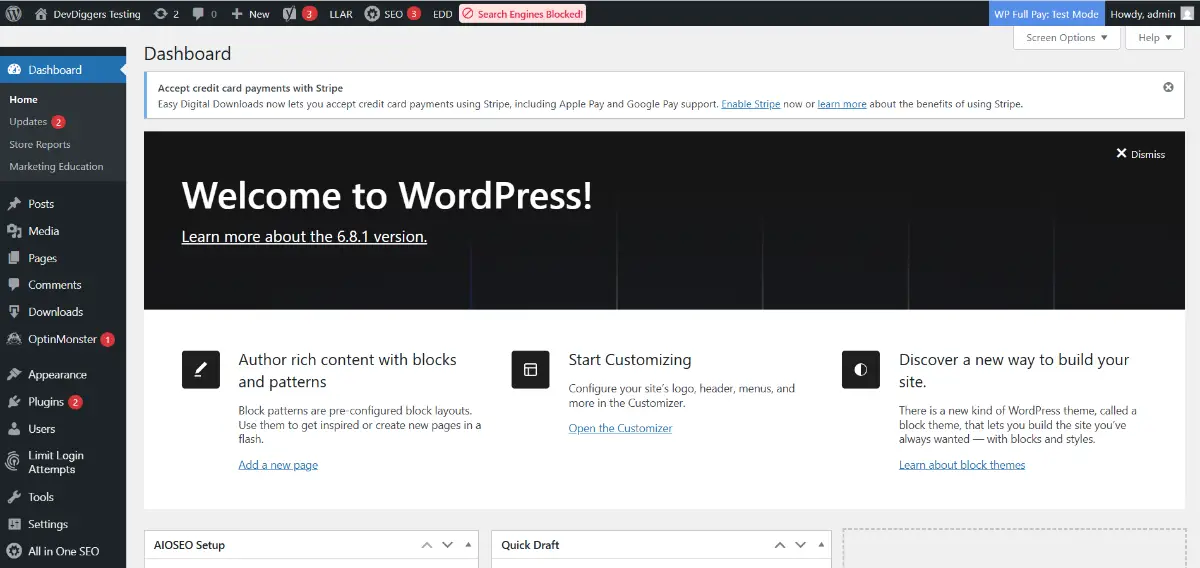
WordPress is incredibly flexible in how it manages content. Posts, pages, custom post types, taxonomies, categories, you name it, WordPress can structure it.
The downside of WordPress is the content editor (Gutenberg), which is still a love-it-or-hate-it experience. While the editor allows for block-based layouts, which is great for landing pages, it can feel clunky when you’re just looking to write.
On top of writing and building a regular website or blog, you’ll need to implement newsletter and membership tools (ideally, with plugins). Some you may consider are MailPoet, MemberPress, or ConvertKit integrations.
Winner: Ghost
If publishing and ultimately developing a content-first brand is your number one priority, Ghost’s built-in tools are simply more efficient and streamlined.
6. Flexibility & Customization
Ghost

Ghost is built for publishing. It is beautiful and fast, but deliberately limited in capability. You can extend it via the Ghost API, build custom themes with Handlebars.js, and use third-party integrations through Zapier or custom code.
That being said, Ghost is not a great option if you want to build an online store, multi-language site, discussion forum, or anything significantly beyond blogging and newsletters.
WordPress

This is where WordPress excels. If you want to turn your site into:
- An eCommerce store? Use WooCommerce.
- A course platform? Use LearnDash or TutorLMS.
- A job board, directory, or portfolio? There’s a plug-in for that.
The options are endless with over 60,000 plugins, and more frameworks for themes than you can count. You can customize pretty much every pixel. Developers can use hooks, filters, and radical custom functionality however they please.
Winner: WordPress
There is no debate here. If it is flexibility and the ability to build anything, WordPress is the obvious answer.
7. Pricing and Cost of Ownership
Ghost

Ghost has 2 delivery methods:
- Self-hosted (free)—you’ll still need a VPS, like Digital Ocean (~$6/month), and will be responsible for managing updates, security, backups, and emails.
- Ghost(Pro)—managed plans starting at $9/month depending on members and features.
The good news? You don’t pay for plugins or SEO tools; the majority of Ghost’s features are built into the platform. Pricing is explicit and geared towards value.
WordPress
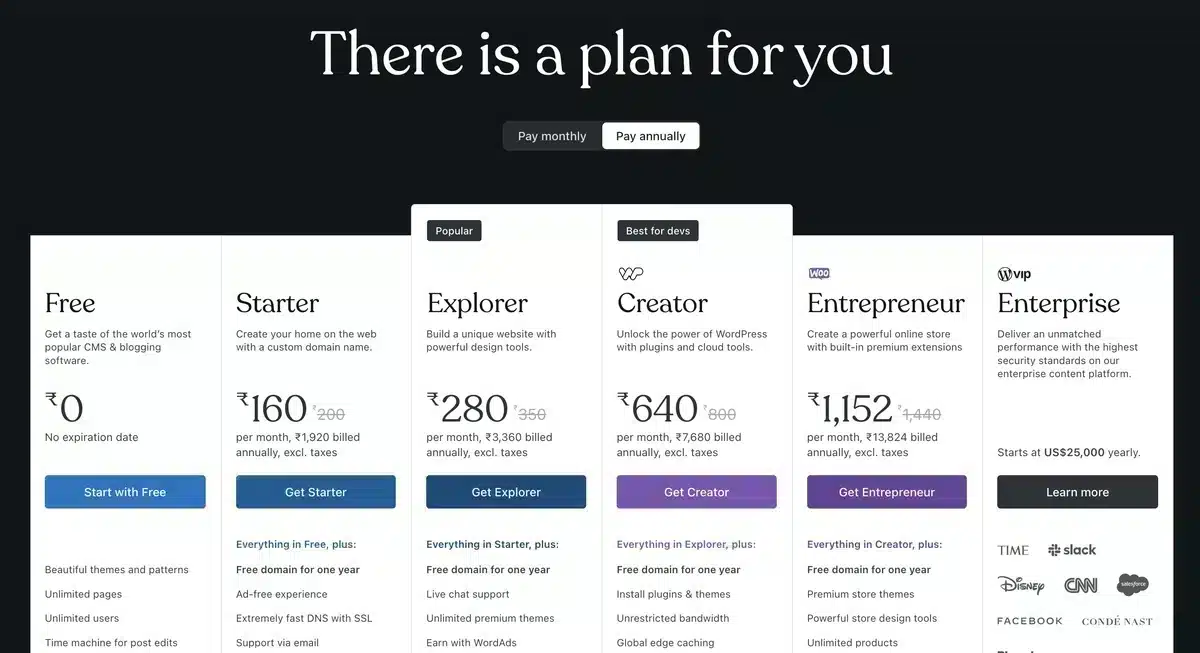
WordPress.org is free, but costs can easily add up:
- Hosting—like Ghost, depending on provider $3-25/month.
- Premium themes—your initiation fee will be anywhere from $40-$100, one-time or yearly, depending on the theme developer.
- Plugins—many free; however, quite a few also charge monthly/yearly. For example, Elementor Pro ($49), MemberPress ($249), and SEO tools are too.
If you have no tech skills, you may also end up paying a lot for support or for someone to develop on your behalf.
Winner: Tie
Ghost is a better option in terms of predictability and capability out of the box. WordPress has higher potential flexibility and is likely cheaper in terms of first costs, but how quickly can costs rise with premium add-ons?
8. Community & Ecosystem
Ghost

Ghost has a very passionate, developer-focused community. It’s open source, and it’s rapidly growing, but it still has a comparatively small ecosystem compared to WordPress. Ghost has great documentation, but not as many tutorials, YouTube videos, or freelancers.
The forums are helpful, but you may need to be a little niche if you run into issues.
WordPress

This is where WordPress absolutely is miles ahead. With millions of users, contributors, developers, and agencies, the support system is huge:
- Massive forums and Reddit communities
- Many, many tutorials and blogs on YouTube
- Thousands of developers are available for hire
- Active plugin and theme developer communities
With WordPress, you’ll never feel like you’re alone.
Winner: WordPress
With its global reach, massive contributor community, and limitless access to learning material, WordPress wins by a mile.
Final Verdict: Which One Should You Choose—Ghost or WordPress?
When it comes to Ghost vs WordPress, the answer is not as simple as saying what’s better—they both can be “better” based on what you want to accomplish, your level of expertise, and what capabilities you want from a website.
Choose Ghost if you’re a writer, content creator, or indie publisher who wants a fast, no-frills, SEO ready publishing platform right out of the box, has an interest in publishing newsletters, using paid memberships, and wants things to be easy. Ghost is a creator’s dream, with performance and writing-focused features and tools for modern creators.
On the other hand, choose WordPress if you want maximum flexibility, access to thousands of themes or plugins, or plan to upgrade into a full-on website (a blog, eCommerce store, course site, or membership platform). WordPress is the most flexible platform, supported by the largest web-based community.
They both have a lot of great features, but they also serve two very different purposes. So instead of asking “Which is better?” ask “Which is better for me?”
Still not sure? Why not try testing the platforms out to see what feels more comfortable for you, either with a free trial or a local setup of both platforms? Sometimes, physically doing the work is the difference in making a decision.
Frequently Asked Questions – Ghost vs WordPress
Q1. Which is more beginner-friendly, Ghost or WordPress?
Generally speaking, WordPress is more beginner-friendly with its user-friendly setup, thousands of tutorials, and expansion with plugins.
Q2. Can Ghost be a replacement for WordPress?
Ghost can replace WordPress for blogs and a newsletter, but it is not flexible enough to build a complex or multipurpose site.
Q3. Does Ghost have plugins like WordPress?
Ghost does not have plugins, but most of the features in your custom integrations either are built into Ghost or require custom integration with APIs or third-party services.
Q4. Is Ghost free to use?
Yes, self-hosted Ghost is free. Ghost(Pro), the managed hosting plan, starts at $9/month.
Q5. Can I monetize content with Ghost?
Yes, Ghost has membership and subscription features built in, making it great for paid newsletters and exclusive content for your members.
Ekta Lamba
Hi! I’m passionate blogger who loves turning ideas into impactful stories. I’m here to simplify tech and make blogging easier for everyone. Whether it’s helping others start a blog, grow an online presence, or stay inspired- I’m here to share, learn, and grow with my readers.
Join thousands of readers getting smarter every week.
Leave a Reply