
By now you’ve heard about Heartbleed. If not, go check these links out:
- LastPass’s blog post about Heartbleed
- LastPass’s Heartbleed checker
- Steve Gibson’s Security Now! podcast about Heartbleed (audio, notes, and transcript)
- xkcd 1353 and 1354
Once you have changed your pants, you should enable a check for server certificate revocation in Google Chrome and any other browsers you use, since a bazillion certificates need to be revoked right now. Here’s a quick how-to for Chrome.
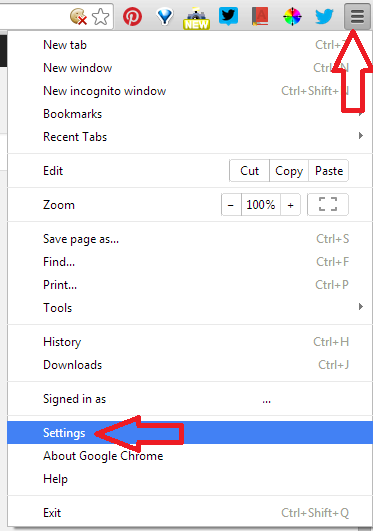
Open Chrome’s “hamburger menu” and choose “Settings”:
Scroll to the bottom and click “Show advanced settings…”:

Scroll again and check the box beside “Check for server certificate revocation”:

This will make sure that Chrome verifies certificates, rather than assuming no news is good news.
 Brandon Grasley's Blog