This technique allows for a variable to be assigned a value if another variable is either empty or is undefined. NOTE: This “other variable” can be the same or another variable.
excerpt
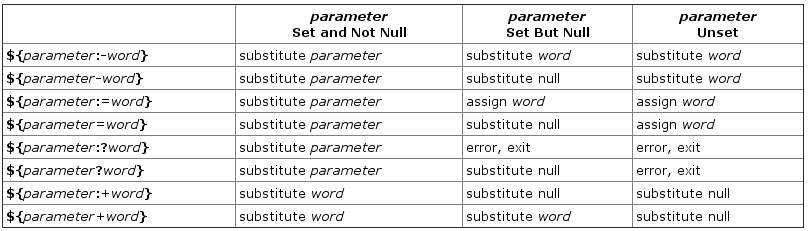
${parameter:-word}
    If parameter is unset or null, the expansion of word is substituted.
    Otherwise, the value of parameter is substituted.
NOTE: This form also works, ${parameter-word}. If you’d like to see a full list of all forms of parameter expansion available within Bash then I highly suggest you take a look at this topic in the Bash Hacker’s wiki titled: “Parameter expansion“.
Examples
variable doesn’t exist
$ echo "$VAR1"

$ VAR1="${VAR1:-default value}"
$ echo "$VAR1"
default value
variable exists
$ VAR1="has value"
$ echo "$VAR1"
has value

$ VAR1="${VAR1:-default value}"
$ echo "$VAR1"
has value
The same thing can be done by evaluating other variables, or running commands within the default value portion of the notation.
$ VAR2="has another value"
$ echo "$VAR2"
has another value
$ echo "$VAR1"

$

$ VAR1="${VAR1:-$VAR2}"
$ echo "$VAR1"
has another value
More Examples
You can also use a slightly different notation where it’s just VARX=${VARX-<def. value>.
$ echo "${VAR1-0}"
has another value
$ echo "${VAR2-0}"
has another value
$ echo "${VAR3-0}"
0
In the above $VAR1 & $VAR2 were already defined with the string “has another value” but $VAR3was undefined, so the default value was used instead, 0.
Another Example
$ VARX="${VAR3-0}"
$ echo "$VARX"
0
Checking and assigning using := notation
Lastly I’ll mention the handy operator, :=. This will do a check and assign a value if the variable under test is empty or undefined.
Example
Notice that $VAR1 is now set. The operator := did the test and the assignment in a single operation.
$ unset VAR1
$ echo "$VAR1"

$ echo "${VAR1:=default}"
default
$ echo "$VAR1"
default
However if the value is set prior, then it’s left alone.
$ VAR1="some value"
$ echo "${VAR1:=default}"
some value
$ echo "$VAR1"
some value
Handy Dandy Reference Table
 A Passionate Techie