How is this list expanded with the slicing assignment?

I came across the following code (sort of):

my_list = [1, [2, 3, 4], 5]
my_list[1:2] = my_list[1]

After running these two lines, the variable my_list will be [1, 2, 3, 4, 5]. Pretty useful for expanding nested lists.

But why does it actually do what it does?

I would have assumed that the statement my_list[1:2] = my_list[1] would do one of the following:

  • simply put [2, 3, 4] into the second position in the list (where it already is)
  • give some kind of “too many values to unpack” error, from trying to put three values (namely 2,3,4) into a container of only length 1 (namely my_list[1:2]). (Repeating the above with a Numpy array instead of a list results in a similar error.)

Other questions (e.g. How assignment works with python list slice) tend to not pay much attention to the discrepancy between the size of the slice to be replaced, and the size of the items you’re replacing it with. (Let alone explaining why it works the way it does.)

Solution:

Slice assignment replaces the specified part of the list with the iterable on the right-hand side, which may have a different length than the slice. Taking the question at face value, the reason why this is so is because it’s convenient.

You are not really assigning to the slice, i.e. Python doesn’t produce a slice object that contains the specified values from the list and then changes these values. One reason that wouldn’t work is that slicing returns a new list, so this operation wouldn’t change the original list.

Also see this question, which emphasizes that slicing and slice assignment are totally different.
Create multiple pandas DataFrame columns from applying a function with multiple returns

I’d like to apply a function with multiple returns to a pandas DataFrame and put the results in separate new columns in that DataFrame.

So given something like this:

import pandas as pd

df = pd.DataFrame(data = {'a': [1, 2, 3], 'b': [4, 5, 6]})

def add_subtract(a, b):
  return (a + b, a - b)

The goal is a single command that calls add_subtract on a and b to create two new columns in df: sum and difference.

I thought something like this might work:

(df['sum'], df['difference']) = df.apply(
    lambda row: add_subtract(row['a'], row['b']), axis=1)

But it yields this error:

—-> 9 lambda row: add_subtract(row[‘a’], row[‘b’]), axis=1)

ValueError: too many values to unpack (expected 2)

EDIT: In addition to the below answers, pandas apply function that returns multiple values to rows in pandas dataframe shows that the function can be modified to return a list or Series, i.e.:

def add_subtract_list(a, b):
  return [a + b, a - b]

df[['sum', 'difference']] = df.apply(
    lambda row: add_subtract_list(row['a'], row['b']), axis=1)

or

def add_subtract_series(a, b):
  return pd.Series((a + b, a - b))

df[['sum', 'difference']] = df.apply(
    lambda row: add_subtract_list(row['a'], row['b']), axis=1)

both work (the latter being equivalent to Wen’s accepted answer).

Solution:

Adding pd.Series

df[['sum', 'difference']] = df.apply(
    lambda row: pd.Series(add_subtract(row['a'], row['b'])), axis=1)
df

yields

   a  b  sum  difference
0  1  4    5          -3
1  2  5    7          -3
2  3  6    9          -3

Selecting Random Windows from Multidimensional Numpy Array Rows

I have a large array where each row is a time series and thus needs to stay in order.

I want to select a random window of a given size for each row.

Example:

>>>import numpy as np
>>>arr = np.array(range(42)).reshape(6,7)
>>>arr
array([[ 0,  1,  2,  3,  4,  5,  6],
       [ 7,  8,  9, 10, 11, 12, 13],
       [14, 15, 16, 17, 18, 19, 20],
       [21, 22, 23, 24, 25, 26, 27],
       [28, 29, 30, 31, 32, 33, 34],
       [35, 36, 37, 38, 39, 40, 41]])
>>># What I want to do:
>>>select_random_windows(arr, window_size=3)
array([[ 1,  2,  3],
       [11, 12, 13],
       [14, 15, 16],
       [22, 23, 24],
       [38, 39, 40]])

What an ideal solution would look like to me:

def select_random_windows(arr, window_size):
    offsets = np.random.randint(0, arr.shape[0] - window_size, size = arr.shape[1])
    return arr[:, offsets: offsets + window_size]

But unfortunately this does not work

What I’m going with right now is terribly slow:

def select_random_windows(arr, wndow_size):
    result = []
    offsets = np.random.randint(0, arr.shape[0]-window_size, size = arr.shape[1])
    for row, offset in enumerate(start_indices):
        result.append(arr[row][offset: offset + window_size])
    return np.array(result)

Sure, I could do the same with a list comprehension (and get a minimal speed boost), but I was wondering wether there is some super smart numpy vectorized way to do this.

Solution:

Here’s one leveraging np.lib.stride_tricks.as_strided

def random_windows_per_row_strided(arr, W=3):
    idx = np.random.randint(0,arr.shape[1]-W+1, arr.shape[0])
    strided = np.lib.stride_tricks.as_strided 
    m,n = arr.shape
    s0,s1 = arr.strides
    windows = strided(arr, shape=(m,n-W+1,W), strides=(s0,s1,s1))
    return windows[np.arange(len(idx)), idx]

Runtime test on bigger array with 10,000 rows –

In [469]: arr = np.random.rand(100000,100)

# @Psidom's soln
In [470]: %timeit select_random_windows(arr, window_size=3)
100 loops, best of 3: 7.41 ms per loop

In [471]: %timeit random_windows_per_row_strided(arr, W=3)
100 loops, best of 3: 6.84 ms per loop

# @Psidom's soln
In [472]: %timeit select_random_windows(arr, window_size=30)
10 loops, best of 3: 26.8 ms per loop

In [473]: %timeit random_windows_per_row_strided(arr, W=30)
100 loops, best of 3: 9.65 ms per loop

# @Psidom's soln
In [474]: %timeit select_random_windows(arr, window_size=50)
10 loops, best of 3: 41.8 ms per loop

In [475]: %timeit random_windows_per_row_strided(arr, W=50)
100 loops, best of 3: 10 ms per loop

Supgrouping of Groups Pandas

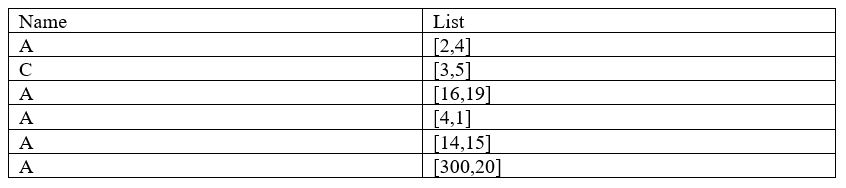
I have a following pandas table (schematically):

enter image description here

Now I would like to sort it…

… in such a way that:

  1. The Dataframe is sorted by name

  2. The rows which have the same name and similar list elements are grouped together. By “similar” I mean that the two adjacent rows should have a list elements where the difference of the list elements between those rows lies within a certain threshold (here I chose 5).

In other words:
For any two adjacent rows if there exists one element in the first row and one element in the second row such that the difference is within the threshold, then they should be grouped together.

  1. those groups should be renamed.

The result should look like:

enter image description here

EDIT:
What I tried:
df.sort_values([‘name’],ascending=False).groupby(‘List’)

but of course, this does not work, because each list will be a new group, since I cannot introduce “similarity”.

EDIT2:
Here is a code to reproduce the pandas dataframe:

import pandas as pd
df = pd.DataFrame({
    'List' : [[2,4],[3,5],[16,19],[4,1],[14,15],[300,20]],
    'Name' :  ["A","C","A","A","A","A"]})

Solution:

We need new para ‘G’ here, and using groupby

df['G']=df.L.apply(max)
df=df.sort_values(['Name','G'])

df['G']=df.groupby(['Name']).G.apply(lambda x : x.diff().fillna(0).gt(5).cumsum())
df.Name=df.Name+'_'+df.G.astype(str)
df
Out[1287]: 
           L Name  G
0     [2, 4]  A_0  0
3     [4, 1]  A_0  0
4   [14, 15]  A_1  1
2   [16, 19]  A_1  1
5  [300, 20]  A_2  2
1     [3, 5]  C_0  0

Data input

df=pd.DataFrame({'Name':list('ACAAAA'),'L':[[2,4],[3,5],[16,19],[4,1],[14,15],[300,20]]})

This is the update :

df['G']=df.L.apply(max)
df['G1']=df.L.apply(min)
df=df.sort_values(['Name','G'])

df['G']=df.groupby(['Name']).G.apply(lambda x : x.diff().fillna(0).gt(5))
df=df.sort_values(['Name','G1'])
df['G1']=df.groupby(['Name']).G1.apply(lambda x : x.diff().fillna(0).gt(5))
df.groupby('Name').apply(lambda x : ((x.G)|(x.G1)).cumsum())

df.Name=df.Name+'_'+df.groupby('Name').apply(lambda x : ((x.G)|(x.G1)).cumsum()).reset_index(level=0,drop=True).astype(str)
df
Out[1307]: 
           L Name      G     G1
3     [4, 1]  A_0  False  False
0     [2, 4]  A_0  False  False
4   [14, 15]  A_1   True   True
2   [16, 19]  A_1  False  False
5  [300, 20]  A_2   True  False
1     [3, 5]  C_0  False  False

How to pass an argument to a method decorator

I have a method decorator like this.

class MyClass:
    def __init__(self):
        self.start = 0

    class Decorator:
        def __init__(self, f):
            self.f = f
            self.msg = msg

        def __get__(self, instance, _):
            def wrapper(test):
                print(self.msg)
                print(instance.start)    
                self.f(instance, test)
                return self.f
            return wrapper

    @Decorator
    def p1(self, sent):
        print(sent)

c = MyClass()
c.p1('test')

This works fine. However, If I want to pass an argument to the decorator, the method is no longer passed as an argument, and I get this error:

TypeError: init() missing 1 required positional argument: ‘f’

class MyClass:
    def __init__(self):
        self.start = 0

    class Decorator:
        def __init__(self, f, msg):
            self.f = f
            self.msg = msg

        def __get__(self, instance, _):
            def wrapper(test):
                print(self.msg)
                print(instance.start)    
                self.f(instance, test)
                return self.f
            return wrapper

    @Decorator(msg='p1')
    def p1(self, sent):
        print(sent)

    @Decorator(msg='p2')
    def p2(self, sent):
        print(sent)

How do I pass an argument to the decorator class, and why is it overriding the method?

Solution:

The descriptor protocol doesn’t serve much of a purpose here. You can simply pass the function itself to __call__ and return the wrapper function without losing access to the instance:

class MyClass:
    def __init__(self):
        self.start = 0

    class Decorator:
        def __init__(self, msg):
            self.msg = msg

        def __call__(self, f):
            def wrapper(instance, *args, **kwargs):
                print(self.msg)
                # access any other instance attributes
                return f(instance, *args, **kwargs)
            return wrapper

    @Decorator(msg='p1')
    def p1(self, sent):
        print(sent)

>>> c = MyClass()
>>> c.p1('test')
p1
test

Create dynamic level nested dict from a list of objects?

I am trying to turn a list of objects into a nested dict which could be accessed by indexes.

The following code works for a two-level nested dictionary. I would like to extend it to work flexibly for any number of levels.

from collections import namedtuple
import pprint 

Holding = namedtuple('holding', ['portfolio', 'ticker', 'shares'])
lst = [
        Holding('Large Cap', 'TSLA', 100),
        Holding('Large Cap', 'MSFT', 200),
        Holding('Small Cap', 'UTSI', 500)
]

def indexer(lst, indexes):
    """Creates a dynamic nested dictionary based on indexes."""
    result = {}
    for item in lst:
        index0 = getattr(item, indexes[0])
        index1 = getattr(item, indexes[1])
        result.setdefault(index0, {}).setdefault(index1, [])
        result[index0][index1].append(item)
    return result 


d = indexer(lst, ['portfolio', 'ticker'])
pp = pprint.PrettyPrinter()
pp.pprint(d)

Outputs:

{'Large Cap': {'MSFT': [holding(portfolio='Large Cap', ticker='MSFT', shares=200)],
               'TSLA': [holding(portfolio='Large Cap', ticker='TSLA', shares=100)]},
 'Small Cap': {'UTSI': [holding(portfolio='Small Cap', ticker='UTSI', shares=500)]}}

Solution:

You could try sth along the following lines. Just iterate the list of attribtes specified by the indexes and keep following down the thus created nested dict:

def indexer(lst, indexes):
    result = {}
    for item in lst:
        attrs = [getattr(item, i) for i in indexes]
        crnt = result  # always the dict at the current nesting level
        for attr in attrs[:-1]:
            # follow one level deeper
            crnt = crnt.setdefault(attr, {})  
        crnt.setdefault(attrs[-1], []).append(item)
    return result 

This produces the following outputs:

>>> d = indexer(lst, ['portfolio', 'ticker'])
{'Large Cap': {'ticker': [holding(portfolio='Large Cap', ticker='TSLA', shares=100),
                          holding(portfolio='Large Cap', ticker='MSFT', shares=200)]},
 'Small Cap': {'ticker': [holding(portfolio='Small Cap', ticker='UTSI', shares=500)]}}

>>> d = indexer(lst, ['portfolio', 'ticker', 'shares'])
{'Large Cap': {'MSFT': {200: [holding(portfolio='Large Cap', ticker='MSFT', shares=200)]},
               'TSLA': {100: [holding(portfolio='Large Cap', ticker='TSLA', shares=100)]}},
 'Small Cap': {'UTSI': {500: [holding(portfolio='Small Cap', ticker='UTSI', shares=500)]}}}

What is the difference between Pass and None in Python

I would personally like to know the semantic difference between using Pass and None. I could not able to find any difference in execution.

PS: I could not able to find any similar questions in SO. If you find one, please point it out.

Thanks!

Solution:

pass is a statement. As such it can be used everywhere a statement can be used to do nothing.

None is an atom and as such an expression in its simplest form. It is also a keyword and a constant value for “nothing” (the only instance of the NoneType). Since it is an expression, it is valid in every place an expression is expected.

Usually, pass is used to signify an empty function body as in the following example:

def foo():
    pass

This function does nothing since its only statement is the no-operation statement pass.

Since an expression is also a valid function body, you could also write this using None:

def foo():
    None

While the function will behave identically, it is a bit different since the expression (while constant) will still be evaluated (although immediately discarded).

Faster implementation of pandas apply function

I have a pandas dataFrame in which I would like to check if one column is contained in another.

Suppose:

df = DataFrame({'A': ['some text here', 'another text', 'and this'], 
                'B': ['some', 'somethin', 'this']})

I would like to check if df.B[0] is in df.A[0], df.B[1] is in df.A[1] etc.

Current approach

I have the following apply function implementation

df.apply(lambda x: x[1] in x[0], axis=1)

result is a Series of [True, False, True]

which is fine, but for my dataFrame shape (it is in the millions) it takes quite long.
Is there a better (i.e. faster) implamentation?

Unsuccesfull approach

I tried the pandas.Series.str.contains approach, but it can only take a string for the pattern.

df['A'].str.contains(df['B'], regex=False)

Solution:

Use np.vectorize – bypasses the apply overhead, so should be a bit faster.

v = np.vectorize(lambda x, y: y in x)

v(df.A, df.B)
array([ True, False,  True], dtype=bool)

Here’s a timings comparison –

df = pd.concat([df] * 10000)

%timeit df.apply(lambda x: x[1] in x[0], axis=1)
1 loop, best of 3: 1.32 s per loop

%timeit v(df.A, df.B)
100 loops, best of 3: 5.55 ms per loop

# Psidom's answer
%timeit [b in a for a, b in zip(df.A, df.B)]
100 loops, best of 3: 3.34 ms per loop

Both are pretty competitive options!

Edit, adding timings for Wen’s and Max’s answers –

# Wen's answer
%timeit df.A.replace(dict(zip(df.B.tolist(),[np.nan]*len(df))),regex=True).isnull()
10 loops, best of 3: 49.1 ms per loop

# MaxU's answer
%timeit df['A'].str.split(expand=True).eq(df['B'], axis=0).any(1)
10 loops, best of 3: 87.8 ms per loop

Move list inside list to the end if both item identical

I have the following list of paired values :

a = [['A', 'B'], ['A', 'C'], ['D', 'D'], ['C', 'D']]

This list can contain one or more remarkable pairs that are made of the same item:

['D', 'D']

I’d like to move those pairs to the end of the list to obtain :

a = [['A', 'B'], ['A', 'C'], ['C', 'D'], ['D', 'D']]

I can’t figure it out, but I believe I’m not too far:

a.append(a.pop(x) for x in range(len(a)) if a[x][0] == a[x][1])

Solution:

Straight-forward sorting:

a = [['A', 'B'], ['A', 'C'], ['D', 'D'], ['C', 'D']]
a = sorted(a, key=lambda x: x[0] == x[1])
# [['A', 'B'], ['A', 'C'], ['C', 'D'], ['D', 'D']]

This simple key function works because False is sorted before True while mapping all pairs to only two keys maintains stability. The downside to this approach is that sorting is O(N_logN). For a linear solution without unecessary list concatenations, you could use itertools.chain with appropriate generators:

from itertools import chain
a = list(chain((p for p in a if p[0] != p[1]), (p for p in a if p[0] == p[1])))