
Àpèjúwe
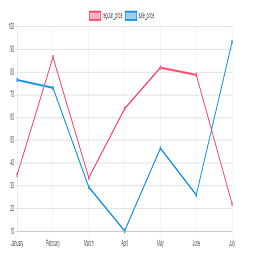
Chart plugin to view price changes of woocommerce product.
- 1-Place the Php code do_shortcode( ‘[chartprice]’ ); in the single page product.
- 2-use shortcode [chartprice] in product post.
- 3-change setting in woocommerce page setting.
Arbitrary section
-
for change format date use php code below in function.php file:
Àwọn àwòrán ìbòjú

Plot in product 
Settting
Ìgbéwọlẹ̀
This section describes how to install the plugin and get it working.
e.g.
- Upload plugin folder to the /wp-content/plugins/ directory
- Activate the plugin through the ‘Plugins’ menu in WordPress
FAQ
1-Place the Php code do_shortcode( ‘[chartprice]’ ); in the single page product.
2-use shortcode [chartprice] in product post.
3- for change format date use php code below in function.php file:
    add_filter('chart_price_apply_filter_format_date', 'format_date');

    function format_date($date)

    {

    $date=date('Y/m/d');//defult Y-m-d

    return $date;

    }
Àwọn àgbéyẹ̀wò


Àwọn Olùkópa & Olùgbéejáde
“Plot prices woocommerce product (product price history)” jẹ́ ètò ìṣàmúlò orísun ṣíṣí sílẹ̀. Àwọn ènìyàn wọ̀nyí ti ṣe ìkópa sí plugin yìí.
Àwọn Olùkópa
Túmọ̀ “Plot prices woocommerce product (product price history)” sí èdè rẹ.
Ṣe o nífẹ̀ẹ́ sí ìdàgbàsókè?
Ṣàwárí koodu, ṣàyẹ̀wò ibi ìpamọ́ SVN, tàbí ṣe àgbékalẹ̀ sí àkọsílẹ̀ ìdàgbàsókè nípasẹ̀ RSS.
Àkọsílẹ̀ àwọn àyípadà
1.0
*head version of plugin
1.1
*chang js file to chart js
2.0
*add the variable product to plot