


I've used many different network configurations lately, from custom OPNsense boxes to Eero mesh networks, have used custom firmware on various hardware, several generations of Ubiquiti, and I am working on some OpenWrt-based router content. One thing that has struck me along the way is that it's a rare system that makes it easy for non-technical users, or gives you enough control to satisfy the more technical ones. That makes the search for a capable Wi-Fi router tricky, and it doesn't have to be like that.
I've also used many of the devices marketed as protecting the family from the scary parts of the Internet, like Circle, and while I dislike the way they're marketed, if that's what it takes to get users to think about online security, maybe that's okay. I've paid for Eero Secure, and I'd rather not have to pay for what should be basic security functions at this point. The list of options by this point is pretty small. I could go to OPNsense again (but I'd need to pay for a couple of security subscriptions to get things up to where I want). I could go to Ubiquiti, but the parental controls are lacking. Gryphon might have the parental controls, but the hardware is lacking, as are the advanced features.
I've been using Firewalla Gold Pro for a while now, and it's impressed me with the ease of use through the app-based management, the depth of logging, security features, and Zero Trust design, and the speed of the hardware while inspecting packets. The company also recently released Wi-Fi 7 access points, in desktop and ceiling-mounted versions, and I've been testing the desktop variant. The thing I hadn't noticed is that Firewalla runs on Debian Linux, with SSH access, so I could add anything I wanted to the system, and have it running on the same box that's always on, which is a game changer for me.

What happened to router custom firmware?
It was once a no-brainer to install custom firmware on a router, but support has largely dried up.
About this article: Firewalla sent us the hardware for the purposes of this article, but had no input into its contents or saw it before publishing.
Wait, what's a Firewalla?
Not just a router, it's a Linux server where you have root access, plus more
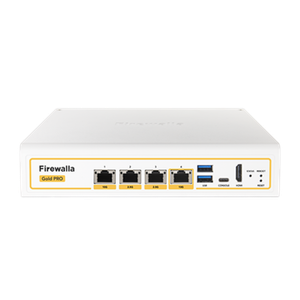
Firewalla is a hardware firewall with deep inspection of packets, and has been optimized for that. The Gold Pro I've been using is also a router replacement, with two 10GBase-T ports, and two 2.5GBase-T ports, along with a couple of USB ports, a console port, and a HDMI output. That means if all else fails, you can plug a keyboard and monitor in, and recover your device even if you can't reach it over the network.
Any of the four LAN ports can be used as the WAN, and while it defaults to port 4 which is 10GBase-T, I moved it to port 3 on mine because I only have gigabit fiber, so 2.5GBase-T is just fine, and then I get a 10 Gbps connection to go to my NAS, as the other 10GbE port goes to one of the Firewalla AP7 units I have.
The only minor annoyance is that it doesn't have SFP+ ports, which might have been a nicer option for the faster ports, but with the AP 7 using RJ45 ports as well, it probably makes more sense to go that route. I don't like using SFP+ transceivers to convert to copper cabling, and I know I'm not alone in that.
And Access Point 7 enables Zero Trust Wi-Fi

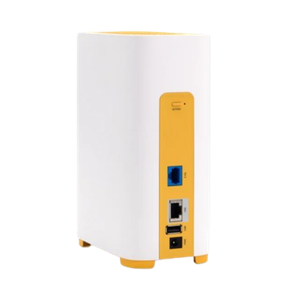
While the Firewalla appliance can use any APs or switches, when you pair it with one (or more) of the AP7 access points, you gain a huge amount of granularity of security settings that I really appreciate. You can use VqLANs to add small groups of devices so they can only talk to each other and the Internet, great for IoT or managing younger family member's devices.
Newly added devices can get quarantined until an admin approves them to use other network resources, or you can go further by assigning personal keys to users instead of traditional SSID passwords, so any new sign-in from those users gets automatically added to their existing group. And between VqLANs and setting Device Isolation, it's easy to set up a Zero Trust network with the least amount of access for devices you're not sure about. The exhaustive list of network traffic monitoring then lets you see what's trying to communicate outside of their limits, and if those are blocking features you need or not.
Why this and not OPNsense, pfSense, or other custom firmware?
It all boils down to user experience and ease of use

While I feel most users would benefit from ditching their ISP router, I'm also not convinced that everyone should make their own network appliance. If you're a more technical user, perhaps there's a case to be made, but I'm a technical user, have lots of sysadmin and devops friends, and we all tend to gravitate towards easier-to-manage systems for home use.
That means lots of Unifi gear generally, but I've had bad experiences with Ubiquiti and didn't feel like repeating those particular mistakes. Firewalla's Gold range are aimed at people like me that care about ease of use but also know enough to poke at advanced features, and I appreciate that, while the app automates many things, none of those automated tasks are inviolable, so I can change things if I want. I also appreciate the mobile app, which lets me adjust things quickly.
Plus the hardware fits my needs

I've built many custom OPNsense boxes, with old PC hardware, mini PCs, and barebones devices that were designed for router use. OpenWrt was limited to older Wi-Fi versions, DD-WRT and other custom firmware packages are pretty much dead, and the sheer number of packages I'd need to add to a bare Linux install to make it a capable router and firewall is daunting. While OPNsense and pfSense run well on many of these, they all come with their own set of drawbacks:
- Old PC: High energy use, potential compatibility issues (like Realtek NICs)
- Mini PC: Often limited CPU or RAM specs, not tuned for throughput when packet inspecting, often only two NICs and limited to 2.5GbE
- Barebones devices: Rarely have 10GbE ports, more commonly have 4x 2.5GbE, which isn't enough for Wi-Fi 7 APs
My list of requirements for a router + firewall device is fairly high. I need at least two 10GbE-capable ports (SFP+ or 10GBase-T is fine), and at least two more ports that are preferably Multi-Gig capable, but 2.5GbE at a minimum. I want throughput that's at least as fast as my ISP package when doing deep packet inspection, so that means anything over 1 Gbps at present. I also want easy setup, and prefer to be able to manage APs from the same dashboard and not have to log into multiple web interfaces to do so.
I've used Ubiquiti hardware and every time I've used it, throughput goes through the floor when packet inspection is on. I've got Eero and Zyxel APs, but while I can add those, I can't manage them from the Firewalla app. I've also got plenty of all-in-one Wi-Fi routers, which I'd rather keep in the boxes because they're a box full of compromises in design. I love OPNsense as an interface and the powerful features it has, but every piece of hardware I've run it on has been slow and unoptimized for being a firewall, and that's an absolute shame. Maybe I'll change my thoughts on that when I use official OPNsense hardware, but until then that's been my experience.
The web interface is fairly barebones
Firewalla is designed to work best with the mobile app, where the bulk of the administration tools are. But if you prefer to read on a larger screen, you can log into the web interface and see the main flows of data, blocks, and other important traffic details that you might want to consider when limiting access to parts of the Internet. You just can't implement those plans from the web interface, you'll have to go find the device in question in the app to manage. Think of the web interface as a basic Grafana interface and you'll get the idea.
You get SSH access if you want to add new packages

The Firewalla is not locked down in the slightest, and I can SSH in to a root user account and poke at anything I find there. Whether I should touch anything I find is another story, but I can add new Docker containers for things I'd want to run on the device, or anything based on Debian that I might want that I'm (mostly) sure isn't going to break the routing or firewall features.
I could use tcpdump or other Linux tools to see what's going on behind the GUI, but I'm going to limit the number of apps I install because I'm sure something will break eventually. Docker is nicely sandboxed, and I can destroy those containers with impunity, and as long as I watch system resources, I can add functionality like Homebridge, or use Ansible to add functionality.

Why I use OPNsense over pfSense, and why I don't trust Netgate at all
Both platforms have their uses, but Netgate has a lot of controversial history.
Firewalla has built something beautiful for home and SMB users
I've used almost every network appliance that a home user would use, and I don't know of any that come out of the box with the capabilities of the Firewalla firmware. I can make VLANs with a few taps, add Smart Queue for next-gen QoS, block ads, proactively block intrusions, see granular traffic from every device on my network in a readable list, and still SSH in to poke around the bare Linux install if I want. To set up anything like this with OPNsense or any other firewall software would take a lot of installation, configuration, and searching for how, and I'd rather not. I like the simplicity of the setup, combined with the deep customizability afterward, and that's rare to find.