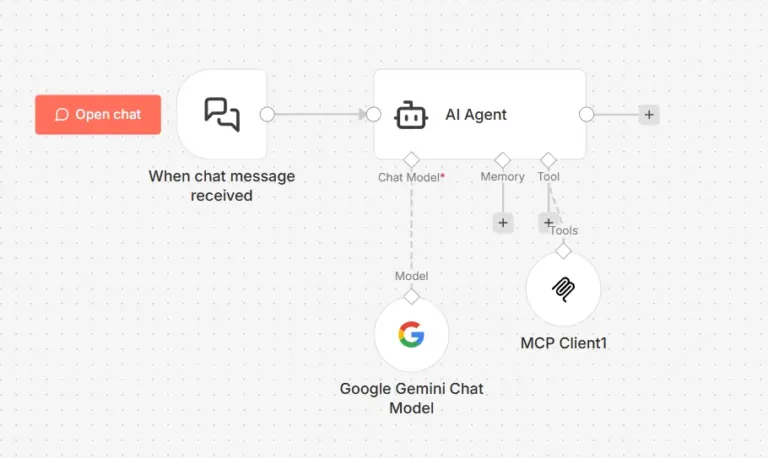
Most AI assistants forget everything the moment a conversation ends. You explain your project, your preferences, your working style, and the next session starts from zero. You repeat yourself constantly. The assistant never learns. It never improves from experience. It never builds a model of who you are or what you need.
Hermes Agent, built by Nous Research, solves this at the architecture level. It is a self-improving AI agent with a built-in learning loop. It creates skills from experience, improves those skills during use, searches its own past conversations, and builds a deepening model of who you are across sessions. It runs on a $10 VPS, a GPU cluster, or serverless infrastructure that costs nearly nothing when idle. It is not tied to your laptop. You talk to it from Telegram while it works on a cloud server.
This guide explains what Hermes Agent is, how its core systems work, and how to get it running.
What Makes Hermes Agent Different From a Chatbot
A chatbot responds to messages. Hermes Agent executes tasks, delegates work to subagents, schedules automations, creates its own tools, and remembers everything it learns about you and your work across every session.
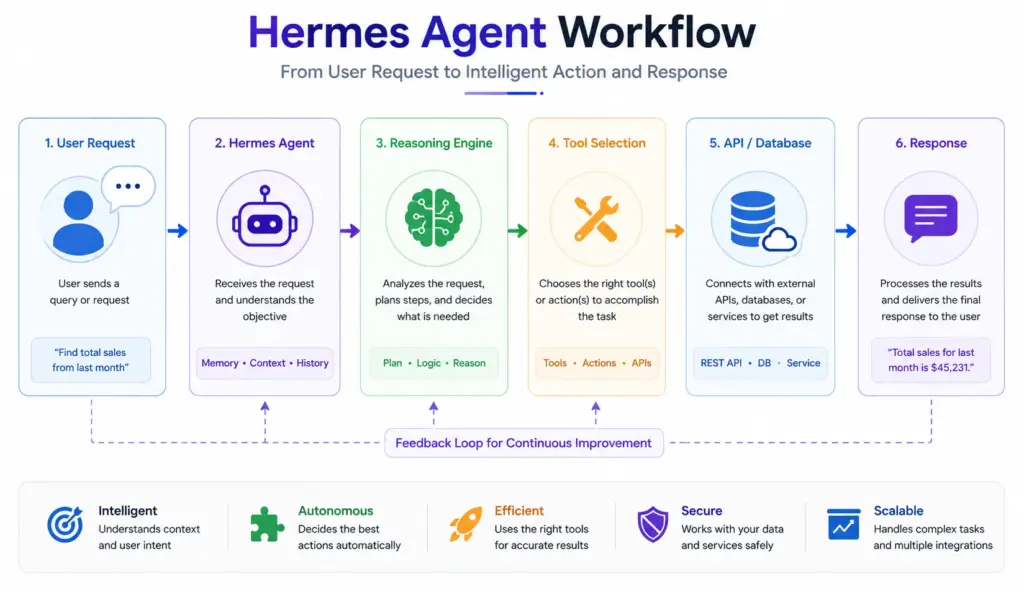
The architectural difference is the learning loop. After completing complex tasks, Hermes autonomously creates skills that capture what it learned. Those skills self-improve during use. It periodically nudges itself to persist important knowledge to memory. It searches past conversations using full-text search with LLM summarization to recall relevant context from sessions that happened weeks ago.
This is not a feature list. It is a fundamentally different approach to what an AI agent is. Most agents are stateless executors. Hermes is a stateful system that accumulates capability over time.
How Hermes Agent Works
Hermes runs a gateway process that connects to your messaging platforms and model providers simultaneously. The gateway is a single process that handles all communication channels and routes messages to the agent core, which handles reasoning, tool execution, memory, and skill management.
The agent loop works like this: you send a message from any connected platform, the gateway receives it, the agent core processes it with full context from memory and past sessions, the agent executes tools or delegates to subagents as needed, results stream back to you on the same platform you used to send the message.
Every component of this loop is configurable. The model, the tools, the memory system, the scheduling, the platforms. Nothing is hardcoded to a specific provider or platform.

Model Flexibility: Use Any Provider
Hermes is model-agnostic. You can use any of these providers and switch between them with a single command:
hermes modelSupported providers include Nous Portal, OpenRouter with 200+ models, NovitaAI, NVIDIA NIM with Nemotron, Xiaomi MiMo, z.ai/GLM, Kimi/Moonshot, MiniMax, Hugging Face, OpenAI, and any custom endpoint you configure.
Switching models requires no code changes and no reconfiguration of your workflows. You run hermes model, select the new provider and model, and the agent continues with the new model on the next message. This makes Hermes immune to vendor lock-in and lets you route different workloads to different models based on cost and capability requirements.
If you do not want to manage multiple API keys for models, web search, image generation, and text-to-speech separately, Nous Portal consolidates all of them under one subscription:
hermes setup --portalThis logs you in via OAuth, sets Nous as your provider, and enables the Tool Gateway covering web search through Firecrawl, image generation through FAL, text-to-speech through OpenAI, and a cloud browser through Browser Use.
Installation
Hermes installs on Linux, macOS, WSL2, and Termux with one command:
curl -fsSL https://raw.githubusercontent.com/NousResearch/hermes-agent/main/scripts/install.sh | bashThe installer handles all dependencies: uv, Python 3.11, Node.js, ripgrep, and ffmpeg. After installation, reload your shell and start the agent:
source ~/.bashrc
hermes
On Windows natively through PowerShell in early beta:
iex (irm https://raw.githubusercontent.com/NousResearch/hermes-agent/main/scripts/install.ps1)The Windows installer includes a portable MinGit install under %LOCALAPPDATA%\hermes\git that requires no admin rights and does not interfere with any existing Git installation. Native Windows support is marked early beta. For the most stable Windows experience, run the Linux one-liner inside WSL2.
On Android through Termux, follow the documented manual path in the Termux guide. Hermes installs a curated subset of dependencies on Termux that excludes voice features incompatible with Android.
After installation, run the setup wizard to configure everything at once:
hermes setupThe Memory System
Hermes has three layers of memory that work together to build persistent context across sessions.
The first layer is agent-curated memory with periodic nudges. During and after conversations, Hermes identifies information worth preserving and writes it to memory. It does not wait for you to tell it to remember something. It makes autonomous decisions about what matters and persists it.
The second layer is full-text search over past sessions using FTS5 with LLM summarization. When you reference something from a past conversation, Hermes searches its session history, finds the relevant context, and summarizes it into the current conversation window. You do not need to re-explain projects, preferences, or decisions you made weeks ago.
The third layer is Honcho dialectic user modeling. Hermes builds a model of who you are across sessions: your working style, your preferences, your recurring projects, and the context that shapes how you want responses formatted and delivered.
These three layers together produce an agent that gets more useful over time rather than starting fresh every session.
The Skills System
Skills are procedural memory. When Hermes completes a complex multi-step task, it creates a skill that captures the procedure. The next time a similar task comes up, Hermes loads the relevant skill and executes it without rediscovering the steps from scratch.
Skills self-improve during use. When Hermes executes a skill and encounters a better approach, it updates the skill to reflect the improvement. This means skills become more reliable and efficient the more they are used.
You browse available skills with:
hermes skillsOr call a specific skill directly using its name as a slash command:
/skill-nameHermes is compatible with the agentskills.io open standard, which means skills created by the community are compatible with your Hermes installation. The Skills Hub at the community portal provides a growing library of pre-built skills for common automation tasks.
Tools: What Hermes Can Execute
Hermes has 40+ built-in tools organized into toolsets. You configure which tools are active:
hermes toolsTool categories include terminal execution across six backends, web search and browsing, file system operations, code execution, image generation, text-to-speech, and API calls. The terminal backends cover local execution, Docker containers, SSH connections, Singularity, Modal serverless, and Daytona workspaces.
The Modal and Daytona backends are significant for VPS deployment. Modal offers serverless persistence where the agent environment hibernates when idle and wakes on demand. For workloads that run intermittently, this means near-zero cost between sessions with full environment restoration when activity resumes.
Hermes also integrates with any MCP server, which extends its tool capabilities to any service that exposes an MCP interface. This means the tool ecosystem is unbounded by the built-in set.
Planning and Execution: How Hermes Handles Complex Tasks
When you give Hermes a complex goal, it does not attempt to handle everything in a single thread. It spawns isolated subagents for parallel workstreams. Each subagent handles an independent portion of the work. Results are collected and synthesized by the main agent.
You can also write Python scripts that call Hermes tools via RPC. This collapses multi-step pipelines into zero-context-cost turns, which matters when you are working with large amounts of data across many steps and need to avoid hitting context window limits.
The agent loop supports interrupt and redirect. If Hermes is working on something and you want to change direction, you interrupt it with Ctrl+C in CLI mode or send a new message from the messaging platform. Hermes stops the current work and redirects to the new instruction without losing the session context it has accumulated.
Scheduling: Automated Tasks Running Unattended
Hermes has a built-in cron scheduler that you configure in natural language. You describe the task and the schedule and Hermes handles execution and delivery to whatever platform you specify.
Common scheduled automations include daily briefings, nightly server backups, weekly project audits, and periodic data pulls. These run unattended on your server and deliver results to your Telegram, Discord, Slack, or email without any manual intervention.
The scheduler integrates with the platform delivery system, so a task scheduled to run at 3 AM delivers its output to your Telegram the moment it finishes, even if you are not actively using the agent.
Messaging Platforms: Talk From Anywhere
Hermes runs a single gateway process that serves all your connected messaging platforms simultaneously. You configure the gateway with:
hermes gatewaySupported platforms are Telegram, Discord, Slack, WhatsApp, Signal, and CLI. All platforms share the same conversation context and memory system. A conversation you start on Telegram continues on Slack without losing context. This is what Hermes calls cross-platform conversation continuity.
Voice memo transcription is available on supported platforms. You send a voice note and Hermes transcribes it and processes it as a text message, allowing hands-free interaction from mobile.
The CLI reference for common actions across both interfaces:
hermes              # start interactive CLI
hermes gateway      # start messaging gateway
/new                # start fresh conversation
/model              # switch model
/compress           # compress context to save tokens
/usage              # check token usage
/insights           # usage analytics
/retry              # retry last turn
/stop               # interrupt current work
Migrating From OpenClaw
If you are coming from OpenClaw, Hermes imports your existing configuration automatically. The setup wizard detects an OpenClaw installation at ~/.openclaw and offers migration before setup begins.
Manual migration after install:
hermes claw migrate              # interactive migration
hermes claw migrate --dry-run    # preview without changes
hermes claw migrate --preset user-data   # migrate without secrets
hermes claw migrate --overwrite  # overwrite existing conflicts
Migration imports your SOUL.md persona file, MEMORY.md and USER.md memory entries, user-created skills into ~/.hermes/skills/openclaw-imports/, command allowlist patterns, platform configurations and allowed users, API keys for Telegram, OpenRouter, OpenAI, Anthropic, and ElevenLabs, TTS workspace assets, and AGENTS.md workspace instructions.
After migration, your Hermes instance starts with the full context your OpenClaw instance accumulated rather than starting from zero.
Running Hermes on a VPS
Hermes is designed to run on a server, not your laptop. The documentation explicitly frames it as an agent that works on a cloud VM while you talk to it from Telegram. This is the intended production deployment pattern.
Running Hermes on a server means your automations run continuously without depending on your local machine being on. Scheduled tasks execute on time regardless of whether you are at your computer. The gateway stays connected to your messaging platforms 24 hours a day. Subagent workstreams run in parallel without consuming your local CPU and RAM.
The setup on a server after installation:
# Install Hermes
curl -fsSL https://raw.githubusercontent.com/NousResearch/hermes-agent/main/scripts/install.sh | bash
source ~/.bashrc

# Run setup wizard
hermes setup

# Configure messaging platforms
hermes gateway setup

# Start the gateway as a persistent process
hermes gateway start
For the gateway to keep running after you close your SSH session, use a screen session or systemd service:
# Using screen
screen -S hermes-gateway
hermes gateway start
# Detach with Ctrl+A then D

# Reattach later
screen -r hermes-gateway
For a permanent systemd setup:
nano /etc/systemd/system/hermes-gateway.service[Unit]
Description=Hermes Agent Gateway
After=network.target
[Service]
User=root
WorkingDirectory=/root
ExecStart=/root/.local/bin/hermes gateway start
Restart=always
RestartSec=10
Environment=PATH=/root/.local/bin:/usr/local/bin:/usr/bin:/bin
[Install]
WantedBy=multi-user.targetsystemctl daemon-reload
systemctl enable hermes-gateway
systemctl start hermes-gateway
systemctl status hermes-gatewayHermes gateway now starts automatically on every server boot and restarts if it crashes. Your Telegram connection, your scheduled tasks, and your cross-platform continuity run unattended on the server.
Diagnosing Issues
Hermes includes a built-in diagnostic tool that checks your installation, configuration, connectivity, and tool availability:
hermes doctorThis command outputs a status report covering Python version, installed dependencies, provider connectivity, gateway status, and any configuration issues detected. Run it first whenever something behaves unexpectedly before looking at logs or reinstalling.
Update Hermes to the latest version with:
hermes updateConclusion
Hermes Agent represents a different category of AI tool. It is not a chatbot wrapper. It is a self-improving agent system with persistent memory, autonomous skill creation, multi-platform delivery, built-in scheduling, and parallel execution capabilities. It accumulates capability and context over time, runs unattended on a server, and meets you on the messaging platform you already use.
The agent is only as reliable as the infrastructure it runs on. Scheduled automations that fail because the server ran out of memory, gateways that drop Telegram connections because of an overloaded CPU, and skills that time out because disk I/O is too slow all undermine the value of a self-improving agent. Hermes is designed to run on a $5 VPS and scales to a GPU cluster when the workload demands it. Getting the hosting right from the start means your agent accumulates months of learning on stable infrastructure rather than losing context to server failures.
Ucartz VPS plans give you the right foundation. The VPS Lite at $10 per month with 4GB RAM and 50GB NVMe SSD runs the Hermes gateway and basic automation workloads. The VPS Standard at $20 per month with 8GB RAM handles the gateway alongside a self-hosted model or multiple concurrent subagent workstreams. The VPS Pro at $30 per month with 4 vCPU, 16GB RAM, and 200GB NVMe SSD runs the full Hermes stack including the gateway, a local model via llama.cpp, n8n for workflow automation, and persistent session storage with room to scale. All plans include unmetered bandwidth, KVM root access, NVMe storage, and DDoS protection. Deploy Hermes on a Ucartz VPS, configure your Telegram gateway, set your first scheduled automation, and let the learning loop run.
FAQ
Does Hermes Agent require coding knowledge?
Basic Python knowledge is helpful, but beginners can start with simple workflows and gradually add more advanced features.
Can Hermes Agent use external tools?
Yes. Hermes Agent can connect to APIs, databases, search tools, messaging platforms, and custom integrations.
Can I self-host Hermes Agent?
Yes. Hermes Agent can be deployed on your own VPS, giving you full control over data, performance, and costs.
What AI models work with Hermes Agent?
Depending on the setup, Hermes Agent can work with models from OpenAI, OpenRouter, Anthropic, local LLMs, and other compatible providers.
What is the difference between Hermes Agent and a chatbot?
A chatbot mainly responds to messages. Hermes Agent can reason, make decisions, use tools, and complete multi-step tasks autonomously.
Can Hermes Agent run on a VPS?
Yes. Many users deploy Hermes Agent on Linux VPS servers to create private AI assistants and automation systems.