|
Chilkat • HOME • Android™ • AutoIt • C • C# • C++ • Chilkat2-Python • CkPython • Classic ASP • DataFlex • Delphi DLL • Go • Java • JavaScript • Node.js • Objective-C • PHP Extension • Perl • PowerBuilder • PowerShell • PureBasic • Ruby • SQL Server • Swift • Tcl • Unicode C • Unicode C++ • VB.NET • VBScript • Visual Basic 6.0 • Visual FoxPro • Xojo Plugin
(Android™) AI Modify Existing Image with Text PromptSee more AI ExamplesUses an AI text prompt and uploaded image data to modify an existing image and receive the modified output.Note: This example requires Chilkat v11.4.0 or greater.
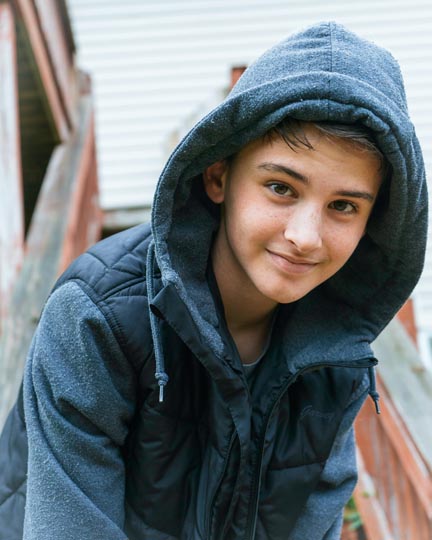
// Important: Don't forget to include the call to System.loadLibrary // as shown at the bottom of this code sample. package com.test; import android.app.Activity; import com.chilkatsoft.*; import android.widget.TextView; import android.os.Bundle; public class SimpleActivity extends Activity { private static final String TAG = "Chilkat"; // Called when the activity is first created. @Override public void onCreate(Bundle savedInstanceState) { super.onCreate(savedInstanceState); boolean success = false; // This example assumes the Chilkat API to have been previously unlocked. // See Global Unlock Sample for sample code. // Load the data from an existing image. CkBinData bdImageData = new CkBinData(); success = bdImageData.LoadFile("qa_data/jpg/kid_blue_coat.jpg"); if (success == false) { Log.i(TAG, bdImageData.lastErrorText()); return; } CkAi ai = new CkAi(); ai.put_Provider("openai"); // Use your provider's API key. ai.put_ApiKey("MY_API_KEY"); // Choose a model. ai.put_Model("gpt-5"); CkJsonObject askParams = new CkJsonObject(); askParams.UpdateString("image.output_format","jpeg"); ai.SetAskParams(askParams); ai.InputAddImageData(bdImageData,""); ai.InputAddText("Modify the image by replacing the blue coat with a Metallica T-shirt."); // Give the AI some time (2 minutes). ai.put_IdleTimeoutMs(120000); // Ask the AI for image output. success = ai.Ask("image"); if (success == false) { Log.i(TAG, ai.lastErrorText()); return; } // Get the image response data.; success = ai.GetOutputBd(bdImageData); if (success == false) { Log.i(TAG, ai.lastErrorText()); return; } bdImageData.WriteFile("c:/aaworkarea/out.jpg"); Log.i(TAG, "Success."); // ------------------------------- // Sample Input: // ------------------------------- // |
||||
© 2000-2026 Chilkat Software, Inc. All Rights Reserved.