---
title: "How to write performant React apps with Context"
slug: "how-to-write-performant-react-apps-with-context"
description: "De-mystifying Context and its influence on React apps' performance. Learning a few useful patterns in the process, that could help minimize the re-renders impact and improve code's readability and scalability."
url: "https://www.developerway.com/posts/how-to-write-performant-react-apps-with-context"
datePublished: "2022-02-07"
dateModified: "2022-02-07"
categories: ["react", "performance"]
readingTimeMinutes: 18
---
It’s impossible to have a conversation on [how to write performant React code](/posts/how-to-write-performant-react-code) without having an article or two on Context. And it’s such a controversial topic! There are so many prejudices and rumours surrounding it. Context is evil! React re-renders everything for no reason when you use Context! Sometimes I have a feeling that developers treat Context like it’s a magic gremlin, that randomly and spontaneously re-renders the entire app for its own amusement.
In this article I do not intend to convince anyone that we should ditch our beloved state management libraries in favour of Context. They exist for a reason. The main goal here is to de-mystify Context and provide a few interesting coding patterns, that could help minimise Context-related re-renders and improve your React apps performance. And as a nice bonus, the code will look cleaner and more understandable as a result.
Let’s start the investigation with implementing some real-life app, and see where this will take us.
## Let’s implement a form in React
Our form is going to be quite complicated, it would consist, to begin with, from:
- a “Personal info“ section, where people can set some personal information, i.e name, email, etc
- a “Value calculation“ section where people can set their currency preferences, their preferred discount, add some coupons, etc
- the selected discount should be highlighted in the Personal section in a form of an emoji (don’t ask, the designer has a weird sense of humour)
- an “Actions” section with action buttons (i.e. “Save”, “Reset”, etc)
The “design” looks like this:
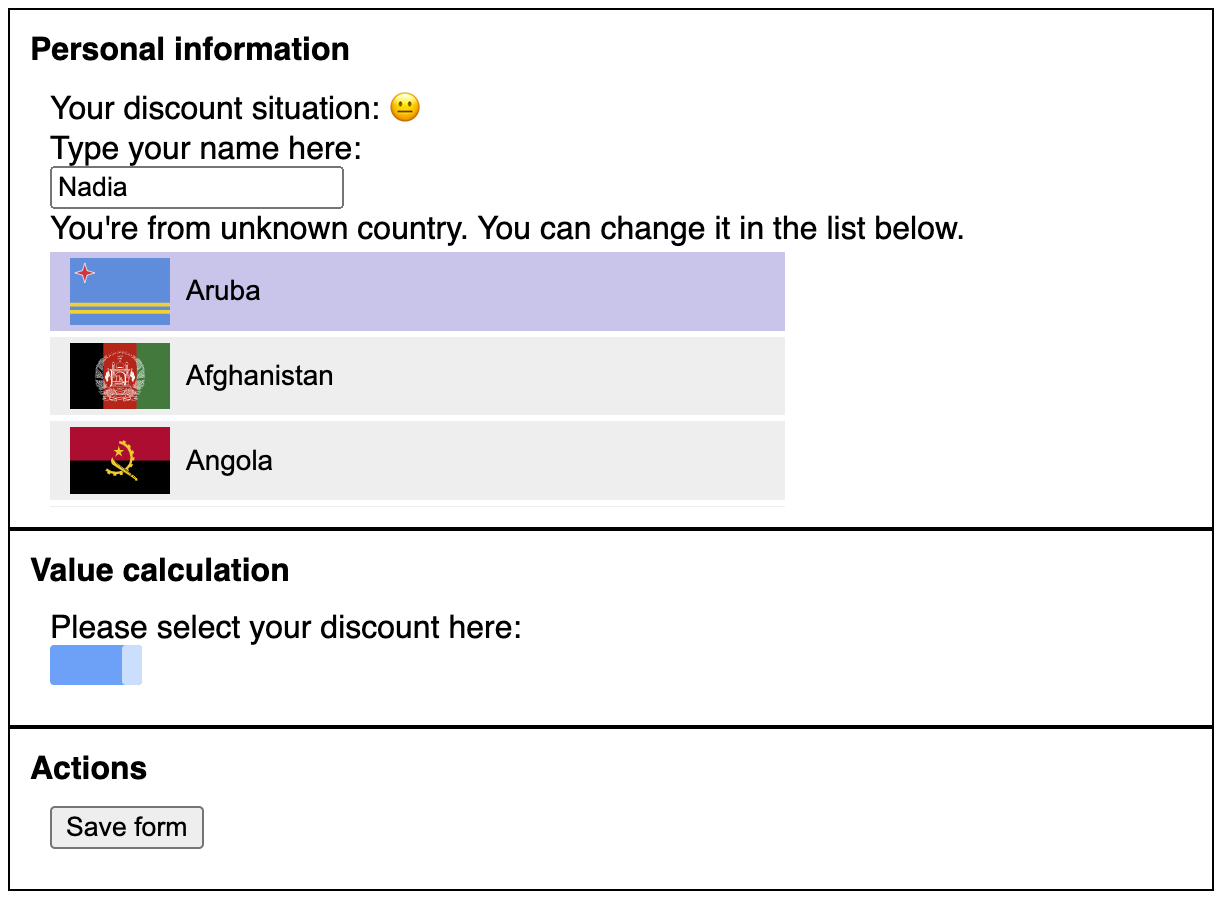
To make things more interesting, we’re also going to pretend that “select country” and “dragging bar” components are “external” libraries that we installed as a package. So we can only use them through API, but have no influence on what’s inside. And we’re going to use the “slow” version of the countries select, that we implemented in the [previous performance investigation](/posts/how-to-write-performant-react-code).
Now it’s time to write some code. Let’s start with the components structure of the app. I know this form will quickly become quite complicated, so I want to separate it into smaller, more contained components right away.
At the root I’ll have my main `Form` component, which will render the three required sections:
```tsx
const Form = () => {
return (
<>
);
};
```
“Personal info” section will then render three more components: the discount emoji, input for the name and countries select
```tsx
const PersonalInfoSection = () => {
return (
);
};
```
All three of them will contain the actual logic of those components (the code of them will be below), and the `Section` just encapsulates some styles.
“Value calculation” section will have just one component (for now), the discount bar:
```tsx
const ValueCalculationSection = () => {
return (
);
};
```
And “Actions” section will have just one button for now as well: the save button with onSave callback.
```tsx
const ActionsSection = ({ onSave }: { onSave: () => void }) => {
return (
);
};
```
Now the interesting part: we need to make this form interactive. Considering that we have a single “Save” button for the entire form, and different sections would need data from other sections, the natural place for the state management is at the root, in the `Form` component. We’ll have 3 pieces of data there: Name, Country and Discount, a way to set all three of them, and a way to “save” it:
```tsx
type State = {
name: string;
country: Country;
discount: number;
};
const Form = () => {
const [state, setState] = useState(defaultState as State);
const onSave = () => {
// send the request to the backend here
};
const onDiscountChange = (discount: number) => {
setState({ ...state, discount });
};
const onNameChange = (name: string) => {
setState({ ...state, name });
};
const onCountryChange = (country: Country) => {
setState({ ...state, country });
};
// the rest as before
};
```
And now we need to pass the relevant data and callbacks to the components that need it. In our `PersonalInfoSection`:
- the `DiscountSituation` component should be able to show the emoji based on `discount` value.
- the `NameFormComponent` should be able to control `name` value
- the `SelectCountryFormComponent` should be able to set the selected `country`
Considering that those components are not rendered in `Form` directly, but are children of `PersonalInfoSection`, time to do some prop drilling 😊
`DiscountSituation` will accept `discount` as a prop:
```tsx
export const DiscountSituation = ({ discount }: { discount: number }) => {
// some code to calculate the situation based on discount
const discountSituation = ...;
return
Type your name here:
onChange(e.target.value)} value={name} />
);
};
```
`SelectCountryFormComponent` will accept `onChange` callback:
```tsx
export const SelectCountryFormComponent = ({ onChange }: { onChange: (country: Country) => void }) => {
return ;
};
```
And our `PersonalInfoSection` would have to pass all of them from its parent `Form` component to its children:
```tsx
export const PersonalInfoSection = ({
onNameChange,
onCountryChange,
discount,
name,
}: {
onNameChange: (name: string) => void;
onCountryChange: (name: Country) => void;
discount: number;
name: string;
}) => {
return (
);
};
```
And the same story with `ValueCalculationSection`: it needs to pass `onDiscountChange` and `discount` value from `Form` component to its child:
```tsx
export const ValueCalculationsSection = ({ onDiscountChange }: { onDiscountChange: (val: number) => void }) => {
console.info('ValueCalculationsSection render');
return (
);
};
```
And the `DiscountFormComponent` just uses the “external” library `DraggingBar` to render the bar and catch the changes via the callback it gives:
```tsx
export const DiscountFormComponent = ({ onDiscountChange }: { onDiscountChange: (value: number) => void }) => {
console.info('DiscountFormComponent render');
return (
Please select your discount here: onDiscountChange(value)} />
);
};
```
And, the render of our `Form` component would look like this:
```tsx
const Form = () => {
return (
);
};
```
Quite a bit of code, but finally done 😅 Want to take a look at the result? [See the codesandbox.](https://codesandbox.io/s/form-initial-implementation-uxw8v?file=/src/App.tsx)
Unfortunately, the result is much worst than you’d expect from a composition of a few components and a simple state 😕 Try to type your name in the input, or drag the blue bar - both of them are lagging even on a fast laptop. With CPU throttling they are basically unusable. So, what happened?
### The form performance investigation
First of all, let’s take a look at the console output there. If I type a single key in the `Name` input, I’ll see:
```
Form render
PersonalInfoSection render
Section render
Discount situation render
NameFormComponent render
SelectCountryFormComponent render
ValueCalculationsSection render
Section render
DiscountFormComponent render
ActionsSection render
Section render
```
Every single component in our form re-renders on every keystroke! And the same situation is with the dragging - on every mouse move the entire form and all its components re-renders themselves. And we already know, that our `SelectCountryFormComponent` is very slow, and there is nothing we can do with its performance. So the only thing that we can do here, is to make sure it doesn’t re-render on every keypress or mouse move.
And, as we know, components will re-render when:
- state of a component changed
- parent component re-renders
And this is exactly what is happening here: when the value in an input changes, we propagate this value up to the root `Form` component through our chain of callbacks, where we change the root state, which triggers re-render of the `Form` component, which then cascades down to every child and child of a child of this component (i.e. all of them).
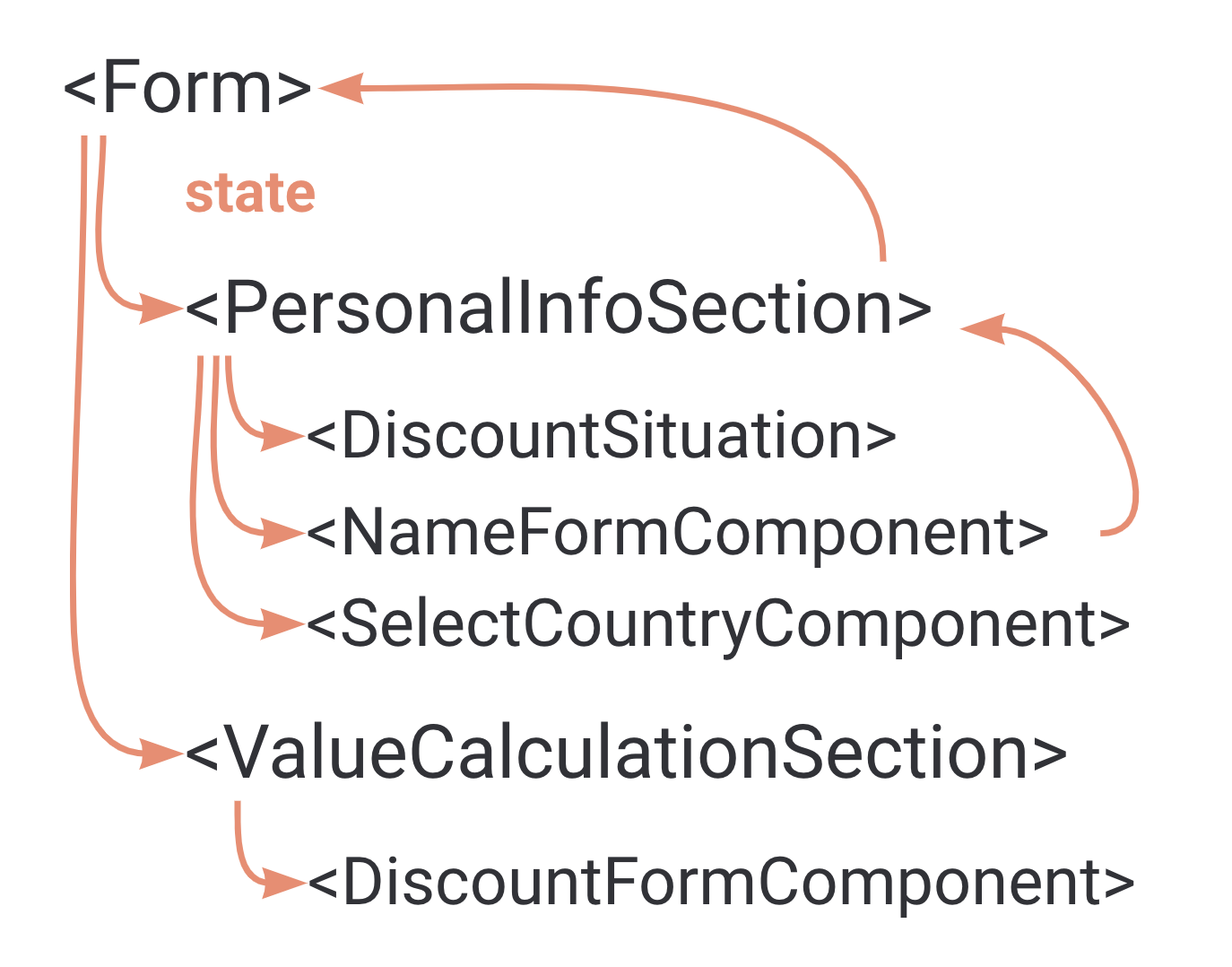
To fix it, we could, of course, sprinkle some `useMemo` and `useCallback` in strategic places and call it a day. But that just brushes the problem under the rug, not actually solving it. When in the future we introduce another slow component, the story will repeat itself. Not to mention that it will make the code much more complicated and harder to maintain. In the ideal world, when I type something in the `Name` component, I want only the `NameFormComponent` and components that actually use the `name` value to re-render, the rest should just sit idle there and wait for their turn to be interactive.
And React actually gives us a perfect tool to do that - `Context`!
## Adding Context to the form
As per [React docs](https://reactjs.org/docs/context.html), context provides a way to pass data through the component tree without having to pass props down manually at every level. If, for example, we extract our Form state into Context, we can get rid of all the props we’ve been passing through intermediate sections like `PersonalInfoSection` and use state directly in the `NameFormComponent` and `DiscountFormComponent`. The data flow then would look something like this:
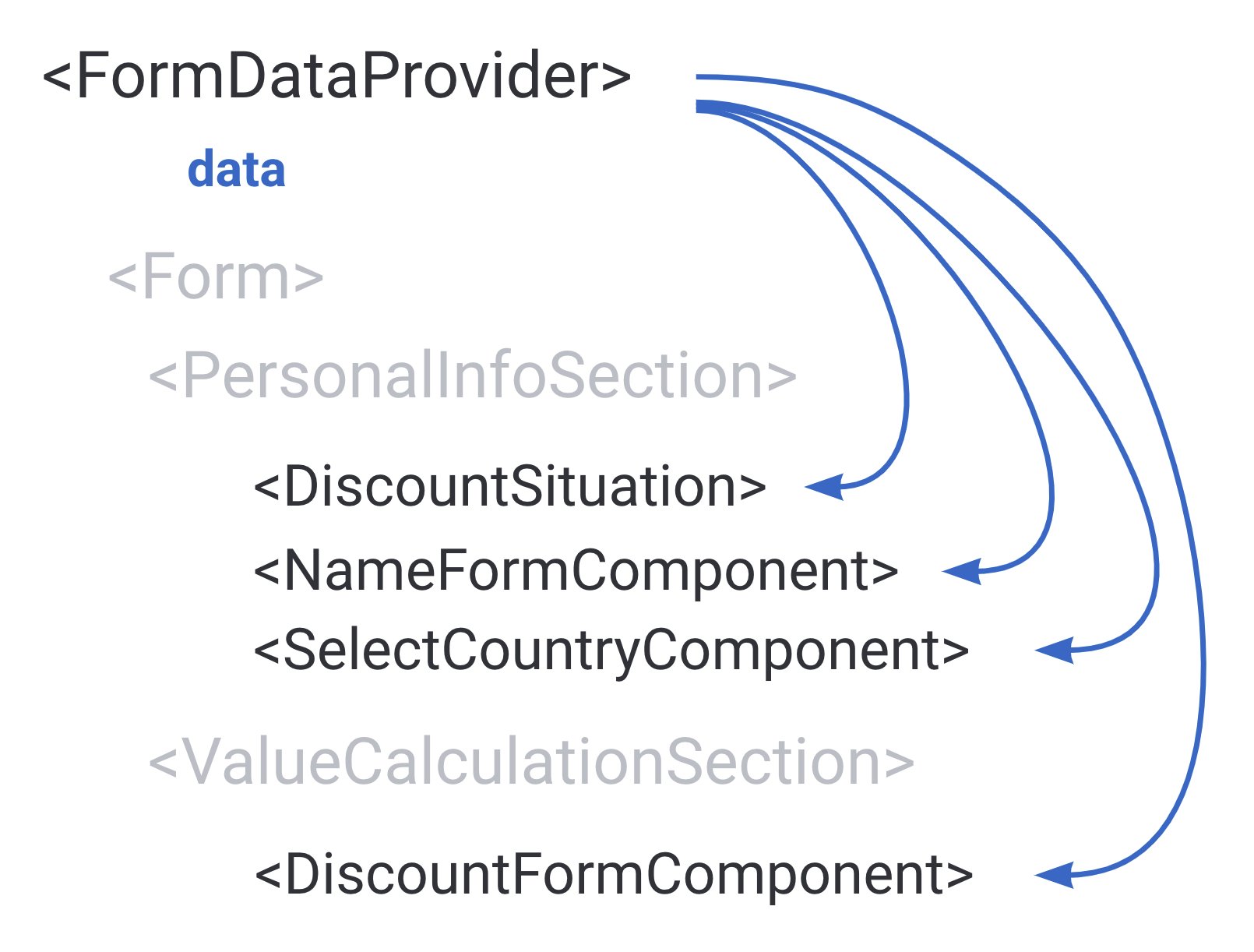
To achieve this, first we’re creating the `Context` itself, which will have our state and the API to manage this state (i.e. our callbacks):
```tsx
type State = {
name: string;
country: Country;
discount: number;
};
type Context = {
state: State;
onNameChange: (name: string) => void;
onCountryChange: (name: Country) => void;
onDiscountChange: (price: number) => void;
onSave: () => void;
};
const FormContext = createContext({} as Context);
```
Then we should move all the state logic, that we had in `Form`, in the `FormDataProvider` component, and attach the state and callbacks to the newly created `Context`:
```tsx
export const FormDataProvider = ({ children }: { children: ReactNode }) => {
const [state, setState] = useState({} as State);
const value = useMemo(() => {
const onSave = () => {
// send the request to the backend here
};
const onDiscountChange = (discount: number) => {
setState({ ...state, discount });
};
const onNameChange = (name: string) => {
setState({ ...state, name });
};
const onCountryChange = (country: Country) => {
setState({ ...state, country });
};
return {
state,
onSave,
onDiscountChange,
onNameChange,
onCountryChange,
};
}, [state]);
return {children};
};
```
Then expose the hook for other components to use this Context without accessing it directly:
```tsx
export const useFormState = () => useContext(FormContext);
```
And wrap our `Form` component into the `FormDataProvider`:
```tsx
export default function App() {
return (
);
}
```
After that, we can get rid of **all the props** throughout the app, and use the required data and callbacks directly in the components where it’s needed via `useFormState` hook.
For example, our root `Form` component will turn into just this:
```tsx
const Form = () => {
// no more props anywhere!
return (
);
};
```
And `NameFormComponent` will be able to access all the data like this:
```tsx
export const NameFormComponent = () => {
// accessing the data directly right where it's needed!
const { onNameChange, state } = useFormState();
const onValueChange = (e: ChangeEvent) => {
onNameChange(e.target.value);
};
return (
Type your name here:
);
};
```
Take a look at the full code in [this codesandbox](https://codesandbox.io/s/form-implementation-with-context-2-3wd2i?file=/src/App.tsx). Don’t forget to appreciate how clean it looks now when there is no more mess of props everywhere!
### What about the performance of the new form?
From the performance perspective we’re still not there yet: typing the name and dragging the bar is still lagging. But if I start typing in the `NameFormComponent`, in the console I will now see this:
```
Discount situation render
NameFormComponent render
SelectCountryFormComponent render
DiscountFormComponent render
ActionsSection render
Section render
```
Half of the components now don’t re-render, including our parent `Form` component. This is happening because of how Context works: when a Context value changes, **every consumer of this context will re-render**, regardless of whether they use the changed value or not. But also, those components that are bypassed by Context won’t be re-rendering at all. Our re-renders flow now looks like this:
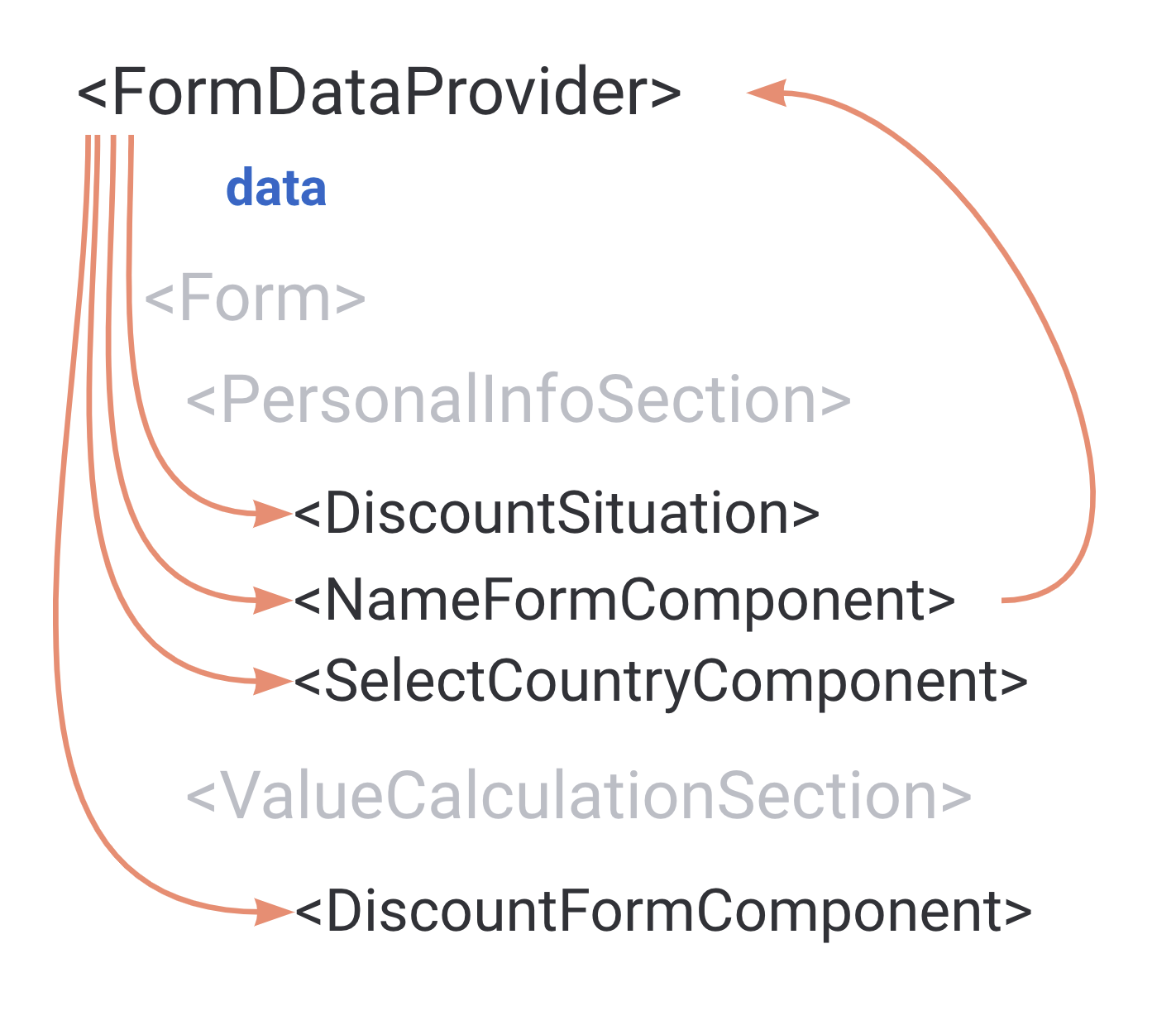
And now, if we look closely at our components implementation, in particular `SelectCountryComponent`, which is the wrapper around the slow “external” component, we’ll see that it doesn’t actually use the `state` itself. All it needs is the `onCountryChange` callback:
```tsx
export const SelectCountryFormComponent = () => {
const { onCountryChange } = useFormState();
console.info('SelectCountryFormComponent render');
return ;
};
```
And this gives us an opportunity to try out a really cool trick: we can split the `state` part and the `API` part under our `FormDataProvider`.
## Splitting the state and the API
Basically, what we want to do here is to decompose our “monolith” state into two “microstates” 😅.
Instead of one context that has everything we’d need 2 contexts, one for data, one for API:
```tsx
type State = {
name: string;
country: Country;
discount: number;
};
type API = {
onNameChange: (name: string) => void;
onCountryChange: (name: Country) => void;
onDiscountChange: (price: number) => void;
onSave: () => void;
};
const FormDataContext = createContext({} as State);
const FormAPIContext = createContext({} as API);
```
Instead of one context provider in our `FormDataProvider` component, we’d again have two, where we’d pass our state directly to the `FormDataContext.Provider`:
```tsx
const FormDataProvider = () => {
// state logic
return (
{children}
);
};
```
And now the most interesting part, the `api` value.
If we just leave it as it was before, the whole “decomposition” idea is not going to work because we still would have to rely on the `state` as a dependency in the `useMemo` hook:
```tsx
const api = useMemo(() => {
const onDiscountChange = (discount: number) => {
// this is why we still need state here - in order to update it
setState({ ...state, discount });
};
// all other callbacks
return { onSave, onDiscountChange, onNameChange, onCountryChange };
// still have state as a dependency
}, [state]);
```
This will result in the `api` value changing with every state update, which would lead to the `FormAPIContext` triggering re-renders on every state update, which would make our split useless. We want our `api` to stay constant regardless of the `state`, so that consumers of this provider don't re-render.
Fortunately, there is another neat trick that we can apply here: we can extract our state into a reducer and instead of calling `setState` in the callback we would just trigger a reducer action.
First, create actions and reducer itself:
```tsx
type Actions =
| { type: 'updateName'; name: string }
| { type: 'updateCountry'; country: Country }
| { type: 'updateDiscount'; discount: number };
const reducer = (state: State, action: Actions): State => {
switch (action.type) {
case 'updateName':
return { ...state, name: action.name };
case 'updateDiscount':
return { ...state, discount: action.discount };
case 'updateCountry':
return { ...state, country: action.country };
}
};
```
Use reducer instead of `useState`:
```tsx
export const FormProvider = ({ children }: { children: ReactNode }) => {
const [state, dispatch] = useReducer(reducer, {} as State);
// ...
};
```
And migrate our `api` to `dispatch` instead of `setState`:
```tsx
const api = useMemo(() => {
const onSave = () => {
// send the request to the backend here
};
const onDiscountChange = (discount: number) => {
dispatch({ type: 'updateDiscount', discount });
};
const onNameChange = (name: string) => {
dispatch({ type: 'updateName', name });
};
const onCountryChange = (country: Country) => {
dispatch({ type: 'updateCountry', country });
};
return { onSave, onDiscountChange, onNameChange, onCountryChange };
// no more dependency on state! The api value will stay the same
}, []);
```
And the final step: don’t forget to migrate all the components that used `useFormState` to `useFormData` and `useFormAPI`. For example, our `SelectCountryFormComponent` will use `onCountryChange` from the `useFormAPI` hook, and will never re-render on the state change.
```tsx
export const SelectCountryFormComponent = () => {
const { onCountryChange } = useFormAPI();
return ;
};
```
Take a look at the full implementation in [this codesandbox.](https://codesandbox.io/s/form-implementation-split-api-2-g9q3e?file=/src/App.tsx) The typing and dragging bar are blazing fast now, and the only console output we’d see when we type something is this:
```
Discount situation render
NameFormComponent render
```
Only two components, since only those two use the actual state data. 🎉
## Splitting state even further
Now, people with good design eyes or just careful readers might notice that I cheated a little bit. We don’t pass the selected country to our “external” `SelectCountry` component, and it's stuck on the very first item in the list. In reality, the selected “lilac” color should move to the country you click on. And the component actually allows us to pass it via `activeCountry`. Technically, I can do it as simple as that:
```tsx
export const SelectCountryFormComponent = () => {
const { onCountryChange } = useFormAPI();
const { country } = useFormData();
return ;
};
```
There is one problem with it though - as soon as I use `useFormData` hook in a component, it will start re-rendering with the state changes, same as `NameFormComponent`. Which in our case means we’ll be back to the laggy experience on typing and dragging.
But now, since we already know how to split the data between different providers, nothing stops us from taking this to the next level and just splitting the rest of the state as well. Moar providers! 😅
Instead of one unified context for `State` we’ll have three now:
```tsx
const FormNameContext = createContext({} as State['name']);
const FormCountryContext = createContext({} as State['country']);
const FormDiscountContext = createContext({} as State['discount']);
```
Three state providers:
```tsx
{children}
```
And three hooks to use the state:
```tsx
export const useFormName = () => useContext(FormNameContext);
export const useFormCountry = () => useContext(FormCountryContext);
export const useFormDiscount = () => useContext(FormDiscountContext);
```
And now in our `SelectCountryFormComponent` we can use `useFormCountry` hook, and it will not be re-rendering on any changes other than country itself:
```tsx
export const SelectCountryFormComponent = () => {
const { onCountryChange } = useFormAPI();
const country = useFormCountry();
return ;
};
```
Check this out [in codesandbox](https://codesandbox.io/s/form-implementation-split-api-and-state-0tvq0?file=/src/App.tsx): it’s still fast, and country is selectable. And the only thing we’ll see in console output when we type something in the name input is:
```
NameFormComponent render
```
## Bonus: external state management
Now, the question of whether this form’s state should’ve been implemented with some state management library right away might cross some of your minds. And you’re maybe right. After all, if we look closely at the code, we just re-invented the wheel and implemented a rudimentary state management library, with selectors-like functionality for the state and separate actions to change that state.
But now you have _a choice_. Context is not a mystery anymore, with those techniques you can easily write performant apps with just pure Context if there is a need, and if you want to transition to any other framework, you can do it with minimal changes to the code. State management framework **doesn’t really matter** when you design your apps with Context in mind.
We might as well move it to the good old Redux right now. The only things we’d need to do are: get rid of Context and Providers, convert React reducer to Redux store, and convert our hooks to use Redux selectors and dispatch.
```tsx
const store = createStore((state = {}, action) => {
switch (action.type) {
case 'updateName':
return { ...state, name: action.payload };
case 'updateCountry':
return { ...state, country: action.payload };
case 'updateDiscount':
return { ...state, discount: action.payload };
default:
return state;
}
});
export const FormDataProvider = ({ children }: { children: ReactNode }) => {
return {children};
};
export const useFormDiscount = () => useSelector((state) => state.discount);
export const useFormCountry = () => useSelector((state) => state.country);
export const useFormName = () => useSelector((state) => state.name);
export const useFormAPI = () => {
const dispatch = useDispatch();
return {
onCountryChange: (value) => {
dispatch({ type: 'updateCountry', payload: value });
},
onDiscountChange: (value) => dispatch({ type: 'updateDiscount', payload: value }),
onNameChange: (value) => dispatch({ type: 'updateName', payload: value }),
onSave: () => {},
};
};
```
Everything else stays the same and works exactly as we designed. [See the codesandbox.](https://codesandbox.io/s/form-implementation-redux-2-t5w30?file=/src/form-api.tsx)
That is all for today, hope now `Context` is not the source of mysterious spontaneous re-renders in your app, but a solid tool in your arsenal of writing performant React code ✌🏼