
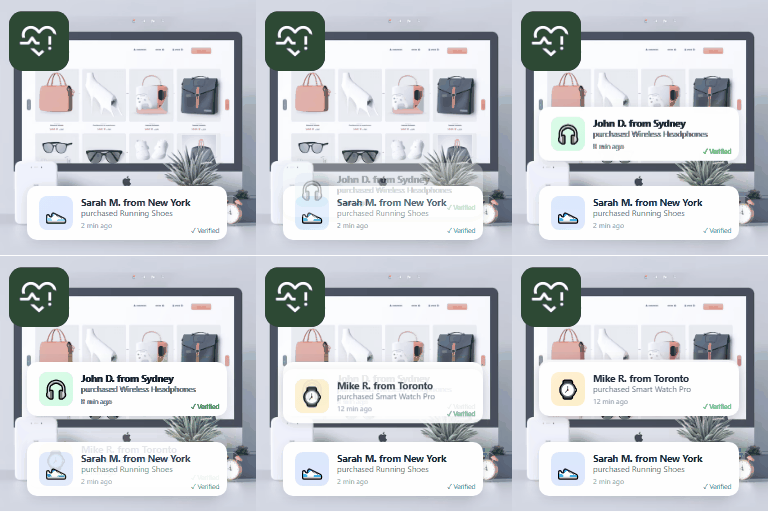
Description
SalesPulse is a lightweight, WordPress-native social proof and FOMO (Fear Of Missing Out) notification plugin that helps you boost conversions by showing real-time purchase alerts, signup notifications, live visitor counts, review highlights, notification bars, and more.
🚀 Get SalesPulse Pro | 🎯 Live Demo
🚀 Key Features (Free)
- Purchase Notifications — Show recent WooCommerce orders as social proof popups
- Signup Alerts — Display new user registrations to build community trust
- Review & Comment Highlights — Surface recent positive comments and reviews
- Live Visitor Count — Show real-time visitor numbers to create urgency
- Custom Messages — Create your own FOMO notifications with merge tags
- Notification Bar — Full-width announcement bar with CTA button, scheduling, and dismiss
- Cookie Consent Banner — GDPR-compliant cookie consent with WP Consent API support
- Contact Form Notifications — Show recent form submissions (WPForms, Gravity Forms, Ninja Forms, CF7)
- EDD Integration — Easy Digital Downloads purchase notifications
- GiveWP Integration — Donation activity notifications
- 8 Popup Templates — Classic, Minimal, Bold, Rounded, Glass, Gradient, Dark Modern, Compact
- 6 Bar Templates — Classic, Minimal, Banner, Split Duo, Sticky Ribbon, Custom
- Smart Merge Tags — Use {customer_name}, {product_name}, {time_ago} and more
- Position Control — Bottom-left, bottom-right, top-left, or top-right
- 3 Animation Styles — Slide, Fade, or Bounce entrance effects
- Display Targeting — Show everywhere, specific pages, or exclude pages
- Device Controls — Separate toggles for Desktop, Tablet, and Mobile
- Analytics Tracking — Track impressions and clicks per notification
- Flashing Tab — Grab attention with custom tab title when user switches tabs
- Shortcode & Gutenberg Block — Embed notifications anywhere
- Performance Optimized — Vanilla JS, zero dependencies, ~5KB CSS + ~4KB JS
- GDPR Friendly — Privacy-safe visitor tracking with hashed identifiers
- Close Button — Let visitors dismiss notifications
- Hover Pause — Notifications pause when hovered
- Loop Mode — Optionally restart the notification queue
🎯 Perfect For
- WooCommerce stores wanting to increase sales
- SaaS landing pages needing social proof
- Membership sites showcasing community growth
- Service businesses building trust with reviews
- Course creators showing enrollment activity
- Digital product sellers using Easy Digital Downloads
- Nonprofits using GiveWP for donations
🔌 Integrations
SalesPulse automatically detects and integrates with:
- WooCommerce — Real purchase data, customer names, products, cities
- Easy Digital Downloads — Digital product sale notifications
- GiveWP — Donation activity notifications
- WPForms — Contact form submission notifications
- Gravity Forms — Form submission notifications
- Ninja Forms — Form entry notifications
- Contact Form 7 (via Flamingo) — Message notifications
📐 Merge Tags
Build dynamic notification messages with these tags:
{customer_name}— Buyer’s first name{customer_city}— Buyer’s city{product_name}— Product name{time_ago}— Human time difference (“2 minutes ago”){visitor_count}— Live visitor count{post_title}— Post or page title{comment_text}— Comment excerpt
⚡ Need More Power? Try SalesPulse Pro!
Unlock premium features to supercharge your conversions:
- AI-powered notification message generation
- A/B testing for notification variants
- Advanced analytics with date range filtering and export
- Advanced page targeting rules (URL, user role, geo)
- Exit-intent popups
- Countdown timer notifications
- 15+ additional premium templates
- Review import from Google, Yelp
- Priority support
Screenshots

Dashboard overview with real-time analytics, quick setup wizard, and recent activity 
Notification management — create, edit, and organize all your social proof notifications 
Template gallery with 23 beautiful notification designs (8 free + 15 Pro) 
Live demo showing notification popups on a real store page 
Notification bar on a live site
Blocks
This plugin provides 1 block.
- SalesPulse Notifications
Installation
- Upload the
salespulsefolder to/wp-content/plugins/ - Activate the plugin through the ‘Plugins’ menu in WordPress
- Go to SalesPulse in your admin menu
- Create notification types and customize settings
- Enable notifications with the global toggle — you’re live!
FAQ
-
Does it work without WooCommerce?
-
Yes! SalesPulse works with any WordPress site. Without WooCommerce, you can use signup alerts, review highlights, visitor counts, notification bars, cookie consent banners, and custom messages.
-
What form plugins are supported?
-
SalesPulse supports WPForms, Gravity Forms, Ninja Forms, and Contact Form 7 (via Flamingo) for contact form submission notifications.
-
Will it slow down my site?
-
No. SalesPulse loads only ~5KB of CSS and ~4KB of JavaScript with zero external dependencies. Assets only load when notifications are active.
-
Is it GDPR compliant?
-
SalesPulse uses privacy-safe hashed identifiers for visitor tracking. No personal data is stored or transmitted to external services. It also includes a built-in cookie consent banner with WP Consent API support.
-
Can I customize the notification appearance?
-
Yes! Choose from 8 popup templates, 6 bar templates, 4 positions, 3 animation styles, and control timing, close buttons, sounds, and more.
-
Can I show a notification bar?
-
Yes! SalesPulse includes a full-width notification bar feature with CTA buttons, dismissible option, scheduling, and 6 template styles.
-
Does it support multisite?
-
SalesPulse works on individual sites within a multisite network. Each site has its own settings.
-
Can I embed notifications in page content?
-
Yes! Use the
[salespulse]shortcode or the Gutenberg block to embed notifications inline or as floating popups anywhere in your content.
Reviews
There are no reviews for this plugin.
Contributors & Developers
“SalesPulse – Social Proof & FOMO Notifications” is open source software. The following people have contributed to this plugin.
Contributors
Translate “SalesPulse – Social Proof & FOMO Notifications” into your language.
Interested in development?
Browse the code, check out the SVN repository, or subscribe to the development log by RSS.
Changelog
1.0.2
- Bug Fixes
1.0.1
- Improvement: Synced Free version templates with PRO preview styles.
- Fix: Addressed template duplication when PRO version is active.
- Fix: Resolved styling issues in the Custom configuration panel.
1.0.0
- Initial release
- 8 popup notification templates (Classic, Minimal, Bold, Rounded, Glass, Gradient, Dark Modern, Compact)
- 6 notification bar templates (Classic, Minimal, Banner, Split Duo, Sticky Ribbon, Custom)
- WooCommerce purchase notifications
- Easy Digital Downloads sale notifications
- GiveWP donation notifications
- Signup / registration alerts
- Review / comment highlights
- Live visitor count
- Custom message notifications
- Contact form submission notifications (WPForms, Gravity Forms, Ninja Forms, CF7)
- Announcement notifications
- Notification bar with CTA, scheduling, and dismiss
- Cookie consent banner with WP Consent API
- Analytics tracking (impressions and clicks)
- Merge tag system
- Shortcode and Gutenberg block support
- Display targeting (everywhere, specific pages, exclude pages)
- Device visibility controls (desktop, tablet, mobile)
- Flashing tab title for inactive tabs
- REST API for admin CRUD
- Mobile responsive
- Accessibility support (prefers-reduced-motion)