

 Laura Marano

If you are looking for a free license key for ThunderSoft PC Optimizer, you are in the right place. We actively track the best official software giveaways, and today we are sharing a verified method to secure a full version of this optimization tool at no cost.
- Product: ThunderSoft PC Optimizer
- Current Price:
$29.99(Free) - License Type: Lifetime
- OS: Windows
- Status: 🔥 Active
ℹ️ Details on how to get the license key are explained below.
What Is ThunderSoft PC Optimizer?
ThunderSoft PC Optimizer is a multifunctional utility designed to clean and optimize your Windows operating system. It functions as an all-in-one toolkit to remove system junk, manage memory usage, and repair frustrating system or registry errors. By addressing duplicate files, damaged DLLs, and invalid registry entries, it helps maintain system stability and fix common application or game startup issues.

Download ThunderSoft PC Optimizer License Key for Free
- Product name: ThunderSoft PC Optimizer v11.6.0
- Website: https://www.thundershare.net/pc-optimizer/
- License type: lifetime
- Platform: Windows
- Download: thundersoft-pc-optimizer1160-giveaway.exe
- License code – last updated: Feb 28, 2026
The giveaway has ended!
The giveaway version usually does not include free updates. If you miss the giveaway above and would like to use PC optimization tools at the lowest price, we highly recommend the deal below.


Please follow the instructions below to get your license key or activate the software successfully. If you have any questions or need help, feel free to leave a comment at the bottom of this post.
1. Download the giveaway installation file for ThunderSoft PC Optimizer by download link above. Run the installer and follow the on-screen prompts to set up the software on your Windows machine.

2. Launch the application, click on the key icon on the software’s main screenshot. Paste the license code provided above.

3. Enjoy the full features.
Key Features & Screenshots
- Deep System Cleaning: Scans and removes system junk, large unused files, and duplicate data to free up valuable storage space.
- System & Registry Repair: Detects and fixes corrupted registry entries, missing DLL files, and .NET Framework abnormalities that cause application or game crashes.
- Memory Optimization: Actively releases unused RAM to improve overall system responsiveness and performance.
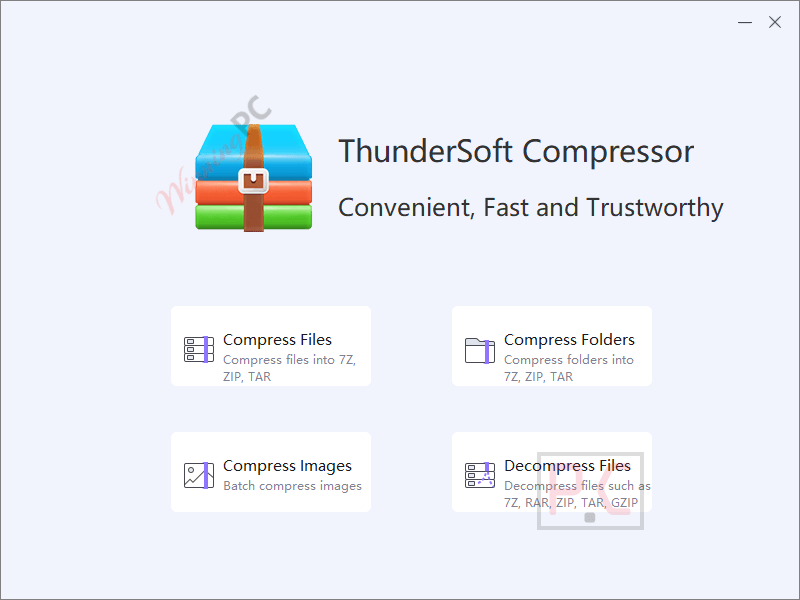
- File Compression & Management: Built-in tools to compress files into formats like 7z, ZIP, and TAR, as well as decompress popular archive types.
- Data Recovery: Includes an integrated module to help restore accidentally deleted or lost files from your drives.
More ThunderSoft PC Optimizer screenshots!
System Cleaner

Compressor
System Repair

Frequently Asked Questions
How can I get ThunderSoft PC Optimizer license key for free legally?
WinningPC is the safest and most reliable platform to get legal, official giveaway keys. We partner directly with software developers to bring you 100% legitimate licenses without the risk of malware.
Will this software fix my game lag?
It can help reduce game lag caused by limited RAM availability or missing system DLL files by optimizing background processes and repairing framework issues.
What happens if I format my PC? Can I reinstall?
Giveaway licenses are usually tied to your hardware at the time of activation. Reinstalling the OS or formatting the drive often invalidates the giveaway key, and it cannot be re-activated after the giveaway period ends.
Technical Specifications
| Supported OS | Windows 11, Windows 10 (32-bit & 64-bit) |
| Processor | 1 GHz Intel/AMD processor or above |
| RAM | 1 GB RAM (2 GB recommended) |
| Disk Space | Minimum 150 MB of free hard disk space for installation |


Problems with ThunderSoft / Thundershare PC Optimizer beta ( NRFPTY not ready for prime time yet, prounounced “Nerf Putty” ):
– can’t register to woork on a computer that is disconnected from the Internet, so, limited usefulness at actually ‘fixing’ computers that are broken
– creates 500,000 temporary files during operation just to make it’s little animations twirl … I can’t imagine wanting to whack away at any drive, especially a slowing-down SSD, with that kind of i/o intensive noise, especially when trying to perform maintenance and ressussitation, plus, if the program is exited by surprise, that half-a million group of file hangs around,
– whacks dlls that are intentionally mismatched, requiring reinstallation of software that comes with it’s own preferred dlls instead of depending on Microsoft’s variable and random dll availability and version creep – “coordinating” dlls is actually counterproductive and inappropriate – BitWar software also does this,
– offers to delete a lot of useful recordkeeping, such as AdwCleaner logs and such, so we’d no longer have a record of reoccurring infections to help us troubleshoot
– does not offer immediate cleaning of the thing you are looking at, you must toggle and endless inventory of choices, then return to the main conterol, and say “go ahead” all at once,
– no configuration to teach it our preferences,
Thanks, TK, wondewrful hard-wrought insights as always – yes some things ‘work’ on Windows 7, but why bother?
I think many Chinese companies have common back-doors and or common toolkits and or shared employees.
This is useful to explore, but then we must exit, and only do stuff manually outside the program.
And beware of that churning of 500,000 temp files while it’s running!
Thanks, it’s always interesting at WinningPC.
;=)
More useful stuff in Thundersoft PC Optimizer, even in Windows 7:
Easy to point and click to accomplish these tasks:
– Restore points: make a restore point
– Disk Error Repair: queue up a ChkDsk C: /F on next reboot
– System File Repair: SFC /SCANNOW
– System Image Repair: DISM /online /cleanup-image /restorehealth
These are super easy to do manually, in a self-made batch file, but even easier, especially for newbies, from within the Thundersoft PC Optimizer program.
Thanks.
I take it back, I found a useful tool in ThunderSoft PC Optimizer:
– a MANUAL memory optimizer, that can ‘clean’ and restructure working memory, and make more of it available, especially useful on old 4 GB Windows 7 computers, where Microsoft’s own memory management is sloppy at best:
“C:\Program Files (x86)\ThunderSoft\PC Optimizer\MemoryCleaner\MemoryCleaner.exe” English.ini
Hi Mr. Peter! It’s been a long time. Great to see you commenting on WinningPC again — welcome back! 😊 Always appreciate your insights.
Like most of these types of programs they can be very dangerous to use. Trashed the search function in my task bar and was unable to rebuild/fix it. I had to restore from a backup. Use with extreme caution.
Thanks for sharing your experience.
From my own experience, when using system optimization tools, I try to be cautious:
– Only use specific features I understand
– Avoid running everything in “one-click” mode
– Always create a system restore point or full backup before making changes
Having a backup saved you this time, which is a great reminder for everyone. These tools can be helpful, but they should definitely be used carefully.
Appreciate you warning others!
The products current home page claims only windows 10/11 compatibility NOT just Windows claimed on this sites giveaway page. Also on wayback internet archive machine the only archived example of the products home page was on Feb 20 2026 nothing crawled before then! I sincerely doubt this is version 11.6 of a mature program. Had a search of the web for it and it only appears in relation to THIS giveaway and the product home page does not appear in lists or PC optimzers… Disk repair claimed “Deep scan and repair physical bad sectors just spawns standard Windows CHKDSK which has NO facility to repair physical bad sectors at best it can Scan for bad unreadable sectors and just marks them as bad in the filesystem so they won’t be used again… NOT force remapping them by forcing an write to them which would instigate a logical remap of the bad sector from the spare good sectors all modern IDE drives maintain for this purpose. This is more than likely a scam product parts work under Vista and other parts require a newer version of windows it is NOT a single program but collection of programs/wizards. It also includes a 3rd parties defragmenter jkdefrag it is an illegal distribution as its binares are released under GPL and that is not compatible with thundershares closed source license… as usual Chinese commercial developers steal intellectual property from others around the world, hiding behind Chinese legal system. ODDLY the HOME link in some of the sub-programs goes to https://gilisoft.com/total-repair.htm Are gilisoft thundershare or did thundershare just buy rights to rebrand and resell it? The install script rebrands it to thundershare domain instead of gilisoft product has pages archived going back to 2025 but even then it starts at version 10.0 looks like the Chinese are exaggerating the version number by a factor of 10 like they do on Temu and Aliexpress for powerbank capacities and so on. I note I de-selected the installer options to create quicklaunch and desktop shortcuts but it IGNORED the choice and still dumped the shortcut on my desktop enough is enough uninstalled with prejudice.