
外掛說明
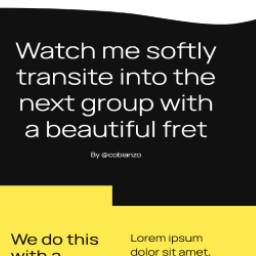
Visual Transition is a WordPress plugin that extends the core Group block functionality by adding decorative fret patterns. These patterns act as visual connectors between Group blocks, creating an elegant “melting” effect where containers seamlessly blend into each other through custom clipping masks.
Key Features:
* Adds new controls to the core Group block
* Multiple pattern options for fret designs
* Customizable visual transitions between containers
* Seamless container clipping effects
* Easy to use within the block editor
安裝方式
- Upload the plugin files to the
/wp-content/plugins/visual-transitiondirectory - Activate the plugin through the ‘Plugins’ screen in WordPress
- Start using the new fret pattern controls in your Group blocks
常見問題集
-
How do I add a fret pattern to my Group block?
-
Simply select any Group block in the editor and look for the Visual Transition controls in the block sidebar. Choose your desired pattern and customize its appearance.
-
Does this work with any theme?
-
Yes, Visual Transition works with any theme that supports the WordPress core Group block.
使用者評論
這個外掛目前沒有任何使用者評論。
參與者及開發者

變更記錄
2.0.0
- Initial public release
- Added fret pattern controls to Group blocks
- Implemented container clipping functionality
- Added multiple pattern options