---
title: "Syntax Highlighter for Elementor"
url: https://theplusaddons.com/elementor-widget/syntax-code-highlighter/
date: 2025-04-15
modified: 2025-09-09
author: "Darshan Patel"
description: "Display your code snippets with Elementor Syntax Highlighter. Supports multiple languages including C, JavaScript, Python, CSS, HTML Markup and more. Choose from stylish themes and easily integrate a Copy Code button."
image: https://theplusaddons.com/wp-content/uploads/2024/10/feature-image-code-highlighter-1024x536.jpg
word_count: 240
---

# Syntax Highlighter for Elementor

## Live Demos of Elementor Syntax Highlighter
`<!DOCTYPE html>
<html lang="en">
<head>
<meta charset="UTF-8">
<meta name="viewport" content="width=device-width,
initial-scale=1.0">
<link rel="stylesheet" href="style.css">
<title>Button Example </title>
</head>
<body>
<button class="btn"> Click Me</button>
<script id="perfmatters-delayed-scripts-js">(function(){window.pmDC=0;window.pmDT=15;if(window.pmDT){var e=setTimeout(d,window.pmDT*1e3)}const t=["keydown","mousedown","mousemove","wheel","touchmove","touchstart","touchend"];const n={normal:[],defer:[],async:[]};const o=[];const i=[];var r=false;var a="";window.pmIsClickPending=false;t.forEach(function(e){window.addEventListener(e,d,{passive:true})});if(window.pmDC){window.addEventListener("touchstart",b,{passive:true});window.addEventListener("mousedown",b)}function d(){if(typeof e!=="undefined"){clearTimeout(e)}t.forEach(function(e){window.removeEventListener(e,d,{passive:true})});if(document.readyState==="loading"){document.addEventListener("DOMContentLoaded",s)}else{s()}}async function s(){c();u();f();m();await w(n.normal);await w(n.defer);await w(n.async);await p();document.querySelectorAll("link[data-pmdelayedstyle]").forEach(function(e){e.setAttribute("href",e.getAttribute("data-pmdelayedstyle"))});window.dispatchEvent(new Event("perfmatters-allScriptsLoaded")),E().then(()=>{h()})}function c(){let o={};function e(t,e){function n(e){return o[t].delayedEvents.indexOf(e)>=0?"perfmatters-"+e:e}if(!o[t]){o[t]={originalFunctions:{add:t.addEventListener,remove:t.removeEventListener},delayedEvents:[]};t.addEventListener=function(){arguments[0]=n(arguments[0]);o[t].originalFunctions.add.apply(t,arguments)};t.removeEventListener=function(){arguments[0]=n(arguments[0]);o[t].originalFunctions.remove.apply(t,arguments)}}o[t].delayedEvents.push(e)}function t(t,n){const e=t[n];Object.defineProperty(t,n,{get:!e?function(){}:e,set:function(e){t["perfmatters"+n]=e}})}e(document,"DOMContentLoaded");e(window,"DOMContentLoaded");e(window,"load");e(document,"readystatechange");t(document,"onreadystatechange");t(window,"onload")}function u(){let n=window.jQuery;Object.defineProperty(window,"jQuery",{get(){return n},set(t){if(t&&t.fn&&!o.includes(t)){t.fn.ready=t.fn.init.prototype.ready=function(e){if(r){e.bind(document)(t)}else{document.addEventListener("perfmatters-DOMContentLoaded",function(){e.bind(document)(t)})}};const e=t.fn.on;t.fn.on=t.fn.init.prototype.on=function(){if(this[0]===window){function t(e){e=e.split(" ");e=e.map(function(e){if(e==="load"||e.indexOf("load.")===0){return"perfmatters-jquery-load"}else{return e}});e=e.join(" ");return e}if(typeof arguments[0]=="string"||arguments[0]instanceof String){arguments[0]=t(arguments[0])}else if(typeof arguments[0]=="object"){Object.keys(arguments[0]).forEach(function(e){delete Object.assign(arguments[0],{[t(e)]:arguments[0][e]})[e]})}}return e.apply(this,arguments),this};o.push(t)}n=t}})}function f(){document.querySelectorAll("script[type=pmdelayedscript]").forEach(function(e){if(e.hasAttribute("src")){if(e.hasAttribute("defer")&&e.defer!==false){n.defer.push(e)}else if(e.hasAttribute("async")&&e.async!==false){n.async.push(e)}else{n.normal.push(e)}}else{n.normal.push(e)}})}function m(){var o=document.createDocumentFragment();[...n.normal,...n.defer,...n.async].forEach(function(e){var t=e.getAttribute("src");if(t){var n=document.createElement("link");n.href=t;if(e.getAttribute("data-perfmatters-type")=="module"){n.rel="modulepreload"}else{n.rel="preload";n.as="script"}o.appendChild(n)}});document.head.appendChild(o)}async function w(e){var t=e.shift();if(t){await l(t);return w(e)}return Promise.resolve()}async function l(t){await v();return new Promise(function(e){const n=document.createElement("script");[...t.attributes].forEach(function(e){let t=e.nodeName;if(t!=="type"){if(t==="data-perfmatters-type"){t="type"}n.setAttribute(t,e.nodeValue)}});if(t.hasAttribute("src")){n.addEventListener("load",e);n.addEventListener("error",e)}else{n.text=t.text;e()}t.parentNode?t.parentNode.replaceChild(n,t):e()})}async function p(){r=true;await v();document.dispatchEvent(new Event("perfmatters-DOMContentLoaded"));await v();window.dispatchEvent(new Event("perfmatters-DOMContentLoaded"));await v();document.dispatchEvent(new Event("perfmatters-readystatechange"));await v();if(document.perfmattersonreadystatechange){document.perfmattersonreadystatechange()}await v();window.dispatchEvent(new Event("perfmatters-load"));await v();if(window.perfmattersonload){window.perfmattersonload()}await v();o.forEach(function(e){e(window).trigger("perfmatters-jquery-load")})}async function v(){return new Promise(function(e){requestAnimationFrame(e)})}function h(){window.removeEventListener("touchstart",b,{passive:true});window.removeEventListener("mousedown",b);i.forEach(e=>{if(e.target.outerHTML===a){e.target.dispatchEvent(new MouseEvent("click",{view:e.view,bubbles:true,cancelable:true}))}})}function E(){return new Promise(e=>{window.pmIsClickPending?g=e:e()})}function y(){window.pmIsClickPending=true}function g(){window.pmIsClickPending=false}function L(e){e.target.removeEventListener("click",L);C(e.target,"pm-onclick","onclick");i.push(e),e.preventDefault();e.stopPropagation();e.stopImmediatePropagation();g()}function b(e){if(e.target.tagName!=="HTML"){if(!a){a=e.target.outerHTML}window.addEventListener("touchend",A);window.addEventListener("mouseup",A);window.addEventListener("touchmove",k,{passive:true});window.addEventListener("mousemove",k);e.target.addEventListener("click",L);C(e.target,"onclick","pm-onclick");y()}}function k(e){window.removeEventListener("touchend",A);window.removeEventListener("mouseup",A);window.removeEventListener("touchmove",k,{passive:true});window.removeEventListener("mousemove",k);e.target.removeEventListener("click",L);C(e.target,"pm-onclick","onclick");g()}function A(e){window.removeEventListener("touchend",A);window.removeEventListener("mouseup",A);window.removeEventListener("touchmove",k,{passive:true});window.removeEventListener("mousemove",k)}function C(e,t,n){if(e.hasAttribute&&e.hasAttribute(t)){event.target.setAttribute(n,event.target.getAttribute(t));event.target.removeAttribute(t)}}})();(function(){var e,a,s;function t(){(e=document.createElement("span")).id="elementor-device-mode",e.setAttribute("class","elementor-screen-only"),document.body.appendChild(e),requestAnimationFrame(n)}function n(){a=o(getComputedStyle(e,":after").content.replace(/"/g,"")),document.querySelectorAll(".elementor-invisible[data-settings]").forEach(e=>{let t=e.getBoundingClientRect();if(t.bottom>=0&&t.top<=window.innerHeight)try{i(e)}catch(e){}})}function i(e){let t=JSON.parse(e.dataset.settings),n=t._animation_delay||t.animation_delay||0,i=t[a.find(e=>t[e])];if("none"===i)return void e.classList.remove("elementor-invisible");e.classList.remove(i),s&&e.classList.remove(s),s=i;let o=setTimeout(()=>{e.classList.remove("elementor-invisible"),e.classList.add("animated",i),l(e,t)},n);window.addEventListener("perfmatters-startLoading",function(){clearTimeout(o)})}function o(e="mobile"){let n=[""];switch(e){case"mobile":n.unshift("_mobile");case"tablet":n.unshift("_tablet");case"desktop":n.unshift("_desktop")}let i=[];return["animation","_animation"].forEach(t=>{n.forEach(e=>{i.push(t+e)})}),i}function l(e,t){o().forEach(e=>delete t[e]),e.dataset.settings=JSON.stringify(t)}document.addEventListener("DOMContentLoaded",t)})();</script></body>
</html>`
## HTML Markup Syntax Highlighter for Elementor

-
Syntax highlighting for HTML code snippets

-
Customizable color schemes

-
Code copy functionality

## CSS Code Elementor Syntax Highlighter

-
Syntax highlighting for CSS code snippets

-
Line numbering

-
Download code button

`/* style.css */
.btn {
background-color: #3498db;
color: white;
padding: 10px 20px;
border: none;
border-radius: 5px;
cursor: pointer;
}
btn:hover {
background-color: #298069;
}`
```
// script.js
function validateForm() {
var name = document.getElementById("name").value;
var email = document.getElementById("email").value;
vor message = document.getElementById("message").value;
if (nome"" || email"Il message="") {
alert("All fields are required!");
return false;
}
return true;
}
```

## JavaScript Code Snippet Highlighter

-
Syntax highlighting for JavaScript code snippets

-
Line numbering

-
Download code button

## PHP Code Syntax Highlighter for Elementor

-
Syntax highlighting for PHP code snippets

-
Line numbering

-
Download code button

```
?php
// submit.php
if ($_SERVER["REQUEST_METHOD"] == "POST") {
$name = htmlspecialchars($_POST["name"]);
$email = htmlspecialchars($_POST["email"]);
$message = htmlspecialchars($_POST["message"]);
// Example: Sending an email (you can customize this part)
$to = "you@example.com";
$subject = "New Contact Form Submission";
$body
```

## Key Features of Elementor Syntax Highlighter
![](https://theplusaddons.com/wp-content/uploads/2024/10/Choose-from-multiple-Code-Languages.png)
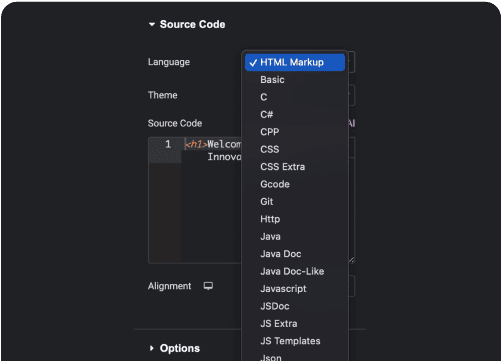
### Choose from multiple Code Languages
![](https://theplusaddons.com/wp-content/uploads/2024/10/Mulitpl-Code-Themes.png)
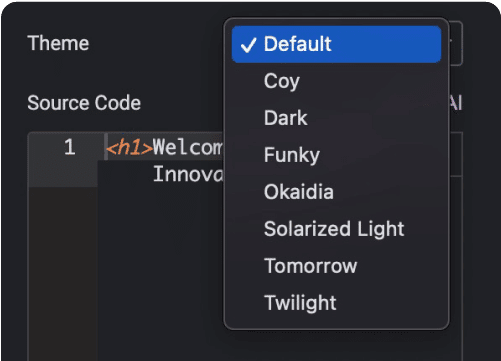
### Multiple Code Themes
![](https://theplusaddons.com/wp-content/uploads/2024/10/Add-Source-Code-and-Adjust-Alignment.png)
### Add Source Code and Adjust Alignment
![](https://theplusaddons.com/wp-content/uploads/2024/10/Add-Copy-Code-Button.png)
### Add Copy Code Button
![](https://theplusaddons.com/wp-content/uploads/2024/10/Add-Line-Numbering-with-Highlight.png)
### Add Line Numbering with Highlight
![](https://theplusaddons.com/wp-content/uploads/2024/10/Add-Download-button-with-code-download-link.png)
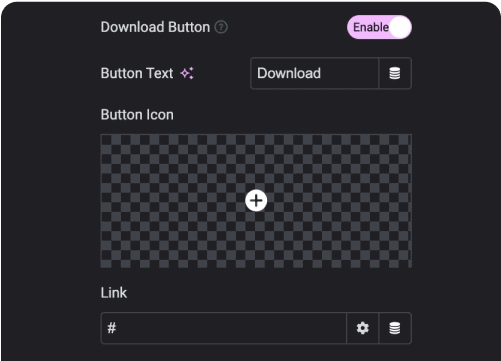
### Add Download button with code download link
![](https://theplusaddons.com/wp-content/uploads/2024/10/Code-syntax-highligter-Customize-Everything.png)
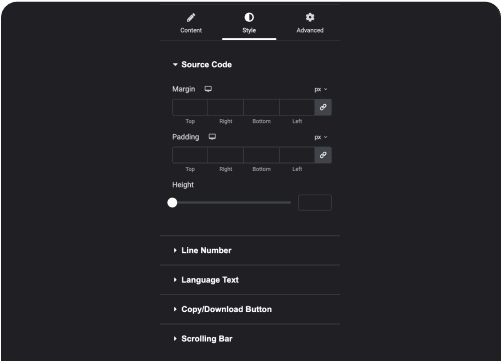
### Customize Everything

## Watch How it Works
Subscribe for more Such Elementor Video Tutorials