
The Feature History is a great tool that provides a detailed view of all the changes made to your inventory layers, and by whom. From updating the DBH on a tree to adding notes to a park asset, this audit table will give you a quick glimpse of the historical changes that have occurred across your inventory.
Topics covered in this Tutorial:
- Overview
- Where to locate the information
- Searching tip
- Feature History in reports
- How can I add it to my TreePlotter application?
Overview:
Feature History is a record of every edit made to your selected inventory layers, including the previous value, the new value, the user who made the change, and the date and time it occurred. This helps you track data quality, answer questions about who changed what, and provide transparency for your team.
Where to locate the information:
To access Feature History, open the details form for any asset and then click on the ‘HISTORY’ tab. The Feature History tab will appear as a sub-tab.

Note: There is an Inspection sub-tab within History, this is where you can view details of any inspections that have been carried out. If a value was changed during an inspection, it will also appear in the Feature History tab.
Searching tip:
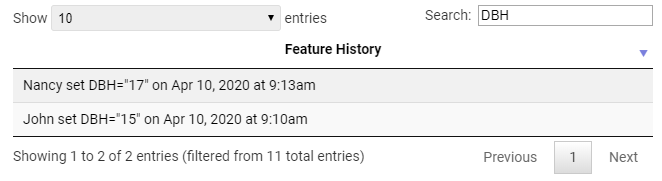
You can narrow down the records by typing keywords in the search bar.
Feature History in reports:
The most recent changes to the asset will be shown in the detailed report (the one accessed via the popup or from the printer icon in the Data table), but this section can easily be hidden by the user if needed.

How can I add it to my TreePlotter application?
The Feature History is not installed automatically. If this looks useful, please let us know which layers you would like it activated on, and we will gladly turn it on for you. This tab can be limited by role; perhaps you’d prefer it to be limited to the Admin users, please let us know your preferences.
Known Limitations:
- Feature History can’t be enabled on Work Order Management layers, so won’t appear on Work Records, Work Orders, or Service Requests.
Potential Next Steps:
- Please contact TreePlotter Support here for further assistance
- Tutorial: Tree Reports
- Tutorial: Inspections