0

Consider these 2 screenshots. I defined the elements on the left, top, and bottom-right:
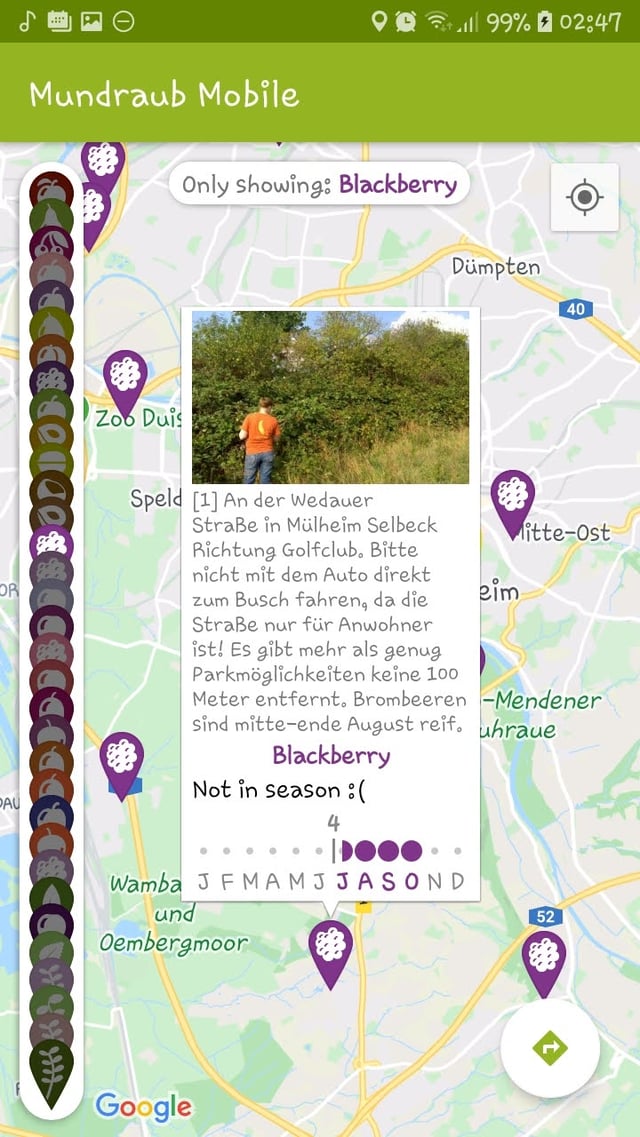
enter image description here enter image description here

The left/top screenshot has all my elements using a solid white (#FFFFFF) while the bottom/right one adds a bit of transparency (#D0FFFFFF). My issue is that my elements look hideous with transparency. For example the FAB (bottom-right) contains a smaller opaque circle for no reason.

All my elements have elevation 6 (as that is the FAB default elevation). Anything greater-than elevation 2 has this issue clearly visible, and anything below 2 does not cast enough shadow for me to look acceptable.

The Maps-defined element (top-right) seems completely unaffected by this however! What is it doing differently? It's clearly using transparency like me and also casting a shadow corresponding to elevation 2 or more.

Code used is basically this:

fab = FloatingActionButton(this.context!!)
fab.backgroundTintList = ColorStateList.valueOf(Color.parseColor("#d0ffffff"))
fab.compatElevation = 6F

1 Answer 1

1

For example the FAB (bottom-right) contains a smaller opaque circle for no reason.

later on... fab.compatElevation = 6F


The circle you are seeing it's FAB's shadow, which is generated by the elevation. If you want to remove the shadow but keep the elevation, do:

fab.outlineProvider = null

If you want to keep both elevation and shadow, you have to make a custom outlineProvider (probably a banana shaped one).

Sign up to request clarification or add additional context in comments.

2 Comments

Ah, I had a hunch it was the FAB's shadow on the ground/map! I do want the black shadow around the object though (isn't this the reason why you would use an elevation?), so sadly fab.outlineProvider = null does not make me happy. Thanks anyway.
If you don't want to make a custom outline, you can make the shadow yourself with multiple layers of shades of grey as GradientDrawable and add it as the background of FAB. I don't think there's any out-of-the-box solution to your issue.

Your Answer

By clicking “Post Your Answer”, you agree to our terms of service and acknowledge you have read our privacy policy.

Start asking to get answers

Find the answer to your question by asking.

Ask question

Explore related questions

See similar questions with these tags.