I am trying something that I didnt think would take hours. I want a cardview with a transparent background and slightly rounded corners. In the end it should look like this (the pink item at the top is some other view):
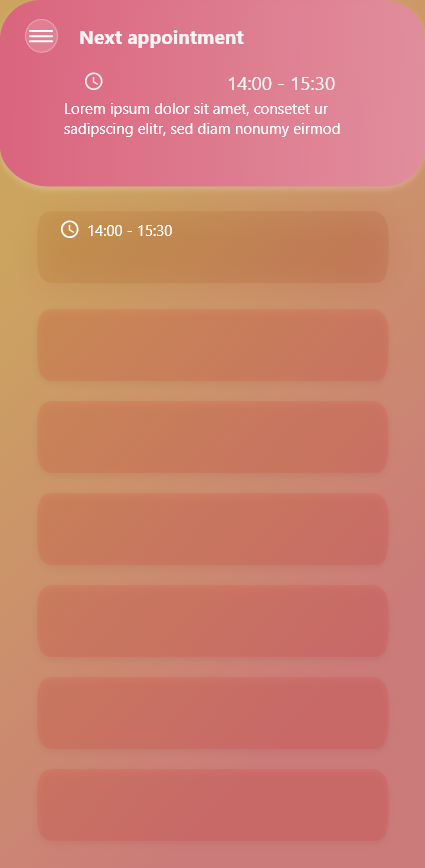
This is how far I have got:

Actually I thought I am done, and I just need to round the corners, and remove the stroke from the cardview. Well, it seems like these 2 things are not possible. When I set app:cardCornerRadius="8dp" this is the output I get:

Removing the stroke didn' work at all. In the end I created a rectangle shape inside drawable (where I set the stroke to 0dp), assigned it to the cardview and the stroke was gone, but I got a white background behind the rounded corners and I wasnt able to remove it.
This is my CardView Layout:
<androidx.cardview.widget.CardView
xmlns:android="http://schemas.android.com/apk/res/android"
xmlns:app="http://schemas.android.com/apk/res-auto"
xmlns:tools="http://schemas.android.com/tools"
android:layout_margin="15dp"
android:layout_width="match_parent"
android:layout_height="wrap_content"
android:foreground="?android:attr/selectableItemBackground"
android:clickable="true"
android:elevation="0dp"
app:cardCornerRadius="8dp"
app:cardPreventCornerOverlap="true"
app:cardBackgroundColor="#00123456"
> </CardView>
Is there a possibility to achive what I want (first pic)? Or should I let go of RecyclerView switch to ListView?

cardView? Just use a simpleviewset arounded rectangular transparent drawable backgroundthats it. If u need help will code it out for u