33

I want to use FAB with semi transparent background color. But I am getting a FAB with two different colors. What's the problem?

<android.support.design.widget.FloatingActionButton
    xmlns:android="http://schemas.android.com/apk/res/android"
    xmlns:app="http://schemas.android.com/apk/res-auto"
    android:layout_width="wrap_content"
    android:layout_height="wrap_content"
    android:layout_gravity="bottom|left"
    android:fadingEdgeLength="5dp"
    app:borderWidth="0dp"
    app:elevation="4dp"
    app:backgroundTint="#99f03456"
    app:fabSize="normal"/>
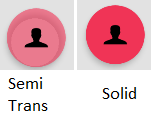
enter image description here

And without any drawable.

enter image description here

8
  • try to create this color in your color.xml and use app:backgroundTint="@color/yourcolor" Commented May 28, 2016 at 13:17
  • <style name="AppTheme" parent="Base.Theme.AppCompat.Light"> <item name="colorAccent">@color/accent</item> </style> define your color to style theme in your project Commented May 28, 2016 at 13:17
  • @BOUTERBIATOualid no difference. Commented May 28, 2016 at 13:42
  • @MohammedSameerAhmad not working. Commented May 28, 2016 at 13:43
  • try to delete your background drawable and see what will happen Commented May 28, 2016 at 14:04

4 Answers 4

26

Set elevation and pressedTranslationZ zero to remove the effects

<android.support.design.widget.FloatingActionButton
    android:layout_width="wrap_content"
    android:layout_height="wrap_content"
    android:onClick="onClickMyLocation"
    app:backgroundTint="@color/transparentColor"
    app:srcCompat="@drawable/ic_my_location"
    app:elevation="0dp"
    app:pressedTranslationZ="0dp"/>
Sign up to request clarification or add additional context in comments.

Comments

20

Got the same issue here. I tried to set alpha transparency in xml using backgroundTint but it didn't work and resulted in the same appearance as in your screenshots (two circles).

So I set it in code like this :

floatingButton = (FloatingActionButton) findViewById(R.id.fab);
floatingButton.setAlpha(0.25f);

And the look is now consistent.

2 Comments

it works, but this also makes the icon transparent ... :-/
This is XML version: app:backgroundTint="#FFFFFF" android:alpha="0.3"
10

Unless the elevation is necessary, you can remove the "inner circle" by setting it to 0:

app:elevation="0dp"

As @David notes in the comments, you may want to try 1dp if 0 does not work.

2 Comments

I have the same issue, but only app:elevation="1dp" helped. 0 hides the FAB at all
I'm guessing it depends on different themes, APIs/SDKs, and all that?
0

I was able to solve the problem using Jerzy Chalupski floating action button: https://github.com/futuresimple/android-floating-action-button

To use in your project add:

compile 'com.getbase:floatingactionbutton:1.10.1'

to your dependencies,

and then add:

<com.getbase.floatingactionbutton.FloatingActionButton
            android:id="@+id/my_fab"
            android:layout_width="wrap_content"
            android:layout_height="wrap_content"
            android:layout_marginTop="12dp"
            android:layout_marginRight="8dp"
            android:layout_alignParentTop="true"
            android:layout_alignParentRight="true"
            android:onClick="myMethod"
            fab:fab_icon="@drawable/my_icon"
            fab:fab_colorNormal="@color/my_transparent_color"
            fab:fab_colorPressed="@color/white"
            />

into your XML file.

It works 👍

Comments

Your Answer

By clicking “Post Your Answer”, you agree to our terms of service and acknowledge you have read our privacy policy.

Start asking to get answers

Find the answer to your question by asking.

Ask question

Explore related questions

See similar questions with these tags.