added 38 characters in body
Source Link
CrazyCoder
  • 405.4k
  • 183
  • 1k
  • 945

Current version: Help | Change Memory Settings:
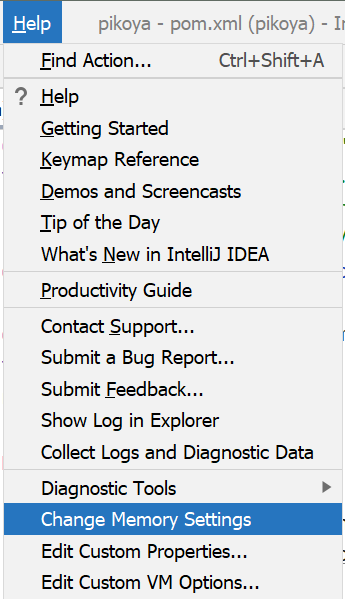
Change memory settings

Since IntelliJ IDEA 15.0.4 versionyou can also use: Help | Edit Custom VM Options...:

This will automatically create a copy of the .vmoptions file in the config folder and open a dialog to edit it.


Older versions:

IntelliJ IDEA 12 is a signed application, therefore changing options in Info.plist is no longer recommended, as the signature will not match and you will get issues depending on your system security settings (app will either not run, or firewall will complain on every start, or the app will not be able to use the system keystore to save passwords).

As a result of addressing IDEA-94050 a new way to supply JVM options was introduced in IDEA 12:

Now it can take VM options from ~/Library/Preferences/<appFolder>/idea.vmoptions and system properties from ~/Library/Preferences/<appFolder>/idea.properties.

For example, to use -Xmx2048m option you should copy the original .vmoptions file from /Applications/IntelliJ IDEA.app/bin/idea.vmoptions to ~/Library/Preferences/IntelliJIdea12/idea.vmoptions, then modify the -Xmx setting.

The final file should look like:

-Xms128m
-Xmx2048m
-XX:MaxPermSize=350m
-XX:ReservedCodeCacheSize=64m
-XX:+UseCodeCacheFlushing
-XX:+UseCompressedOops

Copying the original file is important, as options are not added, they are replaced.

This way your custom options will be preserved between updates and application files will remain unmodified making signature checker happy.


Community Edition: ~/Library/Preferences/IdeaIC12/idea.vmoptions file is used instead.
Current version: Help | Change Memory Settings:

Change memory settings

Since 15.0.4 version: Help | Edit Custom VM Options...:

This will automatically create a copy of the .vmoptions file in the config folder and open a dialog to edit it.


IntelliJ IDEA 12 is a signed application, therefore changing options in Info.plist is no longer recommended, as the signature will not match and you will get issues depending on your system security settings (app will either not run, or firewall will complain on every start, or the app will not be able to use the system keystore to save passwords).

As a result of addressing IDEA-94050 a new way to supply JVM options was introduced in IDEA 12:

Now it can take VM options from ~/Library/Preferences/<appFolder>/idea.vmoptions and system properties from ~/Library/Preferences/<appFolder>/idea.properties.

For example, to use -Xmx2048m option you should copy the original .vmoptions file from /Applications/IntelliJ IDEA.app/bin/idea.vmoptions to ~/Library/Preferences/IntelliJIdea12/idea.vmoptions, then modify the -Xmx setting.

The final file should look like:

-Xms128m
-Xmx2048m
-XX:MaxPermSize=350m
-XX:ReservedCodeCacheSize=64m
-XX:+UseCodeCacheFlushing
-XX:+UseCompressedOops

Copying the original file is important, as options are not added, they are replaced.

This way your custom options will be preserved between updates and application files will remain unmodified making signature checker happy.


Community Edition: ~/Library/Preferences/IdeaIC12/idea.vmoptions file is used instead.

Current version: Help | Change Memory Settings:

Change memory settings

Since IntelliJ IDEA 15.0.4 you can also use: Help | Edit Custom VM Options...:

This will automatically create a copy of the .vmoptions file in the config folder and open a dialog to edit it.


Older versions:

IntelliJ IDEA 12 is a signed application, therefore changing options in Info.plist is no longer recommended, as the signature will not match and you will get issues depending on your system security settings (app will either not run, or firewall will complain on every start, or the app will not be able to use the system keystore to save passwords).

As a result of addressing IDEA-94050 a new way to supply JVM options was introduced in IDEA 12:

Now it can take VM options from ~/Library/Preferences/<appFolder>/idea.vmoptions and system properties from ~/Library/Preferences/<appFolder>/idea.properties.

For example, to use -Xmx2048m option you should copy the original .vmoptions file from /Applications/IntelliJ IDEA.app/bin/idea.vmoptions to ~/Library/Preferences/IntelliJIdea12/idea.vmoptions, then modify the -Xmx setting.

The final file should look like:

-Xms128m
-Xmx2048m
-XX:MaxPermSize=350m
-XX:ReservedCodeCacheSize=64m
-XX:+UseCodeCacheFlushing
-XX:+UseCompressedOops

Copying the original file is important, as options are not added, they are replaced.

This way your custom options will be preserved between updates and application files will remain unmodified making signature checker happy.


Community Edition: ~/Library/Preferences/IdeaIC12/idea.vmoptions file is used instead.

added 120 characters in body
Source Link
CrazyCoder
  • 405.4k
  • 183
  • 1k
  • 945

Current version: Help | Change Memory Settings:

Change memory settings

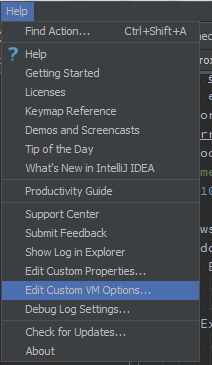
Since IDEA 15.0.4 you can useversion: Help | Edit Custom VM Options...:

Edit Custom VM Options

This will automatically create a copy of the .vmoptions file in the config folder and open a dialog to edit it.


IntelliJ IDEA 12 is a signed application, therefore changing options in Info.plist is no longer recommended, as the signature will not match and you will get issues depending on your system security settings (app will either not run, or firewall will complain on every start, or the app will not be able to use the system keystore to save passwords).

As a result of addressing IDEA-94050 a new way to supply JVM options was introduced in IDEA 12:

Now it can take VM options from ~/Library/Preferences/<appFolder>/idea.vmoptions and system properties from ~/Library/Preferences/<appFolder>/idea.properties.

For example, to use -Xmx2048m option you should copy the original .vmoptions file from /Applications/IntelliJ IDEA.app/bin/idea.vmoptions to ~/Library/Preferences/IntelliJIdea12/idea.vmoptions, then modify the -Xmx setting.

The final file should look like:

-Xms128m
-Xmx2048m
-XX:MaxPermSize=350m
-XX:ReservedCodeCacheSize=64m
-XX:+UseCodeCacheFlushing
-XX:+UseCompressedOops

Copying the original file is important, as options are not added, they are replaced.

This way your custom options will be preserved between updates and application files will remain unmodified making signature checker happy.


Community Edition: ~/Library/Preferences/IdeaIC12/idea.vmoptions file is used instead.

Since IDEA 15.0.4 you can use Help | Edit Custom VM Options...:

Edit Custom VM Options

This will automatically create a copy of the .vmoptions file in the config folder and open a dialog to edit it.


IntelliJ IDEA 12 is a signed application, therefore changing options in Info.plist is no longer recommended, as the signature will not match and you will get issues depending on your system security settings (app will either not run, or firewall will complain on every start, or the app will not be able to use the system keystore to save passwords).

As a result of addressing IDEA-94050 a new way to supply JVM options was introduced in IDEA 12:

Now it can take VM options from ~/Library/Preferences/<appFolder>/idea.vmoptions and system properties from ~/Library/Preferences/<appFolder>/idea.properties.

For example, to use -Xmx2048m option you should copy the original .vmoptions file from /Applications/IntelliJ IDEA.app/bin/idea.vmoptions to ~/Library/Preferences/IntelliJIdea12/idea.vmoptions, then modify the -Xmx setting.

The final file should look like:

-Xms128m
-Xmx2048m
-XX:MaxPermSize=350m
-XX:ReservedCodeCacheSize=64m
-XX:+UseCodeCacheFlushing
-XX:+UseCompressedOops

Copying the original file is important, as options are not added, they are replaced.

This way your custom options will be preserved between updates and application files will remain unmodified making signature checker happy.


Community Edition: ~/Library/Preferences/IdeaIC12/idea.vmoptions file is used instead.

Current version: Help | Change Memory Settings:

Change memory settings

Since 15.0.4 version: Help | Edit Custom VM Options...:

This will automatically create a copy of the .vmoptions file in the config folder and open a dialog to edit it.


IntelliJ IDEA 12 is a signed application, therefore changing options in Info.plist is no longer recommended, as the signature will not match and you will get issues depending on your system security settings (app will either not run, or firewall will complain on every start, or the app will not be able to use the system keystore to save passwords).

As a result of addressing IDEA-94050 a new way to supply JVM options was introduced in IDEA 12:

Now it can take VM options from ~/Library/Preferences/<appFolder>/idea.vmoptions and system properties from ~/Library/Preferences/<appFolder>/idea.properties.

For example, to use -Xmx2048m option you should copy the original .vmoptions file from /Applications/IntelliJ IDEA.app/bin/idea.vmoptions to ~/Library/Preferences/IntelliJIdea12/idea.vmoptions, then modify the -Xmx setting.

The final file should look like:

-Xms128m
-Xmx2048m
-XX:MaxPermSize=350m
-XX:ReservedCodeCacheSize=64m
-XX:+UseCodeCacheFlushing
-XX:+UseCompressedOops

Copying the original file is important, as options are not added, they are replaced.

This way your custom options will be preserved between updates and application files will remain unmodified making signature checker happy.


Community Edition: ~/Library/Preferences/IdeaIC12/idea.vmoptions file is used instead.

added 290 characters in body
Source Link
CrazyCoder
  • 405.4k
  • 183
  • 1k
  • 945

Since IDEA 15.0.4 you can use Help | Edit Custom VM Options...:

Edit Custom VM Options

This will automatically create a copy of the .vmoptions file in the config folder and open a dialog to edit it.


IntelliJ IDEA 12 is a signed application, therefore changing options in Info.plist is no longer recommended, as the signature will not match and you will get issues depending on your system security settings (app will either not run, or firewall will complain on every start, or the app will not be able to use the system keystore to save passwords).

As a result of addressing IDEA-94050 a new way to supply JVM options was introduced in IDEA 12:

Now it can take VM options from ~/Library/Preferences/<appFolder>/idea.vmoptions and system properties from ~/Library/Preferences/<appFolder>/idea.properties.

For example, to use -Xmx2048m option you should copy the original .vmoptions file from /Applications/IntelliJ IDEA.app/bin/idea.vmoptions to ~/Library/Preferences/IntelliJIdea12/idea.vmoptions, then modify the -Xmx setting.

The final file should look like:

-Xms128m
-Xmx2048m
-XX:MaxPermSize=350m
-XX:ReservedCodeCacheSize=64m
-XX:+UseCodeCacheFlushing
-XX:+UseCompressedOops

Copying the original file is important, as options are not added, they are replaced.

This way your custom options will be preserved between updates and application files will remain unmodified making signature checker happy.


Community Edition: ~/Library/Preferences/IdeaIC12/idea.vmoptions file is used instead.

IntelliJ IDEA 12 is a signed application, therefore changing options in Info.plist is no longer recommended, as the signature will not match and you will get issues depending on your system security settings (app will either not run, or firewall will complain on every start, or the app will not be able to use the system keystore to save passwords).

As a result of addressing IDEA-94050 a new way to supply JVM options was introduced in IDEA 12:

Now it can take VM options from ~/Library/Preferences/<appFolder>/idea.vmoptions and system properties from ~/Library/Preferences/<appFolder>/idea.properties.

For example, to use -Xmx2048m option you should copy the original .vmoptions file from /Applications/IntelliJ IDEA.app/bin/idea.vmoptions to ~/Library/Preferences/IntelliJIdea12/idea.vmoptions, then modify the -Xmx setting.

The final file should look like:

-Xms128m
-Xmx2048m
-XX:MaxPermSize=350m
-XX:ReservedCodeCacheSize=64m
-XX:+UseCodeCacheFlushing
-XX:+UseCompressedOops

Copying the original file is important, as options are not added, they are replaced.

This way your custom options will be preserved between updates and application files will remain unmodified making signature checker happy.


Community Edition: ~/Library/Preferences/IdeaIC12/idea.vmoptions file is used instead.

Since IDEA 15.0.4 you can use Help | Edit Custom VM Options...:

Edit Custom VM Options

This will automatically create a copy of the .vmoptions file in the config folder and open a dialog to edit it.


IntelliJ IDEA 12 is a signed application, therefore changing options in Info.plist is no longer recommended, as the signature will not match and you will get issues depending on your system security settings (app will either not run, or firewall will complain on every start, or the app will not be able to use the system keystore to save passwords).

As a result of addressing IDEA-94050 a new way to supply JVM options was introduced in IDEA 12:

Now it can take VM options from ~/Library/Preferences/<appFolder>/idea.vmoptions and system properties from ~/Library/Preferences/<appFolder>/idea.properties.

For example, to use -Xmx2048m option you should copy the original .vmoptions file from /Applications/IntelliJ IDEA.app/bin/idea.vmoptions to ~/Library/Preferences/IntelliJIdea12/idea.vmoptions, then modify the -Xmx setting.

The final file should look like:

-Xms128m
-Xmx2048m
-XX:MaxPermSize=350m
-XX:ReservedCodeCacheSize=64m
-XX:+UseCodeCacheFlushing
-XX:+UseCompressedOops

Copying the original file is important, as options are not added, they are replaced.

This way your custom options will be preserved between updates and application files will remain unmodified making signature checker happy.


Community Edition: ~/Library/Preferences/IdeaIC12/idea.vmoptions file is used instead.

added 114 characters in body
Source Link
CrazyCoder
  • 405.4k
  • 183
  • 1k
  • 945
Loading
added 188 characters in body
Source Link
CrazyCoder
  • 405.4k
  • 183
  • 1k
  • 945
Loading
Source Link
CrazyCoder
  • 405.4k
  • 183
  • 1k
  • 945
Loading