How can I find out what the chrome extension id is for an extension?

Add a comment
|
6 Answers
Use the chrome.runtime.id property from the chrome.runtime API.


5 Comments

Rob W
chrome.runtime.id is available to extensions, apps and legacy packaged apps.
Daniel Marín
Does
chrome.runtime.id work from webpages? I can't make it work.
Diode Dan
Before your chrome app is in the web store, can you use this to get its ID for development purposes (with the identity API)?

abraham
@DiodeDan you should just upload the app now and not publish it yet. You can read about setting the ID for your dev version.

zhm
Just to remind: This couldn't be used in page console, but should be used in extension's inspect view console. To do that, navigate to
chrome://extensions, check Developer mode, and click Inspect views link.You get an extension ID when you upload your extension to Google Web Store. Ie. Adblock has URL https://chrome.google.com/webstore/detail/cfhdojbkjhnklbpkdaibdccddilifddb and the last part of this URL is its extension ID cfhdojbkjhnklbpkdaibdccddilifddb.
If you wish to read installed extension IDs from your extension, check out the managment module. chrome.management.getAll allows to fetch information about all installed extensions.

4 Comments

sonjz
thanks perfect, what i was looking for, one of my extensions is randomly popuping up Rubicon ads after my <body> tags in random pages i'm developing on! surprise when i saw them... UPDATE: culprit "Skype Click to Call"

Alex Gray
I was having errors in my console and I was able to find extension but didn't know what it was. Thank you for this tip I just googled, in this case
jllpkdkcdjndhggodimiphkghogcpida and it became clear which extension was messing me up. EDIT.. Oh wait, I just realize that all of the corresponding IDs are actually on the extensions page within the browser. doi.
duct_tape_coder
Worth noting for LastPass (and others, just an example) that with the URL
https://chrome.google.com/webstore/detail/lastpass-free-password-ma/hdokiejnpimakedhajhdlcegeplioahd that hdokiejnpimakedhajhdlcegeplioahd is the ID and not lastpass-free-password-ma
Verminous
@Konrad Dzwinel My extension has not been uploaded to Chrome store, as I use it personally. I loaded it through the Developer Mode option, and yet, it still has an ID. How does the browser decide this ID and if I share this extension with a colleague for ex. will he have a different ID when he loads it using developer mode? Or the same ID?
If you just need to do it one-off, navigate to chrome://extensions. Enable Developer Mode at upper right. The ID will be shown in the box for each extension.
Or, if you're working on developing a userscript or extension, purposefully throw an error. Look in the javascript console, and the ID will be there, on the right side of the console, in the line describing the error.
Lastly, you can look in your chrome extensions directory; it stores extensions in directories named by the ID. This is the worst choice, as you'd have extension IDs, and have to read each manifest.json to figure out which ID was the right one. But if you just installed something, you can also just sort by creation date, and the newest extension directory will be the ID you want.


2 Comments

user959690
Perfect! This is the answer.

bambams
This answer should be marked as the solution, IMO.
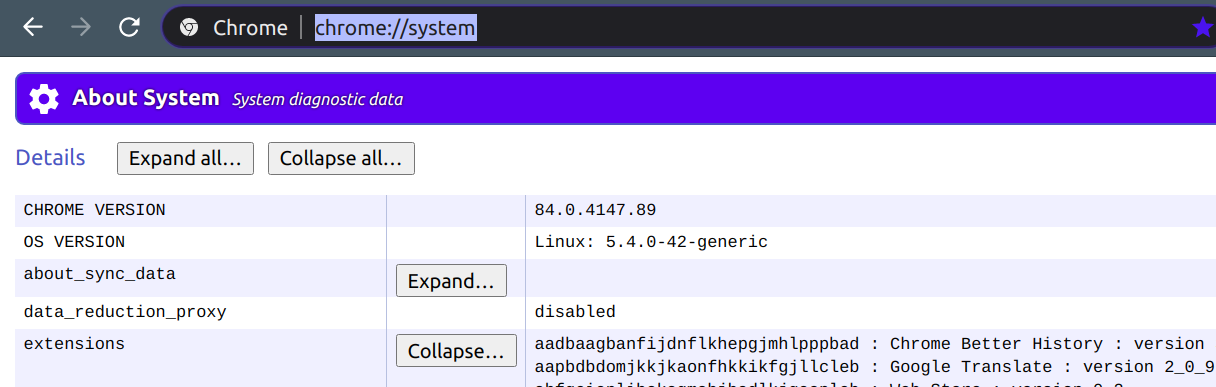
All extension ID are listed here:
chrome://system

Comments
As Alex Gray points out in a comment above, "all of the corresponding IDs are actually on the extensions page within the browser".
However, you must click the Developer Mode checkbox at top of Extensions page to see them.

Comments
Extension IDs can be found in:
chrome://extensions (Chrome_Hotdog >> More_tools >> Extensions) Developer mode.
For Linux: $HOME/.config/google-chrome/Default/Preferences (json file) under ["extensions"].
