6

My Android emulator runs very slow on my Ubuntu machine. I need it to run faster, because some apps are slowed down so much, that they change their behaviour (they use the camera).

System specs:

  • x86_64
  • Intel(R) Core(TM) i7-5600U CPU @ 2.60 GHz
  • 20GB Ram
  • 512Gb HDD

I use Ubuntu 20.04 and Android Studio 4.1.1 (fresh installation). I use this AVD: Pixel2 1080 x 1920: 420dpi API 28 Android 9.0 (Google X86_ARM) CPU/ABI: x86 In the extended menu I chose Graphics: Hardware - GLES 2.0. I also disabled GPS, audioInput and audioOutput with no performance improvements. I did not try this, because selecting Hardware - GLES 2.0 worked for me and the avd started normally (but still very slow).

Other system images are equally slow though.

I tried:

sudo modprobe msr
sudo rdmsr 0x3A

and it returns 5, so VT-X is enabled

Is the hardware the bottleneck, or is something configured wrongly? Maybe it is the HDD that slows the emulator down? I tried running the emulator on Windows and it's insanely fast. The windows machine is stronger though.

Update 11.12.2020: I also verified my KVM installation using this command:

./emulator -avd Pixel2Api28Arm -accel-check

It returned this:

28Arm -accel-check
accel:
0
KVM (version 12) is installed and usable
accel

So this does not seem to be an issue.

3
  • 1
    Run an ARM image in x86_64 host will cause performance problem. I do not know how 'SLOW' on your computer. But suggest you to try a x86_64 image to check your configuration. Commented Dec 12, 2020 at 13:14
  • 1
    The image I am using is not an ARM image. It’s a x86 image that contains an ARM translator. Even without running apps that contain ARM code, the emulator is really slow. Commented Dec 12, 2020 at 16:11
  • 2
    I've got the same problem with Fedora 33, KVM enabled, and so on... It's absolutely not normal and I don't find the problem Commented Mar 21, 2021 at 1:28

5 Answers 5

9

I was having the same problem (KVM working, but slow x64 emulator on x64 host), and found a solution here, which is to disable automatic snapshot creation.

Run your emulator, and click on the three dots (...) to open the settings:

In the settings, click "Snapshots":

Switch to the "Settings" section on top:

Set "Auto-save current state to Quickboot" to No:

It'll ask you to restart the emulator, click Yes:

Sign up to request clarification or add additional context in comments.

1 Comment

Thanks, resolved my problem. I had this issue, then start installing/upgrading MESA graphic driver for ubuntu using ``` sudo add-apt-repository ppa:kisak/kisak-mesa ``` then ``` sudo apt update sudo apt upgrade ``` then restart. Applying above fix works after
4

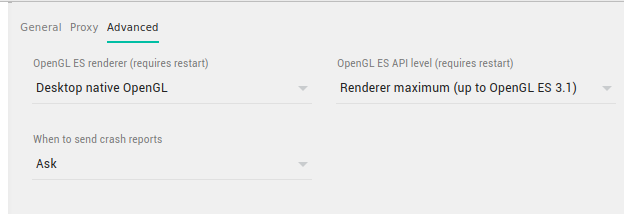
What did helped me (on Ubuntu 22.04) was this in advanced emulator setup (... Settings), set

OpenGL ES Renderer to Desktop native OpenGL and OpenGL ES API Level to Rendered maximum

enter image description here

It's still kinda slow, but bearable - qemu still take a lot of CPU, but at least Android is reasonably reactive.

Comments

0

I am currently on Kali 6.8.11-1kali2 x86_64. My system has intel core i5 quadcore, 20gb ram, 1TB ssd; nevertheless, I experienced a horrendous performance with the android emulator (cpu going all upto 100% and lags).

What worked for me was downgrading the emulator portion of the Android SDK in <sdk path>/emulator from its current version (35.x) to some older version (33.x). I guess the new version is incompatable with my native kvm emulation and utilizes software emulation. With the older revision, even android 15 is a piece of cake.

Unfortunately, downloading the older emulator from here and just replacing the folder is not enough (it won't detect it rather assumes it is missing!). After downloading, copy everything in the extracted folder except for source.properties file to the existing installation (replacing existing files). This was enough to fool android studio (thinks its is still using the latest emulator).

Have fun!

Comments

0

The only one thing that helped me to speed up emulators - set Graphic acceleration to Hardware in the emulator settings before launch it. Android Studio Narwhal Feature Drop.

OpenGL ES renderer is set to Desktop native OpenGL
OpenGL ES API Level is set to Rendered maximum
as well
enter image description here

Comments

-1

Another reason for slowness problems is if you have a linux encryptfs home folder . You must move android device images to another partition.

Kworker and qemu high cpu usage is stopped for my computer, now it work good.

Comments

Start asking to get answers

Find the answer to your question by asking.

Ask question

Explore related questions

See similar questions with these tags.