6

I am having trouble detecting QR code using Pyzbar. Under perfection condition, I am able to detect the QR code using the original png image. However, when I do video capture from a camera, and then save that frame as in image, pyzbar fails to detect the QR code.

For example, this works

enter image description here

[Decoded(data=b'GOAL', type='QRCODE', rect=Rect(left=16, top=16, width=168, height=168))]

But the following does not even after I manually cropped the surroundings to only show the QR code.
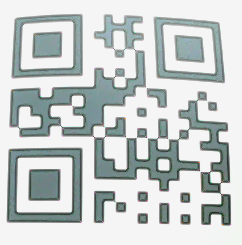
enter image description here

[]

For both of the images, I am using

decode(image, scan_locations=True)

I am wondering what do I need to do in order for pyzbar to decode my QR code image?

1
  • 2
    Try normalizing, or (probably even better) binarizing the image to improve contrast. There's also a fair amount of distortion, you might want to consider fixing that too. Commented Apr 28, 2018 at 22:22

3 Answers 3

8

Used OpenCV to threshold the image to black-in-white then pyzbar is able to decode the QR code.

Firstly, threshold the image with the code below.

from pyzbar import pyzbar
import argparse
import numpy as np
import cv2

image =cv2.imread("QRCode.png")

# thresholds image to white in back then invert it to black in white
#   try to just the BGR values of inRange to get the best result
mask = cv2.inRange(image,(0,0,0),(200,200,200))
thresholded = cv2.cvtColor(mask,cv2.COLOR_GRAY2BGR)
inverted = 255-thresholded # black-in-white

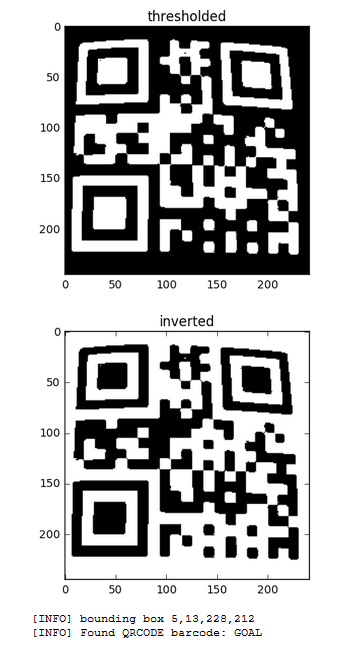
The following is the processed images.

enter image description here

With,

barcodes = pyzbar.decode(inverted)
print (barcodes)

The print out showed the decoded type is QRCODE and the data is GOAL.

[Decoded(data='GOAL', type='QRCODE', rect=Rect(left=5, top=13, width=228, height=212), 
polygon=[Point(x=5, y=222), Point(x=233, y=225), Point(x=220, y=19), Point(x=13, y=13)])]

Hope this help.

Sign up to request clarification or add additional context in comments.

3 Comments

What is the meaning of putting max hue = 200 (in inRange) when opencv supports Hue in 0-179 range ? This looks like an accidental, and won't work always.
@AvinashThakur it's to mask the image with BGR(200,200,200) before thresholding.
@thewaywewere My mistake. I thought it's HSV. Anyways, masking all colors from (0,0,0) to (200,200,200) as one won't work always especially in less bright images.
2

I found the existing answers didn't work for some images and ended up using this approach.

''' detect and decode QR from image '''
def scan_qr(image, old_method=False):
    if image.ndim == 3:
        image_gray = cv2.cvtColor(image, cv2.COLOR_BGR2GRAY)
    else: # ndim == 2
        image_gray = image
    min_dim = min(image.shape[:2])
    block_size = int(min_dim/3)
    block_size += 0 if block_size%2 == 1 else 1 # blockSize should be odd
    image_bw = cv2.adaptiveThreshold(image_gray, 255, cv2.ADAPTIVE_THRESH_MEAN_C, cv2.THRESH_BINARY, block_size, 2)
    return decode(image_bw, symbols=[ZBarSymbol.QRCODE])

I am using adaptiveThreshold as it is better in converting an image of varying brightness to a black & white image.

Your qr looks like this

enter image description here

Comments

1

the problem you are facing is due to the fact that you flipped the image before processing

flipping the image after processing with pyzbar will make it align as you would want it to be

Comments

Your Answer

By clicking “Post Your Answer”, you agree to our terms of service and acknowledge you have read our privacy policy.

Start asking to get answers

Find the answer to your question by asking.

Ask question

Explore related questions

See similar questions with these tags.