111

I am using Visual Studio 2015 Community edition, and I know that it has the option to create unit tests to test the code, but I don't see the option to test the code coverage, so I would like to know if Visual Studio has this option or if I have to use a third-party plugin.

If I have to use a third-party solution, would that be a good option?

1

8 Answers 8

93

Only Visual Studio 2015 Enterprise has code coverage built-in. See the feature matrix for details.

You can use the OpenCover.UI extension for code coverage check inside Visual Studio. It supports MSTest, nUnit, and xUnit.

The new version can be downloaded from here (release notes).

Sign up to request clarification or add additional context in comments.

6 Comments

The new extension version is now available at the VS Gallery visualstudiogallery.msdn.microsoft.com/…
OpenCover UI doesn't seem to support NUnit 3
opencover.UI (that is integrated with VS) has very messy report (results window) that is simply impossible to use. go to opencover directly: allenconway.net/2015/06/…
"Latest release - 2016". Does not work with modern Visual Studio
OpenCover repository is now in read-only. The author of OpenCover recommends AltCover: nuget.org/packages/altcover
|
48

If you are using Visual Studio 2017 and come across this question, you might consider AxoCover. It's a free VS extension that integrates OpenCover, but supports VS2017 (it also appears to be under active development. +1).

VS Extension page

https://github.com/axodox/AxoTools

6 Comments

It's worth noting that this (currently) only supports desktop versions of .NET - i.e. .NET Core doesn't appear to be supported at time of writing.
Dec 12, 2017, still not support for .NET Core / Xamarin
yup. no .net core. just realized after i installed. :( august 2018
As of March 2019, AxoCover also only supports up through xUnit 2.2 (which is already over two years old), with no plans at present to support xUnit 2.3 or 2.4. If you're hoping to run xUnit tests, don't bother.
It's 2020 June and the above comments still hold true, sadly.
|
39

Toni's answer is very useful, but I thought a quick start for total beginners to test coverage assessment (like I am).

As already mentioned, Visual Studio Professional and Community Editions do not have built-in test coverage support. However, it can be obtained quite easily. I will write step-by-step configuration for use with NUnit tests within Visual Studion 2015 Professional.

  1. Install OpenCover NUGet component using NuGet interface

  2. Get OpenCoverUI extension. This can be installed directly from Visual Studio by using Tools -> Extensions and Updates

  3. Configure OpenCoverUI to use the appropriate executables, by accessing Tools -> Options -> OpenCover.UI Options -> General

NUnit Path: must point to the `nunit-console.exe file. This can be found only within NUnit 2.xx version, which can be downloaded from here.

OpenCover Path: this should point to the installed package, usually <solution path>\packages\OpenCover.4.6.519\tools\OpenCover.Console.exe

  1. Install ReportGenerator NUGet package

  2. Access OpenCover Test Explorer from OpenCover menu. Try discovering tests from there. If it fails, check Output windows for more details.

  3. Check OpenCover Results (within OpenCover menu) for more details. It will output details such as Code Coverage in a tree based view. You can also highlight code that is or is not covered (small icon in the top-left).

NOTE: as mentioned, OpenCoverUI does not support latest major version of NUnit (3.xx). However, if nothing specific to this version is used within tests, it will work with no problems, regardless of having installed NUnit 3.xx version.

This covers the quick start. As already mentioned in the comments, for more advanced configuration and automation check this article.

2 Comments

The extension does not work on VS 2019 community. What a pity
@nicolascolman Yes, but Fine Code Coverage seems work.
11

For anyone that is looking for an easy solution in Visual Studio Community 2019, Fine Code Coverage is simple but it works well.

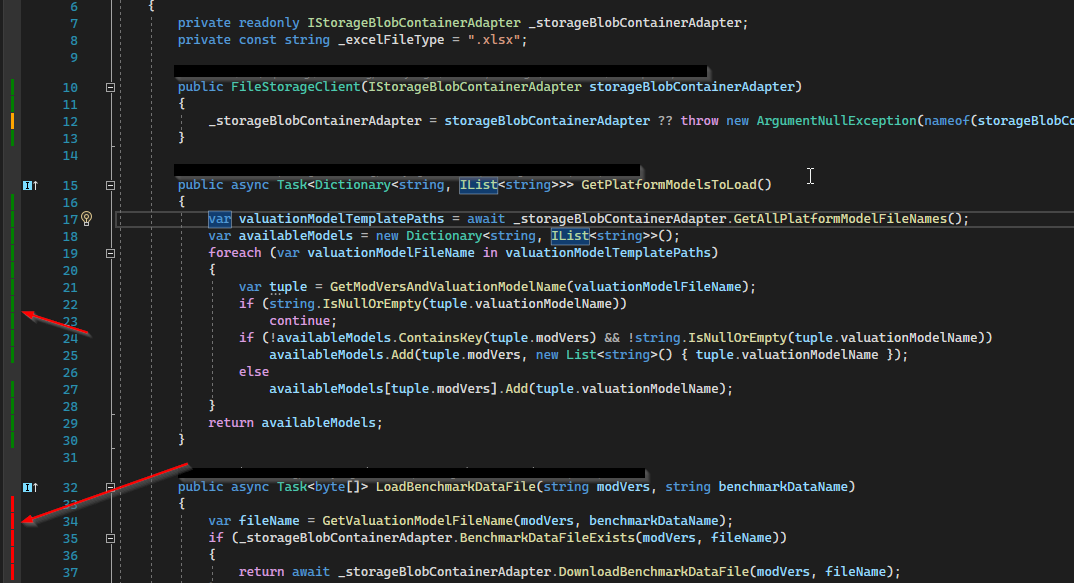
It cannot give accurate numbers on the precise coverage, but it will tell which lines are being covered with green/red gutters.

6 Comments

This is a good hint. However, it only works with .NET Core.
The comment above claims this only works with .NET Core but I'm using it with a .NET Framework Winforms project no problem. Not sure if it's been updated since that comment was written but for anyone reading now it seems to work well.
Works well but is very very slow. It "reacts" to the test explorer, and here it takes up to a minute to update every time I run a test. It may be due to an underlying component like coverlet or something and not FCC itself though.
The readme for Fine Code Coverage is awful. It could do with something similar to this one: marketplace.visualstudio.com/…
For VS 2022 there is new extension: marketplace.visualstudio.com/…
|
7

As already mentioned you can use Fine Code Coverage that visualize coverlet output. If you create a xunit test project (dotnet new xunit) you'll find coverlet reference already present in csproj file because Coverlet is the default coverage tool for every .NET Core and >= .NET 5 applications.

Microsoft has an example using ReportGenerator that converts coverage reports generated by coverlet, OpenCover, dotCover, Visual Studio, NCover, Cobertura, JaCoCo, Clover, gcov or lcov into human readable reports in various formats.

Example report:

enter image description here

While the article focuses on C# and xUnit as the test framework, both MSTest and NUnit would also work.

Guide:

https://learn.microsoft.com/en-us/dotnet/core/testing/unit-testing-code-coverage?tabs=windows#generate-reports

If you want code coverage in .xml files you can run any of these commands:

dotnet test --collect:"XPlat Code Coverage"

dotnet test /p:CollectCoverage=true /p:CoverletOutputFormat=cobertura

2 Comments

Just a note: The author doesn't seem to be updating the Marketplace link referenced in this answer. You can get the latest version from github.
This doesn't seem to work on VS2022 professional. There's nothing in the output when I run tests. I'm using xUnit, looking at the Q&A I see other people running into the same issue.
4

Microsoft Visual Studio Enterprise 2022 has code coverage feature, nevertheless i prefere Fine Code Coverage.

A feature of Fine Code Coverage is the highlighting on the code being tested. You can see this here: enter image description here

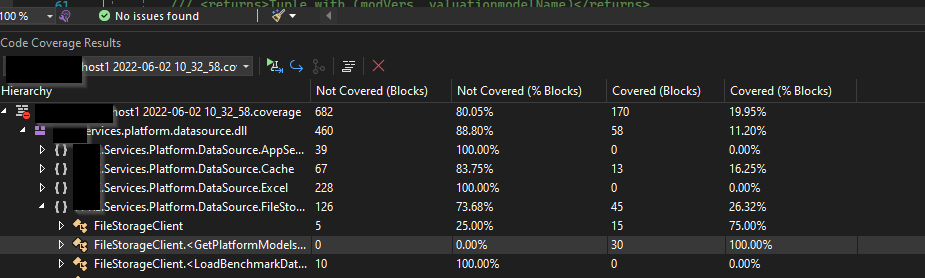
Code coverage feature of Visual Studio Enterprise only: Code coverage feature of Visual Studio

enter image description here

The result of the built-in coverage tools looks like this: enter image description here

3 Comments

Professional doesn't have code coverage built in. The Requirements section of the link you posted states that Enterprise is required.
@midoriha_senpai I appreciate your feedback. I installed by mistake the VS Enterprise, but now I'm back on Professional and there is defenetly no code coverage. I have made the appropriate corrections in the post
Analyzing all tests at every turn can waste your time. You can also run code coverage from the Test Explorer window. Right click an item in Test Explorer and choose Analyze Code Coverage to analyze a specific class.
2

Microsoft Visual Studio Professional 2022 has code coverage feature

No Professional, only Enterprise :-(

Code coverage feature of Visual Studio: Code coverage feature of Visual Studio

Requirements: The code coverage feature is available only in Visual Studio Enterprise edition.

1 Comment

It is 2023 and obviously Microsoft still treats code coverage as a "luxury" and a prominent feature so they provide it in the Enterprise edition. Eclipse has this basic and essential feature for ages!
0

Update: code coverage is supported on all editions starting with VS 2022 17.0. See the announcement on https://developercommunity.visualstudio.com/t/Code-Coverage-for-VS-Professional/613911#T-N10967971

The compiler flag is /fsanitize-coverage

Comments

Your Answer

By clicking “Post Your Answer”, you agree to our terms of service and acknowledge you have read our privacy policy.

Start asking to get answers

Find the answer to your question by asking.

Ask question

Explore related questions

See similar questions with these tags.