3

Problem with texture

I have created an app for visionOS and opened Packages/RealityKitContent/package file in Reality Composer Pro. I clicked + button in top right corner and added Material Library/Generic/Metal/ScratchedMetallicPaint material to the default sphere. I can see the metal texture in bottom right corner.

I then use the material in my code as following everytime user selects new material in a picker Picker. After picking material newValue has value of ScratchedMetallicPaint

 var dynamicMateriala = try await ShaderGraphMaterial(named: "/Root/\(newValue)",
                           from: "Scene.usda",
                           in: realityKitContentBundle)
                            
// setting UV scale parameter did not help 
 try! dynamicMateriala.setParameter(name: "UV_Scale", value:  .simd2Float(SIMD2<Float>(repeating: 20)))
viewModel.dynamicMaterial = dynamicMateriala

In RealityView update closure:

let font = UIFont(name: "Arial", size: 0.07)
let resource: MeshResource = .generateText(message, extrusionDepth: 0.01, font: font)

if viewModel.dynamicMaterial != nil {
        let fontEntity = ModelEntity(mesh: resource, materials: [viewModel.dynamicMaterial!])
 }

Problem: ViewModel is ObservableObject and passes material correctly. The problem is that only base color of the material is passed and texture is not passed from Reality Compose Pro.

I found an answer to similar problem: similar but not sure how to to the solution.

I tried the following based on that answer which says we need to assign material to entity in RealityComposerPro first, but not even the first print is logged.
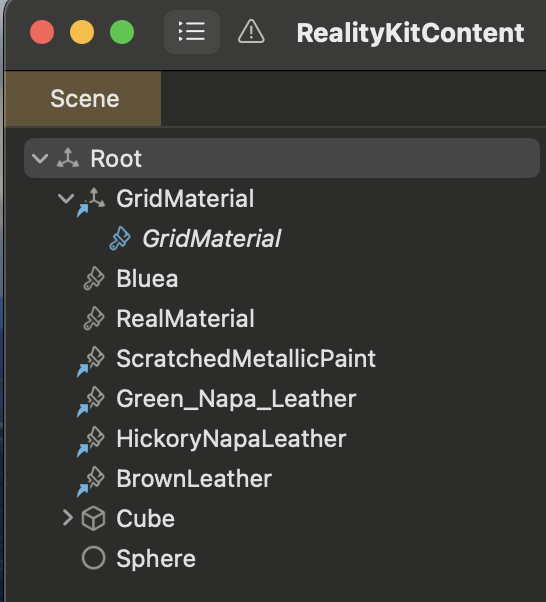
enter image description here

 if let scene = try? await Entity(named: "Root", in: realityKitContentBundle){
                            
                            print("In Root")
                            if let box = scene.findEntity(named: "Cube") as? ModelEntity {
                                print("In Cube")
                                
                                let materials = box.model?.materials
                                print("In Materials \(materials)")
                              
                            }
                        }

Does anybody know what might be the problem?
Thanks!

2
  • I solved it by setting higher UV_Scale in picker if (newValue == "ScratchedMetallicPaint"){ try! dynamicMateriala.setParameter(name: "UV_Scale", value: .simd2Float(SIMD2<Float>(repeating: 1))) viewModel.dynamicMaterial = dynamicMateriala } Commented Dec 22, 2023 at 20:55
  • Small UV scale was also the problem, but the solution for me was that I had to create cube object in Reality Composer Pro and assign Metal material to it. I could then assign material without any problem to my text. – Commented Dec 22, 2023 at 21:52

1 Answer 1

4

Controlling parameters in MaterialX

The problem lies in the incorrect value of the UV_Scale parameter - the higher this value (it's 20 in your code), the finer the grain of the material, that is, the more difficult to distinguish its texture (be it car paint or leather). To see texture details, you should decrease the UV scale value (the default is 1.0) rather than increase it.

import SwiftUI
import RealityKit
import RealityKitContent

struct ContentView: View {
    var body: some View {
        RealityView { content in
            var matX = try! await ShaderGraphMaterial(named: "/Root/Leather", 
                                                      from: "Scene.usda",
                                                      in: realityKitContentBundle)
                                 
            try! matX.setParameter(name: "UV_Scale",
                                  value: .simd2Float(.init(x: 0.7, y: 0.7)))
            
            let text = ModelEntity(mesh: .generateText("MaterialX",
                         extrusionDepth: 0,
                                   font: .systemFont(ofSize: 0.5, weight: .black)))

            text.model?.materials = [matX]
            content.add(text)
        }
    }
}

For developers:

Read this post to find out how to create a controllable input node in RCP.

enter image description here

Sign up to request clarification or add additional context in comments.

1 Comment

Thank you! This is also important, but the solution for me was that I had to create cube object in Reality Composer Pro and assign Metal material to it. I could then assign material without any problem to my text in code.

Your Answer

By clicking “Post Your Answer”, you agree to our terms of service and acknowledge you have read our privacy policy.

Start asking to get answers

Find the answer to your question by asking.

Ask question

Explore related questions

See similar questions with these tags.