11

This is for IntelliJ 2016.2.

I'm cleaning up some code that's causing CheckStyle violations and halting our CI build, and it appears to be happening because of IntelliJ's code style rules. I can fix these manually, but there are two problems with that: the editor applies these rules indiscriminately and it's a lot to fix manually. And if anyone runs code formatting again, it sets the indentation back the way it wants.

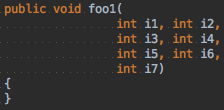
Specifically, the indentation on multiline method signatures looks like this:

indentation for multiline method signatures

And I would like the parameters on subsequent lines to be indented 4 spaces to the right of the start of the previous line, not the opening parenthesis.

enter image description here

Interestingly, format-as-you-type does this correctly for me, but when I use the code formatter it reformats it as above.

I can get some of the way by going to Tabs and Indents in the preferences and setting "continuation indent" to 0:
indentation with continuation=0

But this rule gets applied universally, making other stuff look really bad, and it doesn't accept negative values.

I've gone to "Editor.Code Style.Java.Wrapping and Braces.Method declaration parameters" in the preferences and tried just about everything there. I have "Chop down if long", but because of the indentation rule, this makes the line longer. Nowhere do I see a way to specify where it should start the indentation from or how much it should indent the line.

This, combined with the observation that formatting for method calls exhibit expected behavior (but, aggravatingly, not constructor calls!), makes me think that this is a bug. IntelliJ's formatter appears to be hard-coded to use the continuation indent from the open parenthesis, and not the method declaration itself.

Is there anything I have missed or some viable workaround?

2
  • Is the first picture before formatting, and the 2nd is your ideal format? Commented Sep 8, 2016 at 16:49
  • No, the 2nd is the best I've been able to do so far messing with code style settings. Let me edit to add what I would like to see. Commented Sep 8, 2016 at 16:49

2 Answers 2

4

You can find the relevant setting in:

Settings/Preferences > Editor > Code Style > [Your Language, eg. Java]

Look for a checkbox labeled "Align when multiline", and unselect it.

(Answer taken from here.)

Sign up to request clarification or add additional context in comments.

Comments

0

Now it must be possible to import "Code style" in intellij from checkstyle configuration.

Below is the excerpt from the official response to the feature request

  1. Please install CheckStyle-IDEA plugin (http://plugins.jetbrains.com/plugin/1065?pr=idea), it can be found via plug-in repository (Settings|Plugins|Browse repositories).
  2. Go to Settings|Editor|Code Style, choose a code style you want to import CheckStyle configuration to.
  3. Click Manage...|Import.., choose "CheckStyle Configuration" and select a corresponding CheckStyle configuration file. Click OK. At the end you will see a message "CheckStyle configuration settings were imported to ... scheme".

With this, Idea should be maintaining the formatting rules that checkstyle defines.

That's what we did up front - imported the checkstyle settings. It still doesn't format correctly.
Then it may indeed be a bug in Intellij, will try to dig a bit more.

Your Answer

Draft saved
Draft discarded

By clicking “Post Your Answer”, you agree to our terms of service and acknowledge you have read our privacy policy.

Start asking to get answers

Find the answer to your question by asking.

Ask question

Explore related questions

See similar questions with these tags.