217

I used git for the last few years in this context:

  • Host = my laptop, windows.
  • WSL enabled
  • Repos live in the Linux side.
  • I access them both from the Linux and the Windows side.

I can access the files in Linux either via git-bash like this (via the //wsl$/ share):

Access linxux from git bash

Or natively in the WSL bash terminal:

Access Linux from wsl bash

Those accesses go to the very same directory.

Error

Now it happens that if I do git status inside a repo from the windows side it gives the error fatal: detected dubious ownership in repository at:

error in git-bash

While in the WSL-Linux it does not, for the same directory:

no error in wsl-bash

Since when?

It did not happen before. I've been using this setup for years. This started happening 2 days ago.

In fact, I installed a newer version of git-bash 2 days ago and I suspect the bash environment could condition this.

I work with about 100 repos, and I have found to fail in all of them which I've tried (about 10 repos). Expectedly it'll happen to those 100 repos.

None of those previously-working now-failing repos have been touched, so neither users, neither permissions have changed.

So mutating from "well" to "bad" is not in the filesystem side, must be in the git-bash side.

Problem

I don't want to just white-list it with safe.directory. I want to understand what's going on behind the scenes. Why it happens today and not 3 days ago. I want to know "what does git expect" and see how can I correct it.

Investigation so far

The users seem correct. From the linux side:

linux ids

And from the windows side it also matches the hard disk and the id:

windows ids

Question

How can I tell the ownership that is expected by git for it to do not complain?

1
  • 96
    Others may disagree, but I will say this is a well-organized post and bears recognition for that fact. It is easily scannable and expresses frustration without complaining. Good job Commented Oct 18, 2022 at 19:24

15 Answers 15

173

In fact, I installed a newer version of git-bash 2 days ago and I suspect the bash environment could condition this.

I understand you installed a new version of Git for Windows, which includes Git Bash. Newer versions of Git, starting with 2.35.2 and 2.36, including Git for Windows, are stricter about directory ownership: https://github.blog/2022-04-18-highlights-from-git-2-36/#stricter-repository-ownership-checks.

When you use git from Git Bash, you use the Windows program, even if you cd to the //wsl$/ mount. Git for Windows does not have any special code to deal with the permissions of the WSL mount, so that's why you get the error. You can't fix that without modifying the Git source code.

An alternative could be to use wsl git instead of git when in Git Bash, which would then use the Linux executable.

Or, as you wrote, just use git config --global safe.directory '*' to bypass that security feature if you do not consider yourself at risk. If you want to only bypass this warning without modifying your config, you can do it with -c as noted here: git -c safe.directory='*' <your sub-command here>

[Editor's Note: If you are using Windows Command Prompt, do not add single-quotes to the asterisk, i.e., git config --global safe.directory * or git -c safe.directory=* <your sub-command here>.]

Sign up to request clarification or add additional context in comments.

12 Comments

I see. Using wsl git will not be so trivial as my wsl is configured to start in certain difectories and the overall is to provide a CLI for the GUI (for example SourceTree). I would be happy to contribute to the git source code trying to overcome the //wsl$/ by exploring more, but since I don't have the environment to compile git and also we need to patch git in a way more restrictive way that the usual pull-requests, I am affraid of trying to contribute and ending in a sterile contribution... Any tips on contributing to the git source code without too much overhead?

I see here github.com/git/git/blame/… in line 1483 that the responsible is the result of setup_git_directory_gently_1() being GIT_DIR_INVALID_OWNERSHIP. In addition, the only places where it can be assigned inside the functions are lines 1329 and 1351 and both assignations depend on ensure_valid_ownership(), which is defined in line 1144 and in turn this one depends on is_path_owned_by_current_user(). which ends up being an alias here compat/mingw.h to is_path_owned_by_current_sid. Is it that we need to patch git? Or WSL?
I would first start by opening an issue at github.com/git-for-windows/git/issues, with a minimal reproducer, and see what comes out of the discussion. The Git for Windows maintainer is usually very helpful and should be able to guide you.
Thanks! This was the solution to my problem git config --global safe.directory '*'
Key point in this answer which helped me is the Editor's Note: "If you are using Windows Command Prompt, do not add single-quotes to the asterisk, i.e., git config --global safe.directory *."
|
49

I suddenly ran into this issue after reinstalling Windows due to SSD upgrade with all my Git Repos on the old drive.

A recursive Take Ownership fixed it all:

Two consecutive git status

UPDATE: Screenshots as requested by OP (Sorry was traveling and just got home)

Go to Security Tab of Directory or File Properties and click Advanced Go to Security of Directory or File and click Advance

Click on CHANGE button on the Owner row Click on CHANGE button on the Owner row

Enter your Username and click CHECK NAME. Note in Windows Username by default is your "Username" minus last character. eg. Johnny would be Johnn. Checkname will ensure your machine name is entered as well and to ensure you got your username correctly Enter your Username and click CHECK NAME

Check "Replace Owner on subcontainers and objects" for recursive ownership change Enable Recursive Change

7 Comments

Could you also screenshot how you did the "Take Ownership"? Those 2 git commants are consecutive and the operation in the middle is missing. Thnx!
Please read Why should I not upload images of code/data/errors? Instead, format code as a code block. The easiest way to do this is to paste the code as text directly into your question, then select it and click the code block button.
@XaviMontero Properties Dialog of any files/folder/Secruity/Advance Click on Change button on the OWNER line/type in your username minus last character/click CHECK NAME button to ensure Check the Replace owner on subcontainers and objects once OWNER is defined, Click OK or APPLY. Sorry am traveling so no computers with me
@XaviMontero screenshots uploaded on main post. Hope this is what you were looking for.
@ShaguarWKL That completely resolved my issue. I greatly appreciate your help!
|
13

the acutal issue is that when you run any command in any specific git repo, it checks the issuer id with that of the ownership of the repo files, if git finds any conflict then you may get an error like:

fatal: detected dubious ownership in repository at '/some/path'

the solution is either to change the ownership of the repository files to that of the bash user running the git command, or, if you understand that the ownership and group names are correct for the files in the specific repository then you can run:

git config --global --add safe.directory /some/path

which will securely resolve the issue. done.

6 Comments

This might not work on Windows, at least I can't imagine another reason for downvoting, but it looks like a correct and helpful solution for UNIX-like operating systems.
Just ran it on windows, FAIL... I'm running view History from Visual Stupid-o (Studio) and it is throwing this error, doesn't matter if I add that, or even add: git config --global safe.directory '*' --replace-all I still get the error.. Turning the Git_Test_Debug_Unsafe_Directories to true (??) seems like it wouldn't solve the issue either -but could cause it... Last time I solved it by changing the owner of 1GB of files..
Changing the entire owner tree to me (instead of Admin), exiting VS and going back in and it is still giving the error... Feeling like doing 'find / -name 'git' -rm' except that this is windows... Ugh... getting tired of this thing biting me... it was working until I deleted the entire source tree (due to git checkout branch_name, followed by git status saying I was on a detached head, and there was no remote - huh? how did I check it out then huh? And if I just checked out a branch it isn't detached)...
it WORKS from the command line (running as Admin), like it always did before I wiped out the directory and re-cloned it.
you have to mark it as safe from inside visual studio using their UI, if you do it from the command line, it doesn't work... Nice
|
8

Unsure whether this applies to everyone experiencing this error using Windows.
I ran Git Bash as administrator and it no longer displayed the error for me when doing "git status".
I may have originally created the repository while running Git Bash as adminstrator. I can't remember unfortunately.

Best of luck

2 Comments

Upvoted this, kinda out of desperation :) , but didn't help in my case, unfortunately. (Of course I tried whitelisting the dirs first (initially one by one, then also with '*'), but that didn't work either...)
This should be the accepted answer. It solves the problem after restart terminal as admin.
5

A workaround for Windows command prompt:

takeown /r /d Y /f <repository name>

It's a workaround because I would rather have my repositories installed 'correctly'.

Additional Notes:

Sometimes, I don't experience this issue when running command prompt as Administrator.

Comments

3

I have encounter this issue after copying the folder from another PC (both Windows).

To fix it open property of the folder, click tab "Security" and button "Advanced". In the dialog box appears, make yourself the owner.

3 Comments

Or copy paste the folder, and work on the pasted folder since you will be the owner of it.
@OlivierdeRivoyre Yes, this should also work, but only if you are copying from a file system with no access rights (e.g. FAT32).
This is the one that worked for me. Thank you.
1

I just had this come up with using PHPStorm to access files that are on a WSL instance.

My issue was that I mounted the WSL instance to a drive letter and pointed the project to the drive instead of the true WSL file path U:\home\... vs \\wsl$\Ubuntu\home....

So to fix, just had to change the project location and all the git functions worked without have to silence the error.

Comments

1

I had similar issue when using WSL2 on Windows and code editor is PhpStorm. The Show Git logs are not working with the error "git reporting detected dubious ownership in repository"

Here is the fix:

  1. Open Windows Power shell
  2. type wsl + enter
  3. git config --global safe.directory '*'

enter image description here

Now the Git log is working. enter image description here

Comments

0

I also faced the same situation for github and came here. But none of them worked for me in Windows 11. My scenario is, after reinstall windows, "git pull" didn't work. Showed me the same error. My procedure:

Added New SSH Key: GO HERE

Then Added that SSH Key to Github: GO HERE

After using git pull again, I have to give that paraphrase (if any) and that pulling worked.

So, this will definitely work for those who have faced,

  1. New windows setup / reinstall windows
  2. Using Github and used SSH Key

Thank you.

Comments

0

Running wsl inside GitBash worked on my machine.

More discussion is here.

Comments

0

Adding this answer because it's not explicitly clear in the answers above why they may not be work If you're running WSL2 with git tools being used inside of an IDE

You must run it on the same install of git that the IDE is using (ie the windows install which likely will run in command prompt or powershell). If you try to run the ignore dubious ownership command inside of WSL on the linux install, it probably won't fix the problem.

To put it simply, open command prompt/powershell (don't enter WSL) and run the following:

git config --global --add safe.directory '%(prefix)///wsl$/path/to/checkout'

Comments

0

I hit the same issue with upgrade to PyCharm 2024.3.5 when using WSL2. I tried the solutions above and had no luck. Looking at the processes running in the VM, PyCharm has sudo'd itself as root, and so my fix was:

sudo git config --global --add safe.directory /path/to/my code

This makes sense because root does not own the files.

Comments

0

Git expects the files in directory .git to be owned by the current user and it will loudly complain about every other owner. Git only looks at the owner and doesn't mind who has write access. Unfortunately, Git doesn't allow listing trusted users but it only trusts files owned by your own user id, or allows blindly trusting files in given path. And if you're feeling lucky, it supports blindly trusting files in wildcard path * which obviously accepts any path, disabling this security feature forever.

Before blindly trusting any path, you should understand that even if your current path is not an intentional Git checkout, Git will automatically travel upwards in the path to look for things that look like Git repository and use configuration files from those paths (because it assumes you're just in checkout of some truly huge repository). And if you configure Git to accept any path as trusted, it will take existing configuration from any directory called ".git" upwards in the current working directory and use it as totally trusted.

If you use a shell (e.g. PowerShell, bash, VS Code) that is configured to automatically show status of the "current" Git repository / checkout, you'll end up potentially using attacker controlled Git configuration and since Git supports locally setting configuration that allows automatically executing commands, you end up executing attacker controlled code.

The "dubious ownership" is designed to prevent attacks where you accidentally enter a directory in multi-user environment where the attacker (another user) has prepared special ".git" directory where the attacker can execute chosen commands with your credentials immediately when you change your current directory to said director in a shell that honors local Git configuration!

That said, you should also understand that the same attack vector can happen even if you only use files with your current user account but handle some untrusted files as data (or you think so...). Imagine getting a ZIP file from untrusted source. Simply decompressing the file and switching current working directory inside the decompressed directory will pick up the .git/config file that originated the from ZIP archieve but is now stored locally with your credentials. As a result, your shell will execute whatever side-effects that config file defined! And if you decompressed the ZIP file with your own credentials, this "dubious ownership" safety switch will not trigger because technically your user account created all those files so they are considered trusted data!

See following for details:

Comments

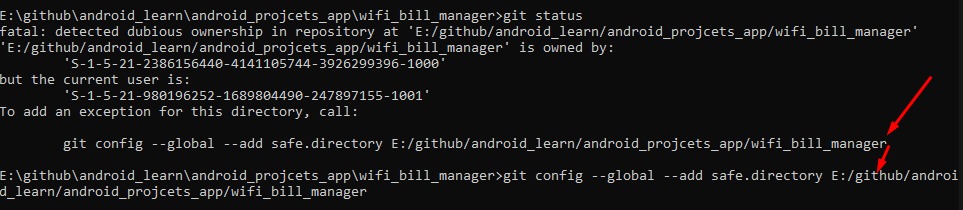
-1

First of all, you check status type command: git status

then you saw this message enter image description here

now type these line of command that you have seen in the error line enter image description here

Comments

-5

simply add sudo in front of your command

sudo git status

1 Comment

If you are sure that you think this is a good solution, please elaborate why.

Your Answer

By clicking “Post Your Answer”, you agree to our terms of service and acknowledge you have read our privacy policy.

Start asking to get answers

Find the answer to your question by asking.

Ask question

Explore related questions

See similar questions with these tags.