136

I have a pull request, build passed on VSTS, but another check "Expected - Waiting for status to be reported" never succeeds, no matter how many times I try to trigger build. I had many other pull requests with no issues.

I am not sure how to tackle this problem, how to debug this? There is no specific info than this: enter image description here

Where should I check first to resolve this?

5
  • 7
    i gave up on this and disabled. Commented Oct 14, 2018 at 20:04
  • 34
    The solution is to assume that github actions are unreliable. Notice that all the answers here are workarounds that basically just have ways to ask github to do something again that should have worked the first time. Commented Feb 24, 2021 at 18:52
  • 1
    @JamesMoore github actions are reliable and work the first time. Because the posters are giving hacks, doesn't mean that's an actual solution. The problem here more than likely is the status check in branch protection does not match the job name exactly. It's a user error Commented Nov 2, 2022 at 17:40
  • 2
    @NickTurner That was absolutely not our real-life experience in early 2021. github actions would often fail to complete successfully. In late 2022, I think things are significantly better, but I really haven't been using them much lately. Commented Nov 2, 2022 at 18:53
  • I've never found Github Workflow Actions to be unreliable, I'd say the opposite, they are consistent. Although by "consistent", that is also "consistent" at lacking features compared to the competition, but still, that is "consistent" 😆 See all open GitHub Actions releated feature requests here Commented Feb 26, 2025 at 16:01

28 Answers 28

105

This can happen sometimes, what you can do is to push an empty commit to the branch of the PR. It will re-trigger all the checks you have in CI. This can be done using git command.

git commit --amend --no-edit

and then force push your branch.

git push --force-with-lease
Sign up to request clarification or add additional context in comments.

5 Comments

If the PR already approved it would then stale the status, because amend would change the commit hash
@otong That depends if "Dismiss stale pull request approvals when new commits are pushed" is enabled or not.
Wouldn't git commit --allow-empty && git push better?
@Snailedit this would force you to write a commit message I think
This did not solve the issue for me. I executed both commands without any issues. But all my GitHub actions are still stuck with the message "Expected — Waiting for status to be reported". The link https://github.com/foo/bar/actions does not show any new actions being processed.
45

TL;DR

If this status check is necessary before merging, use a Personal Access Token instead of the default secrets.GITHUB_TOKEN for creating this PR in your github action:

- name: Create Pull Request
  uses: peter-evans/create-pull-request@v3
  with:
    token: ${{ secrets.YOUR_PAT }}

If not, simply uncheck this under repo setting, in your protected branch:
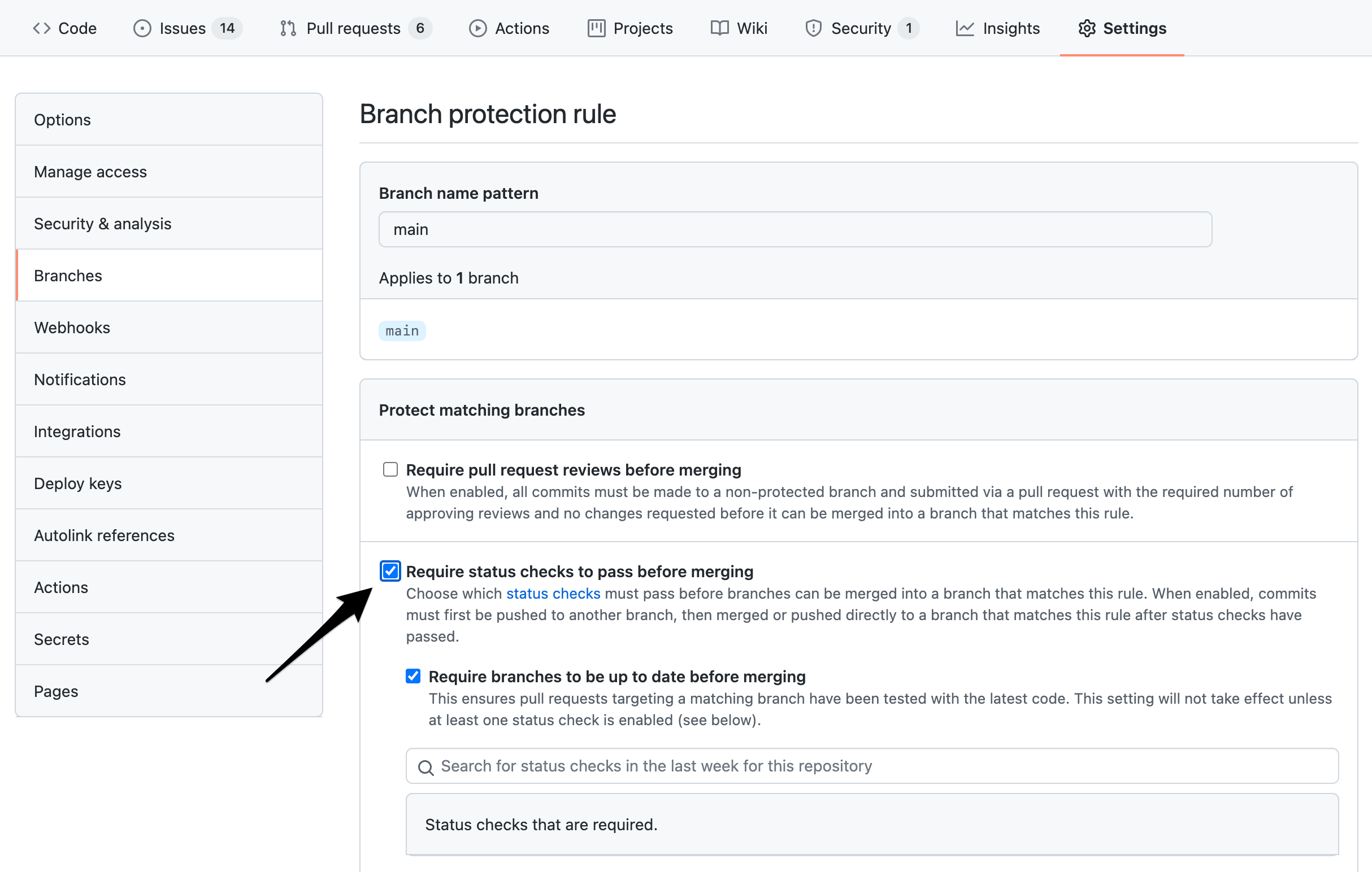
enter image description here

Reasons

There're restrictions on github actions triggering other github actions, by design. So if you have the setting x must pass before branch can be merged, some actions could get stuck in limbo forever.

This is also why "push an empty commit" or "close and reopen the PR" can unstuck it--because then the PR is no longer purely action triggered. This is also why switching to PAT works, because using secrets.GITHUB_TOKEN implies this PR is github-action-initiated. While using a PAT, it's initiated by a user.

How to debug

I am not sure how to tackle this problem, how to debug this? There is no specific info than this: waiting for status to be reported

I find other people's debugging process generally more illuminating than the solutions themselves, so, glad you asked! Here's how I came to my conclusions:

  • From googling "Expected — Waiting for status to be reported", I got to this top result, where ​I found the above setting change vaguely described in the comments.
  • Then from reading the description of this setting, I understood it to mean that the reason I see this status is because I've configured for it to must pass before any branch can be merged, but for some reason this branch does not trigger it.
  • So I considered what made this branch different from all the other branches that were triggering correctly. One big difference is that this PR is triggered by another action. Running with this theory, I googled "github action doesn't trigger when PR created by bot", and got this first result, which explained why.
  • Finally I double checked other similar actions in other repos, and curiously, some action triggered PRs had runs below, but some don't. I compared their definitions, and noticed that the limboed ones were using secrets.GITHUB_TOKEN as token when creating PR, while the correct ones were using PAT. And indeed those PRs were headed by this octopus while the correct ones were headed by user icons:

enter image description here

Case closed.

5 Comments

Using a PAT instead of GITHUB_TOKEN will make the action able to read/write on all repositories that the account has, right?
This is because your pipeline failed as some point. Removing restriction is a very bad thing and should not be done.
And to add, you shouldn't be putting a PAT in the pipeline. It will be there forever. It's best to set up a BOT account and add to secrets. However, GITHUB_TOKEN will not cause the pipeline to fail and should always be used unless you're using cross repo calls.
Good answer, for the record I had a workflow build explicitly mentioned under the "require status checks to pass before merging" and then did some changes to my workflows - for me the solution was to uncheck this option and check it again
Really nice catch! Kudos!
42

The simplest solution for me was closing the PR and opening it again. After that, checks were executed as expected.

There's a button on GitHub that makes closing the PR very easy:

close PR button

And then, at the bottom of the page, the button "Reopen pull request" will appear, which reopens the PR (no comments, etc, are lost in that process):

reopen PR button

6 Comments

This will also clear Approvals, right?
@MichaelChirico No, it does not clear approvals
But you lose all pr comments that may be needed. It's best to see why it's failing, hence no status check
After trying multiple answers here this is what worked.
This did not fix the problem for me. Re-opened PR is still stuck in exactly the same way. Trying @Lucia's suggestion next...
|
22

I believe you need to double-check that the name of the job in the yml file is exactly the same as in Branch protection rule / Status checks that are required. Be aware it is case sensitive I spent some time fixing this issue but it turned out it expected build job to finish whereas I had Build

2 Comments

This is the answer
Can confirm this was our issue. We've updated some jobs and the branch protection rule still had the old action jobs required to pass. When you make a change in your action workflow, you have to manually update the ones under "Require status checks to pass before merging" too.
10

I found a workaround! You need to create a new PR for the same commit using different branch name. This will kick the build upon completion both original and new PR will get status update. Then you can merge the original and close the new one.

If PR was created from remote repository you can pull the ref to your repository locally by following these instructions:

git fetch origin pull/{id}/head:temporary
git push origin temporary

1 Comment

The new PR was stuck with the same status as before, crazy stuff...
7

For me nothing helped but waiting. The reason was that GitHub was partially down. Check for current status on https://www.githubstatus.com

1 Comment

It may be rare, but it's still a good tip if nothing else seems to help.
6

I had a similar issue and it turned out that merge conflicts were my problem: "Workflows will not run on pull_request activity if the pull request has a merge conflict. The merge conflict must be resolved first.", like stated here: https://docs.github.com/en/actions/using-workflows/events-that-trigger-workflows#pull_request

Comments

3

It's working for me: close the stuck pull request and reopen it.

Comments

2

One case we seen this happens consistenly is (for example): when github has required PR build, but in the stages there is no stage what actually runs on PR. So Imaging that we have just one stage but with condition that it runs only on push, cron, api but not on pull_request.

  include:
     - stage: sample-stage
       if: type IN (push, cron, api)
       name: stage-name
       script:
         - mysript.sh

In this case, the travis will not run, at the github however will be:

Wating for status to be reported

As mentioned in question.

2 Comments

ok but what is the solution for that?
this was a while ago, but I guess adding "pull_request" to "if type in (...)" part.
2

In my case it happened when the Workflow was not trigerring. I corrected the branch on which the action should be trigerred and then it worked

1 Comment

This was the same issue for us, we were expecting to run on certain paths which caused the action not to trigger.
1

You have to somehow refresh the PR, I changed the base of the to PR to some other branch and then back to master and it worked.

1 Comment

This wipes approvals
1

For our situation it turned out that we had added the following ignore into our workflows because we didn't want the status checks (which are lengthy code scans) to run when changes were just occuring with our actual changes to our workflows.

    paths-ignore:
    - '.github/workflows/**'

The problem was that the only changes were in the workflows folder and so the status checks are waiting for a run that will never happen. We had two solutions, one was to turn off those status checks for this PR or we removed the paths-ignore. We ended up removing the ignore and this kicked off the status checks (which are totally unnecessary) but it gets us past GitHub just waiting around forever.

Comments

0

To amels. All that you need it is only rerun build for the branch. I did it for the PR in GitHub and it helped me.

For example. Go to Jenkins (or where is build can be managed manually) via details link and select your branch that relates to your pull request then push "Build Now" link. This action will rerun branch build. After the build will complete the merge button will became accessible.

Comments

0

You can simply restart the jobs using the GitHub UI:

Comments

0

If there is conflict with master/main. In my case there was a conflict. I resolved that conflict and pushed another commit. It reworked as usual.

Comments

0

If your checks are starting and then getting stuck on pending , you need to look if the reported status checks are in a commit above that

for me a status badge that was pushed as part of my workflow, did not trigger the status checks to re-run

I had to add an ignore paths

on:
  push:
    # only trigger on branches, not on tags
    branches: '**'
    paths-ignore:
      - '**/README.md'

When I did that it passed

Comments

0

In my case the issue was that the search results contained two variants of the check names, one including the workflow name and one without.

check search results

Only the ones without the workflow name (i.e. validate-lambdas and validate-iac) worked for me - the other two just remained in Expected - Waiting for status to be reported status.

Comments

0

I did not want to disable the checks to fix this issue. But I disabled the Require status checks to pass before merging rule and enabled it again immediately.

Now when I checked the PR again the build passed. enter image description here

Comments

0

In my particular case, I had the default build as the name build (16.x) (because I haven't given it a valid one).

When I edited the workflow file and gave it a new name Code Formatting, it wasn't updating the status check to reflect that the workflow succeeded.

To fix it, I had to go to the specific branch on GitHub -> "Settings" -> "Branches" -> "Branch protection rules", select "Edit" on the desired branch (mine was main) then under "Require status checks to pass before merging" type in the name of the job:

enter image description here

Afterwards, I selected "Re-run all jobs" and the status check was successfully updated. You could also add a new commit or force push as mentioned on other answers to get the status check from updating.

Comments

0

If you are using CLA-assistant to manage your CLA checks, you might also be able to do the following without interfering with GitHub settings, the PR, etc:

  1. Go to https://cla-assistant.io/
  2. Sign in via GitHub
  3. Select the Three-dot-menu of the repository where the PR got stuck, and
  4. Select "Recheck PRs"

This re-ran the check that was stuck for me and completed successfully within a minute.

Comments

0

This can also happen if you have specified a pull request type and an unhandled action happens. In my case, I had the following:

on:
  pull_request:
    types: [opened, closed]
    branches:
      - main

and the error appeared when I added new commits to the PR, which required the synchronize type:

on:
  pull_request:
    types: [opened, synchronize, closed]
    branches:
      - main

So be careful when using types.

Comments

0

For those still facing the issue please check the following:

  • According to the Github docs here, you cannot have [skip ci] tags in your commits and require status checks unless you push a new commit.

    You won't be able to merge the pull request if your repository is configured to require specific checks to pass first. To allow the pull request to be merged you can push a new commit to the pull request without the skip instruction in the commit message.

  • If your PR/commit is coming from another Github Action workflow and it doesn't trigger the Github action status checks it might be because of actions/checkout settings. It persists GITHUB_TOKEN credential which cannot trigger another workflow. Use the persist-credentials: false config to prevent this issue. Discussion here.

    The auth token is persisted in the local git config. This enables your scripts to run authenticated git commands. The token is removed during post-job cleanup. Set persist-credentials: false to opt-out.

  • Don't skip running the render action using file filters. This prevents the workflow from getting triggered as mentioned in the docs here.

    Due to path filtering, a pull request that only changes a file in the root of the repository will not trigger this workflow and is blocked from merging. On the pull request, you would see "Waiting for status to be reported."

Comments

0

I had the exact same issue as this post and many of you. I found the solution in a github forum, basically GITHUB_TOKEN won't create a workflow run, we have to use a PAT token and replace it so the workflow can run.

Link here: https://github.com/changesets/action/issues/187

rom GitHub docs:

When you use the repository’s GITHUB_TOKEN to perform tasks, events triggered by the GITHUB_TOKEN will not create a new workflow run. This prevents you from accidentally creating recursive workflow runs. For example, if a workflow run pushes code using the repository’s GITHUB_TOKEN, a new workflow will not run even when the repository contains a workflow configured to run when push events occur.

Use a repo scoped Personal Access Token (PAT) created on an account that has write access to the repository that pull requests are being created in. This is the standard workaround and recommended by GitHub. However, the PAT cannot be scoped to a specific repository so the token becomes a very sensitive secret. If this is a concern, the PAT can instead be created for a dedicated machine account that has collaborator access to the repository. Also note that because the account that owns the PAT will be the creator of pull requests, that user account will be unable to perform actions such as request changes or approve the pull request.

Comments

0

I tried closing and reopening the pull request (as suggested by Bernat), but that didn’t fix the issue. It remained stuck. The process only exited the “loop” after I modified an unrelated line in the action file, committed the change, and pushed it to GitHub. After that, the pull request automatically re-ran all the required checks, including the one that had previously been stuck.

Comments

0

Remove the check that is not completing and add it again by searching in the Branch Protection Rules check. it needs to be exactly named like the executed action.

Example:

Foo - Waiting for Status be reported...

and in your Actions Tab you have:

Bar / Foo ✅

THIS won't match and GH will wait forever to have something reported under the original name.

This is because you maybe refactored it to be run from a separate job or similar. Name didn't change, but now it's run below another, so the Branch Protection check has to match that change. I can be confusing at first, but actually its just logical, since the check refers to name that is displayed (no technical id here to reference). If the name changes, you have to also change the BPR rule. Best bet is remove the check and add it again via search and drop-down. Warining: it would still display the old name, since it caches all action names that have run for that Repo/PR.

Comments

0

I was in a private organization, forked a private repo and made a PR to the original repository. The CI status stayed at "Expected — Waiting for status to be reported" no matter if I force-pushed, rebased or closed+reopened the PR.

The solution in my case was not to make the PR from a forked repository, but by pushing to a branch in the original repository and make the PR from that branch. For some reasons, CircleCI did not build/pick up the changes from the forked repository.

Comments

-1

No need to add empty commits. You can re-run the checks by adding the comment below in the PR:

/azp run

1 Comment

Is this only for Azure?
-7

In March of 2022, this still happens. Refresh your browser (cmd-R on Mac, F5 on Windows/Linux) first. That worked for me - hope it works for you!

Comments

Your Answer

By clicking “Post Your Answer”, you agree to our terms of service and acknowledge you have read our privacy policy.

Start asking to get answers

Find the answer to your question by asking.

Ask question

Explore related questions

See similar questions with these tags.