13

I am aware that I can use assoc and ftype on the command line to get the file type assocation. So when i do:

enter image description here

I am under the impression that .html files are opened with iexplorer.

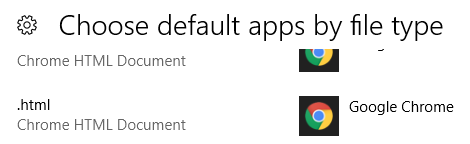
However html files are opening with chrome since chrome has been set as the default app for html files.

enter image description here

Why is ftype giving me iexplorer when indeed the program opens with chrome?

3
  • 3
    Just a addition: Even though the Regkey HKEY_CURRENT_USER\Software\Microsoft\Windows\CurrentVersion\Explorer\FileExts\.html\OpenWithList\a points to firefox.exe, ftype shows the internet-explorer. Would be interesting to know where ftype gets it informations from. Commented Aug 6, 2018 at 21:18
  • 1
    Seems that ftype read this key HKEY_CLASSES_ROOT\htmlfile\shell\open\command and prints the default value that is registred there Commented Aug 6, 2018 at 21:28
  • There's also an xml file in the windows directory for new profiles. That hash protected key is why you get those annoying "apps defaults reset" after doing sysprep on an existing profile. Commented Apr 1, 2020 at 16:43

3 Answers 3

13

It seems that ftype and assoc are pretty useless on systems running Windows 8 or later.

This is due to the fact that Microsoft decided in Windows 8 that users should be able to set default programs only via the built in GUI. This probably was due to security reasons and trouble with applications hijacking file type associations.

Therefore a new registry key was introduced and Windows now writes the user choice to

HKEY_CURRENT_USER\Software\Microsoft\Windows\CurrentVersion\Explorer\FileExts\<extension>\UserChoice

The key contains a Prog-Id and a Hash Value. The correct Hash value proves that the UserChoice ProgId value was set by the user, and not by any other application. If the hash is invalid, windows will reset the user choice to the default application.

The ftype command however is not aware of the above registry key.

It reads the HKCR\htmlfile\shell\open\command\(Default) registry key and prints out the result.

Therefore the results of the ftype command therefore are not usuable to determine which application is associated with a specific file extension.

Sign up to request clarification or add additional context in comments.

4 Comments

CMD's assoc and ftype commands read from HKLM\Software\Classes, not the HKCR merged view. This has always been potentially wrong given per-user file associations assigned in "HKCU\Software\Classes", which take precendence over system associations. There are also few other registry keys where default associations are defined, which these commands also do not include. The only way to determine the association without reimplmenting the shell's search is to simply ask the shell via AssocQueryString. Possibly PowerShell can provide this information.
Thank you! Using AssocQueryString is a good solution. I pinvoked it from c# - works. Wrapping it into powershell is a bit cumbersome but also works. I also run process monitor to verify that ftype indeed is reading hkcr and not hklm - which it does on my machine - but regardless from where exactly ftype reads, it is (sadly) not giving correct information about the real file type association.
Process Monitor is telling a little lie. It works at the kernel level, and the implementation of the HKCR merged view is in the user-mode registry API. Whenever it sees "[HKLM/HKCU]\Software\Classes" accessed, it simply reports this as HKCR. You can test this with reg query HKLM\Software\Classes\batfile. You'll see it reported as "HKCR\batfile". My claim was based on reading the disassembled code of CMD's internal AssocWork and FtypeWork functions, as well inspecting the arguments passed to the NtOpenKeyEx syscall.
I looked through the HKCU extensions and the HKCR, deleting the UserChoice subkeys there, but it didn't work. The hint about looking into HKCR below .extensions to the file type name without a dot (then shell and open) is what fixed it for me.
5

As mentioned by Eryk Sun, you can get it with AssocQueryString. Here's a powershell implementation as he mentioned mostly derived from this: http://pinvoke.net/default.aspx/shlwapi.AssocQueryString

$Signature = @"
using System;
using System.Runtime.InteropServices;
using System.Text;
    public static class Win32Api
    {

        [DllImport("Shlwapi.dll", SetLastError = true, CharSet = CharSet.Auto)]
        static extern uint AssocQueryString(AssocF flags, AssocStr str, string pszAssoc, string pszExtra,[Out] System.Text.StringBuilder pszOut, ref uint pcchOut);


        public static string AssocQueryString(string extension)
        {
            return AssocQueryString(AssocF.None, AssocStr.Executable, extension);
        }

        internal static string AssocQueryString(AssocF assocF, AssocStr association, string assocString)
        {
            uint length = 0;
            uint ret = AssocQueryString(assocF, association, assocString, null, null, ref length);
            if (ret != 1) //expected S_FALSE
            {
                return null;
                //throw new InvalidOperationException("Could not determine associated string");
            }

            var sb = new System.Text.StringBuilder((int) length); //(length-1) will probably work too as null termination is added
            ret = AssocQueryString(assocF, association, assocString, null, sb, ref length);
            if (ret != 0) //expected S_OK
            {
                return null;
                //throw new InvalidOperationException("Could not determine associated string");
            }

            return sb.ToString();
        }


        [Flags]
        internal enum AssocF : uint
        {
            None = 0,
            Init_NoRemapCLSID = 0x1,
            Init_ByExeName = 0x2,
            Open_ByExeName = 0x2,
            Init_DefaultToStar = 0x4,
            Init_DefaultToFolder = 0x8,
            NoUserSettings = 0x10,
            NoTruncate = 0x20,
            Verify = 0x40,
            RemapRunDll = 0x80,
            NoFixUps = 0x100,
            IgnoreBaseClass = 0x200,
            Init_IgnoreUnknown = 0x400,
            Init_FixedProgId = 0x800,
            IsProtocol = 0x1000,
            InitForFile = 0x2000,
        }

        internal enum AssocStr
        {
            Command = 1,
            Executable,
            FriendlyDocName,
            FriendlyAppName,
            NoOpen,
            ShellNewValue,
            DDECommand,
            DDEIfExec,
            DDEApplication,
            DDETopic,
            InfoTip,
            QuickTip,
            TileInfo,
            ContentType,
            DefaultIcon,
            ShellExtension,
            DropTarget,
            DelegateExecute,
            SupportedUriProtocols,
            Max,
        }
    }
"@
Add-Type -TypeDefinition $Signature
[Win32Api]::AssocQueryString(".docx")

Comments

0

I found that if I rename or delete a file association in HKEY_CURRENT_USER\Software\Microsoft\Windows\CurrentVersion\Explorer\FileExts\<extension>\UserChoice then I can get Windows to look at the ftype/assoc definitions and work as I want it.

The problem with the UserChoice key is, that I cannot run perl on .pl extension as I can with ftype/assoc.

E.g. I use the setup below to run my perl programs with .pl extensions:

>assoc .pl  
.pl=Perl  
>ftype perl  
perl="C:\Perl64\bin\perl.exe" "%1" %*  

Comments

Your Answer

By clicking “Post Your Answer”, you agree to our terms of service and acknowledge you have read our privacy policy.

Start asking to get answers

Find the answer to your question by asking.

Ask question

Explore related questions

See similar questions with these tags.