19

This question relates to

I'm asking in here because I believe the SO community might have a way to fix this behavior.

So I like to set the background color of a ScrollArea to either being transparent or to a custom background image as it will contain some banners. I got it running in the Qt Creator (Designer) already! :-):

Qt Creator sample

But when deploying the app to the simulator it won't work, the are stays gray, dark gray:

Emulator sample

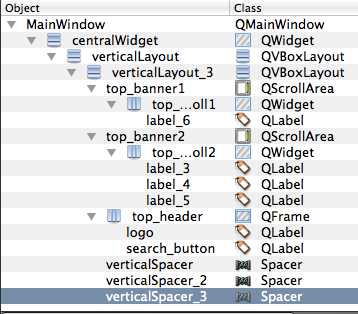
Here is my layout tree:

Layout Tree

And here is the stylesheet I'm using (attached & set to the MainWindow):

QMainWindow {
    background: transparent url(:/ui/designs/images_from_android/bg_plain_empty.png) top left;
}
QWidget#centralWidget {
    background-color: transparent;
}
QPushButton {
    color: red;
    border: 1px solid green;
}
QFrame#top_header {
    background: transparent url(:/ui/designs/images_from_android/bg_title_bar_landscape.png) top left repeat-x;
}
QWidget#top_banner_scroll1,
QWidget#top_banner_scroll2 {
    background: transparent url(:/ui/designs/images_from_android/stripe_bg.png) top left repeat-x;
}

This is quite puzzling. And as Qt Designer is showing me the proper design...

0

4 Answers 4

29

Use the stylesheet

QScrollArea { background: transparent; }
QScrollArea > QWidget > QWidget { background: transparent; }
QScrollArea > QWidget > QScrollBar { background: palette(base); }

To understand this lets asume a similar but simplyfied layout:

scrollarea            QScrollArea
  + scrollareaContent QWidget
      + label         QLabel

Interestingly there are two widgets with an non-transparent background. The first is the scrollarea itself (made transparent with the first line of the stylesheet).

The other one (which I didn't expect) is scrollareaContent which gets addressed with the second line. There the first QWidget is the private viewport of the QScrollArea which could not be accessed directly. The other one is the scrollareaContent. This approach should make all QScrollAreas transparent without affecting any of the other widgets.

UPDATE: I added a third line to the stylesheet which prevents the scrollbars from becoming transparent as they are also QWidgets two levels below QScrollArea.

Sign up to request clarification or add additional context in comments.

6 Comments

+1 Thanks! the syntax QScrollArea > QWidget > QWidget helped me setting also background-color!
This breaks the scrollbar's colors. Jadamec's answer below seems to be correct.
In Qt 5.6.2 I managed to make everything but scrollbars transparent with the following (order matters!): setStyleSheet("QScrollArea > QWidget > QScrollBar { background: palette(base); }"); _graphicsView->setStyleSheet("background: transparent");
what's _graphicsView? @kambala
@isanae Apparently, by setting the background of the scrollbar to any integer, it will display the default one again. (QScrollArea > QWidget > QScrollBar { background: <any integer>; })
|
7

Using the following stylesheets I was able to make the scroll area transparent, while keeping the default background color for scrollbars:

scrollArea.setStyleSheet("QScrollArea {background-color:transparent;}");
scrollAreaContents.setStyleSheet("background-color:transparent;");

1 Comment

This makes the context menus black on the widget. The CSS on the contents widget (the second line) should be constrained to that widget only by using its ID (from the objectName property). If the widget is named scrollAreaContents, then it should be #scrollAreaContents { background-color:transparent; }.
4

Can you try scrollArea.setStyleSheet("background-color:transparent;"); It works for me.

3 Comments

though that will make all children transparent that have no specialized stylesheet (thoughthough one could pack the children in some other container which has the right stylesheets)
Yes, childern will inherit the parent's stylesheet if they don't have their own stylesheet.
Johannes answer works correctly without affecting all children within the scroll area.
0

Shouldn't you be setting styles to QScrollArea#top_banner1 and QScrollArea#top_banner2?

You're currently selecting the viewport QWidgets and, to my experience, pure QWidgets always have transparent backgrounds and do not support styling. Thus, if the scroll area has a color, it will show through.

PS. Neat styling!

Comments

Your Answer

By clicking “Post Your Answer”, you agree to our terms of service and acknowledge you have read our privacy policy.

Start asking to get answers

Find the answer to your question by asking.

Ask question

Explore related questions

See similar questions with these tags.