Tag Archives: Sql Server 2016

JSON_QUERY Function in Sql Server 2016

JSON_QUERY is one of the new JSON function introduced in Sql Server 2016 to query the JSON data. JSON_QUERY basically returns the JSON fragment (i.e. JSON object or an array) from the input JSON string from the specified JSON path.

SYNTAX:

JSON_QUERY ( json_string,  json_path )

WHERE:

json_string is the JSON string from which the JSON fragment will be extracted.

json_path is the location of the JSON string in the json_string. Within json_path we can specify the path mode, it can be lax or strict. Lax is the default path mode, if json_path is invalid (i.e. it is not present in the json_string) then it returns null, but if path mode is strict it will raise an error.

This function will return error even in the scenario if the specified json_path is resulting in a scalar value other than the JSON object or array. Where as JSON_VALUE works the other way, it returns an error in case the JSON path is

[ALSO READ]:

Let us understand JSON_QUERY function with extensive list of examples:

Example 1: In this example let us try to get the Hobbies array using the JSON_QUERY function

DECLARE @json_str NVARCHAR(MAX) = 
 '{"Id":1,"Name":"Basavaraj",
		"Hobbies":["Blogging","Cricket"]}'
SELECT JSON_QUERY(@json_str,'$.Hobbies') Hobbies

RESULT:
JSON_QUERY Sql Example 1 1

Here in the json_path the $ symbol implies the json_string and $. Hobbies means Hobbies property in the json_string at the root level.

Let us try doing the same using the JSON_VALUE function

DECLARE @json_str NVARCHAR(MAX) = 
 '{"Id":1,"Name":"Basavaraj",
		"Hobbies":["Blogging","Cricket"]}'
SELECT JSON_VALUE(@json_str,'$.Hobbies') Hobbies

RESULT:
JSON_QUERY Sql Example 1 2

From the result it is clear that JSON_VALUE function is not for reading the JSON object or array, instead it is for reading the scalar JSON values like string, integer etc.

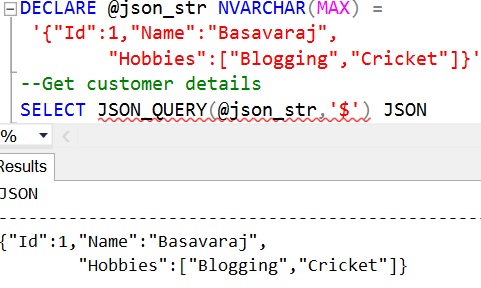
Example 2: Try to get the complete JSON string from the root

DECLARE @json_str NVARCHAR(MAX) = 
 '{"Id":1,"Name":"Basavaraj",
		"Hobbies":["Blogging","Cricket"]}'
--Get customer details
SELECT JSON_QUERY(@json_str,'$') JSON
GO

RESULT:
JSON_QUERY Sql Example 2

Example 3: Try to get a JSON scalar value (i.e. non-JSON object or array)

DECLARE @json_str NVARCHAR(MAX) = 
 '{"Id":1,"Name":"Basavaraj",
		"Hobbies":["Blogging","Cricket"]}'
SELECT JSON_QUERY(@json_str,'$.Name') Name

RESULT:
JSON_QUERY Sql Example 3
[ALSO READ]:lax and strict JSON Path modes in Sql Server 2016
Example 4: lax and strict JSON path modes in JSON_QUERY

Let us try to re-execute the example 3 by setting the JSON path mode as strict

DECLARE @json_str NVARCHAR(MAX) = 
 '{"Id":1,"Name":"Basavaraj",
		"Hobbies":["Blogging","Cricket"]}'
SELECT JSON_QUERY(@json_str,'strict$.Name') Name

RESULT:

Msg 13608, Level 16, State 2, Line 4
Property cannot be found in specified path.

Let us try executing the above query by explicitly specifying the default JSON path mode lax

DECLARE @json_str NVARCHAR(MAX) = 
 '{"Id":1,"Name":"Basavaraj",
		"Hobbies":["Blogging","Cricket"]}'
SELECT JSON_QUERY(@json_str,'lax$.Name') Name

RESULT:
JSON_QUERY Sql Example 4 2
Example 5: In this example try to read on of the array element which in-turn is not a JSON object or an array

DECLARE @json_str NVARCHAR(MAX) = 
 '{"Id":1,"Name":"Basavaraj",
		"Hobbies":["Blogging","Cricket"]}'
SELECT JSON_QUERY(@json_str,'$.Hobbies[1]') Hobby

RESULT:
JSON_QUERY Sql Example 5 1

Try to execute the above query using the JSON_VALUE function instead of JSON_QUERY function

DECLARE @json_str NVARCHAR(MAX) = 
 '{"Id":1,"Name":"Basavaraj",
		"Hobbies":["Blogging","Cricket"]}'
SELECT JSON_VALUE(@json_str,'$.Hobbies[1]') Hobby

RESULT:
JSON_QUERY Sql Example 5 2

From these examples it is clear that we can use the JSON_QUERY function to extract a JSON object or an array only, but not for the scalar values like string, integer etc.

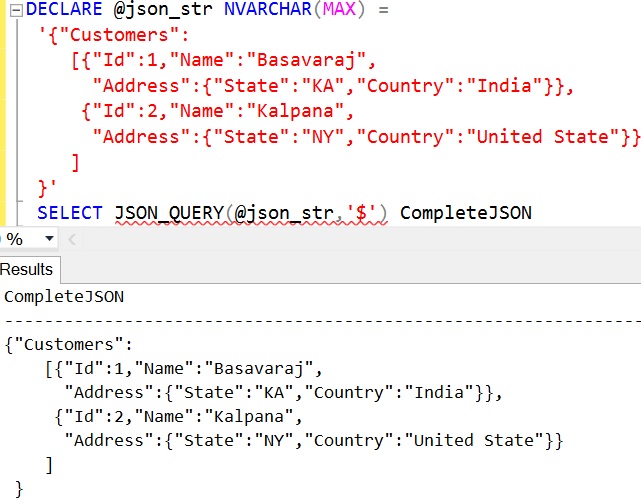
Example 6: Try to extract complete JSON from the JSON string

DECLARE @json_str NVARCHAR(MAX) = 
 '{"Customers":
	[{"Id":1,"Name":"Basavaraj",
	  "Address":{"State":"KA","Country":"India"}},
	 {"Id":2,"Name":"Kalpana",
	  "Address":{"State":"NY","Country":"United State"}}
	]
 }'
 SELECT JSON_QUERY(@json_str,'$') CompleteJSON

RESULT:
JSON_QUERY Sql Example 6

Example 7: In this example try to extract the Customers array

DECLARE @json_str NVARCHAR(MAX) = 
 '{"Customers":
	[{"Id":1,"Name":"Basavaraj",
			"Address":{"State":"KA","Country":"India"}},
	 {"Id":2,"Name":"Kalpana",
			"Address":{"State":"NY","Country":"United State"}}
	]
 }'
 SELECT JSON_QUERY(@json_str,'$.Customers') CustomersArray

RESULT:
JSON_QUERY Sql Example 7

Example 8: In this example extract the first customer JSON object

DECLARE @json_str NVARCHAR(MAX) = 
 '{"Customers":
	[{"Id":1,"Name":"Basavaraj",
			"Address":{"State":"KA","Country":"India"}},
	 {"Id":2,"Name":"Kalpana",
			"Address":{"State":"NY","Country":"United State"}}
	]
 }'
 SELECT JSON_QUERY(@json_str,'$.Customers[0]') CustomerObject

RESULT:
JSON_QUERY Sql Example 8

Example 9: In this example try to extract the first customer’s address object

DECLARE @json_str NVARCHAR(MAX) = 
 '{"Customers":
	[{"Id":1,"Name":"Basavaraj",
			"Address":{"State":"KA","Country":"India"}},
	 {"Id":2,"Name":"Kalpana",
			"Address":{"State":"NY","Country":"United State"}}
	]
 }'
 SELECT JSON_QUERY(@json_str,'$.Customers[0].Address') AddressObject

RESULT:
JSON_QUERY Sql Example 9

[ALSO READ]:

JSON_VALUE Function in Sql Server 2016

JSON_VALUE is one of the new JSON scalar function introduced in Sql Server 2016. This function returns the scalar value from the input JSON text from the specified JSON path location.

SYNTAX:

JSON_VALUE ( json_string,  json_path )

WHERE:

json_string is the JSON string from which the scalar value will be extracted.

json_path is the location of the scalar value in the json_string. Within json_path we can specify the path mode, it can be lax or strict. Lax is the default path mode, if json_path is invalid (i.e. it is not present in the json_string) then it returns null, but if path mode is strict it will raise an error.

[ALSO READ]:

Let us understand JSON_VALUE function with extensive list of examples:

Basic JSON_VALUE function examples

Example 1: Basic example where we are trying to get FirstName from a JSON string

SELECT 
 JSON_VALUE('{"FirstName":"Basavaraj","Last Name":"Biradar"}',
					'$.FirstName') AS 'First Name'

RESULT:
JSON_VALUE Sql Example 1

Here in the json_path the $ symbol implies the json_string and $.FirstName means FirstName property in the json_string at the root level.

Example 2: Getting FirstName JSON property value which is not at the root level

SELECT JSON_VALUE(
 '{"Name":{"FirstName":"Basavaraj","Last Name":"Biradar"}}',
					'$.Name.FirstName') AS 'First Name'

RESULT:
JSON_VALUE Sql Example 2

Here in this example FirstName property is not at the root level instead it is in the Name object, because of that we need to specify the path as ‘$.Name.FirstName’ instead of just ‘$.FirstName’ like the example 1.

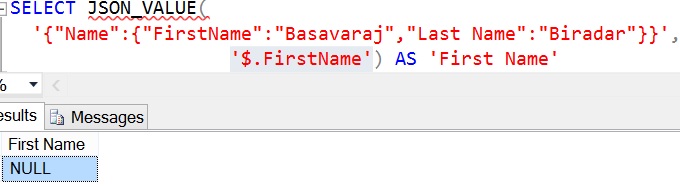
Example 3: Repeat the example 2, but specify the path as in example one. Basically, the idea of this example is to check whether specifying the path like $.PropertyName searches the PropertyName anywhere in the JSON string or just at the root level

SELECT JSON_VALUE(
  '{"Name":{"FirstName":"Basavaraj","Last Name":"Biradar"}}',
					'$.FirstName') AS 'First Name'

RESULT:
JSON_VALUE Sql Example 3

From the result it is clear that, specifying the JSON path like $.PropertyName, just tries to locate the PropertName just at the root level, in otherwords JSON path is the exact location of the string.

Example 4: This example explains that the JSON path expression is case sensitive

SELECT JSON_VALUE('{"name":"Basavaraj"}','$.NAME') AS Name

RESULT:
JSON_VALUE Sql Example 4 1

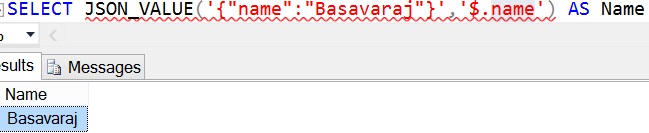
From the result it is clear that the JSON path is case sensitive. Even though the JSON sting has the property name but the response returned is NULL because the property mentioned in the JSON path is in upper case where as in the JSON string it is in lower case

Let us try the above example by specifying the JSON path in the same case as that in the JSON string

SELECT JSON_VALUE('{"name":"Basavaraj"}','$.name') AS Name

RESULT:
JSON_VALUE Sql Example 4 2

Example 5: This example explains how to specify a JSON String property name with spaces in it in the JSON path expression

Let us try to fetch the JSON property Last Name value, where this property name has an empty space in it:

SELECT JSON_VALUE(
	'{"Last Name":"Basavaraj"}','$.Last Name') AS 'Last Name'

RESULT:

Msg 13607, Level 16, State 4, Line 1
JSON path is not properly formatted. Unexpected character found at position 7.

In case if the JSON property name has a space in it, then while specifying it in the JSON path we need to specify property name by enclosing it in the double quotes.

Let us re-write the query and try now

SELECT JSON_VALUE(
  '{"Last Name":"Basavaraj"}','$."Last Name"') AS 'Last Name'

RESULT:
JSON_VALUE Sql Example 5 2

Advanced JSON_VALUE function examples

Example 1: Reading values from JSON object where one of its property is an Array (i.e. [ , ])

DECLARE @json_str NVARCHAR(MAX) = 
 '{"Id":1,"Name":"Basavaraj",
		"Hobbies":["Blogging","Cricket"]}'
SELECT JSON_VALUE(@json_str,'$.Name') Name,
	JSON_VALUE(@json_str,'$.Hobbies[0]') Hobby1,
	JSON_VALUE(@json_str,'$.Hobbies[1]') Hobby2

RESULT:
JSON_VALUE Sql Advance Example 1

Example 2: Trying to get a non-scalar value. In the below example trying to get the value of a property which is an array

DECLARE @json_str NVARCHAR(MAX) = 
 '{"Id":1,"Name":"Basavaraj",
		"Hobbies":["Blogging","Cricket"]}'
SELECT JSON_VALUE(@json_str,'$.Hobbies') Hobbies

RESULT:
JSON_VALUE Sql Advance Example 2

From the result it is clear that if the JSON Path is pointing to a non-scalar value like an array, sub JSON object etc will return a NULL value or an error if PATH mode is strict. In this example the JSON path is pointing to an array [“Blogging”,”Cricket”] , because of this JSON_VALUE function returning a NULL value

Example 3: Reading JSON property value from a JSON object where Customers property is an array of JSON object (i.e. [{},{}])

DECLARE @json_str NVARCHAR(MAX) = 
 '{"Customers":
	[{"Id":1,"Name":"Basavaraj",
			"Address":{"State":"KA","Country":"India"}},
	 {"Id":2,"Name":"Kalpana",
			"Address":{"State":"NY","Country":"United State"}}
	]
 }'
--Get first customer details
SELECT 
 JSON_VALUE(@json_str,'$.Customers[0].Name') Name,
 JSON_VALUE(@json_str,'$.Customers[0].Address.Country') Country
 --Get second customer details
SELECT 
 JSON_VALUE(@json_str,'$.Customers[1].Name') Name,
 JSON_VALUE(@json_str,'$.Customers[1].Address.Country') Country

RESULT:
JSON_VALUE Sql Advance Example 3

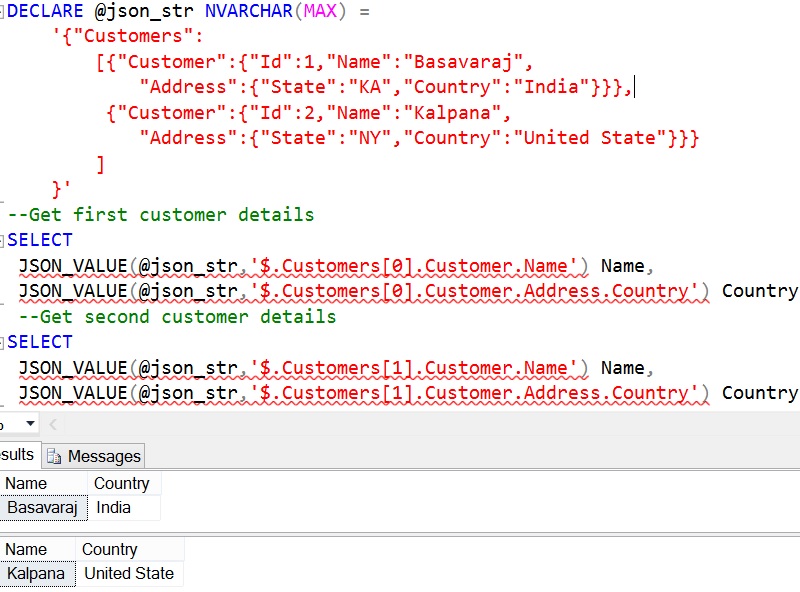
Example 4: A modified version of the example 3

DECLARE @json_str NVARCHAR(MAX) = 
	'{"Customers":
		[{"Customer":{"Id":1,"Name":"Basavaraj",
			"Address":{"State":"KA","Country":"India"}}},
		 {"Customer":{"Id":2,"Name":"Kalpana",
			"Address":{"State":"NY","Country":"United State"}}}
		]
	}'
--Get first customer details
SELECT 
 JSON_VALUE(@json_str,'$.Customers[0].Customer.Name') Name,
 JSON_VALUE(@json_str,
   '$.Customers[0].Customer.Address.Country') Country
 --Get second customer details
SELECT 
 JSON_VALUE(@json_str,'$.Customers[1].Customer.Name') Name,
 JSON_VALUE(@json_str,
   '$.Customers[1].Customer.Address.Country') Country

RESULT:
JSON_VALUE Sql Advance Example 4

[ALSO READ]:

DROP IF EXISTS Statement in Sql Server 2016

In Sql Server 2016, IF EXISTS is the new optional clause introduced in the existing DROP statement. Basically, it checks the existence of the object, if the object does exists it drops it and if it doesn’t exists it will continue executing the next statement in the batch. Basically it avoids writing if condition and within if condition writing a statement to check the existence of the object.

Syntax:

DROP OBJECT_TYPE [ IF EXISTS ] OBJECT_NAME

WHERE: OBJECT_TYPE like Table, Procedure, View, Function, Database, Trigger, Assembly, Sequence, Index etc.

IF EXISTS: It is an optional clause and if it is mentioned in the DROP statement then it checks the existence of the object, if it exists it will drop otherwise continues executing the next statement in the block without raising any issues.

Let us understand this new IF EXISTS clause in the DROP statement with an extensive list of examples. To demonstrate this clause let us first create a sample Database with a Table and a Stored Procedure.

CREATE DATABASE SqlHintsDemoDB
GO
USE SqlHintsDemoDB
GO
CREATE TABLE dbo.Customers  (Id INT, Name Nvarchar(50))
GO
CREATE PROCEDURE dbo.WelcomeMessage
AS
	SELECT 'Welcome to Sql Server'
GO

DROP Stored Procedure IF EXISTS

[ALSO READ] How to check if a Stored Procedure exists

In Sql Server 2016 we can write a statement like below to drop a Stored Procedure if exists.

DROP PROCEDURE IF EXISTS dbo.WelcomeMessage

DROP PROCEDURE IF EXISTS

If the stored procedure doesn’t exists it will not raise any error, it will continue executing the next statement in the batch. Let’s try to re-drop the stored procedure WelcomeMessage which is already dropped.

DROP PROCEDURE IF EXISTS Sql Server 2016

From the result it is clear that it will not raise any error if the stored procedure doesn’t exists, it will continue executing the next statement in the batch.

In previous versions of Sql Server we use statement like below to drop the stored procedure if exists.

IF EXISTS(SELECT 1 FROM sys.procedures 
          WHERE Name = 'WelcomeMessage')
BEGIN
    DROP PROCEDURE dbo.WelcomeMessage
END

You can go through the article How to check if a Stored Procedure exists to see various options in the previous versions of Sql Server to check for the existence of a Stored Procedure.

DROP TABLE IF EXISTS

[ALSO READ] How to check if a Table exists

In Sql Server 2016 we can write a statement like below to drop a Table if exists.

DROP TABLE IF EXISTS dbo.Customers

DROP TABLE IF EXISTS

If the table doesn’t exists it will not raise any error, it will continue executing the next statement in the batch. Let’s try to re-drop the Table dbo.Customers which is already dropped.

DROP TABLE IF EXISTS Sql Server 2016

From the result it is clear that it will not raise any error if the Table doesn’t exists, it will continue executing the next statement in the batch.

In previous versions of Sql Server we use statement like below to drop the Table if exists.

IF EXISTS(SELECT 1 FROM sys.Tables 
          WHERE  Name = N'Customers' AND Type = N'U')
BEGIN
  DROP TABLE dbo.Customers
END

You can go through the article How to check if a Table exists to see various options in the previous versions of Sql Server to check for the existence of a Table.

DROP DataBase IF EXISTS

[ALSO READ] How to check if a Database exists

In Sql Server 2016 we can write a statement like below to drop a DataBase if exists.

USE MASTER
GO
DROP DATABASE IF EXISTS SqlHintsDemoDB

DROP DATABASE IF EXISTS

If the Database doesn’t exists it will not raise any error, it will continue executing the next statement in the batch. Let’s try to re-drop the Database SqlHintsDemoDB which is already dropped.

DROP DATABASE IF EXISTS Sql 2016

From the result it is clear that, it will not raise any error if the Database doesn’t exists, it will continue executing the next statement in the batch.

In previous versions of Sql Server we use statement like below to drop the Database if exists.

IF DB_ID('SqlHintsDemoDB') IS NOT NULL
BEGIN
    DROP DATABASE SqlHintsDemoDB
END

You can go through the article How to check if a Database exists to see various options in the previous versions of Sql Server to check for the existence of a Database.

[ALSO READ]: