Filtered Index (i.e. Index with where clause) is one of the new feature introduced in Sql Server 2008. It is a non-clustered index, which can be used to index only subset of the records of a table. As it will have only the subset of the records, so the storage size will be less and hence they perform better from performance perspective compared to the classic non-clustered indexes.
Before using filtered index I strongly recommend everyone to go through the article INSERT/UPDATE failed because the following SET options have incorrect settings: ‘QUOTED_IDENTIFIER’. Basically, adding a filtered index on a table may cause the existing working stored procedure to fail if the stored procedure was not created with a setting which doesn’t meet the filtered index prerequisites.
Let us understand filtered index with examples:
Example 1:
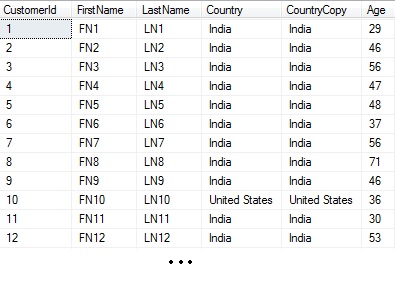
Let us first create a customer table with hundred thousand records as shown in the below image by the following script. Note Customer tables Country and CountryCopy column type and values are same. And also every tenth record has the Country/CountryCopy column value as United States and rest of the records column value as India. Also the age column value between 18 to 75 years.
CREATE DATABASE SqlHintsFilteredIndexDemo
GO
USE SqlHintsFilteredIndexDemo
GO
CREATE TABLE dbo.Customer(
CustomerId      INT NOT NULL PRIMARY KEY IDENTITY(1,1),
FirstName       VARCHAR(50) ,
LastName        VARCHAR(50),
Country         VARCHAR(50),
CountryCopy     VARCHAR(50),
Age				INT)
GO
SET NOCOUNT ON
GO
--Populate 100K records, where every 10th record record
--has country as United States and rest of the
--records have country as India
DECLARE @i INT = 1, @istring VARCHAR(20), @Country VARCHAR(50)
WHILE(@i<=100000)
BEGIN
 IF(@i % 10 =0)
  SET @Country = 'United States'
 ELSE
  SET @Country = 'India'

 SET @istring = CAST(@i AS VARCHAR(20))

 INSERT INTO dbo.Customer(FirstName, LastName,
                  Country, CountryCopy, Age)
 VALUES ('FN' + @istring, 'LN' + @istring,@Country , @Country,
 ROUND(RAND(convert(varbinary, newid()))*57+18,0))--Age 18 to 75
 SET @i = @i +1
END
GO
Let us now create a classic non-clustered index on the Country column
CREATE NONCLUSTERED INDEX IX_Customer_Country
ON dbo.Customer(Country)
GO
Let us now create a filtered non-clustered index on the CountryCopy column
CREATE NONCLUSTERED INDEX IXF_Customer_CountryCopy
ON dbo.Customer(CountryCopy)
WHERE CountryCopy = 'United States'
GO
Now table has three indexes one is a clustered index created created on the CustomerId column as result of it being a primary key column, the Country column has classic non-clustered index IX_Customer_Country on it and the CountryCopy column has filtered non-clustered index IXF_Customer_CountryCopy on it. Let us now see how many number of rows each of these indexes has and also the size of these indexes using the below script:
SELECT I.name [Index Name],i.type_desc [Index Type],
 PS.row_count [Number of rows],
 PS.used_page_count [Used page count],
 PS.reserved_page_count [Reserved page count]
FROM sys.indexes I
 INNER JOIN sys.dm_db_partition_stats ps
  ON I.object_id = ps.object_id AND I.index_id = ps.index_id
WHERE I.object_id = OBJECT_ID('Customer')
RESULT:

So, from the above result it is clear that the number of records in the filtered index is equal to the number records in the table which matches to the filter criteria, so the filtered indexes requires less storage space and they perform better from performance perspective.
Now let us check by running below two queries and see how filtered and classic index perform from performance perspective:
--Filtered Index
SELECT COUNT(1) FROM dbo.Customer WITH(NOLOCK)
WHERE CountryCopy = 'United States'
GO
--Classic regular Index
SELECT COUNT(1) FROM dbo.Customer WITH(NOLOCK)
WHERE Country = 'United States'
GO
RESULT:

From the above result it is clear that the query which uses filtered index has a cost of 37% whereas the query which uses classic index has a cost of 63%. From this result it is clear that the query which uses filtered index performs better.
Let us drop the two non-clustered indexes created in this example by the following script:
DROP INDEX IX_Customer_Country ON dbo.Customer
GO
DROP INDEX IXF_Customer_CountryCopy ON dbo.Customer
GO
Example 2: This example explains the columns in the filter index’s filter criteria/expression doesn’t need to be a key column in the filtered index definition
If we know that the look-up on the Customer tables record by FirstName and LastName is always for the United States customers. Then in such a scenario, a filtered index like below is more suitable than having a regular non-clustered index.
CREATE INDEX IXF_CUSTOMER_FirstName_LastName
ON dbo.Customer(FirstName,LastName)
WHERE Country = 'United States'
GO
This index will only index the records whose country is ‘United States’ by FirstName and LastName. And also observe that the Country column is used in the filter criteria, but it is not a key column of the index.
Note: This index will not be used if country of the customer is not ‘United States’.
Example 3: Filter Criteria need to be part of the queries WHERE clause to force the usage of the Filtered Index
Let us try executing the below query and see whether it is using filtered index created in the previous example (i.e. example 2).
Note: For the customer with FirstName = ‘FN90000’ AND LastName = ‘LN90000’ the Country/CountryCopy column value is ‘United States’
SELECT *
FROM dbo.Customer WITH(NOLOCK)
WHERE FirstName = 'FN90000' AND LastName = 'LN90000'
RESULT

From the above result it is clear that query is not using the filtered index. Now let us add the filter index’s filter criteria in the queries WHERE clause and verify whether it is using the filtered index:
SELECT *
FROM dbo.Customer WITH(NOLOCK)
WHERE Country = 'United States'
 AND FirstName = 'FN90000' AND LastName = 'LN90000'
RESULT:
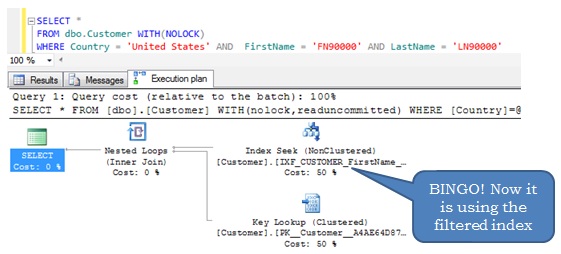
From the above examples it is clear that the filter index’s filter expression need to be part of the queries WHERE clause to force it’s usage.
Below result depicts the performance comparison of the above two queries (i.e. one which doesn’t use the filtered index and another one which uses the filtered index):

EXAMPLE 4: Whether I can specify the index hint for the query to force filtered index usage instead of writing the filter expression of the filtered index in the queries WHERE clause?
While going through Example 3, you may have thought instead of writing filter index expression in the queries WHERE clause, we would have specified the INDEX hint in the query to force it’s usage. Let us see whether this thought works:
SELECT *
FROM dbo.Customer WITH(NOLOCK,
        INDEX(IXF_CUSTOMER_FirstName_LastName))
WHERE FirstName = 'FN90000' AND LastName = 'LN90000'
RESULT:
Msg 8622, Level 16, State 1, Line 1
Query processor could not produce a query plan because of the hints defined in this query. Resubmit the query without specifying any hints and without using SET FORCEPLAN.
So, from the above result it is clear that we can’t force a filtered index usage by specifying the index hint, instead of it as explained in example 3 the WHERE clause of the query need to have filtered index’s filter expression.
EXAMPLE 5: Whether using a local variable instead of the constant of the filter expression of the filtered index’s in the queries WHERE clause still results in the usage of the filtered index?
As per Example 3, to force the filter index usage we need to write the filter index’s filter expression in the queries WHERE clause (i.e. Country = ‘United States’). Instead of directly specifying the country name ‘United States’ directly in the query, whether we can declare a local variable and assign it the country name and then use the local variable in the query. The below example demonstrates this use case scenario:
--Query with filter index's filter expressions value
--as a local variable in the WHERE clause
DECLARE @CountryName VARCHAR(50) = 'United States'
SELECT *
FROM dbo.Customer WITH(NOLOCK)
WHERE Country = @CountryName
 AND FirstName = 'FN90000' AND LastName = 'LN90000'
RESULT:

From the above query result it is clear that we can’t replace the constant of the filter expression of the filtered index in the queries where clause by a local variable.
Drop the index IXF_CUSTOMER_FirstName_LastName created in example 2 by the following script:
DROP INDEX IXF_CUSTOMER_FirstName_LastName ON dbo.Customer
EXAMPLE 6: Whether the WHERE clause of the query need to have the same constant expression as specified in the Filtered Index’s filter expression to force the filtered index usage.
Let us create a filtered index on the FirstName and LastName column with filter criteria as Age > 60.
CREATE INDEX IXF_CUSTOMER_FirstName_LastName
ON dbo.Customer(FirstName,LastName)
WHERE Age > 60
GO
Note: For the customer with FirstName = ‘FN88002’ AND LastName = ‘LN88002’ the age column value is 72.
Let us check whether the below query which has the same constant expression in the WHERE clause as in the filtered index’s filter expression forces the usage of the filtered index
SELECT *
FROM dbo.Customer WITH(NOLOCK)
WHERE Age > 60
 AND FirstName = 'FN88002' AND LastName = 'LN88002'
RESULT:
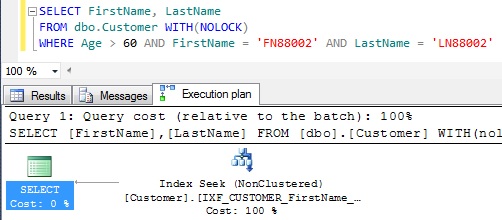
So, from the above example it is clear that if the queries WHERE clause has the same constant expression as the filtered index’s filter expression, then the filtered index is used.
Let us change the WHERE clauses Age > 60 condition to Age > 65 and see whether the query is still forcing the usage of filtered index.
SELECT FirstName, LastName
FROM dbo.Customer WITH(NOLOCK)
WHERE Age > 65
 AND FirstName = 'FN88002' AND LastName = 'LN88002'
RESULT:

From the above result the query is still using the filtered index when the WHERE clause Age > 60 condition is changed to Age > 65.
Now let us try to change the WHERE clauses Age > 65 condition to Age > 55 and see whether the query is still forcing the usage of filtered index.
SELECT FirstName, LastName
FROM dbo.Customer WITH(NOLOCK)
WHERE Age > 55
 AND FirstName = 'FN88002' AND LastName = 'LN88002'
RESULT:

From the above result it is clear that the query is not using the filtered index when the WHERE clause Age > 65 condition is changed to Age > 55.
So, the conclusion is: the constant expression specified in the queries WHERE clause should be same or subset of the filtered index’s filter expression to force the filtered index usage.
Will be continued with couple of more examples…


