Tag Archives: Sql Server

Introduction to Common Table Expression (a.k.a CTE) in Sql Server

This is the first article in the series of articles on Common Table Expression in Sql Server. Below are the other articles in this series:

Recursive CTE
Multiple CTEs in a Single Query
Nested Common Table Expressions

Introduction to Common Table Expression

Common Table expression (a.k.a CTE) is one of the new feature introduced in Sql Server 2005. CTE provides the structured way for writing the complex queries as a simple readable and maintainable queries. CTEs provides an alternative way of writing sub queries in a more readable and maintainable way.

CTEs are something like temporary named result sets, but they are not exactly as temporary table or table variable. CTEs doesn’t use the TempDB for maintaining the temporary named result set. And also the scope of the CTEs temporary named result set is to the immediate next SELECT, INSERT, UPDATE or DELETE statement only.

CTEs are like views, for views meta data is stored in the database but not for CTES. From this point of view we can call CTEs as a dynamic view or temporary view.

In most of the cases CTEs performance is on par with the existing sub queries, table variable or temp table approaches. The main thing with CTEs is, it apart from providing a mechanism to write simple readable and maintainable queries. It also provides a mechanism to write recursive queries. And the current recursion level supported by the recursive function or stored procedure is 32 level only, where as by default max recursion level which CTE is 100. But CTE provides an option to set a MAXRECURSION level value between 0 to 32,767 . Specifying it’s value as 0 means no limit, you agreed for a risk and server crash by a bugy query if any 🙂

CTE SYNTAX

[ WITH <common_table_expression> [ ,...n ] ]

<common_table_expression>::=
    expression_name [ ( column_name [ ,...n ] ) ]
    AS
    ( CTE_query_definition )

I think we had enough theory, let us jump on to the examples to understand all the above explained theory.

CTE Syntax explained by a very basic example

CTE in Sql Server

To demonstrate the CTE feature with extensive list of examples, let us create a demo database SqlHintsCTED with Employees table having the sample data as shown in the below image by the following script:
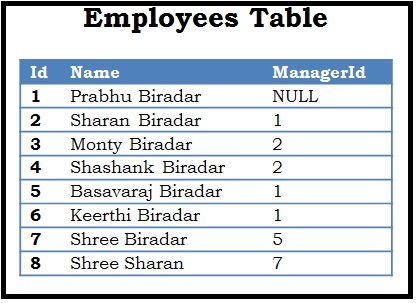
CTE Example Table
Script:

--Create demo database
CREATE DATABASE SqlHintsCTE
GO
USE SqlHintsCTE
GO
-- Create an Employees table.
CREATE TABLE dbo.Employees
( Id INT  PRIMARY KEY, Name NVARCHAR(50), ManagerId INT NULL)
GO
-- Populate Employees table with sample data
INSERT INTO dbo.Employees VALUES
 (1, 'Prabhu Biradar',NULL) ,(2, 'Sharan Biradar', 1)
,(3, 'Monty Biradar', 2), (4, 'Shashank Biradar', 2)
,(5, 'Basavaraj Biradar',1),(6, 'Keerthi Biradar',1)
,(7, 'Shree Biradar',5), (8,'Shree Sharan', 7)

Very basic CTE example, here skipped defining the optional CTE column_names

Below is an example of a very basic CTE, in this CTE example the optional CTE column_names are not specified. So, in this case the the column names specified in the CTE query_definition will be returned.

WITH DemoCTE
AS (SELECT Id, Name FROM dbo.Employees)
SELECT * FROM DemoCTE

RESULT:
Basic CTE Result

If CTE is not the first statement in the batch, then the previous statement to it Should be terminated with a semicolon.

Let us understand this with an example. In the below example we have PRINT statement before the CTE, let us see what is the result of executing the following script:

PRINT 'CTE Demo'
WITH CTESemicolon
AS (SELECT Id, Name FROM dbo.Employees WITH(NOLOCK))
SELECT * FROM CTESemicolon WHERE id = 2
GO

RESULT:

Msg 319, Level 15, State 1, Line 2
Incorrect syntax near the keyword ‘with’. If this statement is a common table expression, an xmlnamespaces clause or a change tracking context clause, the previous statement must be terminated with a semicolon.

To resolve this error let us terminate the PRINT statement with a Semicolon and see what is the result:

PRINT 'CTE Demo';
WITH CTESemicolonPrefix
AS (SELECT Id, Name FROM dbo.Employees WITH(NOLOCK))
SELECT * FROM CTESemicolonPrefix WHERE id = 2
GO

RESULT:
CTE Should be prefixed by Semicolon

From the above result it is clear that, if CTE is not the first statement in the batch of statements, then the previous statement to it must be terminated with a semicolon.

How to get all the Tables with or without an Identity column in Sql Server?

This article provides the script to find all the Tables with or without an Identity column

Tables with Identity column

We can write a query like below to get all the Tables with Identity column:

SELECT name 'Table with Identity column'
FROM SYS.Tables
WHERE OBJECTPROPERTY(object_id,'TableHasIdentity') = 1
      AND type = 'U'

Tables without Identity column

We can write a query like below to get all the Tables without Identity column:

SELECT name 'Table without Identity column'
FROM SYS.Tables
WHERE OBJECTPROPERTY(object_id,'TableHasIdentity') = 0
      AND type = 'U'

EXAMPLE

Let us understand the above scripts with an example. To understand this, let us create a demo database SqlHintsDemoDB with Customers table having an identity column and an Orders table without identity column.

CREATE DATABASE SqlHintsDemoDB
GO
USE SqlHintsDemoDB
GO
/*Let us create Customers table with Identity column.*/
CREATE TABLE dbo.Customers (
    CustomerId int IDENTITY (1, 1) 
              PRIMARY KEY CLUSTERED NOT NULL ,
    FirstName Varchar(50),
    LastName Varchar(50))
GO
/*Let us create Orders Table without and Identity column.*/
CREATE TABLE dbo.Orders (
    OrderId int NOT NULL ,
    CustomerId int NOT NULL ,
    CreationDT DATETIME NOT NULL)
GO

Now let us run the queries to get the list of all Tables with or without identity column and verify the result:

Sql List of Tables with or without Identity column

Difference between Len() and Datalength() functions in Sql Server

The LEN() and DATALENGTH() functions are there for completely different purpose. But it often confuses many in identifying which one to use when. The aim of this article is to clear all these confusions by presenting a comparative analysis of LEN() and DATALENGTH() Sql Serer functions.

[ALSO READ] Difference Between Sql Server VARCHAR and NVARCHAR Data Type

Below table lists out the comparative analysis between LEN() and DATALENGTH() Sql Server functions:

LEN() DATALENGTH()
DEFINITION
The LEN() Sql Server function returns the number of characters in the specified string expression The DATALENGTH() Sql Server function returns the number of bytes used/required to represent an expression
SYNTAX
LEN ( string_expression ) DATALENGTH ( expression )
INPUT PARAMETER
Input parameter is a string expression, it can be a constant or variable or column of character or binary data Input parameter is an expression of any data type
RETURN TYPE
bigint if expression is of the varchar(max), nvarchar(max) or varbinary(max) data types; otherwise, int bigint if expression is of the varchar(max), nvarchar(max) or varbinary(max) data types; otherwise int
EXAMPLE
SELECT LEN('Shree') AS 'LEN'

RESULT:
LEN

SELECT DATALENGTH('Shree') 
 AS 'DATALENGTH'

RESULT:
DATALENGTH

EXCLUDES TRAILING BLANK SPACES?
YES. LEN() function excludes the trailing blank spaces while calculating the number of characters in the specified string expressionEXAMPLE:

SELECT LEN('Shree     ')  
 AS 'LEN'

RESULT:
Sql LEN function Trailing Spaces

NO. DATALENGTH() function includes the trailing blank spaces while calculating the number of bytes used/required to represent an expressionEXAMPLE:

SELECT DATALENGTH('Shree     ') 
 AS 'DATALENGTH'

RESULT:
Sql DATALENGTH function Trailing Spaces

INPUT PARAMETER IS NULL?
LEN(NULL) is NULL
Sql LEN of NULL
DATALENGTH(NULL) is NULL
Sql DATALENGTH of NULL
WHEN INPUT IS A UNICODE (i.e. double byte) CHARACTER STRING CONSTANT
For LEN() function it doesn’t matter whether input is a single byte or double byte (i.e. unicode) charcter strings, it always counts the number of characters.
EXAMPLE:

SELECT LEN(N'Shree') AS
 'LEN of Unicode chars'

RESULT:
Sql LEN of Unicode Character Constant expression

Note: The prefix N for any character string denotes that the following charcter string is of Unicode or double byte type

As we know each character in the UNICODE character string requires two bytes of storage. So DATALENGTH of UNICODE character string will be equal to the number characters including spaces multiplied by 2.
EXAMPLE:

SELECT DATALENGTH(N'Shree') AS
 'DATALENGTH of Unicode chars'

RESULT:
Sql DATALENGTH of Unicode Character Constant expression

WHEN INPUT IS A DOUBLE BYTE VARIABLE (EX: NVARCHAR DATATYPE)
DECLARE @Name NVARCHAR(50) 
 = 'Shree'
SELECT LEN(@Name) AS
 'LEN of Unicode chars'

RESULT:
Sql LEN of Unicode Character Variable

DECLARE @Name NVARCHAR(50)
 = 'Shree'
SELECT DATALENGTH(@Name) AS
 'DATALENGTH of Unicode chars'

RESULT:
Sql DATALENGTH of Unicode Character Variable

WHEN INPUT IS A DOUBLE BYTE VARIABLE (EX: NVARCHAR DATATYPE) HAVING VALUE WITH TRAILING SPACES
DECLARE @Name NVARCHAR(50) 
 = 'Shree     '
SELECT LEN(@Name) AS
 'LEN of Unicode chars'

RESULT:
Sql LEN of Unicode Character Variable trailing spaces

DECLARE @Name NVARCHAR(50)
 = 'Shree     '
SELECT DATALENGTH(@Name) AS
 'DATALENGTH of Unicode chars'

RESULT:
Sql DATALENGTH of Unicode Character Variable trailing spaces

SUPPORTS TEXT, NTEXT AND IMAGE DATA TYPES?
NO.

DECLARE @Customer TABLE
(TextColumn TEXT)

INSERT INTO @Customer
VALUES('100')

SELECT LEN(TextColumn) AS 'LEN'
FROM #t1

RESULT:
Msg 8116, Level 16, State 1, Line 7
Argument data type text is invalid for argument 1 of len function.

YES.

DECLARE @Customer TABLE
(TextColumn TEXT)

INSERT INTO @Customer
VALUES('100')

SELECT DATALENGTH(textcolumn)
  AS 'DATALENGTH'
FROM #t1

RESULT:
DATALENGTH
———–
3

ALSO READ