Tag Archives: Sql Server

100 Frequently used queries in Sql Server – Part 1

This article lists out the fifty frequently used queries by the Sql Server Developers. The next article (i.e part 2 of this article) lists out another 50 frequently used queries by the Sql Server Developers. Hope you will like this article and if any of your commonly used query is not listed here, please let me know. I will definitely post it and we can help together to the Sql Server Developers community

1. How to check if a Database exists in Sql Server

We can use DB_ID() function like below to check if a database exists. Here in the below script we are checking the existence of the database SqlHintsDB. We can as well use the sys.databases Catalog View to check the existence of the database.

IF DB_ID('SqlHintsDB') IS NOT NULL
BEGIN
	PRINT 'Database Exists'
END

RESULT:
Database existence check using DB_ID() function

To know the various alternative approaches to check the existence of a database read: How to check if a Database exists in Sql Server

2. How to check if a Table exists in Sql Server

We can use the sys.Tables catalog view to check the existence of the Table. Here in the below script we are checking the existence of the table Customers

IF EXISTS(SELECT 1 FROM sys.Tables 
          WHERE  Name = N'Customers' AND Type = N'U')
BEGIN
  PRINT 'Table Exists'
END

RESULT
Check Table Existance Using Sys.Tables Catalog view

To know the various approaches to check the existence of a table read: How to check if a Table exists in Sql Server

3. How to check if a Temp table exists in Sql Server

Below script shows how we can check the existence of a Temporary Table. As we know temp tables are created in TempDB database, so we need to check the existence of the temp table in TempDB database. In the below script we are checking the existence of the temp table #TempTable

IF OBJECT_ID('TempDB.dbo.#TempTable') IS NOT NULL
BEGIN
  PRINT '#TempTable Temporary Table Exists'
END
GO

RESULT:
How to Check if Temporary Table exists in Sql Server

To understand this in detail with examples, you may like to read the article : How to check if Temp table exists in Sql Server?

4. How to check if a Stored Procedure exists in Sql Server

We can use the sys.procedures catalog view to check the existence of a stored proedure. Here in the below script we are checking the existence of the stored procedure GetCustomers

USE SqlHintsDemoDB
GO
IF EXISTS(SELECT 1 FROM sys.procedures 
          WHERE Name = 'GetCustomers')
BEGIN
	PRINT 'Stored Procedure Exists'
END

RESULT:
Check Stored Procedure Existence using sys.procedures

To know the various alternative approaches to check the existence of a stored procedure read: How to check if a Stored Procedure exists in Sql Server

5. How to check if a Function exists in Sql Server

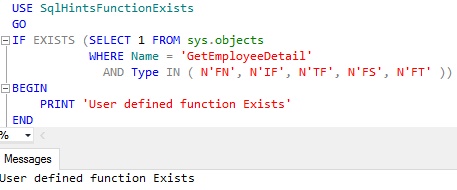
We can use the sys.objects catalog view to check the existence of a User Defined Function. Here in the below script we are checking the existence of the User Defined Function GetEmployeeDetail

USE SqlHintsFunctionExists
GO
IF EXISTS (SELECT 1 FROM sys.objects 
           WHERE Name = 'GetEmployeeDetail' 
             AND Type IN ( N'FN', N'IF', N'TF', N'FS', N'FT' ))
BEGIN
    PRINT 'User defined function Exists'
END

RESULT:
Function Exists Usig Sys Objects Example 1

To know the various alternative approaches to check the existence of a user defined function read: How to check if a Function exists in Sql Server

6. How to check if a VIEW exists in Sql Server

We can use the sys.views catalog view to check the existence of a View. Here in the below script we are checking the existence of the View vwGetCustomerInfo

IF EXISTS(SELECT 1 FROM sys.views 
     WHERE Name = 'vwGetCustomerInfo')
	BEGIN
		PRINT 'View Exists'
	END

RESULT:
Check-View-Existence-using-sys.views 1

To know various alternative approaches to check the existence of a View read: How to check if a VIEW exists in Sql Server

7. How to check if an Index exists in Sql Server

We can use sys.indexes catalog view to check the existence of a Clustered and Non-Clustered indexes. We can execute a query like below to check the existence of a Index IX_Customer_Id on the Customer table created with a default schema (i.e. dbo).

IF EXISTS (SELECT 1
			FROM sys.indexes I
				INNER JOIN sys.tables T
					ON I.object_id = T.object_id
				INNER JOIN sys.schemas S
					ON S.schema_id = T.schema_id
			WHERE I.Name = 'IX_Customer_Id' -- Index name
				AND T.Name = 'Customer' -- Table name
				AND S.Name = 'dbo') --Schema Name
BEGIN
	PRINT 'Index Exists!'
END

RESULT:
Check existence of a Clustered Index by using sys indexes catalog view

To know various alternative approaches to check the existence of a Index read: How to check if an Index exists in Sql Server

8. How to find all the tables with no indexes in Sql Server

We can write a query like below to get all the Tables in the Database that don’t have any indexes:

SELECT Name 'Tables without any Indexes'
FROM SYS.tables
WHERE OBJECTPROPERTY(OBJECT_ID,'TableHasIndex')=0

RESULT:
List_All_Tables_Without_Any_Indexes

To understand this in detail with examples, you may like to read the article: How to find all the tables with no indexes in Sql Server

9. How to find all the indexes that have included columns

We can write a query like below to get the name of all the indexes that have included columns in it and the name of the table to which the index belongs to:

SELECT DISTINCT T.Name 'Table Name',
		I.Name 'Index Name',
		I.type_desc 'Index Type',
		C.Name 'Included Column Name'
FROM sys.indexes I 
 INNER JOIN sys.index_columns IC 
  ON  I.object_id = IC.object_id AND I.index_id = IC.index_id 
 INNER JOIN sys.columns C 
  ON IC.object_id = C.object_id and IC.column_id = C.column_id 
 INNER JOIN sys.tables T 
  ON I.object_id = T.object_id 
WHERE is_included_column = 1
ORDER BY T.Name, I.Name

RESULT:
How_To_Find_All_Indexes_With_Included_Column

To understand this in detail with examples, you may like to read the article: How to find all the indexes that have included columns

10. How to find all the filtered indexes or all the tables having filtered indexes in Sql Server

We can write a query like below to get the name of all the filtered indexes or all the tables having filtered indexes in Sql Server:

SELECT DISTINCT T.Name 'Table Name',
  I.Name 'Filtered Index Name',
  I.Filter_Definition 'Filter Definition'
FROM sys.indexes I		
      INNER JOIN sys.tables T 
        ON I.object_id = T.object_id 
WHERE I.has_filter = 1
ORDER BY T.Name, I.Name

RESULT:
How_To_Find_All_Filtered_Indexes_Or_Tables_With_Filtered_Index

To understand this in detail with examples, you may like to read the article: How to find all the filtered indexes or all the tables having filtered indexes in Sql Server

[ALSO READ] A-Z of Filtered Indexes with examples in Sql Server

11. How to get all HEAP Tables or Tables without Clustered Index in Sql Server

A Table that doesn’t have a Clustered Index is referred to as a HEAP Table. We can write a query like below to get all the HEAP Tables or tables that doesn’t have Clustered Index:

SELECT T.Name 'HEAP TABLE'
FROM sys.indexes I		
	INNER JOIN sys.tables T 
		ON I.object_id = T.object_id 
WHERE I.type = 0 AND T.type = 'U'

RESULT:
List_all_HEAP_Tables_or_Tables_without_Clustered_Index

To understand this in detail with examples, you may like to read the article: How to get all HEAP Tables or Tables without Clustered Index in Sql Server

12. How to get all the Tables with Primary Key Constraint in Sql Server

We can write a query like below to get all the Tables with Primary key constraint:

SELECT T.name 'Table with Primary Key'
FROM SYS.Tables T
WHERE OBJECTPROPERTY(object_id,'TableHasPrimaryKey') = 1
      AND type = 'U'

To understand this in detail with examples, you may like to read the article: How to get all the Tables with or without Primary Key Constraint in Sql Server?

13. How to get all the Tables without Primary Key Constraint in Sql Server

We can write a query like below to get all the Tables without Primary key constraint:

SELECT T.name 'Table without Primary Key'
FROM SYS.Tables T
WHERE OBJECTPROPERTY(object_id,'TableHasPrimaryKey') = 0
      AND type = 'U'

To understand this in detail with examples, you may like to read the article: How to get all the Tables with or without Primary Key Constraint in Sql Server?

14. How to get all the Tables with Non-Clustered Indexes in Sql Server

We can write a query like below to get all the Tables with Non-Clustered indexes:

--List of all the Tables that have Non-Clustered Indexes
SELECT Name 'Tables with Non-Clustered Indexes'
FROM SYS.tables
WHERE OBJECTPROPERTY(OBJECT_ID,'TableHasNonclustIndex') = 1
		AND Type = 'U'

To understand this in detail with examples, you may like to read the article: How to get all the Tables with or without Non-Clustered Indexes in Sql Server?

15. How to get all the Tables without any Non-Clustered Indexes in Sql Server

We can write a query like below to get all the Tables without any Non-Clustered indexes:

--List of all the Tables with NO Non-Clustered Indexes
SELECT Name 'Tables without any Non-Clustered Indexes'
FROM SYS.tables
WHERE OBJECTPROPERTY(OBJECT_ID,'TableHasNonclustIndex') = 0
		AND Type = 'U'

To understand this in detail with examples, you may like to read the article: How to get all the Tables with or without Non-Clustered Indexes in Sql Server?

16. How to get all the Tables with an Identity column in Sql Server

We can write a query like below to get all the Tables with Identity column:

SELECT name 'Table with Identity column'
FROM SYS.Tables
WHERE OBJECTPROPERTY(object_id,'TableHasIdentity') = 1
      AND type = 'U'

To understand this in detail with examples, you may like to read the article: How to get all the Tables with or without an Identity column in Sql Server?

17. How to get all the Tables without an Identity column in Sql Server

We can write a query like below to get all the Tables without Identity column:

SELECT name 'Table without Identity column'
FROM SYS.Tables
WHERE OBJECTPROPERTY(object_id,'TableHasIdentity') = 0
      AND type = 'U'

To understand this in detail with examples, you may like to read the article: How to get all the Tables with or without an Identity column in Sql Server?

18. How to find all the Stored Procedures having a given text in it

We can write a script like below to get all the stored all the Stored Procedures having a given text in its definition. Here we are searching for the text SearchString in all the stored procedures

SELECT OBJECT_NAME(object_id), 
       OBJECT_DEFINITION(object_id)
FROM sys.procedures
WHERE OBJECT_DEFINITION(object_id) LIKE '%SearchString%'

To understand this in detail with examples, you may like to read the article: How to find all the Stored Procedures having a given text in it?

19. How to find all tables that have specified column name in Sql Server

We can use a script like below to find all the tables in the database that have column with specified name in it. Here we are searching for all the tables that have columns with a name having a text ColumnName in it.

SELECT SCHEMA_NAME(schema_id) + '.' + t.name AS 'Table Name'
FROM sys.tables t 
     INNER JOIN sys.columns c
        ON c.object_id = t.object_id
WHERE c.name like '%ColumnName%'
ORDER BY 'Table Name'

To understand this in detail with examples, you may like to read the article: How to find all tables that have specified column name in Sql Server?

20. How to find all dependencies of a table in Sql Server

We can use the Dynamic Management Function sys.dm_sql_referencing_entities to get all the entities in the current database that refer to the specified table. In this script we are trying to get the Employee tables dependencies

SELECT referencing_schema_name, referencing_entity_name, 
 referencing_id, referencing_class_desc
FROM sys.dm_sql_referencing_entities
             ('dbo.Employee', 'OBJECT')
GO

RESULT:
dm_sql_referencing_entities
Note: While specifying the table name please include schema name also, otherwise result will not display the dependencies.

To understand this in detail with examples, you may like to read the article: How to find all dependencies of a table in Sql Server?

21. How to find referenced/dependent objects (like Table, Function etc) of a Stored Procedure/Function in Sql Server

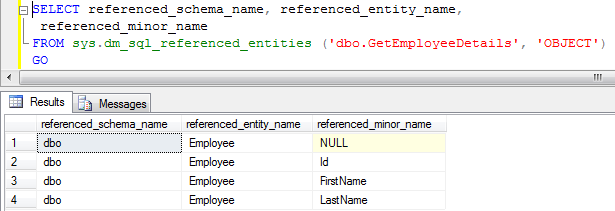
We can use the Dynamic Management Function sys.dm_sql_referenced_entities to get all the entities in the current database which are referenced by a stored procedure or function. Now we can use a script like below to find all the entities in the current database which are referenced by the stored procedure dbo.GetEmployeeDetails

SELECT referenced_schema_name, referenced_entity_name, 
 referenced_minor_name
FROM sys.dm_sql_referenced_entities
              ('dbo.GetEmployeeDetails', 'OBJECT')
GO

RESULT:
dm_sql_refererenced_entities
Note: While specifying the stored procedure name please include schema name also, otherwise referenced objects list will not be displayed.

To understand this in detail with examples, you may like to read the article: How to find referenced/dependent objects (like Table, Function etc) of a Stored Procedure/Function in Sql Server?

22. How to get first day of the previous quarter

--First day of the previous quarter
SELECT DATEADD(qq, DATEDIFF(qq, 0, GETDATE()) - 1, 0)

RESULT:
FirstDayofPreviousQuarter

23. How to get first day of the current quarter

--First day of the current quarter
SELECT DATEADD(qq, DATEDIFF(qq, 0, GETDATE()), 0) 

RESULT:
FirstDayofCurrentQuarter

24. How to get first day of the next quarter

--First day of the next quarter
SELECT DATEADD(qq, DATEDIFF(qq, 0, GETDATE()) + 1, 0) 

RESULT:
FirstDayofNextQuarter

25. How to get first day of the quarter for any given date

DECLARE @date DATETIME
SET @date = '07/28/2016'
SELECT DATEADD(qq, DATEDIFF(qq, 0, @date), 0) 

RESULT:
FirstDayofQuarterforAnyGivenDate

26. How to get last day of the previous quarter

--Last day of the previous quarter
SELECT DATEADD (dd, -1, 
           DATEADD(qq, DATEDIFF(qq, 0, GETDATE()), 0))

RESULT:
LastDayofPreviousQuarter

27. How to get last day of the current quarter

--Last day of the current quarter 
SELECT DATEADD (dd, -1, 
           DATEADD(qq, DATEDIFF(qq, 0, GETDATE()) +1, 0))

RESULT:
LastDayofCurrentQuarter

28. How to get last day of the next quarter

--Last day of the next quarter 
SELECT DATEADD (dd, -1, 
           DATEADD(qq, DATEDIFF(qq, 0, GETDATE()) +2, 0))

RESULT:
LastDayofNextQuarter

29. How to get last day of the quarter for any given date

DECLARE @date DATETIME = '07/28/2016'
SELECT DATEADD (dd, -1, 
           DATEADD(qq, DATEDIFF(qq, 0, @date) +1, 0))

RESULT:
LastDayofQuarterForAnyDate

30. How to get first day of the previous month

--First day of the previous month
SELECT DATEADD(mm, DATEDIFF(mm, 0, GETDATE()) - 1, 0)

RESULT:
FirstDayofPreviousMonth

31. How to get first day of the current month

--First day of the current month
SELECT DATEADD(mm, DATEDIFF(mm, 0, GETDATE()), 0)

RESULT:
FirstDayofCurrentMonth

32. How to get first day of the next month

SELECT DATEADD(mm, DATEDIFF(mm, 0, GETDATE()) + 1, 0)

RESULT:
FirstDayofNextMonth

33. How to get first day of the month for any given date

--First day of the month for any given date
DECLARE @date DATETIME = '07/28/2016'
SELECT DATEADD(mm, DATEDIFF(mm, 0, @date), 0)

RESULT:
FirstDayofMonthforAnyGivenDate

34. How to get last day of the previous month

--Last day of the previous month
SELECT DATEADD(dd, -1, 
	   DATEADD(mm, DATEDIFF(mm, 0, GETDATE()), 0))

RESULT:
LastDayofPreviousMonth

35. How to get last day of the current month

--Last day of the current month
SELECT DATEADD(dd, -1, 
           DATEADD(mm, DATEDIFF(mm, 0, GETDATE()) + 1, 0))

RESULT:
Last

36. How to get last day of the next month

--Last day of the next month
SELECT DATEADD(dd, -1, 
           DATEADD(mm, DATEDIFF(mm, 0, GETDATE()) + 2, 0))

RESULT:
LastDayofNextMonth

37. How to get last day of the month for any given date

--Last day of the month for any given date
DECLARE @date DATETIME = '07/28/2016'
SELECT DATEADD(dd, -1, 
           DATEADD(mm, DATEDIFF(mm, 0, @date) + 1, 0))

RESULT:
LastDayofMonthForAnyDate
[ALSO READ] EOMONTH FUNCTION IN SQL SERVER 2012

38. How to get all tables in a Database

We can use the sys.Tables catalog view to get the list of all the tables in a database. Here in the below script we are trying to get list of all the tables in the SqlhintsDemoDB database

USE SqlhintsDemoDB
GO
SELECT * FROM sys.tables

RESULT:
GetAllTablesofDatabase

39. How to get all stored procedures in a database

We can use sys.procedures catalog view to get the list of all the stored procedures in a database

SELECT * FROM sys.procedures

40. How to get all functions in a database

We can use sys.objects catalog view as shown in the below script to get all the functions in a database. Here joining with sys.sql_modules to display the function definition.

SELECT o.Name, m.[Definition], o.type_desc 
FROM sys.objects o
		INNER JOIN sys.sql_modules m 
			ON m.object_id=o.object_id
WHERE o.type_desc like '%function%'

RESULT:
Get All Functions In a Database

41. How to check the definition or content of a stored procedure in Sql Server

We can use the system stored procedure sp_helptext to check the definition of a Stored Proccedure in Sql Server. In the below example we are using the sp_helptext system stored procedure to check the definition of the Stored Procedure GetCityCustomers.

sp_helptext GetCityCustomers

RESULT:
How to check Stored Procedure Definition or Content

42. How to check if a record exists in a table in Sql Server

Below example script checks the existence of the customer record with CustId = 2 in the IF statement

DECLARE @CustId INT = 2
IF EXISTS(SELECT 1 FROM dbo.Customer WITH(NOLOCK)
          WHERE CustId = @CustId)
	BEGIN
		PRINT 'Record Exists'
	END
ELSE
	BEGIN
		PRINT 'Record doesn''t Exists'
	END

RESULT:
Check if record exists in a table in Sql Server 1

To know more on using the EXISTS clause to check the existence of the record in IF statement, CASE Statement, WHERE clause etc read the article: How to check if a record exists in table in Sql Server

43. How to rename column name in Sql Server

We can use the system stored procedure SP_RENAME to rename the table column. Below is the SYNTAX of the SP_RENAME system stored procedure for renaming the column name:

SYNTAX:

SP_RENAME 'TableName.OldColumnName' , 'NewColumnName', 'COLUMN'

Example 1: Rename Customer table column CustName to FullName using SP_RENAME

SP_RENAME 'Customer.CustName' , 'FullName', 'COLUMN'

Result:
Rename column name in Sql Server 2

To know more table column rename option with extensive list of examples you may like to read the article: How to rename column name in Sql Server

44. How to get month name from date in Sql Server

We can use DATENAME() function to get Month name from Date in Sql Server, here we need specify datepart parameter of the DATENAME function as month or mm or m all will return the same result.

SELECT GETDATE() 'Today', DATENAME(month,GETDATE()) 'Month Name'
SELECT GetDate() 'Today', DATENAME(mm,GETDATE()) 'Month Name'
SELECT GetDate() 'Today', DATENAME(m,GETDATE()) 'Month Name'

RESULT:
Month name from date in sql server 1

We can also get the Month name from date by using the FORMAT function. To know more on this you may like to read the article: How to get month name from date in Sql Server

45. How to get Day or Weekday name from date in Sql Server

We can use DATENAME() function to get Day/Weekday name from Date in Sql Server, here we need specify datepart parameter of the DATENAME function as weekday or dw both will return the same result.

SELECT GETDATE() 'Today', DATENAME(weekday,GETDATE()) 'Day Name'
SELECT GetDate() 'Today', DATENAME(dw,GETDATE()) 'Day Name'

RESULT:
Day or weekday name from Date Sql Server 1

We can also get the Day or Weekday name from date by using the FORMAT function. To know more on this you may like to read the article: How to get Day or Weekday name from date in Sql Server

46. How to find whether a Table is referenced by the Foreign Key constraint defined in another Table in Sql Server

We can use script like below to identify whether a Table is referenced by another Tables foreign key constraints in Sql Server:

SELECT OBJECT_NAME (FK.referenced_object_id) 'Referenced Table', 
 OBJECT_NAME(FK.parent_object_id) 'Referring Table', 
 FK.name 'Foreign Key', 
 COL_NAME(FK.referenced_object_id, FKC.referenced_column_id) 'Referenced Column',
 COL_NAME(FK.parent_object_id,FKC.parent_column_id) 'Referring Column'
FROM sys.foreign_keys AS FK
		INNER JOIN sys.foreign_key_columns AS FKC 
			ON FKC.constraint_object_id = FK.OBJECT_ID
WHERE OBJECT_NAME (FK.referenced_object_id) = 'Enter Table Name'

To understand this in detail with examples, you may like to read the article: How to find whether a Table is referenced by the Foreign Key constraint defined in another Table

47. How to Check if a String Contains a Sub-string in it in Sql Server

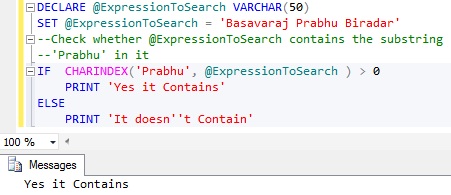
We can use the CHARINDEX() function to check whether a String contains a Sub-string in it. Name of this function is little confusing as name sounds something to do with character, but it basically returns the starting position of matched Substring in the main String. If it is not found then this function returns value 0.

Below example demonstrates how we can use the CHARINDEX() function to check whether a String contains a Sub-string in it.

DECLARE @ExpressionToSearch VARCHAR(50) 
SET @ExpressionToSearch = 'Basavaraj Prabhu Biradar'
--Check whether @ExpressionToSearch contains the substring 
--'Prabhu' in it
IF  CHARINDEX('Prabhu', @ExpressionToSearch ) > 0 
	PRINT 'Yes it Contains'
ELSE
	PRINT 'It doesn''t Contain'

RESULT:
Substring_Within_String_Using_CHARINDEX

To know various alternative approaches to check whether a String contains a Sub-string in it, you may like to read the article: How to Check if a String Contains a Substring in it in Sql Server

48. How to get all the records which contain double byte data in a particular NVARCHAR data type column Sql Server

In NVARCHAR DataType column we can store both Single byte and Double byte data. Many a times we want to know, how many records have double byte data in the NVARCHAR data type column. We can write a script like below for this:

--Query to get all the customers whose CustomerName 
--column contains DOUBLE Byte Data
SELECT *
FROM dbo.Customer 
WHERE CustomerName != CAST(CustomerName AS VARCHAR(50))

RESULT:
Double_Byte_Records_In_Sql_Server

To understand this in detail with examples, you may like to go through the article: How to get all the records which contain double byte data or all the records which contain single byte data in Sql Server?

49. How to get all the records which contain only single byte data in Sql Server

In NVARCHAR DataType column we can store both Single byte and Double byte data. Many a times we want to know, how many records have only single byte data in the NVARCHAR data type column. We can write a script like below for this:

-- Query to get all the customers whose CustomerName 
-- column contains SINGLE Byte Data only
SELECT *
FROM dbo.Customer 
WHERE CustomerName = CAST(CustomerName AS VARCHAR(50))

RESULT:
Single_Byte_Records_Sql_Server

To understand this in detail with examples, you may like to go through the article: How to get all the records which contain double byte data or all the records which contain single byte data in Sql Server?

50. How to get Date Part only from DateTime in Sql Server

There are multiple ways of getting date part only from DateTime, below is one such approach. To know various alternative approaches you may like to read the article: How to get Date Part only from DateTime in Sql Server

SELECT CONVERT (DATE, GETDATE()) 'Date Part Only'

RESULT:
How to get Date Part only from DateTime

To know the various alternative approaches to get Date Part only from DateTime in Sql Server you may like to read the article: How to get Date Part only from DateTime in Sql Server

Hope you liked this article and if any of your commonly used query is not listed here, please let me know. I will definitely post it and we can help together to the Sql Server Developers community.

PRINT Statement in Sql Server

In Sql Server PRINT statement can be used to return message to the client. It takes string expression as input and returns string as a message to the application. In case of SSMS the PRINT statement output is returned to the Messages window and in case applications PRINT statement output is returned as an informational error message to the client application.

Basically we use PRINT statement for troubleshooting the code by displaying the message or displaying variable value etc.

Let us understand PRINT statement with extensive list of examples

Example 1: PRINT statement printing/returning a string literal

PRINT 'Hello World!'

RESULT:
Sql Server PRINT Example1

From the above result we can see that in case of Sql Server Management Studio, the PRINT statement output is returned to the Messages tab.

[ALSO READ] PRINT/SELECT Statement messages within WHILE LOOP or BATCH of statement is not displayed immediately after it’s execution- Sql Server

Example 2: PRINT statement printing a Sql Server variable value

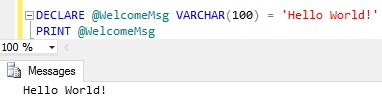
DECLARE @WelcomeMsg VARCHAR(100) = 'Hello World!'
PRINT @WelcomeMsg

RESULT:
Sql Server PRINT Example 2

Example 3: PRINT statement printing a Function output

Let us print built-in function GETDATE() return value

PRINT GETDATE()

RESULT:
Sql Server PRINT Example 3

PRINT Statement Input and Return Data Type

The input to the PRINT statement can be either of CHAR, NCHAR, VARCHAR or NVARCHAR data type. If input passed to it is other than these specified data types then it tries to implicitly convert it to one of these data types. And if input is of type VARCHAR(MAX) or NVARCHAR(MAX) then it is truncated to datatypes VARCHAR(8000) or NVARCHAR(4000). The return type of the PRINT statement is either VARCHAR or NVARCHAR depends on the type of the input.

Example 4: Implicit and Explicit Data Type conversion in PRINT statement

As explained above PRINT statement expects string input, if other data type is passed it will try to do the implicit conversion of the data type. Let us understand this with couple of examples:

Example 4.1: PRINT statement displaying integer variable value

DECLARE @I INT = 100
PRINT @I

RESULT:
Sql Server PRINT Example4

From the above result we can see that the integer variable value passed to the PRINT statement is implicitly converted.

Example 4.2: PRINT statement printing XML type variable value

DECLARE @value XML = '<Employee id="1" Name="Basavaraj"/>'
PRINT @value

RESULT:

Msg 257, Level 16, State 3, Line 2
Implicit conversion from data type xml to nvarchar is not allowed. Use the CONVERT function to run this query.

From the above result we can see that the XML type variables implicit conversion to NVARCHAR type is failed. To solve this issue we can explicitly convert the XML type to VarChar and pass to the PRINT statement.

DECLARE @value XML = '<Employee id="1" Name="Basavaraj"/>'
PRINT CAST(@value AS VARCHAR(50))

RESULT:
Sql Server PRINT Example 4.3

From the above result it is clear that the input to the PRINT statement must be either of CHAR, NCHAR, VARCHAR or NVARCHAR data type. If input passed to it is other than these specified data types then it tries to implicitly convert it to one of these data types.

Example 5: PRINT statement printing the concatenated result of the string literal and and integer variable value

DECLARE @I INT = 100
PRINT 'Current Number : ' + @I

RESULT:
Sql Server PRINT Example 5.1

Msg 245, Level 16, State 1, Line 2
Conversion failed when converting the varchar value ‘Current Number :’ to data type int.

From the above result we can see that in this case Sql Server is trying to convert string literal value ‘Current Number : ‘ to integer type (i.e. type of the variable @I) as integer has higher precedence than the VarChar type.

To solve this issue we can explicitly convert the integer variable @I value to VARCHAR type as shown below script by using the CAST statement:

DECLARE @I INT = 100
PRINT 'Current Number : ' + CAST(@I AS VARCHAR(10))

RESULT:
Sql Server PRINT Example 5.2

In Sql Server 2012 we have CONCAT funtion which takes care of converting the input to the correct format and then concatenating and returning a string output. We can re-write the above script using CONCAT function as below:

DECLARE @I INT = 100
PRINT CONCAT('Current Number : ',@I)

RESULT:
Sql Server PRINT Example 5.3

Example 6: NULL in the PRINT statement

Example 6.1: NULL as input to the PRINT statement

PRINT NULL

RESULT:
Sql Server PRINT Example 61

From the above result we can see that PRINT statement doesn’t print NULL value

Example 6.2: PRINT statement with string expression which is a concatenation of string literal and a variable whose value is NULL

DECLARE @Name NVarChar(50)
PRINT 'Welcome ' + @Name

RESULT:
Sql Server PRINT Example 62

From the above result we can see that PRINT statement didn’t print any value because the concatenation of a string literal ‘Welcome ‘ and the variable @Name whose value is NULL (because it is not initialized) results to NULL.

How to read PRINT statement out in the .NET code

PRINT statement output is returned as an informational error message to the client application. It is not returned as a regular exception instead it is returned as information error message with severity less than or equal to 10. To read the informational messages returned by the PRINT statement or RAISERROR statement with severity less than or equal to 10, we can add event handler delegate method to the InfoMessage event of the connection object in C# ADO.NET code

SqlConnection conn = new SqlConnection(ConnectionString);
 conn.InfoMessage += new SqlInfoMessageEventHandler(ProcessInformationalMessage);

And below is the sample Delegate method ProcessInformationalMessage code which is writing the PRINT statement output to the console:

protected static void ProcessInformationalMessage(
  object sender, SqlInfoMessageEventArgs args)
{
  foreach (SqlError err in args.Errors)
  {
    Console.WriteLine('Error Number {0}, Error Line  {1}, Error Message {2}',
   err.Number, err.LineNumber, err.Message);
  }
}

In a long running stored procedure or script, if you have added multiple PRINT statement to know progress of the script execution. Then to your surprise usually you will not see these messages till the end of procedure execution. The reason is sql server buffers the PRINT statement output and sends to client once it reaches TDS packet size of 4KB. If you want to instantaneously send the PRINT statement output to the client then you can use RAISERROR statement with NO WAIT as explained in the below article:

PRINT/SELECT Statement messages within WHILE LOOP or BATCH of statement is not displayed immediately after it’s execution- Sql Server

Differences Between Sql Server TEXT and VARCHAR(MAX) Data Type

The objective of this article is to compare the legacy Large OBject (LOB) data type TEXT and the Sql Server 2005 introduced VARCHAR(MAX) LOB data type.

[ALSO READ] Difference Between Sql Server VARCHAR and VARCHAR(MAX)

TEXT VarChar(MAX)
Basic Definition

It is a Non-Unicode large Variable Length character data type, which can store maximum of 2147483647 Non-Unicode characters (i.e. maximum storage capacity is: 2GB).

It is a Non-Unicode large Variable Length character data type, which can store maximum of 2147483647 Non-Unicode characters (i.e. maximum storage capacity is: 2GB).

Version of the Sql Server in which it is introduced?

Text data type was present from the very old versions of Sql Server. If I remember correctly it was present even in Sql Server 6.5 days.

VarChar(Max) data type was introduced in Sql Server 2005.

Which one to Use?

As per MSDN link Microfost is suggesting to avoid using the Text datatype and it will be removed in a future versions of Sql Server.

Varchar(Max) is the suggested data type for storing the large string values instead of Text data type.

In-Row or Out-of-Row Storage?

Data of a Text type column is stored out-of-row in a separate LOB data pages. The row in the table data page will only have a 16 byte pointer to the LOB data page where the actual data is present.

Data of a Varchar(max) type column is stored in-row if it is less than or equal to 8000 byte. If Varchar(max) column value is crossing the 8000 bytes then the Varchar(max) column value is stored in a separate LOB data pages and row will only have a 16 byte pointer to the LOB data page where the actual data is present.

When LOB column value is less than 8000 bytes or available space in the row, then whether LOB column value is stored in-row or out-of-row?

Execute the following script to create a demo database SqlHintsLOBDemo if it doesn’t exists already. In the demo data base it creates a table TextTable with a Text LOB type column LargeString. Finally it inserts 100 records, where LargeString column value in each row is 4000 B characters (i.e. 4000 bytes).

--Create a Demo Database
IF DB_ID('SqlHintsLOBDemo')
     IS NULL
CREATE DATABASE SqlHintsLOBDemo
GO
USE SqlHintsLOBDemo
GO
--Create a table with Text type 
--column
CREATE TABLE dbo.TextTable
(
	Id INT IDENTITY(1,1),
	LargeString TEXT
)
GO
--INSERT 100 records, where  
--LargeString column value in 
--each row is 4000 B characters
-- (i.e. 4000 bytes)
INSERT INTO dbo.TextTable
(LargeString)
VALUES(REPLICATE('B', 4000))
GO 100 --Loop 100 times

[ALSO READ] GO Statement can also be used to excute batch of T-Sql statement multiple times

Execute the following statement to check whether the Text type column value is stored in-row or out-of-row:

SELECT alloc_unit_type_desc, 
 page_count
FROM
 sys.dm_db_index_physical_stats 
   (DB_ID('SqlHintsLOBDemo'),
    OBJECT_ID('dbo.TextTable'),
    NULL, NULL , 'DETAILED')

RESULT:
TextData Typ Page Allocation Column Value Less Than 8000 Bytes

From the above result we can see that even though one row (4 Byte for Integer Id column value + 4000 Bytes for Text type column value) can fit into one 8KB data page, but still as per design Sql Server always stores the Text type column value in the LOB data pages. Whether we are storing 1 byte or 2GB data in a Text type column Sql Server always stores the Text type column value out-of-row in the LOB data pages and the row will have a 16 byte pointer pointing to the LOB data pages where the data is stored.

Execute the following script to create a demo database SqlHintsLOBDemo if it doesn’t exists already. In the demo data base it creates a table VarMaxTable with a VarChar(Max) LOB type column LargeString. Finally it inserts 100 records, where LargeString column value in each row is 4000 B characters (i.e. 4000 bytes).

--Create a Demo Database
IF DB_ID('SqlHintsLOBDemo')
   IS NULL
CREATE DATABASE SqlHintsLOBDemo
GO
USE SqlHintsLOBDemo
GO
--Create a table with a 
--Varchar(Max) type column
CREATE TABLE dbo.VarMaxTable
(
	Id INT IDENTITY(1,1),
	LargeString VARCHAR(MAX)
)
GO
--INSERT 100 records, where
--LargeString column value in 
--each row is 4000 B characters 
--(i.e. 4000 bytes)
INSERT INTO dbo.VarMaxTable
 (LargeString)
VALUES(REPLICATE('B', 4000))
GO 100

Execute the following statement to check whether the VarChar(Max) type column value is stored in-row or out-of-row:

SELECT alloc_unit_type_desc, 
 page_count
FROM
 sys.dm_db_index_physical_stats 
   (DB_ID('SqlHintsLOBDemo'),
    OBJECT_ID('dbo.VarMaxTable'),
    NULL, NULL , 'DETAILED')

RESULT:
VarcharMax Type Page Allocation Column Value Less Than 8000 Bytes

From the above result we can see that LOB VarChar(MAX) type column value is stored in-row. For VarChar(MAX) type column Sql Server by default always tries to store the data in-row. Only if it is exceeding 8000 bytes or available space in the row, then only it stores out-of-row in a LOB data pages and in-row it will have 16 byte pointer to the LOB data pages where actual column value is stored.

When LOB column value is more than 8000 bytes or available space in the row, then whether LOB column value is stored in-row or out-of-row?

Execute the following script to remove the previously inserted records and insert 100 records where LargeString column value in each row is 10,000 B characters (i.e. 10,000 bytes).

--TRUNCATE the table to
--remove all the previously
--Inserted records
TRUNCATE TABLE dbo.TextTable
GO
INSERT INTO dbo.TextTable
 (LargeString)
VALUES(REPLICATE(
 CAST('B' AS VARCHAR(MAX)), 
 10000))
GO 100

Execute the following statement to check whether the Text type column value is stored in-row or out-of-row:

RESULT:
TextData Typ Page Allocation Column Value more Than 8000 Bytes

The above result further re-affirms that: whether we are storing 1 byte or 2GB data in a Text type column Sql Server always stores the Text type column value out-of-row in the LOB data pages and the row will have a 16 byte pointer pointing to the LOB data pages where the data is stored.

Execute the following script to remove the previously inserted records and insert 100 records where LargeString column value in each row is 10,000 B characters (i.e. 10,000 bytes).

--TRUNCATE the table to
--remove all the previously
--Inserted records
TRUNCATE TABLE dbo.VarMaxTable
GO
INSERT INTO dbo.VarMaxTable
 (LargeString)
VALUES(REPLICATE(
 CAST('B' AS VARCHAR(MAX)), 
 10000))
GO 100

Execute the following statement to check whether the VarChar(Max) type column value is stored in-row or out-of-row:

RESULT:
VarcharMax Type Page Allocation Column Value more Than 8000 Bytes

From the above result we can see that LOB VarChar(MAX) type column value is stored out-of-row in a LOB data pages. For VarChar(MAX) type column Sql Server by default always tries to store the data in-row. Only if it is exceeding 8000 bytes or available space in the row, then only it stores out-of-row in a LOB data pages having 16 byte pointer in-row pointing to LOB data pages where actual column value is stored.

Do we have an option to change default In-Row and Out-Of-Row Storage behavior?

As we have already seen above whether we are storing 1 byte or 2GB data in a Text type column Sql Server always stores it out-of-row in the LOB data pages and the row will have a 16 byte pointer pointing to the LOB data pages where the data is stored.

Sql Server provides a mechanism where we can change this default behavior of storing the data out-of-row even when we have a sufficient free space in the row to accommodate the Text type column value, by means of sp_tableoption system stored procedure with the option ‘text in row’.

Execute the below statement to store the Text Type Column value in Row if Text Type column value is less than 7000 bytes or enough space is available in the row.

EXEC sp_tableoption 
 @TableNamePattern =
      'dbo.TextTable',
 @OptionName = 'text in row', 
 @OptionValue = 7000

The @OptionValue parameter value can be:
0/OFF (Default Value): Text type column value is stored out-of-row
ON: Text Type Column value is stored in-row as long as the Text type column value is less than or equal to 256 bytes
integer value from 24 through 7000: specifies the number bytes up to which the text type column value is stored in-row.

Execute the following script to remove the previously inserted records and insert 100 records where LargeString column value in each row is 4,000 ‘B’ characters (i.e. 4,000 bytes).

TRUNCATE TABLE dbo.TextTable
GO
INSERT INTO dbo.TextTable
(LargeString)
VALUES(REPLICATE('B', 4000))
GO 100

Execute the following statement to check whether the Text type column value is stored in-row or out-of-row:

SELECT alloc_unit_type_desc, 
 page_count
FROM
 sys.dm_db_index_physical_stats 
   (DB_ID('SqlHintsLOBDemo'),
    OBJECT_ID('dbo.TextTable'),
    NULL, NULL , 'DETAILED')

RESULT:
Changing Text Data Type Default Storgae Behaviour

From the above result now we can see that the Text column values are stored in-row. So we can use sp_tableoption system stored procedures option ‘text in row’ to change the text data types default storage behavior of always storing out-of-row. With this option we an force text data type column value to store in-row up-to 7000 bytes or till the enough space is available in the row.

Execute the following statement to change back the Text type columns storage behavior to the default behavior where Text type columns values are always stored out-of-row even we have sufficient space in the row.

EXEC sp_tableoption
 @TableNamePattern =
      'dbo.TextTable',
 @OptionName = 'text in row',
 @OptionValue = 'OFF'

As we have already seen above for VarChar(MAX) type column Sql Server by default always tries to store the data in-row. Only if it is exceeding 8000 bytes or available space in the row, then only it stores out-of-row in a LOB data pages and in-row it will have 16 byte pointer to the LOB data pages where actual column value is stored.

Sql Server provides a mechanism where we can change this default behavior of storing the data for VarChar(Max) type column, by means of sp_tableoption system stored procedure with the option ‘large value types out of row’.

Execute the below statement to always store Varchar(Max) column value out-of-Row whether it is 1 byte or 2GB even when enough space is available in the row.

EXEC sp_tableoption 
 @TableNamePattern =
  'dbo.VarMaxTable',
 @OptionName = 
  'large value types out of row',
 @OptionValue = 1

The @OptionValue parameter value can be:
0 (Default) : Varchar(Max) column values are stored in-row as long as the value length is <= 8000 bytes and enough space is available in the row. 1 : VarChar(Max) column values are always stored out-of-row even when enough space is available in the row.

Execute the following script to remove the previously inserted records and insert 100 records where LargeString column value in each row is 4,000 ‘B’ characters (i.e. 4,000 bytes).

TRUNCATE TABLE dbo.VarMaxTable
GO
INSERT INTO dbo.VarMaxTable
 (LargeString)
VALUES(REPLICATE('B', 4000))
GO 100

Execute the following statement to check whether the VarChar(Max) type column value is stored in-row or out-of-row:

SELECT alloc_unit_type_desc, 
 page_count
FROM
 sys.dm_db_index_physical_stats 
   (DB_ID('SqlHintsLOBDemo'),
    OBJECT_ID('dbo.VarMaxTable'),
    NULL, NULL , 'DETAILED')

RESULT:
Changing VarcharMax column Default Storgae Behaviour

From the above result we can see that VarChar(Max) type column values are stored out-of-row even when there was a sufficient space available in the row. So we can use the sp_tableoption system stored procedures option ‘large value types out of row’ to change the Varchar(Max) data type columns default storage behavior.

Execute the following statement to change back the Varchar(Max) type columns storage behavior to the default behavior where Sql Server by default always tries to store the data in-row. Only if it is exceeding 8000 bytes or available space in the row, then only it stores out-of-row in a LOB data pages.

EXEC sp_tableoption 
 @TableNamePattern =
  'dbo.VarMaxTable',
 @OptionName = 
  'large value types out of row',
 @OptionValue = 0
Supported/Unsupported Functionalities
Some of the string functions, operators or the constructs which work on VarChar(Max) type column may not work on the Text type column.
Below are two such example functions, operators or constructs:
1. = Operator on Text type column

SELECT *
FROM TextTable WITH(NOLOCK)
WHERE LargeString = 'test string'

RESULT:

Msg 402, Level 16, State 1, Line 1
The data types text and varchar are incompatible in the equal to operator.

2. Group by clause on Text type column

SELECT LargeString, COUNT(1)
FROM VarMaxTable WITH(NOLOCK)
GROUP BY LargeString

RESULT:

Msg 306, Level 16, State 2, Line 3
The text, ntext, and image data types cannot be compared or sorted, except when using IS NULL or LIKE operator.

From the above examples we can see that we can’t use ‘=’ operator on a Text type column and also the Group By clause on the Text type column.

Some of the string functions, operators or the constructs which doesn’t work on the Text type column, but they do work on VarChar(Max) type column.
Below are two such example functions, operators or constructs:
1. = Operator on VarChar(Max) type column

SELECT *
FROM VarMaxTable WITH(NOLOCK)
WHERE LargeString = 'test string'

RESULT:
Equal to Operator on a VarCharMax type column
2. Group by clause on VarChar(Max) type column

SELECT LargeString, COUNT(1)
FROM VarMaxTable WITH(NOLOCK)
GROUP BY LargeString

RESULT:
Group By Clause on VarCharMax Type Column
From the above examples we can see that we use ‘=’ operator and Group By clause on the VarChar(Max) type column, but not on the Text type column. If data stored in the Varchar(Max) column is a very large strings, then using these functions may lead to performance issues.

System IO Considerations

As we know that the Text type column values are always stored out-of-row in LOB data pages and in-row it will have a 16 byte pointer pointing to the root LOB data page. So if the query doesn’t include the LOB columns then the number of pages required to read to retrieve the data will be less as the column data is out-of-row. But if the query includes the LOB columns, then the number of pages required to retrieve the data will be more.

As we know that the VarChar(Max) type column values are stored out-of-row only if the length of the value to be stored in it is greater than 8000 bytes or there is not enough space in the row, otherwise it will store it in-row. So if most of the values stored in the VarChar(Max) column are large and stored out-of-row, the data retrieval behavior will almost similar to the one that of the Text type column.

But if most of the values stored in VarChar(Max) type columns are small enough to store in-row. Then retrieval of the data where LOB columns are not included requires the more number of data pages to read as the LOB column value is stored in-row in the same data page where the non-LOB column values are stored. But if the select query includes LOB column then it requires less number of pages to read for the data retrieval compared to the Text type columns.

ALSO READ