Sql Server 2016 FOR JSON clause can be used to convert the query result to JSON format. It gives flexibility to the developers to convert the result to JSON format in the back-end Sql Server itself, instead of doing it in the client applications.
The FOR JSON clause is very much similar to the FOR XML clause. Basically, it converts each row in the result as a JSON object, column names and values are converted as JSON objects name and value pair.
There are two variants of the FOR JSON clause as listed below:
FOR JSON AUTO
The FOR JSON AUTO clause is very much similar to the FOR XML AUTO clause. It automatically formats the JSON output based on the Column/Tables order in the Select statement.
FOR JSON PATH
The FOR JSON PATH clause is very much similar to the FOR XML PATH clause. It gives more control over the resulting JSON structure.
[ALSO READ]:
Let us understand these two variants of the FOR JSON clause with extensive list of examples:

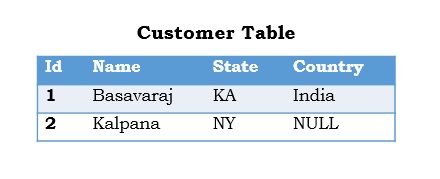
To understand FOR JSON feature, let us create a demo database with Customer table with sample data as shown in the below image by the following script.
Script:
CREATE DATABASE Sql2016SqlHints
GO
USE Sql2016SqlHints
GO
CREATE TABLE dbo.Customer
(Id INT IDENTITY(1,1) PRIMARY KEY, Name NVARCHAR(100),
 State NVARCHAR(50), Country NVARCHAR(50))
GO
INSERT INTO dbo.Customer (Name, State, Country)
VALUES ('Basavaraj', 'KA', 'India'),
       ('Kalpana', 'NY', NULL)
GO
Example 1: Basic FOR JSON PATH example
SELECT 'Basavaraj' FirstName, 'Biradar' LastName
FOR JSON PATH
RESULT:
{“FirstName”:”Basavaraj”,”LastName”:”Biradar”}
Example 2: Basic FOR JSON AUTO requires at-least one table for generating the JSON output
SELECT 'Basavaraj' FirstName, 'Biradar' LastName
FOR JSON AUTO
RESULT:
Msg 13600, Level 16, State 1, Line 10
FOR JSON AUTO requires at least one table for generating JSON objects. Use FOR JSON PATH or add a FROM clause with a table name.
From the above result it is clear that the FOR JSON AUTO clause works only if at-least one table is mentioned in the from clause.
Example 3: FOR JSON PATH/AUTO example where column names are not specified in the select list, instead * is mentioned
PRINT '******* FOR JSON PATH output *******'
SELECT * FROM dbo.Customer FOR JSON PATH
GO
PRINT '******* FOR JSON AUTO output *******'
SELECT * FROM dbo.Customer FOR JSON AUTO
GO
RESULT:

Example 4: FOR JSON PATH/AUTO example where required columns in the JSON output are specified in the SELECT clause
PRINT '******* FOR JSON PATH output *******'
SELECT Id, Name, State, Country FROM dbo.Customer FOR JSON PATH
GO
PRINT '******* FOR JSON AUTO output *******'
SELECT Id, Name, State, Country FROM dbo.Customer FOR JSON AUTO
RESULT:

Example 5: To include NULL values in the JSON output, we need to specify the property INCLUDE_NULL_VALUES in the FOR JSON clause. If this option is not specified, in case of NULL value the name-value pair will be removed from the JSON output. Like country in the previous example for the customer Kalpana.
PRINT '******* FOR JSON PATH output *******'
SELECT Id, Name, State, Country FROM dbo.Customer
FOR JSON PATH, INCLUDE_NULL_VALUES
GO
PRINT '******* FOR JSON AUTO output *******'
SELECT Id, Name, State, Country FROM dbo.Customer
FOR JSON AUTO,INCLUDE_NULL_VALUES
RESULT:

Example 6: We can use the ROOT option in the FOR JSON clause to generate a wrapper object around the generated JSON output. In the below example the ROOT option creates a Customers JSON wrapper object around the generated JSON output:
PRINT '******* FOR JSON PATH output *******'
SELECT Id, Name, State, Country FROM dbo.Customer
FOR JSON PATH, ROOT('Customers')
GO
PRINT '******* FOR JSON AUTO output *******'
SELECT Id, Name, State, Country FROM dbo.Customer
FOR JSON AUTO, ROOT('Customers')
RESULT:

Example 7: In case of FOR JSON PATH clause using “.” Symbol in the column aliases, we can name the each object in the resultant JSON array as shown below:
SELECT Id [Customer.Id], Name [Customer.Name],
 State [Customer.State], Country [Customer.Country]
FROM dbo.Customer FOR JSON PATH, ROOT('Customers')
GO
RESULT:

Using “.” symbol in the column aliases doesn’t have any effect in the resulting JSON output in case of FOR JSON AUTO as shown below:
SELECT Id [Customer.Id], Name [Customer.Name]
FROM dbo.Customer FOR JSON AUTO, ROOT('Customers')
RESULT:

Example 8: We can convert each row into a JSON object with multiple sub-objects by using “.” Symbol in the column alias as shown below:
SELECT Id [Customer.Id], Name [Customer.Name],
 State [Address.State], Country [Address.Country]
FROM dbo.Customer FOR JSON PATH, ROOT('Customers')
RESULT:

Example 9: We can convert each row into a nested JSON object by using “.” Symbol in the column aliases as shown below:
SELECT Id [Customer.Id], Name [Customer.Name],
 State [Customer.Address.State],
 Country [Customer.Address.Country]
FROM dbo.Customer FOR JSON PATH, ROOT('Customers')
RESULT:

[ALSO READ]: