Tag Archives: Sql

How to get Current DATE and TIME in Sql Server

Many times we come across a scenario where we need to get the current Date & Time. There are multiple ways to get this information in Sql Server, here I am listing out few of them:

[ALSO READ] How to get Date Part only from DateTime in Sql Server

Approach 1: Using GETDATE() funtion

GETDATE() function returns the current Date and Time from the system on which the Sql Server is installed/running. Basically it derives the value from the operating system of the computer on which the Sql Server instance is running. The value returned from the GETDATE() function is of the type DATETIME.

Below example shows how we can use the GETDATE() function in the SELECT statement to get the current Date and Time.

SELECT GETDATE() 'Current Date and Time using GETDATE()'

RESULT:
current-date-and-time-in-sql-server
[ALSO READ] How to get current TIME in Sql Server

Approach 2: Using CURRENT_TIMESTAMP function

This function is the ANSI SQL equivalent to GETDATE() function. But majority of the developers in Sql Server use the GETDATE() function instead of CURRENT_TIMESTAMP. Both functions return the same result. And return type of the CURRENT_TIMESTAMP function is also of the type DATETIME

Below example shows how we can use the CURRENT_TIMESTAMP function in the SELECT statement to get the current Date and Time.

SELECT CURRENT_TIMESTAMP 
  AS 'Current Date and Time using CURRENT_TIMESTAMP'

RESULT:
current-date-and-time-2-in-sql-server

From the above reult we can see that the Date and Time returned by the CURRENT_TIMESTAMP function is same as that of the GETDATE() function shown in the previous example.

[ALSO READ] Difference between DateTime and DateTime2 DataType

Approach 3: Using SYSDATETIME() funtion

SYSDATETIME() function can also be used to get the current Date and Time of the computer on which the instance of SQL Server is running. SYSDATETIME() function provides more fractional seconds precision compared to the GETDATE() function. Return type of the SYSDATETIME() function is of the type DATETIME2. This function is introduced in Sql Server 2008.

SELECT SYSDATETIME() 'Current Date and Time using SYSDATETIME()'

RESULT:
current-date-and-time-in-sql-server-using-sysdatetime

TRIM function in Sql Server

Many a times we come across a scenario where we get an input string with leading and/or trailing spaces. In such scenarios we would like to store it into the database by removing the leading and trailing spaces. But Microsoft doesn’t have a built-in TRIM function which can remove both leading and Trailing spaces.

Instead it has LTRIM function which can be used to remove leading blanks and RTRIM function which can be used to remove trailing spaces. Let us understand these functions with examples and then see how we can nest these two functions together as shown in the below examples to remove leading and trailing spaces.

LTRIM Function

LTRIM function removes the leading spaces from the input string

DECLARE @StringToTrim VARCHAR(100) = '    String to trim    '
SELECT @StringToTrim 'String To Trim', 
	  DATALENGTH(@StringToTrim) 'Length of the string',
	  LTRIM(@StringToTrim) 'String trimmed by LTRIM', 
	  DATALENGTH(LTRIM(@StringToTrim)) 'Length of LTRIM string'

RESULT:
ltrim-in-sql-server

From the above result we can see that the LTRIM function is removing only the leading spaces. That is it has removed only the leading 4 spaces and not the trailing 4 spaces.

[ALSO READ] Difference between Len() and Datalength() functions in Sql Server

RTRIM Function

RTRIM function removes the trailing spaces from the input string

DECLARE @StringToTrim VARCHAR(100) = '    String to trim    '
SELECT @StringToTrim 'String To Trim', 
	  DATALENGTH(@StringToTrim) 'Length of the string',
	  RTRIM(@StringToTrim) 'String trimmed by RTRIM', 
	  DATALENGTH(RTRIM(@StringToTrim)) 'Length of RTRIM string'

RESULT:
rtrim-in-sql-server

From the above result we can see that the RTRIM function is removing only the trailing spaces. That is it has removed only the trailing 4 spaces and not the leading 4 spaces.

[ALSO READ] Usage of Function on Index Column in WHERE Caluse Leads to Index/Table Scan

TRIM Function

To remove the leading and trailing spaces we can nest the above LTRIM and RTRIM functions as shown in the below example:

DECLARE @StringToTrim VARCHAR(100) = '    String to trim    '
SELECT @StringToTrim 'String To Trim', 
 DATALENGTH(@StringToTrim) 'Length of the string',
 RTRIM(LTRIM(@StringToTrim)) 'String trimmed by LTRIM and RTRIM', 
 DATALENGTH(RTRIM(LTRIM(@StringToTrim)))
  AS 'Length of trimmed string'

RESULT:
trim-in-sql-server

From the above result we can see that the nested use of RTRIM and LTRIM functions has removed both the leading and trailing paces.. That is it has removed both the leading 4 spaces and the trailing 4 spaces from the input string.

We can create a user defined function like the below one. And use it wherever we want to remove both leading and trailing spaces.

CREATE	FUNCTION dbo.TRIM(@StringToTrim VARCHAR(MAX))
RETURNS	VARCHAR(MAX)
BEGIN 
	RETURN	RTRIM(LTRIM(@StringToTrim))
END

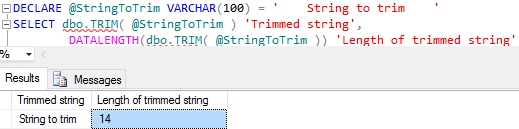
Below example shows how we can use the above created user defined TRIM function:

DECLARE @StringToTrim VARCHAR(100) = '    String to trim    '
SELECT dbo.TRIM( @StringToTrim ) 'Trimmed string',
 DATALENGTH(dbo.TRIM( @StringToTrim )) 
  AS 'Length of trimmed string'

RESULT:
trim-function-in-sql-server

[ALSO READ] 100 Frequently used queries in Sql Server – Part 1

How to Split comma or any other character delimited string into a Table in Sql Server

Many a time we come across a scenario where we pass a comma or any other character delimited string to stored procedure and in stored procedure we want to fetch data from other tables based this delimited string. We can’t use this delimited string directly in the in clause as Sql treats it as one string. So, the solution for this is to get a table by splitting the delimited string by the delimiter character and then join this resultant table data with other table columns.

In Sql Server we have mechanism where we can take table as a input parameter from the application code. So if you like to pass a table from your code with multiple rows instead of passing a delimited string to stored procedure and splitting it in SP, then you may like to read the article Table-Valued Parameters in Sql Server. But I would prefer passing the comma delimited string to stored procedure and split it in the SP.

In Sql Server we have multiple approaches to achieve this. This article lists couple of them. Please let me know which one you use and if you use some-other approach let me know, so that we can help the Sql Server developer community

APPROACH 1: Sql Server 2016 STRING_SPLIT function

STRING_SPLIT is one of the new built-in table valued function introduced in Sql Server 2016. This table valued function splits the input string by the specified character separator and returns output as a table.

Below example shows how we can use STRING_SPLIT function to splits the comma separated string.

SELECT * 
FROM STRING_SPLIT('Basavaraj,Kalpana,Shree',',')

RESULT:
Sql STRING_SPLIT Function Example 1

To know in detail about the STRING_SPLIT function you may like to read the article: STRING_SPLIT function in Sql Server 2016

APPROACH 2: Using While Loop and Sql String Functions

We can crate a table valued function like the below which is using WHILE loop and Sql String functions like CHARINDEX and SUBSTRING to split the string. This should work in all the versions of Sql Server.

CREATE FUNCTION [dbo].StringSplit
(
	@String  VARCHAR(MAX), @Separator CHAR(1)
)
RETURNS @RESULT TABLE(Value VARCHAR(MAX))
AS
BEGIN      
 DECLARE @SeparatorPosition INT = CHARINDEX(@Separator, @String ),
		@Value VARCHAR(MAX), @StartPosition INT = 1

 IF @SeparatorPosition = 0	
  BEGIN	
   INSERT INTO @RESULT VALUES(@String)
   RETURN
  END
	
 SET @String = @String + @Separator
 WHILE @SeparatorPosition > 0
  BEGIN
   SET @Value = SUBSTRING(@String , @StartPosition, @SeparatorPosition- @StartPosition)

   IF( @Value <> ''  ) 
    INSERT INTO @RESULT VALUES(@Value)
  
   SET @StartPosition = @SeparatorPosition + 1
   SET @SeparatorPosition = CHARINDEX(@Separator, @String , @StartPosition)
  END     
	
 RETURN
END

Below example shows how we can use the above function to split the comma delimited string

SELECT * 
FROM StringSplit('Basavaraj,Kalpana,Shree',',')

RESULT:
StringSplit

APPROACH 3: Using XML

We can crate a table valued function like the below which is using Sql XML feature to split the string.

CREATE FUNCTION [dbo].StringSplitXML
(
    @String  VARCHAR(MAX), @Separator CHAR(1)
)
RETURNS @RESULT TABLE(Value VARCHAR(MAX))
AS
BEGIN     
 DECLARE @XML XML
 SET @XML = CAST(
    ('<i>' + REPLACE(@String, @Separator, '</i><i>') + '</i>')
    AS XML)

 INSERT INTO @RESULT
 SELECT t.i.value('.', 'VARCHAR(MAX)') 
 FROM @XML.nodes('i') AS t(i)
 WHERE t.i.value('.', 'VARCHAR(MAX)') <> ''

 RETURN
END

Below example shows how we can use the above function to split the comma delimited string

SELECT * 
FROM StringSplitXML('Basavaraj,Kalpana,Shree',',')

RESULT:
StringSplitXML