How to check if a Table exists in Sql Server

Many a times we come across a scenario where we need to execute some code based on whether a Table exists or not. There are different ways of identifying the Table existence in Sql Server, in this article will list out the different approaches which are commonly used and it’s pros and cons. I prefer using the OBJECT_ID() function as it is easy to remember. Let me know which approach you use and reason for the same.

To demo these different approaches let us create a sample database with a table by the below script:

CREATE DATABASE SqlHintsDemoDB
GO
USE SqlHintsDemoDB
GO
CREATE TABLE dbo.Customers (CustId INT, Name NVARCHAR(50))

[ALSO READ] How to check if Temp table exists in Sql Server?

Approach 1: Using INFORMATION_SCHEMA.TABLES view

We can write a query like below to check if a Customers Table exists in the current database.

IF EXISTS (SELECT * FROM INFORMATION_SCHEMA.TABLES 
           WHERE TABLE_NAME = N'Customers')
BEGIN
  PRINT 'Table Exists'
END

RESULT:
Check Table Existance Using INFORMATION_SCHEMA view

The above query checks the existence of the Customers table across all the schemas in the current database. Instead of this if you want to check the existence of the Table in a specified Schema and the Specified Database then we can write the above query as below:

IF EXISTS (SELECT * 
    FROM SqlHintsDemoDB.INFORMATION_SCHEMA.TABLES   
    WHERE TABLE_SCHEMA = N'dbo'  AND TABLE_NAME = N'Customers')
BEGIN
  PRINT 'Table Exists'
END

RESULT:
Check Table Existance Using INFORMATION_SCHEMA.Tables view1

Pros of this Approach: INFORMATION_SCHEMA views are portable across different RDBMS systems, so porting to different RDBMS doesn’t require any change.

[ALSO READ] How to check if a Stored Procedure exists in Sql Server

Approach 2: Using OBJECT_ID() function

We can use OBJECT_ID() function like below to check if a Customers Table exists in the current database.

IF OBJECT_ID(N'dbo.Customers', N'U') IS NOT NULL
BEGIN
  PRINT 'Table Exists'
END

RESULT:
Check Table Existance Using OBJECT_ID() Function

Specifying the Database Name and Schema Name parts for the Table Name is optional. But specifying Database Name and Schema Name provides an option to check the existence of the table in the specified database and within a specified schema, instead of checking in the current database across all the schemas. The below query shows that even though the current database is MASTER database, we can check the existence of the Customers table in the dbo schema in the SqlHintsDemoDB database.

USE MASTER
GO
IF OBJECT_ID(N'SqlHintsDemoDB.dbo.Customers', N'U') IS NOT NULL
BEGIN
  PRINT 'Table Exists'
END

RESULT:
Check Table Existance Using OBJECT_ID() Function1

Pros: Easy to remember. One other notable point to mention about OBJECT_ID() function is: it provides an option to check the existence of the Temporary Table which is created in the current connection context. All other Approaches checks the existence of the Temporary Table created across all the connections context instead of just the current connection context. Below query shows how to check the existence of a Temporary Table using OBJECT_ID() function:

CREATE TABLE #TempTable(ID INT)
GO
IF OBJECT_ID(N'TempDB.dbo.#TempTable', N'U') IS NOT NULL
BEGIN
  PRINT 'Table Exists'
END
GO

RESULT:
Check Temporary Table Existence Using OBJECT_ID() Function1

[ALSO READ] How to check if a Database exists in Sql Server

Approach 3: Using sys.Objects Catalog View

We can use the Sys.Objects catalog view to check the existence of the Table as shown below:

IF EXISTS(SELECT 1 FROM sys.Objects 
	WHERE  Object_id = OBJECT_ID(N'dbo.Customers') 
               AND Type = N'U')
BEGIN
  PRINT 'Table Exists'
END

RESULT
Check Table Existance Using Sys.Objects view

[ALSO READ] How to check if a record exists in a table

Approach 4: Using sys.Tables Catalog View

We can use the Sys.Tables catalog view to check the existence of the Table as shown below:

IF EXISTS(SELECT 1 FROM sys.Tables 
          WHERE  Name = N'Customers' AND Type = N'U')
BEGIN
  PRINT 'Table Exists'
END

RESULT
Check Table Existance Using Sys.Tables Catalog view

Sys.Tables catalog view inherits the rows from the Sys.Objects catalog view, Sys.objects catalog view is referred to as base view where as sys.Tables is referred to as derived view. Sys.Tables will return the rows only for the Table objects whereas Sys.Object view apart from returning the rows for table objects, it returns rows for the objects like: stored procedure, views etc.

[ALSO READ] How to check if a VIEW exists in Sql Server

Approach 5: Avoid Using sys.sysobjects System table

We should avoid using sys.sysobjects System Table directly, direct access to it will be deprecated in some future versions of the Sql Server. As per Microsoft BOL link, Microsoft is suggesting to use the catalog views sys.objects/sys.tables instead of sys.sysobjects system table directly.

IF EXISTS(SELECT name FROM sys.sysobjects  
          WHERE Name = N'Customers' AND xtype = N'U')
BEGIN
  PRINT 'Table Exists'
END

RESULT:
Check Table Existance Using Sys.sysobjects System Table

[ALSO READ] :
How to check if a Database exists
How to check if a Stored Procedure exists in Sql Server
How to check if a View exists
How to check if Temp table exists
How to check if a record exists in table

How to find all the tables with name like a given pattern in Sql Server?

Many a times I come across a scenario where I will be remembering only part of the table name and need to find the complete table name. Traversing through hundreds of tables in the database and finding the exact table is boring, tedious time consuming job. In such scenarios we can use on of the below three approaches, I always use the first one as it is easy for me to remember. Let me know which approach which you use and reason for the same.

To demo this create a sample database with three tables by the below script:

CREATE DATABASE SqlHintsDemoDB
GO
USE SqlHintsDemoDB
GO
CREATE TABLE dbo.Customers (CustId INT, Name NVARCHAR(50))
CREATE TABLE dbo.CustomerOrders (OrderId INT, CustId INT)
CREATE TABLE dbo.Employee(EmpId INT, Name NVARCHAR(50))
GO

Approach 1: Using sp_tables

We can use sp_tables statement like below to find all the tables in the database whose name contains the word cust in it.

sp_tables '%cust%'

RESULT:
Table Name Like in Sql Server Using sp_tables

Approach 2: Using sys.Tables

We can use sys.tables catalog view like below to find all the tables in the database whose name contains the word cust in it.

SELECT * 
FROM sys.Tables
WHERE name LIKE '%cust%'

RESULT:
Table Name Like in Sql Server Using sys.tables

Approach 3: Using information_schema.tables

We can use information_schema.tables information schema view like below to find all the tables in the database whose name contains the word cust in it.

SELECT *
FROM information_schema.tables
WHERE table_name  LIKE '%cust%'

RESULT:
Table Name Like in Sql Server Using information_schema.tables

Dynamic PIVOT in Sql Server

In the Previous Post PIVOT and UNPIVOT in Sql Server explained how PIVOT relational operator can be used to transform columns distinct values as Columns in the result set by mentioning all the distinct column values in the PIVOT operators PIVOT columns IN clause. This type of PIVOT query is called Static PIVOT query, because if the PIVOT column in the source table get’s extra unique values after the initial query then that will not reflect in the PIVOT query result unless it is mentioned in the PIVOT Columns IN clause. Static PIVOT queries are fine as long as we know that the PIVOT column values never change, for instance if PIVOT column values are MONTH or Day of the Week or hour of the day etc.

In this Article will present how we can write a Dynamic PIVOT query with an example, where we don’t need to mention the PIVOT columns each unique values and no need to worry if PIVOT column gets extra unique values after the initial query.

ALSO READ: PIVOT and UNPIVOT in Sql Server

First Create a Temporary Table #CourseSales with sample records as depicted in the below image by using the following script:

Table to be Pivoted in Sql

--Create Temporary Table #CourseSales
CREATE TABLE #CourseSales
(Course VARCHAR(50),Year INT,Earning MONEY)
GO
--Populate Sample records
INSERT INTO #CourseSales VALUES('.NET',2012,10000)
INSERT INTO #CourseSales VALUES('Java',2012,20000)
INSERT INTO #CourseSales VALUES('.NET',2012,5000)
INSERT INTO #CourseSales VALUES('.NET',2013,48000)
INSERT INTO #CourseSales VALUES('Java',2013,30000)
GO

PIVOT #CourseSales Table data on the Course column Values

Let us first understand the Static PIVOT query and then see how we can modify this Static PIVOT query to Dynamic.

Static PIVOT query

Static PIVOT Query

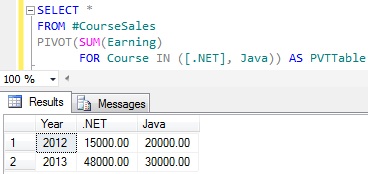
Below Static PIVOT script pivots the #CourseSales Table data so that the Course columns distinct values are transformed as Columns in the result set as depicted in the above image.

SELECT *
FROM #CourseSales
PIVOT(SUM(Earning) 
      FOR Course IN ([.NET], Java)) AS PVTTable

RESULT:
Static PIVOT Query In Sql Server

Let us insert one more row in the #CourseSales table for the new course SQL Server with below insert statement.

INSERT INTO #CourseSales VALUES('Sql Server',2013,15000)

Now rerun the above PIVOT query.
RESULT:
Static PIVOT Query In Sql Server

From the above result it is clear that the newly added course Sql Server sales data is not reflected in the result.

Dynamic PIVOT Query

To make the above Static PIVOT query to dynamic, basically we have to remove the hardcoded PIVOT column names specified in the PIVOT operators PIVOT columns IN clause. Below query demonstrates this.

DECLARE @DynamicPivotQuery AS NVARCHAR(MAX)
DECLARE @ColumnName AS NVARCHAR(MAX)

--Get distinct values of the PIVOT Column 
SELECT @ColumnName= ISNULL(@ColumnName + ',','') 
       + QUOTENAME(Course)
FROM (SELECT DISTINCT Course FROM #CourseSales) AS Courses

--Prepare the PIVOT query using the dynamic 
SET @DynamicPivotQuery = 
  N'SELECT Year, ' + @ColumnName + '
	FROM #CourseSales
	PIVOT(SUM(Earning) 
		  FOR Course IN (' + @ColumnName + ')) AS PVTTable'
--Execute the Dynamic Pivot Query
EXEC sp_executesql @DynamicPivotQuery

[ALSO READ] How to replace NULL value by 0 in the Dynamic Pivot result – Sql Server

RESULT:
Dynamic PIVOT Query in Sql Server

From the above result it is clear that this query is a True Dynamic PIVOT query as it reflected all the courses in the #CourseSales table without needing to write hardcoded course names in the PIVOT query.

Examples of PIVOT and Dynamic PIVOT

Below are the some of the examples of retrieving data in Sql Server using PIVOT and Dynamic PIVOT:

[ALSO READ]
PIVOT and UNPIVOT in Sql Server