SINGLE_USER, RESTRICTED_USER and MULTI_USER user access modes in SQL SERVER

In this article let us go over the following aspects of the database user access modes:

  1. What are the different database user access modes and their meanings?
  2. How to SET database to different user access modes?
  3. How to check database current user access mode?

Let us go through the above listed topics one-by-one:

1. What are the different database user access modes for the Sql Server database and their meanings?

Following are the three possible different user access modes in Sql server:

i) SINGLE_USER Database Access Mode

In SINGLE_USER access mode at any given point of time only one user can access the database. The user can be any user who has access to the database.

Note: Before setting the database to Single user mode make sure to STOP the sql server agent or see if any AUTO_UPDATE_STATISTICS_ASYNC option is set to OFF. Otherwise the Sql Server Agent or the background thread which updates the stats may utilize the only allowed connection.

ii) RESTRICTED_USER Access Mode

In RESTRICTED_USER access mode only the users who have db_owner or db_creator permission can access. Users who belong to the sysadmin fixed server role can also access the database which is in RESTRICTED_USER access mode.

At any given point of time ZERO or Many user can access the database as long as they have specified permission as mentioned previously.

iii) MULTI_USER Access Mode

This is the default database user access mode. In this database user access mode any user who have permission to access the database can access the database.

2. How to SET database to different user access modes?

For this Demo let us first create a sample demo database with below statement:

CREATE DATABASE SqlHintsDBAccessDEMO
GO

i) How to SET database to SINGLE_USER Database Access Mode?

We can use script like below to SET database to SINGLE_USER Database Access Mode

USE SqlHintsDBAccessDEMO
GO
ALTER DATABASE SqlHintsDBAccessDEMO
SET SINGLE_USER WITH ROLLBACK IMMEDIATE

When database is in single user mode and if already one user is connected to the database, then subsequent database connection request will fail with an error message like below:

Msg 924, Level 14, State 1, Line 1
Database ‘SqlHintsDBAccessDEMO’ is already open and can only have one user at a time.

ii) How to SET database to RESTRICTED_USER Database Access Mode?

We can use script like below to SET database to RESTRICTED_USER Database Access Mode

USE SqlHintsDBAccessDEMO
GO
ALTER DATABASE SqlHintsDBAccessDEMO
SET RESTRICTED_USER WITH ROLLBACK IMMEDIATE

iii) How to SET database to MULTI_USER Database Access Mode?

We can use script like below to SET database to MULTI_USER Database Access Mode

USE SqlHintsDBAccessDEMO
GO
ALTER DATABASE SqlHintsDBAccessDEMO
SET MULTI_USER

NOTE: “WITH ROLLBACK IMMEDIATE” ALTER Database option causes all the incomplete transactions to be rolled back and any other connections to the database to be immediately disconnected.

3. How to check database current user access mode?

Below examples show how we can check the current database user access mode:

Example 1: We can use the DATABASEPROPERTYEX() function to check the database user access mode.

SELECT DATABASEPROPERTYEX('SqlHintsDBAccessDEMO','UserAccess') 
                      AS 'Current Database Access Mode'

RESULT:
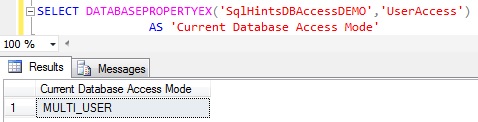
Check Database Access Model using DATABASEPROPERTYEX

Example 2: We can also use the sys.databases catalog view to check the database user access mode.

SELECT user_access_desc 
FROM SYS.databases WHERE name = 'SqlHintsDBAccessDEMO'

RESULT:
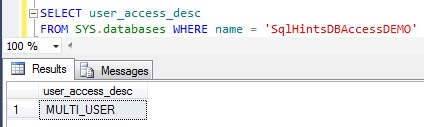
Check Database Access Model using sys.databases catalog view

Example 3: Below examples shows how we can check whether database is in a MULTI_USER access mode.

IF(DATABASEPROPERTYEX('SqlHintsDBAccessDEMO','UserAccess') 
                         = 'MULTI_USER')
	PRINT 'Database is in MULTI_USER mode'
GO
IF(SELECT user_access_desc 
   FROM SYS.databases WHERE name = 'SqlHintsDBAccessDEMO') 
             = 'MULTI_USER'
	PRINT 'Database is in MULTI_USER mode'

RESULT:
How ti Check Database is in MULTI_USER mode

If we want to check if database is in single user mode then we can use the scripts like below:

IF(DATABASEPROPERTYEX('SqlHintsDBAccessDEMO','UserAccess') 
                  = 'SINGLE_USER')
	PRINT 'Database is in SINGLE_USER mode'
GO
IF(SELECT user_access_desc 
   FROM SYS.databases WHERE name = 'SqlHintsDBAccessDEMO') 
               = 'SINGLE_USER'
	PRINT 'Database is in SINGLE_USER mode'

If we want to check, if database is in restricted user mode then we can use the scripts like below:

IF(DATABASEPROPERTYEX('SqlHintsDBAccessDEMO','UserAccess') 
                  = 'RESTRICTED_USER')
	PRINT 'Database is in RESTRICTED_USER mode'
GO
IF(SELECT user_access_desc 
   FROM SYS.databases WHERE name = 'SqlHintsDBAccessDEMO') 
                          = 'RESTRICTED_USER'
	PRINT 'Database is in RESTRICTED_USER mode'
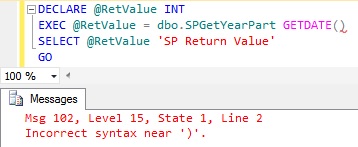
EXECUTE/EXEC Stored Procedure/Function Statement may raise an error like: ‘Msg 102, Level 15, State 1, Line 2 Incorrect syntax near ‘)’.’ if GetDate() like function is used in it – Sql Server

In this article let us go over the scenarios which causes an error like the below one and how to solve it.

Msg 102, Level 15, State 1,
Line 2 Incorrect syntax near ‘)’.’

Basically, we will get the error like the above one if we use GETDATE() like function as a parameter to EXECUTE/EXEC Stored Procedure/Function Statement.

To demonstrate this error scenario, let us first create a Stored Procedure and a User defined function as below:

--Create Demo Stored Procedure
CREATE PROCEDURE dbo.SPGetYearPart(@Date AS DateTime)
AS
BEGIN
	RETURN YEAR(GETDATE())
END
GO
--Create Demo User Defined Function 
CREATE FUNCTION dbo.fnGetYearPart(@Date AS DateTime)
RETURNS INT
AS
BEGIN
	RETURN YEAR(@Date)
END
GO

Below two examples demonstrates when this error occurs and how to solve it:

Example 1:

Try executing the above created stored procedure SPGetYearPart with GETDATE() as parameter:

DECLARE @RetValue INT
EXEC @RetValue = dbo.SPGetYearPart GETDATE()
SELECT @RetValue 'SP Return Value'
GO

RESULT:
Incorrect syntax near ) err

Solution:

Solution to this problem is: instead of passing GETDATE() function as parameter directly in the execute statement, assign it to a local variable and pass the assigned local variable as the parameter as shown in the below script:

DECLARE @RetValue INT
DECLARE @Today DATETIME
SET @Today = GETDATE()
EXEC @RetValue = dbo.SPGetYearPart @Today
SELECT @RetValue 'SP Return Value'
GO

RESULT:
Incorrect syntax near ) Solution

Example 2:

Try executing the above created user defined function fnGetYearPart with GETDATE() as parameter:

DECLARE @RetValue INT
EXEC @RetValue = dbo.fnGetYearPart GETDATE()
SELECT @RetValue 'Function Return Value'
GO

RESULT:
Incorrect syntax near ) Error

Solution:

Solution to this problem is: instead of passing GETDATE() function as parameter directly in the execute statement, assign it to a local variable and pass the assigned local variable as parameter as shown in the below script:

DECLARE @RetValue INT
DECLARE @Today DATETIME
SET @Today = GETDATE()
EXEC @RetValue = dbo.fnGetYearPart @Today
SELECT @RetValue 'Function Return Value'
GO

RESULT:
Incorrect syntax near ) Error Solution

How to add Hours, Minutes, Seconds to a DateTime in Sql Server

In this article we will discuss on How to add Hours, Minutes, Seconds to a DateTime in Sql Server?

You may also like to read the following other popular articles on Date and Time in Sql Server:

How to add Hours to DateTime in Sql Server?

We can use DATEADD() function like below to add hours to DateTime in Sql Server. DATEADD() functions first parameter value can be hour or hh all will return the same result. Below example shows how we can add two hours to Current DateTime in Sql Server:

SELECT GETDATE() 'Now',
           DATEADD(hour,2,GETDATE()) 'Now + 2 Hours'
SELECT GETDATE() 'Now',
           DATEADD(hh,2,GETDATE()) 'Now + 2 Hours'

RESULT:
Add Hours to DateTime in Sql Server

[ALSO READ] How to get difference between two dates in Years, Months and days

How to add Minutes to DateTime in Sql Server?

We can use DATEADD() function like below to add minutes to DateTime in Sql Server. DATEADD() functions first parameter value can be minute or mi or n all will return the same result. Below example shows how we can add two minutes to Current DateTime in Sql Server:

SELECT GETDATE() 'Now',
           DATEADD(minute,2,GETDATE()) 'Now + 2 Minutes'
SELECT GETDATE() 'Now',
           DATEADD(mi,2,GETDATE()) 'Now + 2 Minutes'
SELECT GETDATE() 'Now',
           DATEADD(n,2,GETDATE()) 'Now + 2 Minutes'

RESULT:
Add Minutes to DateTime in Sql Server 1

How to add Seconds to DateTime in Sql Server?

We can use DATEADD() function like below to add seconds to DateTime in Sql Server. DATEADD() functions first parameter value can be second or ss or s all will return the same result. Below example shows how we can add two seconds to Current DateTime in Sql Server:

SELECT GETDATE() 'Now',
           DATEADD(second,2,GETDATE()) 'Now + 2 Seconds'
SELECT GETDATE() 'Now',
           DATEADD(ss,2,GETDATE()) 'Now + 2 Seconds'
SELECT GETDATE() 'Now',
           DATEADD(s,2,GETDATE()) 'Now + 2 Seconds'

RESULT:
Add Seconds to DateTime in Sql Server

[ALSO READ] How to get difference between two dates in Years, Months and days