How to check if a VIEW exists in Sql Server

Many a times we come across a scenario where we need to execute some code based on whether a View exists or not. There are different ways of identifying the View existence in Sql Server, this article will list out the commonly used approaches. Let me know which approach you use and reason for the same.

[ALSO READ] Views in Sql Server

To demonstrate these different approaches let us create a sample database SqlHintsDemoDB. Create Customers Table with sample data and a vwGetCustomerInfo View by the following script:

CREATE DATABASE SqlHintsDemoDB
GO
USE SqlHintsDemoDB
GO
--Create Customer table
CREATE TABLE dbo.Customers
( CustomerID int Identity(1,1), FirstName NVarchar(50),
  LastName NVarChar(50), Phone varchar(50))
GO
--Insert sample records into the customer table
INSERT INTO Customers (FirstName, LastName, Phone)
Values ('Kalpana','Biradar','2727272727'),
       ('Basavaraj','Biradar','1616161616')
GO
--Create view
CREATE VIEW dbo.vwGetCustomerInfo
AS
 SELECT CustomerID, FirstName +' ' + LastName FullName
 FROM CUSTOMERS
GO
SELECT * FROM dbo.vwGetCustomerInfo
GO

[ALSO READ] How to check if a Table exists in Sql Server

Approach 1: Using sys.views catalog view

We can write a query like below to check if a view vwGetCustomerInfo exists in the current database in any schema.

IF EXISTS(SELECT 1 FROM sys.views 
     WHERE Name = 'vwGetCustomerInfo')
	BEGIN
		PRINT 'View Exists'
	END

RESULT:
Check-View-Existence-using-sys.views 1

The above query checks the existence of the vwGetCustomerInfo View across all the schemas in the current database. Instead of this if you want to check the existence of the View in a specified Schema then we can re-write the above query as below:

IF EXISTS(SELECT 1 FROM sys.views 
   WHERE object_id = OBJECT_ID('dbo.vwGetCustomerInfo'))
	BEGIN
		PRINT 'View Exists'
	END

RESULT:
Check-View-Existence-using-sys.views 2

If you want to check the existence of a View in a database other than the current contextual database, then we can re-write the above query as shown below:

IF EXISTS(SELECT 1 FROM SqlHintsDemoDB.sys.views 
   WHERE object_id = OBJECT_ID('dbo.vwGetCustomerInfo'))
	BEGIN
		PRINT 'View Exists'
	END
GO

RESULT:
Check-View-Existence-using-sys.views 3
[ALSO READ] How to check if a record exists in table

Approach 2: Using sys.objects catalog view

sys.views catalog view inherits the rows from the sys.objects catalog view, sys.objects catalog view is referred to as the base view whereas sys.views is referred to as derived view. sys.views will return the rows only for the views, whereas sys.objects view apart from returning the rows for Views, it returns rows for the objects like: tables, stored procedure etc.

We can write a script like below to check the existence of a view in the current contextual database:

IF EXISTS (SELECT * FROM sys.objects
            WHERE object_id = OBJECT_ID('dbo.vwGetCustomerInfo')
                    AND type = 'V') 
	BEGIN
		PRINT 'View Exists'
	END

RESULT:
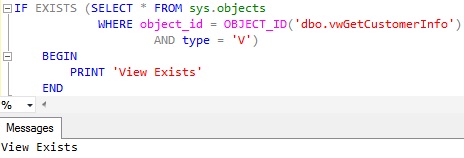
Check-View-Existence-using-sys.objects

Approach 3: Using sys.sql_modules Catalog View

We can use the sys.sql_modules catalog view to check the existence of the View as shown below:

USE SqlHintsDemoDB
GO
IF EXISTS (SELECT 1 FROM sys.sql_modules
   WHERE object_id =  OBJECT_ID('dbo.vwGetCustomerInfo')
   AND OBJECTPROPERTY(object_id, 'IsView') = 1) 
	BEGIN
		PRINT 'View Exists'
	END

RESULT
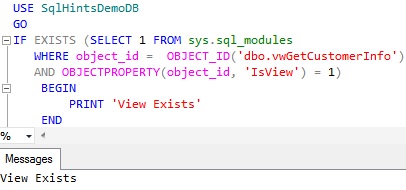
Check-View-Existence-using-sys.sql_modules

Approach 4: Using OBJECT_ID() function

We can use OBJECT_ID() function like below to check if the View vwGetCustomerInfo exists in the current database.

IF OBJECT_ID(N'dbo.vwGetCustomerInfo', N'V') IS NOT NULL
	BEGIN
		PRINT 'View Exists'
	END

RESULT:
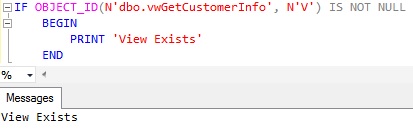
Check-View-Existence-using-Object_Id function

Specifying the Database Name and Schema Name parts for the View Name is optional. But specifying Database Name and Schema Name provides an option to check the existence of the View in the specified database and within a specified schema, instead of checking in the current database across all the schemas. The below query shows that, even though the current database is MASTER database, we can check the existence of the view vwGetCustomerInfo in the dbo schema in the SqlHintsDemoDB database.

USE master	
GO
IF OBJECT_ID(N'SqlHintsDemoDB.dbo.vwGetCustomerInfo', 
                  N'V') IS NOT NULL
	BEGIN
		PRINT 'View Exists'
	END

RESULT:
Check-View-Existence-using-Object_Id function 2

Approach 5: Avoid Using sys.sysobjects System table

We should avoid using sys.sysobjects System Table directly, direct access to it will be deprecated in some future versions of the Sql Server. As per Microsoft BOL link, Microsoft is suggesting to use the catalog views sys.objects/sys.views/sys.sql_modules instead of sys.sysobjects system table directly to check the existence of the View.

USE SqlHintsDemoDB
GO
IF EXISTS(SELECT 1 FROM sys.sysobjects  
     WHERE id = OBJECT_ID(N'dbo.vwGetCustomerInfo') 
                      AND xtype=N'V')
	BEGIN
		PRINT 'View Exists'
	END

RESULT:
Check-View-Existence-using-sys.sysobjects

[ALSO READ] :
How to check if a Database exists
How to check if a Table exists
How to check if a Stored Procedure exists in Sql Server
How to check if Temp table exists
How to check if a record exists in table

How to check if a record exists in table in Sql Server

Frequently, we come across a scenario where we need to check the existence of a record and based on it perform some action. This article explains how to use the EXISTS clause to check the existence of a record in a table. There are multiple options for checking the existence of a record, but EXISTS clause is the best option in terms performance. Basically the Exists clause checks the existence of a record and it stops processing further records after finding the first instance of the record which matches the criteria

This article covers the following examples:

  • Using EXISTS clause in the IF statement to check the existence of a record
  • Using EXISTS clause in the CASE statement to check the existence of a record
  • Using EXISTS clause in the WHERE clause to check the existence of a record
  • EXISTS clause having subquery joining multiple tables to check the record existence in multiple tables

To demonstrate this let us create a Customer and Order table as shown in the below image by the following script:

Customer and Order Table

USE TEMPDB
GO
--Create Customer Table
CREATE TABLE dbo.Customer
(CustId INT, CustName NVARCHAR(50))
--Create Order Table
CREATE TABLE dbo.[Order]
(OrderId INT, CustId INT, OrderTotal Money)
GO
--Insert sample records into Customer table 
INSERT INTO dbo.Customer
VALUES(1, 'Basavaraj Biradar'),
 (2,'Kalpana Biradar')
 --Insert sample records into Customer table
INSERT INTO dbo.[Order]
VALUES(100,1, 1000), (101,1,9500)
GO

[ALSO READ] How to check if a Database exists

EXAMPLE 1: Using EXISTS clause in the IF statement to check the existence of a record

Below example script checks the existence of the customer record with CustId = 2 in the IF statement

DECLARE @CustId INT = 2
IF EXISTS(SELECT 1 FROM dbo.Customer WITH(NOLOCK)
          WHERE CustId = @CustId)
	BEGIN
		PRINT 'Record Exists'
	END
ELSE
	BEGIN
		PRINT 'Record doesn''t Exists'
	END

RESULT:
Check if record exists in a table in Sql Server 1

[ALSO READ] How to check if a Table exists

EXAMPLE 2: Using EXISTS clause in the CASE statement to check the existence of a record

DECLARE @CustId INT = 2
SELECT (CASE WHEN EXISTS(SELECT 1 FROM dbo.Customer WITH(NOLOCK)
    WHERE CustId = @CustId) THEN 'Record Exists'
    ELSE 'Record doesn''t Exists' END) AS [Employee?]

RESULT:
Check if record exists in a table in Sql Server 2

[ALSO READ] How to check if Temp table exists

EXAMPLE 3: Using EXISTS clause in the WHERE clause to check the existence of a record

DECLARE @CustId INT = 1
SELECT 'Record Exist'
WHERE EXISTS(SELECT 1 FROM dbo.Customer WITH(NOLOCK)
       WHERE CustId = @CustId)

RESULT:
Check if record exists in a table in Sql Server 3

[ALSO READ] How to check if a Stored Procedure exists in Sql Server

EXAMPLE 4: EXISTS clause having sub query joining multiple tables to check the record existence in multiple tables

DECLARE @CustId INT = 1
IF EXISTS(SELECT 1 
          FROM dbo.Customer C WITH(NOLOCK) 
			INNER JOIN dbo.[Order] O WITH(NOLOCK)
				ON C.CustId = O.CustId	
		  WHERE C.CustId = @CustId)
	BEGIN
		PRINT 'Record Exists'
	END
ELSE
	BEGIN
		PRINT 'Record doesn''t Exists'
	END
GO

RESULT:
Check if record exists in a table in Sql Server 4

[ALSO READ] :
How to check if a Database exists
How to check if a Table exists
How to check if a Stored Procedure exists in Sql Server
How to check if a View exists
How to check if Temp table exists

Must declare the scalar variable – Error Message 137

This article lists out the extensive list of scenarios in which we get the following error message and how to resolve it.

Error Message:

Msg 137, Level 15, State 1, Line 1
Must declare the scalar variable “%.*ls”.

Root Cause:

This error occurs if we are trying to use an undeclared variable

Below are the couple of scenarios in which we come across this error and how to resolve it.

Scenario 1: Trying to use an undeclared variable

Try executing the below statement

PRINT @AuthorName

RESULT:

Msg 137, Level 15, State 2, Line 1
Must declare the scalar variable “@AuthorName”.

Reason for this error: In the above example, the variable @AuthorName is used in the PRINT statement without declaring it, which is not allowed by Sql Server.

Solution:Declare the @AuthorName variable before using it in the PRINT statement as below:

DECLARE @AuthorName VARCHAR(100) = 'Basavaraj Biradar'
PRINT @AuthorName

RESULT:
Error Message 128

Scenario 2: Trying to use a local declared variable after batch separator GO statement

Try executing the below statement

DECLARE @AuthorName VARCHAR(100) = 'Basavaraj Biradar'
PRINT @AuthorName
GO
PRINT @AuthorName

RESULT:

Basavaraj Biradar
Msg 137, Level 15, State 2, Line 1
Must declare the scalar variable “@AuthorName”.

Reason for this error: In the above example, the variable @AuthorName is used in the PRINT statement after the batch separator GO Statement. Basically the scope of the local variables is within the batch in which it is declared.

Solution:Re-declare the @AuthorName variable before using it in the PRINT statement after the GO statement as below:

DECLARE @AuthorName VARCHAR(100) = 'Basavaraj Biradar'
PRINT @AuthorName
GO
DECLARE @AuthorName VARCHAR(100) = 'Basava'
PRINT @AuthorName

RESULT:
Error Message 137

Scenario 3: Using local declared variable in the dynamic sql statement executed by the EXECUTE statement

Try executing the below statement

DECLARE @AuthorName VARCHAR(100) = 'Basavaraj Biradar'
EXECUTE ('PRINT @AuthorName')

RESULT:

Msg 137, Level 15, State 2, Line 1
Must declare the scalar variable “@AuthorName”.

Reason for this error: In the above example, the variable @AuthorName is used in the statement executed by EXECUTE statement. EXECUTE statement doesn’t have the visibility of the variables declared outside of it.

Solution: We can rewrite the above statements as below to resolve this issue:

DECLARE @AuthorName VARCHAR(100) = 'Basavaraj Biradar'
EXECUTE ('PRINT ''' + @AuthorName + '''' )

RESULT:
Must declare the scalar variable

Alternative solution: One more alternative solution for the above problem, is to use the SP_EXECUTESQL statement which allows parameterized statement as below:

DECLARE @AuthorName VARCHAR(100) = 'Basavaraj Biradar'
EXECUTE SP_EXECUTESQL N'PRINT @AuthorName',
           N'@AuthorName VARCHAR(100)',@AuthorName

RESULT:
Must declare the scalar variable SP_EXECUTESQL

Let me know if you have encountered this error in any other scenario.