Introduction to Common Table Expression (a.k.a CTE) in Sql Server

This is the first article in the series of articles on Common Table Expression in Sql Server. Below are the other articles in this series:

Recursive CTE
Multiple CTEs in a Single Query
Nested Common Table Expressions

Introduction to Common Table Expression

Common Table expression (a.k.a CTE) is one of the new feature introduced in Sql Server 2005. CTE provides the structured way for writing the complex queries as a simple readable and maintainable queries. CTEs provides an alternative way of writing sub queries in a more readable and maintainable way.

CTEs are something like temporary named result sets, but they are not exactly as temporary table or table variable. CTEs doesn’t use the TempDB for maintaining the temporary named result set. And also the scope of the CTEs temporary named result set is to the immediate next SELECT, INSERT, UPDATE or DELETE statement only.

CTEs are like views, for views meta data is stored in the database but not for CTES. From this point of view we can call CTEs as a dynamic view or temporary view.

In most of the cases CTEs performance is on par with the existing sub queries, table variable or temp table approaches. The main thing with CTEs is, it apart from providing a mechanism to write simple readable and maintainable queries. It also provides a mechanism to write recursive queries. And the current recursion level supported by the recursive function or stored procedure is 32 level only, where as by default max recursion level which CTE is 100. But CTE provides an option to set a MAXRECURSION level value between 0 to 32,767 . Specifying it’s value as 0 means no limit, you agreed for a risk and server crash by a bugy query if any 🙂

CTE SYNTAX

[ WITH <common_table_expression> [ ,...n ] ]

<common_table_expression>::=
    expression_name [ ( column_name [ ,...n ] ) ]
    AS
    ( CTE_query_definition )

I think we had enough theory, let us jump on to the examples to understand all the above explained theory.

CTE Syntax explained by a very basic example

CTE in Sql Server

To demonstrate the CTE feature with extensive list of examples, let us create a demo database SqlHintsCTED with Employees table having the sample data as shown in the below image by the following script:
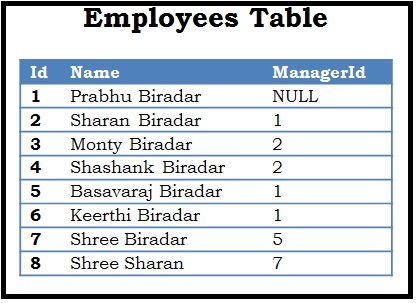
CTE Example Table
Script:

--Create demo database
CREATE DATABASE SqlHintsCTE
GO
USE SqlHintsCTE
GO
-- Create an Employees table.
CREATE TABLE dbo.Employees
( Id INT  PRIMARY KEY, Name NVARCHAR(50), ManagerId INT NULL)
GO
-- Populate Employees table with sample data
INSERT INTO dbo.Employees VALUES
 (1, 'Prabhu Biradar',NULL) ,(2, 'Sharan Biradar', 1)
,(3, 'Monty Biradar', 2), (4, 'Shashank Biradar', 2)
,(5, 'Basavaraj Biradar',1),(6, 'Keerthi Biradar',1)
,(7, 'Shree Biradar',5), (8,'Shree Sharan', 7)

Very basic CTE example, here skipped defining the optional CTE column_names

Below is an example of a very basic CTE, in this CTE example the optional CTE column_names are not specified. So, in this case the the column names specified in the CTE query_definition will be returned.

WITH DemoCTE
AS (SELECT Id, Name FROM dbo.Employees)
SELECT * FROM DemoCTE

RESULT:
Basic CTE Result

If CTE is not the first statement in the batch, then the previous statement to it Should be terminated with a semicolon.

Let us understand this with an example. In the below example we have PRINT statement before the CTE, let us see what is the result of executing the following script:

PRINT 'CTE Demo'
WITH CTESemicolon
AS (SELECT Id, Name FROM dbo.Employees WITH(NOLOCK))
SELECT * FROM CTESemicolon WHERE id = 2
GO

RESULT:

Msg 319, Level 15, State 1, Line 2
Incorrect syntax near the keyword ‘with’. If this statement is a common table expression, an xmlnamespaces clause or a change tracking context clause, the previous statement must be terminated with a semicolon.

To resolve this error let us terminate the PRINT statement with a Semicolon and see what is the result:

PRINT 'CTE Demo';
WITH CTESemicolonPrefix
AS (SELECT Id, Name FROM dbo.Employees WITH(NOLOCK))
SELECT * FROM CTESemicolonPrefix WHERE id = 2
GO

RESULT:
CTE Should be prefixed by Semicolon

From the above result it is clear that, if CTE is not the first statement in the batch of statements, then the previous statement to it must be terminated with a semicolon.

How to check if a Database exists in Sql Server

Many a times we come across a scenario where we need to execute some code based on whether a Database exists or not. There are different ways of identifying the Database existence in Sql Server, in this article will list out the different approaches which are commonly used and it’s pros and cons. I prefer using the DB_ID() function as it is easy to remember. Let me know which approach you use and reason for the same.

To demo these different approaches let us create a sample database by the below script:

CREATE DATABASE SqlHintsDB
GO

[ALSO READ] How to check if a Table exists

Approach 1: Using DB_ID() function

We can use DB_ID() function like below to check if SqlHintsDB database exists. This is the simplest and easiest approach to remember

IF DB_ID('SqlHintsDB') IS NOT NULL
BEGIN
	PRINT 'Database Exists'
END

RESULT:
Database existence check using DB_ID() function

[ALSO READ] How to check if a Stored Procedure exists

Approach 2: Using sys.databases Catalog View

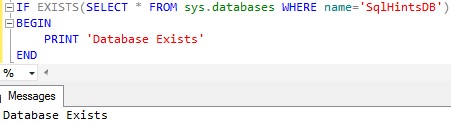
We can use the sys.databases catalog view to check the existence of the Database as shown below:

IF EXISTS(SELECT * FROM master.sys.databases 
          WHERE name='SqlHintsDB')
BEGIN
	PRINT 'Database Exists'
END

RESULT
Check Database existence using sys.databases catalog view

[ALSO READ] :How to check if a View exists

Approach 3: Avoid Using sys.sysdatabases System table

We should avoid using sys.sysdatabases System Table directly, direct access to it will be deprecated in some future versions of the Sql Server. As per Microsoft BOL link, Microsoft is suggesting to use the catalog view sys.databases instead of sys.sysdatabases system table directly.

IF EXISTS(SELECT * FROM master.sys.sysdatabases 
          WHERE name='SqlHintsDB')
BEGIN
	PRINT 'Database Exists'
END

RESULT:
Check Database existence using sys sysdatabases system table ver2

[ALSO READ] :
How to check if Temp table exists
How to check if a record exists in table
How to check if a Table exists
How to check if a Stored Procedure exists in Sql Server
How to check if a View exists

Difference between Sequence and Identity in Sql Server

Below table lists out the major difference between SEQUENCE and IDENTITY in Sql Server

[ALSO READ] Introduction to Sequence

SEQUENCE IDENTITY
Sequence object is introduced in Sql Server 2012 Identity Column property is introduced in Sql Server 6.0
Sequence is a user-defined database object and as name suggests it generates sequence of numeric values according to the properties with which it is created Identity property is a table column property. It is also used to generate a sequence of numbers according to the properties with which it is created
Sequence object can be shared across multiple tables Identity property is tied to a Table
Sequence object can be used to generate database-wide sequential number across multiple tables. Identity property can be used to generate a sequence numbers at a table level
A sequence is created independently of the tables by using the CREATE SEQUENCE statement Identity property can be specified for a table column in CREATE TABLE or ALTER TABLE statement
Syntax:

CREATE SEQUENCE 
  [schema_name.]sequence_name
[ AS [built_in_integer_type 
    | user-defined_integer_type]]
[ START WITH <constant>]
[ INCREMENT BY <constant>]
[ { MINVALUE [<constant>] } 
    | { NO MINVALUE } ]
[ { MAXVALUE [<constant>] }
    | { NO MAXVALUE } ]
[ CYCLE | { NO CYCLE } ]
[ { CACHE [<constant>] } 
   | { NO CACHE } ]
[ ; ]

Where:
Start with: Initial value to start with sequence.
Increment by: Step by which the values will get incremented or decremented.
Minvalue: Minimum value of the sequence.
Maxvalue: Maximum value of the sequence.
Cycle / No Cycle: To recycle the sequence once it reaches to the maximum or minimum (if increment by is a negative number).
Cache / No Cache: To pre-allocate the number of sequences specified by the given value.

Syntax:

IDENTITY [ (seed , increment) ]

Where:
Seed: Initial value to start with
Increment: Step by which the values will get incremented or decremented each time.

Below is simple example of creating a sequence with Initial value 1 and Increment by 1

CREATE SEQUENCE 
  [DBO].[SequenceExample] AS INT
 START WITH 1
 INCREMENT BY 1
GO
Below is an example of creating a customer table with identity column Id with initial value as 1 and increment by 1

CREATE TABLE dbo.Customer
( Id INT IDENTITY(1,1),
  Name	NVARCHAR(50) )
GO
We can get the next sequence value by using NEXT VALUE FOR function without needing to insert a record to the table
Example: Getting Next Sequence Value in A SELECT Statement without inserting a record

SELECT (NEXT VALUE FOR
 DBO.SequenceExample) AS SeqValue

RESULT:
Sequence in Sql Server

Only way to generate the next identity value is by inserting a record to the table in which the identity column is defined.
Example: Insert a record to get the next identity value

INSERT INTO dbo.Customer (Name)
VALUES('Basavaraj Biradar')
GO
SELECT SCOPE_IDENTITY()
GO
SELECT * FROM dbo.Customer

RESULT:
Sequence in Sql Server 1

We can use a script like below to get the sequence object’s current value:

SELECT Current_Value 
FROM Sys.Sequences 
WHERE name='SequenceExample'

Sequence current value

We can use a script like below to get the identity columns current value (i.e. last identity value generated as a result of insert):

SELECT IDENT_CURRENT('Customer') 
 AS 'Identity Current value'

Identity Column Current value

Sequence object provides an option to reset the current sequence value as-well as the increment step size

ALTER SEQUENCE 
 dbo.SequenceExample
RESTART WITH 20
INCREMENT BY 2
GO

Sequence reseeding example 2

Column identity property current value can be reseeded but not it’s increment step size
Example: The following script resets the Customer tables current identity value to 20.

DBCC 
CHECKIDENT('Customer', RESEED,20)

Sequence reseeding example 1

Sequence object provides an option to define the maximum sequence value. If it is not specified, by default it takes the maximum value of the Sequence object data type.

Example: Below script creates a sequence object with maximum value as 2

CREATE SEQUENCE
  [dbo].[SequenceMax] AS INT
 START WITH 1
 INCREMENT BY 1
 MAXVALUE 2
GO

Once the Sequence maximum value is reached the request for the next sequence value results in the following error message:
Msg 11728, Level 16, State 1, Line 2
The sequence object ‘SequenceMax’ has reached its minimum or maximum value. Restart the sequence object to allow new values to be generated.

Identity column property doesn’t provide an option to define the maximum identity value, it always to takes maximum value corresponding to the identity columns data type
Sequence object provides an option of automatic restarting of the Sequence values.If during Sequence object creation the CYCLE option is specified, then once the sequence object reaches maximum/minimum value it will restarts from the specified minimum/maximum value.

Example: Create  a sequence object with CYCLE option which starts with 1 and when Sequence max value 2 is reached it will restart with minimum value 1.

CREATE SEQUENCE [dbo].[SeqCycle]
 AS INT
START WITH 1
INCREMENT BY 1
MINVALUE 1
MAXVALUE 2
CYCLE
GO

Let us check how the Sequence values are recycled by calling the NEXT VALUE FOR function for the 3 times as below:

SELECT (NEXT VALUE FOR
  dbo.SeqCycle) AS SeqValue
GO 3

RESULT:
Sequence Cycle example Sql Server

Identity property doesn’t provides an option for the automatic restarting of the identity values
Sequence object provides sp_sequence_get_range to get multiple sequence numbers at once. Identity column property doesn’t provide an option to get multiple values.
Sequence object provides an option to enable caching, which greatly increases the performance by reducing the disk IO required to generate the next sequence value. CACHE property allows to define cache size, by default caching is disabled.

To Sequence CACHE management and internals you may like to go through the article: Sequence Cache management and Internals

Identity property doesn’t provide an option to enable/diable the cache management and also to define the cache size.

[ALSO READ] Sequence related articles

Introduction to Sequence
Sequence limitations and restrictions
Sequence Cache management and Internals

[ALSO READ] Differences