OPENJSON is one of the new JSON function introduced in Sql Server 2016, it is very much similar to the OPENXML function. This table valued function can be used to transform the JSON text to one or many rows. Basically, it provides a row-set view of the input JSON string.
Syntax:
OPENJSON( json_string [, json_path ] )
[ WITH (column_mapping_definition1
        [,column_mapping_definition2]
        [,… column_mapping_definitionN])
]
Where: column_mapping_definition :: column_name column_type [ column_json_path ] [ AS JSON ]
json_string is the JSON string from which will be transformed to row(s).
json_path is the location of the JSON string in the json_string parameter, which will converted to one or many rows.
WITH clause: This is an optional clause it can used to explicitly specify the schema of the result. Each column in the resultant output can be defined by specifying the column name, column type, it’s location i.e. column json path and the [AS JSON] clause specifies that the column value will be a JSON object or an array, if it is not specified the expected column value is a scalar value.
[ALSO READ]:
- Native JSON Support in Sql Server 2016
- FOR JSON Clause in Sql Server 2016
- ISJSON Function in Sql Server 2016
- JSON_VALUE Function in Sql Server 2016
- JSON_QUERY Function in Sql Server 2016
- lax and strict JSON Path modes in Sql Server 2016
- Indexing Strategy for JSON Value in Sql Server 2016
Let us understand this OPENJSON function with an extensive list of examples.
OPENJSON examples without explicit schema declaration
Example 1: Basic OPENJSON example with default schema
SELECT *
FROM OPENJSON('{"FirstName":"Basavaraj","LastName":"Biradar"}')
RESULT:
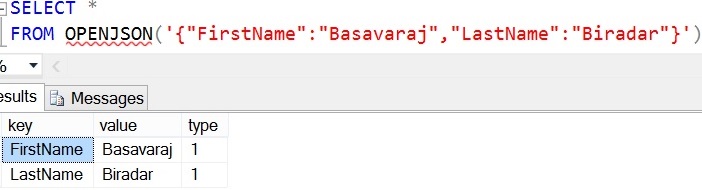
From the result we can observe that when OPENJSON function is executed with the default schema (i.e. Without explicit schema declarartion), following three columns are returned in the result.
Key: Property name if it is present otherwise it will be index
value: Property value
type: An integer number that represents the type of the value. Next example explains all the possible type values.
Example 2: Example explaining all the possible type column values in case of an OPENJSON function with default schema
DECLARE @json_string NVARCHAR(MAX) = N'
	{"Name":"Basavaraj","Id":1,"Permanent":true,
		 "Hobbies":["Blogging","Cricket"],
		"Address":{"State":"KA","Country":"India"}}'
SELECT *
FROM OPENJSON(@json_string)
RESULT:

So from the result we can say that type clumn value will be 1 in case the value is STRING, 2 if the value is of type INT, 3 if the value is of type Boolean, 4 if value is of the type JSON array and 5 if the value is of the type JSON object.
Example 3: Fetching only the key and value columns (i.e. in this example not fetching the type column)
DECLARE @json_string NVARCHAR(MAX) = N'
	{"Id":1,"Name":"Basavaraj",
		"Address":{"State":"KA","Country":"India"}}'
SELECT [key],value
FROM OPENJSON(@json_string)
RESULT:

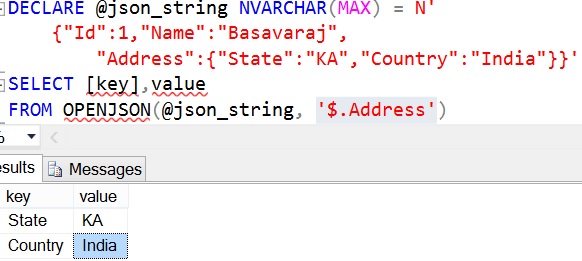
Example 4: In this example specifying the json_path in the OPENJSON function which is pointing to Address JSON object in the input JSON string
DECLARE @json_string NVARCHAR(MAX) = N'
  {"Id":1,"Name":"Basavaraj",
   "Address":{"State":"KA","Country":"India"}}'
SELECT [key],value
FROM OPENJSON(@json_string, '$.Address')
RESULT:
Example 5: One more example where the JSON text has only one attribute at the root level and this attribute is pointing to a nested JSON string
DECLARE @json_string NVARCHAR(MAX) = N'
  {"Customer":{"Id":1,"Name":"Basavaraj",
   "Address":{"State":"KA","Country":"India"}}}'
SELECT [key],value
FROM OPENJSON(@json_string)
RESULT:

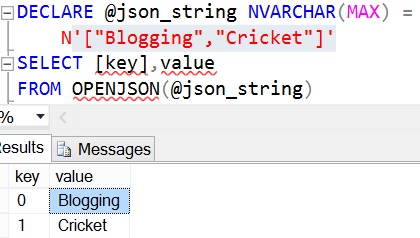
Example 6: Input JSON string is a JSON array of strings.
DECLARE @json_string NVARCHAR(MAX) = '["Blogging","Cricket"]'
SELECT [key],value
FROM OPENJSON(@json_string)
RESULT:
Example 7: Input JSON string is a JSON array of integers.
DECLARE @json_string NVARCHAR(MAX) = '[1,2,3,4]'
SELECT [key],value
FROM OPENJSON(@json_string)
RESULT:
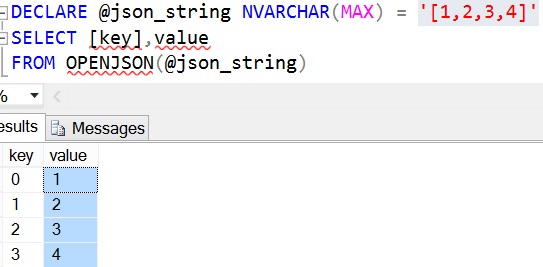
From the results of example 6 and 7, we can see that OPENJSON function converts the JSON array to a result set. So such feature will be useful in converting an array of input values to a temporary result and joining with other tables.
Example 8: In this example specifying the json_path in the OPENJSON function which is pointing to Hobbies JSON array in the input JSON string
DECLARE @json_string NVARCHAR(MAX) = N'
    {"Id":1,"Name":"Basavaraj",
        "Hobbies":["Blogging","Cricket"]}'
SELECT [key],value
FROM OPENJSON(@json_string,'$.Hobbies')
RESULT:

Example 9: In this example the input JSON string is an array of nested JSON objects
DECLARE @json_string NVARCHAR(MAX) =
 N'{"Customers":
    [{"Id":1,"Name":"Basavaraj",
            "Address":{"State":"KA","Country":"India"}},
     {"Id":2,"Name":"Kalpana",
            "Address":{"State":"NY","Country":"United State"}}
    ]
 }'
SELECT *
FROM OPENJSON(@json_string)
RESULT:

Let us re-execute the above example by specifying the json_path which is pointing to an array of JSON objects
DECLARE @json_string NVARCHAR(MAX) =
 N'{"Customers":
    [{"Id":1,"Name":"Basavaraj",
            "Address":{"State":"KA","Country":"India"}},
     {"Id":2,"Name":"Kalpana",
            "Address":{"State":"NY","Country":"United State"}}
    ]
 }'
SELECT *
FROM OPENJSON(@json_string,'$.Customers')
RESULT:

OPENJSON examples with explicit schema definition
Example 1: This is an example of an OPENJSON function with explicit schema declaration.
DECLARE @json_string NVARCHAR(MAX) =
 N'{"Customers":
    [{"Id":1,"Name":"Basavaraj",
      "Address":{"State":"KA","Country":"India"}},
     {"Id":2,"Name":"Kalpana",
      "Address":{"State":"NY","Country":"United State"}}
    ]
 }'
SELECT *
FROM OPENJSON(@json_string,'$.Customers')
WITH(Id INT, Name NVarchar(100))
RESULT:

In this example the json_path in the OPENJSON function points to the array of the JSON objects. In the schema declaration columns values json path is not mentioned, in such cases it tries to match the JSON property name by column name and returns its corresponding JSON property value.
Example 2: Let us extended the example 1, in this example try to get the customer Country from the nested JSON object Address apart from Id and Name.
DECLARE @json_string NVARCHAR(MAX) =
 N'{"Customers":
    [{"Id":1,"Name":"Basavaraj",
            "Address":{"State":"KA","Country":"India"}},
     {"Id":2,"Name":"Kalpana",
            "Address":{"State":"NY","Country":"United State"}}
    ]
 }'
SELECT *
FROM OPENJSON(@json_string,'$.Customers')
WITH(Id INT, Name Varchar(100), [Address.Country] NVarchar(50))
RESULT:

Again in this example the column values json path is not mentioned, so it goes by the column name. So the column name [Address.Country] implies the OPEJSON function returns the Country property value from the Address JSON object.
Example 3: In this example EmployeeId column’s value json path is specified. Other columns (i.e. Name and Address.Country) go by the column name in the input json text for it’s value as explained in the previous example
DECLARE @json_string NVARCHAR(MAX) =
 N'{"Customers":
    [{"Id":1,"Name":"Basavaraj",
      "Address":{"State":"KA","Country":"India"}},
     {"Id":2,"Name":"Kalpana",
      "Address":{"State":"NY","Country":"United State"}}
    ]
 }'
SELECT *
FROM OPENJSON(@json_string,'$.Customers')
WITH(EmployeeId INT '$.Id', Name Varchar(100),
     [Address.Country] NVarchar(50))
RESULT:
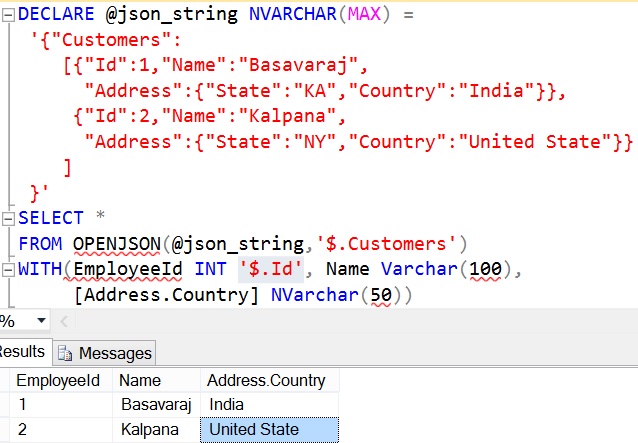
If column value JSON path is mentioned then it overrides the column name approach to extract the column value. So from the result it is clear that, EmployeeId column value is extracted by the column value json path i.e. ‘$.id’, if it would have gone by the column name then we would have not got any value for this column because there is no property in the input JSON string with key name as EmployeeId.
Example 4: In this example for all the columns the column value JSON path is defined
DECLARE @json_string NVARCHAR(MAX) =
 N'{"Customers":
    [{"Id":1,"Name":"Basavaraj",
            "Address":{"State":"KA","Country":"India"}},
     {"Id":2,"Name":"Kalpana",
            "Address":{"State":"NY","Country":"United State"}}
    ]
 }'
SELECT *
FROM OPENJSON(@json_string,'$.Customers')
WITH(EmployeeId INT '$.Id', EmployeeName Varchar(100) '$.Name',
		Country NVarchar(50) '$.Address.Country')
RESULT:

[ALSO READ]:lax and strict JSON Path modes in Sql Server 2016
lax and strict JSON path modes influence on the OPENJSON JSON function output
let us understand the influence of the lax/strict JSON path modes on the OPENJSON function output with extensive list of examples
Example 1: In the below example the json_path ‘$.City’ mentioned in the OPENJSON function doesn’t exists in the input JSON string. And in this json_path the JSON path mode has not be specified explicitly, so it goes with default JSON path mode lax.
DECLARE @json_string NVARCHAR(MAX) = N'
{"Id":1,"Name":"Basavaraj",
  "Address":{"State":"KA","Country":"India"}}'
SELECT [key],value
FROM OPENJSON(@json_string, '$.City')
RESULT:

Let us execute this example by specifying the JSON path mode as strict
DECLARE @json_string NVARCHAR(MAX) =
	N'{"Id":1,"Name":"Basavaraj",
	   "Address":{"State":"KA","Country":"India"}}'
SELECT [key],value
FROM OPENJSON(@json_string, 'strict$.City')
RESULT:
Msg 13608, Level 16, State 3, Line 4
Property cannot be found in specified path.
Let us execute this example by explicitly specifying the default JSON path mode lax
DECLARE @json_string NVARCHAR(MAX) =
	N'{"Id":1,"Name":"Basavaraj",
	   "Address":{"State":"KA","Country":"India"}}'
SELECT [key],value
FROM OPENJSON(@json_string, 'lax$.City')
RESULT:

Example 2: In the below OPENJSON function with explicit schema declaration, DOB column value JSON path ‘$.Dob’ doesn’t exists in the input JSON string. In the json_path the JSON path mode has not be specified explicitly, so it goes with default JSON path mode which is lax.
DECLARE @json_string NVARCHAR(MAX) =
 N'{"Customers":
    [{"Id":1,"Name":"Basavaraj",
            "Address":{"State":"KA","Country":"India"}},
     {"Id":2,"Name":"Kalpana",
            "Address":{"State":"NY","Country":"United State"}}
    ]
 }'
SELECT *
FROM OPENJSON(@json_string,'$.Customers')
WITH(EmployeeId INT '$.Id', EmployeeName Varchar(100) '$.Name',
		DOB Varchar(10) '$.Dob')
RESULT:

Let us execute the previous query by specifying the JSON path mode as strict i.e. ‘strict$.Dob’
DECLARE @json_string NVARCHAR(MAX) = N'
{"Customers":
    [{"Id":1,"Name":"Basavaraj",
      "Address":{"State":"KA","Country":"India"}},
     {"Id":2,"Name":"Kalpana",
      "Address":{"State":"NY","Country":"United State"}}
    ]
 }'
SELECT *
FROM OPENJSON(@json_string,'$.Customers')
WITH(EmployeeId INT '$.Id', EmployeeName Varchar(100) '$.Name',
		DOB Varchar(10) 'strict$.Dob')
RESULT:
Msg 13608, Level 16, State 6, Line 9
Property cannot be found in specified path.
Let us execute the above query by specifying the default JSON path mode explicitly ‘lax$.Dob’
DECLARE @json_string NVARCHAR(MAX) = N'
{"Customers":
    [{"Id":1,"Name":"Basavaraj",
      "Address":{"State":"KA","Country":"India"}},
     {"Id":2,"Name":"Kalpana",
      "Address":{"State":"NY","Country":"United State"}}
    ]
 }'
SELECT *
FROM OPENJSON(@json_string,'$.Customers')
WITH(EmployeeId INT '$.Id', EmployeeName Varchar(100) '$.Name',
		DOB Varchar(10) 'lax$.Dob')
RESULT:

[ALSO READ]:
- Native JSON Support in Sql Server 2016
- DROP IF EXISTS Statement in Sql Server 2016
- Compare Execution Plans in Sql Server 2016
- Live Query Statistics in Sql Server 2016
- DATEDIFF_BIG Function in Sql Server 2016
- Difference between DATEDIFF and DATEDIFF_BIG functions in Sql Server
- SESSION_CONTEXT in Sql Server 2016