Category Archives: Sql Server

How to get current TIME in Sql Server

Many times we come across a scenario where we need to get the current TIME. There are multiple ways to get this information in Sql Server, here I am listing out few of them. This article also lists out the various formats in which we can get the current TIME

[ALSO READ] How to get Time, Hour, Minute, Second and Millisecond Part from DateTime in Sql Server

Approach 1: Get current TIME Using GETDATE() funtion

GETDATE() function returns the current Date and Time from the system on which the Sql Server is installed/running. We can fetch the TIME part from the DATETIME value returned from the GETDATE() function as below:

SELECT CONVERT(TIME, GETDATE()) 
      AS 'Current TIME using GETDATE()'

RESULT:
current-time-using-getdate-in-sql
[ALSO READ] How to get Current DATE and TIME in Sql Server

Approach 2: Get current TIME Using CURRENT_TIMESTAMP funtion

CURRENT_TIMESTAMP function is the ANSI SQL equivalent of the GETDATE() function. We can fetch the TIME part from the DATETIME value returned from the CURRENT_TIMESTAMP function as below:

SELECT CONVERT (TIME, CURRENT_TIMESTAMP) 
  AS 'Current TIME CURRENT_TIMESTAMP'

RESULT:
current-time-using-current_timestamp-in-sql

From the above result we can see that the TIME returned by the CURRENT_TIMESTAMP function is same as that of the TIME returned by using the GETDATE() function as shown in the previous example.

[ALSO READ] How to get Date Part only from DateTime in Sql Server

Approach 3: Get current TIME using SYSDATETIME() funtion

SYSDATETIME() function can also be used to get the current TIME of the computer on which the instance of SQL Server is running. SYSDATETIME() function provides more fractional seconds precision compared to the GETDATE() function. We can fetch the TIME part from the DATE and TIME value returned from the SYSDATETIME() function as below:

SELECT SYSDATETIME() 'Current TIME using SYSDATETIME()'

RESULT:
current-time-using-sysdatetime-in-sql

From the above result we can see that the precision of the current TIME returned by using the SYSDATETIME function is better than that of the TIME part returned by using the GETDATE() or CURRENT_TIMESTAMP function.

[ALSO READ] How to get Day, Month and Year Part from DateTime in Sql Server

Current TIME in Various Formats

Below are the couple of examples of retrieving current TIME in various formats:

1. Current TIME in the 24-hour format hh:mi:ss

SELECT CONVERT(VARCHAR(8), GETDATE(), 108) 'hh:mi:ss'

RESULT:
current-time-in-hh-mi-ss-format
2. Current TIME in the 24-hour format hh:mi:ss:mmm

SELECT CONVERT(VARCHAR(12),GETDATE(),114) 'hh:mi:ss:mmm'

RESULT:
current-time-in-hh-mi-ss-mmm-format
[ALSO READ] How to get month name from date in Sql Server
3. Current TIME in the 12-hour format hh:mi:ss:mmmAM

SELECT RIGHT(CONVERT(VARCHAR(26), GETDATE(), 109),14) 
          'hh:mi:ss:mmmAM (or PM)'

RESULT:
current-time-in-hh-mi-ss-mmm-am-pm-format
4. Current TIME in the 12-hour format hh:miAM (or PM)

SELECT LTRIM(RIGHT(CONVERT(VARCHAR(20), GETDATE(), 100), 7))

RESULT:
current-time-in-12-hour-hh-mi-am-pm-format
5. Current TIME in the 24-hour format hh:miAM (or PM)

SELECT  CONVERT(VARCHAR(5), GETDATE(), 108) + 
    (CASE WHEN DATEPART(HOUR, GETDATE()) > 12 THEN 'PM'
        ELSE 'AM'
    END) 'hh:miAM (or PM)'

RESULT:
current-time-in-24-hour-hh-mi-am-pm-format
[ALSO READ] How to get Day or Weekday name from date in Sql Server

How to get Current DATE and TIME in Sql Server

Many times we come across a scenario where we need to get the current Date & Time. There are multiple ways to get this information in Sql Server, here I am listing out few of them:

[ALSO READ] How to get Date Part only from DateTime in Sql Server

Approach 1: Using GETDATE() funtion

GETDATE() function returns the current Date and Time from the system on which the Sql Server is installed/running. Basically it derives the value from the operating system of the computer on which the Sql Server instance is running. The value returned from the GETDATE() function is of the type DATETIME.

Below example shows how we can use the GETDATE() function in the SELECT statement to get the current Date and Time.

SELECT GETDATE() 'Current Date and Time using GETDATE()'

RESULT:
current-date-and-time-in-sql-server
[ALSO READ] How to get current TIME in Sql Server

Approach 2: Using CURRENT_TIMESTAMP function

This function is the ANSI SQL equivalent to GETDATE() function. But majority of the developers in Sql Server use the GETDATE() function instead of CURRENT_TIMESTAMP. Both functions return the same result. And return type of the CURRENT_TIMESTAMP function is also of the type DATETIME

Below example shows how we can use the CURRENT_TIMESTAMP function in the SELECT statement to get the current Date and Time.

SELECT CURRENT_TIMESTAMP 
  AS 'Current Date and Time using CURRENT_TIMESTAMP'

RESULT:
current-date-and-time-2-in-sql-server

From the above reult we can see that the Date and Time returned by the CURRENT_TIMESTAMP function is same as that of the GETDATE() function shown in the previous example.

[ALSO READ] Difference between DateTime and DateTime2 DataType

Approach 3: Using SYSDATETIME() funtion

SYSDATETIME() function can also be used to get the current Date and Time of the computer on which the instance of SQL Server is running. SYSDATETIME() function provides more fractional seconds precision compared to the GETDATE() function. Return type of the SYSDATETIME() function is of the type DATETIME2. This function is introduced in Sql Server 2008.

SELECT SYSDATETIME() 'Current Date and Time using SYSDATETIME()'

RESULT:
current-date-and-time-in-sql-server-using-sysdatetime

TRIM function in Sql Server

Many a times we come across a scenario where we get an input string with leading and/or trailing spaces. In such scenarios we would like to store it into the database by removing the leading and trailing spaces. But Microsoft doesn’t have a built-in TRIM function which can remove both leading and Trailing spaces.

Instead it has LTRIM function which can be used to remove leading blanks and RTRIM function which can be used to remove trailing spaces. Let us understand these functions with examples and then see how we can nest these two functions together as shown in the below examples to remove leading and trailing spaces.

LTRIM Function

LTRIM function removes the leading spaces from the input string

DECLARE @StringToTrim VARCHAR(100) = '    String to trim    '
SELECT @StringToTrim 'String To Trim', 
	  DATALENGTH(@StringToTrim) 'Length of the string',
	  LTRIM(@StringToTrim) 'String trimmed by LTRIM', 
	  DATALENGTH(LTRIM(@StringToTrim)) 'Length of LTRIM string'

RESULT:
ltrim-in-sql-server

From the above result we can see that the LTRIM function is removing only the leading spaces. That is it has removed only the leading 4 spaces and not the trailing 4 spaces.

[ALSO READ] Difference between Len() and Datalength() functions in Sql Server

RTRIM Function

RTRIM function removes the trailing spaces from the input string

DECLARE @StringToTrim VARCHAR(100) = '    String to trim    '
SELECT @StringToTrim 'String To Trim', 
	  DATALENGTH(@StringToTrim) 'Length of the string',
	  RTRIM(@StringToTrim) 'String trimmed by RTRIM', 
	  DATALENGTH(RTRIM(@StringToTrim)) 'Length of RTRIM string'

RESULT:
rtrim-in-sql-server

From the above result we can see that the RTRIM function is removing only the trailing spaces. That is it has removed only the trailing 4 spaces and not the leading 4 spaces.

[ALSO READ] Usage of Function on Index Column in WHERE Caluse Leads to Index/Table Scan

TRIM Function

To remove the leading and trailing spaces we can nest the above LTRIM and RTRIM functions as shown in the below example:

DECLARE @StringToTrim VARCHAR(100) = '    String to trim    '
SELECT @StringToTrim 'String To Trim', 
 DATALENGTH(@StringToTrim) 'Length of the string',
 RTRIM(LTRIM(@StringToTrim)) 'String trimmed by LTRIM and RTRIM', 
 DATALENGTH(RTRIM(LTRIM(@StringToTrim)))
  AS 'Length of trimmed string'

RESULT:
trim-in-sql-server

From the above result we can see that the nested use of RTRIM and LTRIM functions has removed both the leading and trailing paces.. That is it has removed both the leading 4 spaces and the trailing 4 spaces from the input string.

We can create a user defined function like the below one. And use it wherever we want to remove both leading and trailing spaces.

CREATE	FUNCTION dbo.TRIM(@StringToTrim VARCHAR(MAX))
RETURNS	VARCHAR(MAX)
BEGIN 
	RETURN	RTRIM(LTRIM(@StringToTrim))
END

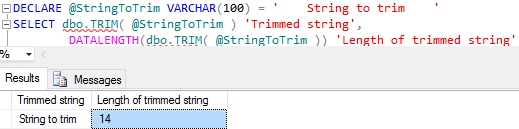
Below example shows how we can use the above created user defined TRIM function:

DECLARE @StringToTrim VARCHAR(100) = '    String to trim    '
SELECT dbo.TRIM( @StringToTrim ) 'Trimmed string',
 DATALENGTH(dbo.TRIM( @StringToTrim )) 
  AS 'Length of trimmed string'

RESULT:
trim-function-in-sql-server

[ALSO READ] 100 Frequently used queries in Sql Server – Part 1